
RabbitMQ点对点的模式
pom:
<project xmlns="http://maven.apache.org/POM/4.0.0" xmlns:xsi="http://www.w3.org/2001/XMLSchema-instance" xsi:schemaLocation="http://maven.apache.org/POM/4.0.0 http://maven.apache.org/xsd/maven-4.0.0.xsd">

  <modelVersion>4.0.0</modelVersion>

  <groupId>com.toov5</groupId>

  <artifactId>rabbitmq</artifactId>

  <version>0.0.1-SNAPSHOT</version>

  	<dependencies>

		<dependency>

			<groupId>com.rabbitmq</groupId>

			<artifactId>amqp-client</artifactId>

			<version>3.6.5</version>

		</dependency>

	</dependencies>

</project>
创建连接的工具类:
package com.toov5.utils;

import java.io.IOException;

import java.util.concurrent.TimeoutException;

import com.rabbitmq.client.Connection;

import com.rabbitmq.client.ConnectionFactory;

//没有做成单例的  VirtualHost 需要复用

public class MQConnectionUtils {

    //创建新的连接

    public static Connection newConnection() throws IOException, TimeoutException {

         //创建连接工厂

    ConnectionFactory factory= new ConnectionFactory();

    //链接地址

    factory.setHost("192.168.91.6");

    //用户名称

    factory.setUsername("admin");

    //用户密码

    factory.setPassword("admin");

    //amqp端口号

    factory.setPort(5672);

    //连接virtualhost

    factory.setVirtualHost("/admin_toov5");

    Connection connection = factory.newConnection();

        return connection;

    }

}
Producer类
package com.toov5.Producer;

import java.io.IOException;

import java.util.concurrent.TimeoutException;

import com.rabbitmq.client.Channel;

import com.rabbitmq.client.Connection;

import com.toov5.utils.MQConnectionUtils;

public class Producer {

    //队列名称

    private static final String UEUE_NAME = "test_queue";

    public static void main(String[] args) throws IOException, TimeoutException {

        //创建新的连接

    Connection connection = MQConnectionUtils.newConnection();

       //创建Channel

        Channel channel = connection.createChannel();

        //创建队列

        channel.queueDeclare(UEUE_NAME, false, false, false, null);

        //创建message

        String msg = "toov5_message";

        System.out.println("生产者投递消息"+msg);

        //生产者发送消息

        channel.basicPublish("",UEUE_NAME, null, msg.getBytes());

        //关闭通道和连接

         channel.close();

         connection.close();

    }

}
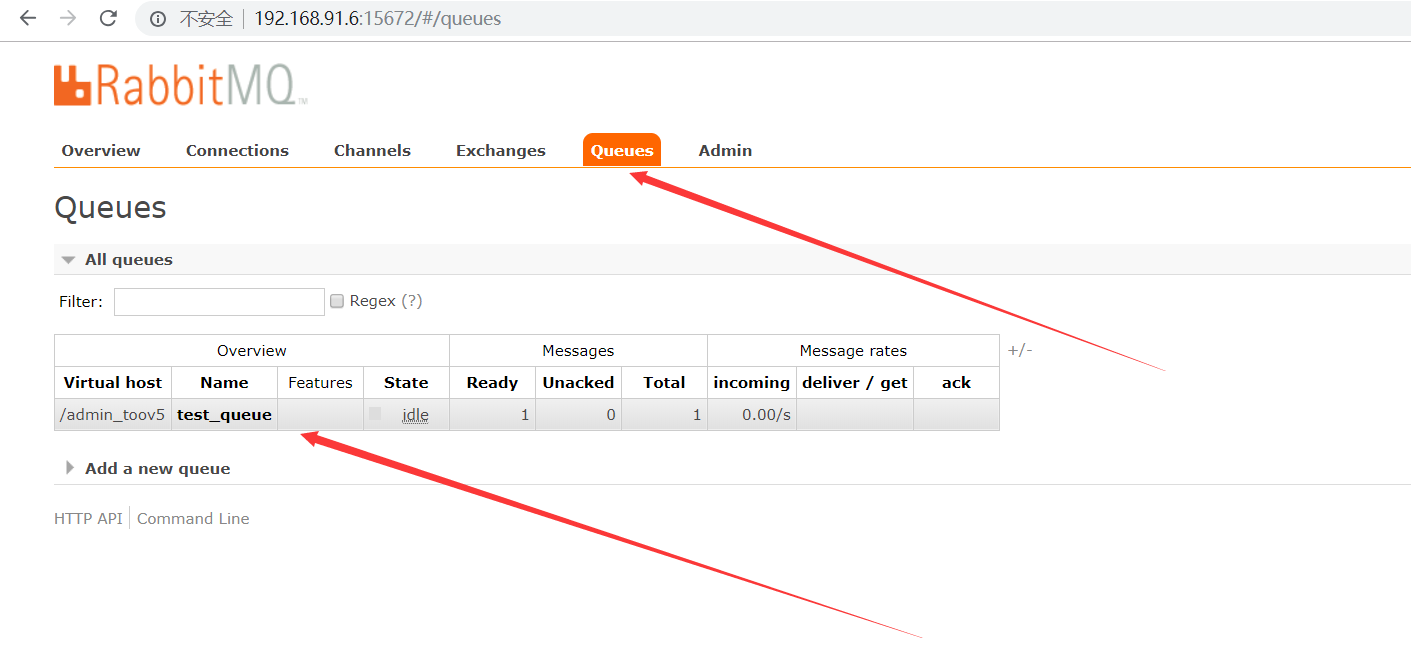
运行结果,看下这个队列
模拟get message

consumer跟 producer基本类似
package com.toov5.Consumer;

import java.io.IOException;

import java.util.concurrent.TimeoutException;

import com.rabbitmq.client.Channel;

import com.rabbitmq.client.Connection;

import com.rabbitmq.client.DefaultConsumer;

import com.rabbitmq.client.Envelope;

import com.rabbitmq.client.AMQP.BasicProperties;

import com.toov5.utils.MQConnectionUtils;

public class Consumer {

     //队列名称

        private static final String QUEUE_NAME = "test_queue";

        public static void main(String[] args) throws IOException, TimeoutException {

            System.out.println("消费者启动..........");

            //创建新的连接

        Connection connection = MQConnectionUtils.newConnection();

           //创建Channel

            Channel channel = connection.createChannel();

            // 消费者关联队列

            channel.queueDeclare(QUEUE_NAME, false, false, false, null);

              DefaultConsumer defaultConsumerr = new DefaultConsumer(channel) {

                  //监听获取消息

                    @Override

                    public void handleDelivery(String consumerTag, Envelope envelope, BasicProperties properties,

                            byte[] body) throws IOException {

                        String msg =new String(body,"UTF-8");

                        System.out.println("消费者获取生产者消息:"+msg);

                    }

              };

            //牵手模式设置  默认自动应答模式  true:自动应答模式

              channel.basicConsume(QUEUE_NAME, true, defaultConsumerr);

//            //关闭通道和连接

//             channel.close();

//             connection.close();

        }

}
运行后的结果:

RabbitMQ点对点的模式的更多相关文章
- RabbitMQ六种队列模式-简单队列模式
前言 RabbitMQ六种队列模式-简单队列 [本文]RabbitMQ六种队列模式-工作队列RabbitMQ六种队列模式-发布订阅RabbitMQ六种队列模式-路由模式RabbitMQ六种队列模式-主 ...
- RabbitMQ六种队列模式-工作队列模式
前言 RabbitMQ六种队列模式-简单队列RabbitMQ六种队列模式-工作队列 [本文]RabbitMQ六种队列模式-发布订阅RabbitMQ六种队列模式-路由模式RabbitMQ六种队列模式-主 ...
- RabbitMQ六种队列模式-发布订阅模式
前言 RabbitMQ六种队列模式-简单队列RabbitMQ六种队列模式-工作队列RabbitMQ六种队列模式-发布订阅 [本文]RabbitMQ六种队列模式-路由模式RabbitMQ六种队列模式-主 ...
- RabbitMQ六种队列模式-路由模式
前言 RabbitMQ六种队列模式-简单队列RabbitMQ六种队列模式-工作队列RabbitMQ六种队列模式-发布订阅RabbitMQ六种队列模式-路由模式 [本文]RabbitMQ六种队列模式-主 ...
- RabbitMQ六种队列模式-主题模式
前言 RabbitMQ六种队列模式-简单队列RabbitMQ六种队列模式-工作队列RabbitMQ六种队列模式-发布订阅RabbitMQ六种队列模式-路由模式RabbitMQ六种队列模式-主题模式 [ ...
- RabbitMQ之消息模式(下)
目的: RabbitMQ之消息模式(上):https://www.cnblogs.com/huangting/p/11994539.html 消费端限流 消息的ACK与重回队列 TTL消息 死信队列 ...
- 【RabbitMQ】六种模式与SpringBoot整合
添加rabbitmq的依赖 <dependency> <groupId>org.springframework.boot</groupId> <artifac ...
- RabbitMQ六种工作模式有哪些?怎样用SpringBoot整合RabbitMQ
目录 一.RabbitMQ入门程序 二.Work queues 工作模式 三.Publish / Subscribe 发布/订阅模式 四.Routing 路由模式 五.Topics 六.Header ...
- java面试一日一题:rabbitMQ的工作模式
问题:请讲下rabbitMQ的工作模式 分析:该问题纯属概念题,需要掌握rabbtiMQ的基础知识,同时该题也是切入MQ的一个引子: 回答要点: 主要从以下几点去考虑, 1.rabbitMQ的基本概念 ...
随机推荐
- 自己定义控件三部曲视图篇(二)——FlowLayout自适应容器实现
前言:我最大的梦想,就是有一天.等老了坐在摇椅上回望一生,有故事给孩子们讲--. 相关文章: <Android自己定义控件三部曲文章索引>:http://blog.csdn.net/har ...
- EularProject 39:给周长推断构成直角三角形个数
华电北风吹 天津大学认知计算与应用重点实验室 完毕日期:2015/7/30 Integer right triangles Problem 39 If p is the perimeter of a ...
- Junit 内部解密之一: Test + TestCase + TestSuite
转自:http://blog.sina.com.cn/s/blog_6cf812be0100wbhq.html nterface: Test 整个测试的的基础接口 Method 1: abstract ...
- mapreduce中reduce中的迭代器只能调用一次。其实迭代器就只能调用一次
亲测,只能调用一次,如果想想在一次reduce重复使用迭代器中的数据,得先取出来放在list中然后在从list中取出来!!多次读取reduce函数中迭代器的数据 public static void ...
- web 开发之js---js 实现自动添加input text 编辑框
<html><head><script type="text/javascript">function addNewLine(){var for ...
- java工程中当前目录在html中的设置
本地启动server的时候总是去读"/"的, 但到了服务器上,如果当前目录是服务器根目录下的一个文件夹,就应该设: <head> <meta charset=&q ...
- iphone开发技术要学习的内容
一.iOS基础 1 开发环境搭建以及IOS组件.框架的概要介绍. 2 mac操作系统与iOS操作系统 3 xcode IDE开发环境的初始 二.C语言基础 1数据类型.表达式与控制流程语句 2数组.函 ...
- PIL+百度aip
1.PIL模块安装 选择PIL 官方没有支持python3.6的PIL库,所以用pillow代替 http://www.lfd.uci.edu/~gohlke/pythonlibs/#pillow 链 ...
- js中 opener和parent的差别
opener即谁打开我的,比方A页面利用window.open弹出了B页面窗体.那么A页面所在窗体就是B页面的opener.在B页面通过opener对象能够訪问A页面. parent表示父窗体,比方一 ...
- spring boot数据库操作汇总
1 关于orm orm即object relational mapping,对象关系映射,即将数据库中的表映射成对象. 常用的orm有以下: mybatis spring jdbc template ...