
RabbitMQ点对点的模式
pom:
<project xmlns="http://maven.apache.org/POM/4.0.0" xmlns:xsi="http://www.w3.org/2001/XMLSchema-instance" xsi:schemaLocation="http://maven.apache.org/POM/4.0.0 http://maven.apache.org/xsd/maven-4.0.0.xsd">

  <modelVersion>4.0.0</modelVersion>

  <groupId>com.toov5</groupId>

  <artifactId>rabbitmq</artifactId>

  <version>0.0.1-SNAPSHOT</version>

  	<dependencies>

		<dependency>

			<groupId>com.rabbitmq</groupId>

			<artifactId>amqp-client</artifactId>

			<version>3.6.5</version>

		</dependency>

	</dependencies>

</project>
创建连接的工具类:
package com.toov5.utils;

import java.io.IOException;

import java.util.concurrent.TimeoutException;

import com.rabbitmq.client.Connection;

import com.rabbitmq.client.ConnectionFactory;

//没有做成单例的  VirtualHost 需要复用

public class MQConnectionUtils {

    //创建新的连接

    public static Connection newConnection() throws IOException, TimeoutException {

         //创建连接工厂

    ConnectionFactory factory= new ConnectionFactory();

    //链接地址

    factory.setHost("192.168.91.6");

    //用户名称

    factory.setUsername("admin");

    //用户密码

    factory.setPassword("admin");

    //amqp端口号

    factory.setPort(5672);

    //连接virtualhost

    factory.setVirtualHost("/admin_toov5");

    Connection connection = factory.newConnection();

        return connection;

    }

}
Producer类
package com.toov5.Producer;

import java.io.IOException;

import java.util.concurrent.TimeoutException;

import com.rabbitmq.client.Channel;

import com.rabbitmq.client.Connection;

import com.toov5.utils.MQConnectionUtils;

public class Producer {

    //队列名称

    private static final String UEUE_NAME = "test_queue";

    public static void main(String[] args) throws IOException, TimeoutException {

        //创建新的连接

    Connection connection = MQConnectionUtils.newConnection();

       //创建Channel

        Channel channel = connection.createChannel();

        //创建队列

        channel.queueDeclare(UEUE_NAME, false, false, false, null);

        //创建message

        String msg = "toov5_message";

        System.out.println("生产者投递消息"+msg);

        //生产者发送消息

        channel.basicPublish("",UEUE_NAME, null, msg.getBytes());

        //关闭通道和连接

         channel.close();

         connection.close();

    }

}
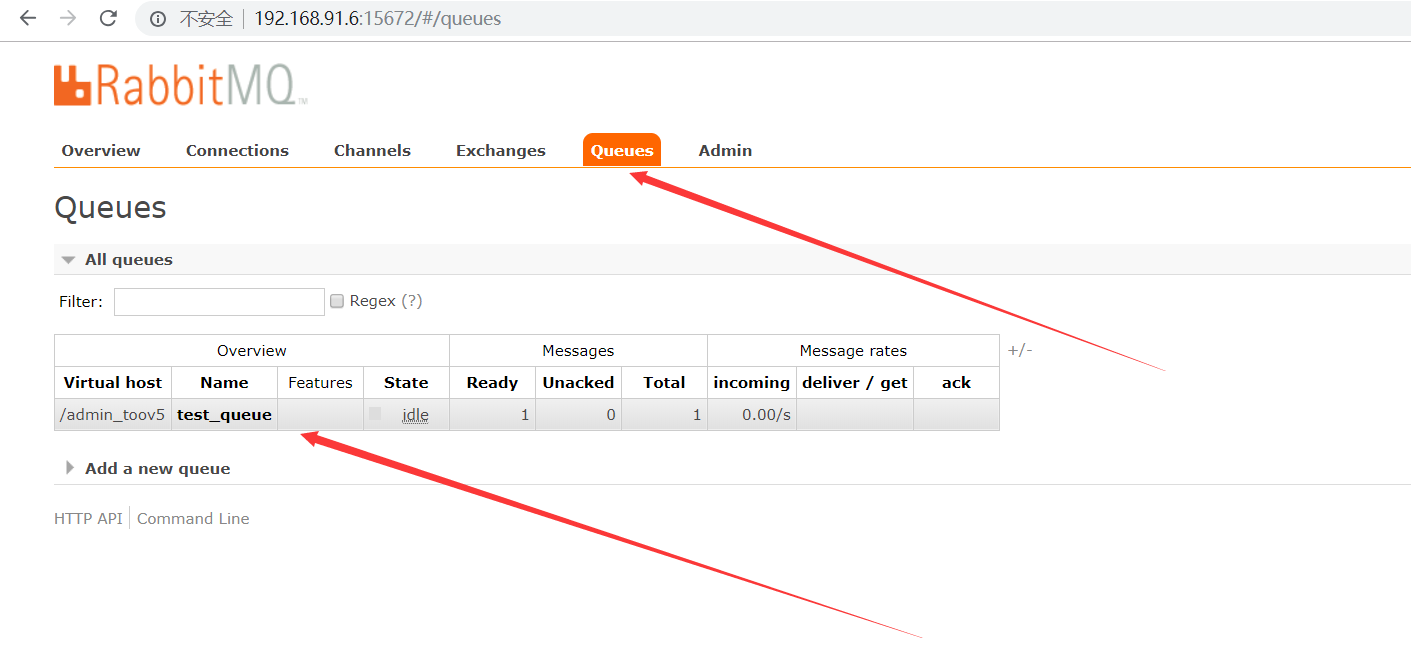
运行结果,看下这个队列
模拟get message

consumer跟 producer基本类似
package com.toov5.Consumer;

import java.io.IOException;

import java.util.concurrent.TimeoutException;

import com.rabbitmq.client.Channel;

import com.rabbitmq.client.Connection;

import com.rabbitmq.client.DefaultConsumer;

import com.rabbitmq.client.Envelope;

import com.rabbitmq.client.AMQP.BasicProperties;

import com.toov5.utils.MQConnectionUtils;

public class Consumer {

     //队列名称

        private static final String QUEUE_NAME = "test_queue";

        public static void main(String[] args) throws IOException, TimeoutException {

            System.out.println("消费者启动..........");

            //创建新的连接

        Connection connection = MQConnectionUtils.newConnection();

           //创建Channel

            Channel channel = connection.createChannel();

            // 消费者关联队列

            channel.queueDeclare(QUEUE_NAME, false, false, false, null);

              DefaultConsumer defaultConsumerr = new DefaultConsumer(channel) {

                  //监听获取消息

                    @Override

                    public void handleDelivery(String consumerTag, Envelope envelope, BasicProperties properties,

                            byte[] body) throws IOException {

                        String msg =new String(body,"UTF-8");

                        System.out.println("消费者获取生产者消息:"+msg);

                    }

              };

            //牵手模式设置  默认自动应答模式  true:自动应答模式

              channel.basicConsume(QUEUE_NAME, true, defaultConsumerr);

//            //关闭通道和连接

//             channel.close();

//             connection.close();

        }

}
运行后的结果:

RabbitMQ点对点的模式的更多相关文章
- RabbitMQ六种队列模式-简单队列模式
前言 RabbitMQ六种队列模式-简单队列 [本文]RabbitMQ六种队列模式-工作队列RabbitMQ六种队列模式-发布订阅RabbitMQ六种队列模式-路由模式RabbitMQ六种队列模式-主 ...
- RabbitMQ六种队列模式-工作队列模式
前言 RabbitMQ六种队列模式-简单队列RabbitMQ六种队列模式-工作队列 [本文]RabbitMQ六种队列模式-发布订阅RabbitMQ六种队列模式-路由模式RabbitMQ六种队列模式-主 ...
- RabbitMQ六种队列模式-发布订阅模式
前言 RabbitMQ六种队列模式-简单队列RabbitMQ六种队列模式-工作队列RabbitMQ六种队列模式-发布订阅 [本文]RabbitMQ六种队列模式-路由模式RabbitMQ六种队列模式-主 ...
- RabbitMQ六种队列模式-路由模式
前言 RabbitMQ六种队列模式-简单队列RabbitMQ六种队列模式-工作队列RabbitMQ六种队列模式-发布订阅RabbitMQ六种队列模式-路由模式 [本文]RabbitMQ六种队列模式-主 ...
- RabbitMQ六种队列模式-主题模式
前言 RabbitMQ六种队列模式-简单队列RabbitMQ六种队列模式-工作队列RabbitMQ六种队列模式-发布订阅RabbitMQ六种队列模式-路由模式RabbitMQ六种队列模式-主题模式 [ ...
- RabbitMQ之消息模式(下)
目的: RabbitMQ之消息模式(上):https://www.cnblogs.com/huangting/p/11994539.html 消费端限流 消息的ACK与重回队列 TTL消息 死信队列 ...
- 【RabbitMQ】六种模式与SpringBoot整合
添加rabbitmq的依赖 <dependency> <groupId>org.springframework.boot</groupId> <artifac ...
- RabbitMQ六种工作模式有哪些?怎样用SpringBoot整合RabbitMQ
目录 一.RabbitMQ入门程序 二.Work queues 工作模式 三.Publish / Subscribe 发布/订阅模式 四.Routing 路由模式 五.Topics 六.Header ...
- java面试一日一题:rabbitMQ的工作模式
问题:请讲下rabbitMQ的工作模式 分析:该问题纯属概念题,需要掌握rabbtiMQ的基础知识,同时该题也是切入MQ的一个引子: 回答要点: 主要从以下几点去考虑, 1.rabbitMQ的基本概念 ...
随机推荐
- TI_DSP_SRIO - package type(包格式)
1.The type of SRIO packageis determined by the combination of Ftype(format type) and Ttype(transacti ...
- win7-vs2012下安装.net frame work 的过程
第一, vs和.net的对应关系大致如下 vs2010----.net framework 4.0 vs2012----.net framework 4.5 vs2015----.net frame ...
- quartz项目中的运用
下面是之前项目中quartz的运用,我将它梳理出来. 测试类: public class OrdExpireTaskMain { public static void main(String[] ar ...
- ifconfig 命令
许多windows非常熟悉ipconfig命令行工具,它被用来获取网络接口配置信息并对此进行修改.Linux系统拥有一个类似的工具,也就是ifconfig(interfaces config).通常需 ...
- 基于日志处理的ElasticSearch的学(gen)习(feng)
最近学了点solr,然后有听说了ElasticSearch,就想着也学一下ElasticSearch,然后看见了ElasticSearch用于日志的收集的分析,这里就来学习一下. 百度一下Elasti ...
- 调用bat文件执行java文件
set path=./jre7/bin--设置jre路径,可以写jre的全路径java -cp "lib/*;" -Xms256m -Xmx512m com.shentong.Ma ...
- 【JMeter4.0学习(十)】之JMeter函数简单运用以及结合正则表达式提取器
下面来简单的举个栗子: 首先,把函数和正则表达式提取器放在一块来介绍,如下所示: 1.结构完整展示,下面再一步一步创建添加: 2.添加线程组: 3.首先添加HTTP请求1 4.添加结果树后,运行后查看 ...
- oracle 11g r2 blob类型getString报错问题
摘要: 问题: 在hibernate中实体类中blob类型字段为 private String textBlob; 查询时报错: java.sql.SQLException: 无效的列类型: getS ...
- python write file
fileHandle = open ( 'test.txt', 'a' ) fileHandle.write ( '\n\nBottom line.' ) fileHandle.close() 转自: ...
- 如何使CSS--better(系列一)
我们想一下以下问题: 1.什么样子的css代码才是高效的? 2.什么样子的css代码才是便于维护的? 3.什么样子的css才是可扩展的? 带着以下问题咱们简单的说一下css的“性能”问题 虽然我技术不 ...