
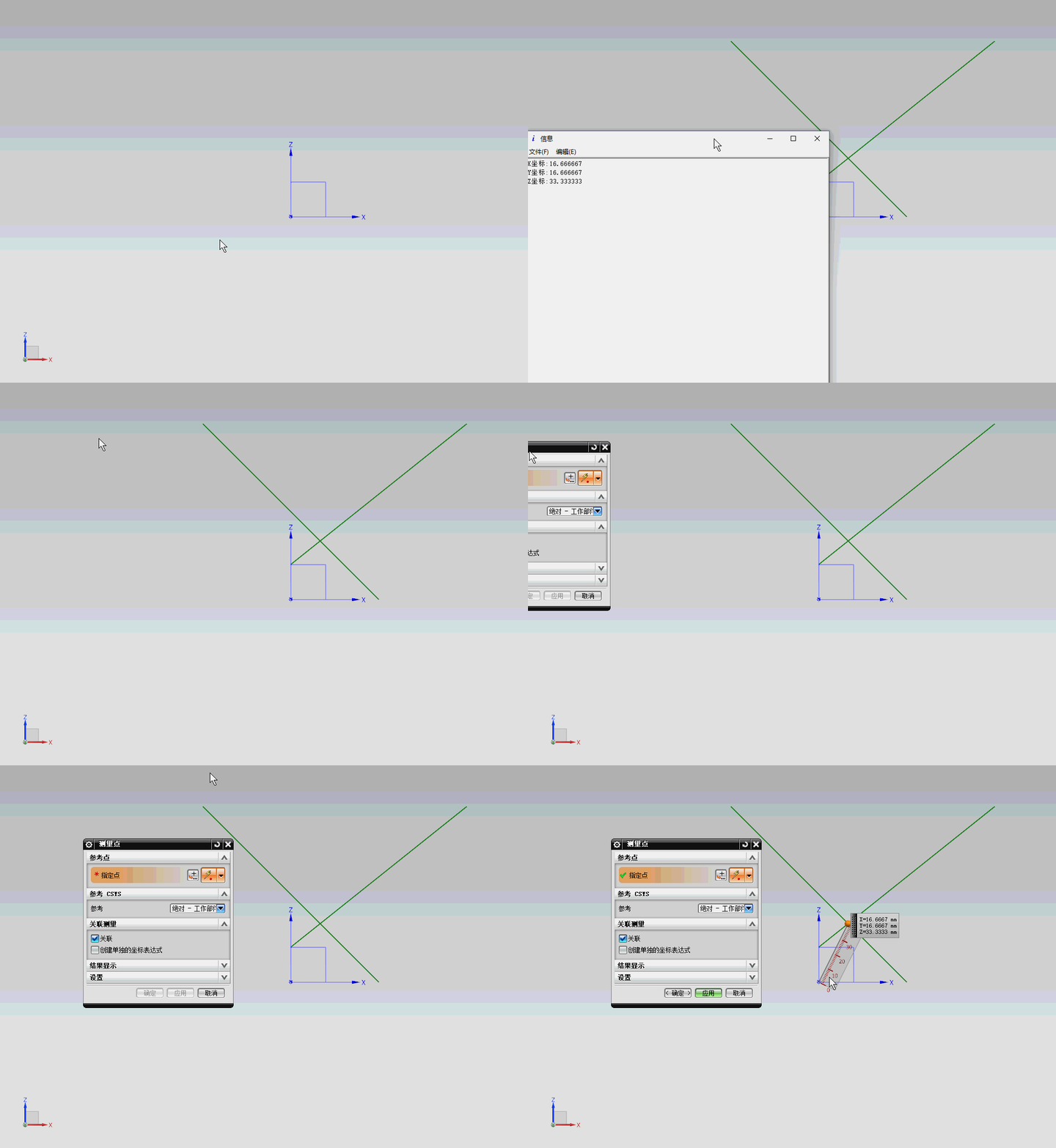
NX二次开发-UF_MODL_intersect_objects获取两个对象的交点
     NX9+VS2012

     #include <uf.h>

     #include <uf_curve.h>

     #include <uf_modl.h>

     #include <uf_ui.h>

     UF_initialize();

     //创建直线

     UF_CURVE_line_t LineCoods1;

     LineCoods1.start_point[] = 0.0;

     LineCoods1.start_point[] = 0.0;

     LineCoods1.start_point[] = 20.0;

     LineCoods1.end_point[] = 100.0;

     LineCoods1.end_point[] = 100.0;

     LineCoods1.end_point[] = 100.0;

     tag_t Line1Tag = NULL_TAG;

     UF_CURVE_create_line(&LineCoods1, &Line1Tag);

     UF_CURVE_line_t LineCoods2;

     LineCoods2.start_point[] = 50.0;

     LineCoods2.start_point[] = 50.0;

     LineCoods2.start_point[] = 0.0;

     LineCoods2.end_point[] = -50.0;

     LineCoods2.end_point[] = -50.0;

     LineCoods2.end_point[] = 100.0;

     tag_t Line2Tag = NULL_TAG;

     UF_CURVE_create_line(&LineCoods2, &Line2Tag);

     int IntersectionsNum;

     UF_MODL_intersect_info_p_t * Intersections;

     UF_MODL_intersect_objects(Line1Tag, Line2Tag, 0.01, &IntersectionsNum, &Intersections);//输入两个对象tag,找交点

     double IntersectionsPoint[];//交点坐标

     for (int i = ; i < IntersectionsNum; i++)

     {

         int type = Intersections[i]->intersect_type;

         if (type == UF_MODL_INTERSECT_POINT)

         {

             IntersectionsPoint[] = Intersections[i]->intersect.point.coords[];

             IntersectionsPoint[] = Intersections[i]->intersect.point.coords[];

             IntersectionsPoint[] = Intersections[i]->intersect.point.coords[];

         }

     }

     //打印

     char msg[];

     sprintf_s(msg, "X坐标:%f\nY坐标:%f\nZ坐标:%f\n", IntersectionsPoint[], IntersectionsPoint[], IntersectionsPoint[]);

     UF_UI_open_listing_window();

     UF_UI_write_listing_window(msg);

     //释放

     UF_free(Intersections);

     UF_terminate();
NX二次开发-UF_MODL_intersect_objects获取两个对象的交点的更多相关文章
- NX二次开发-UFUN求两个对象最短距离UF_MODL_ask_minimum_dist
NX9+VS2012 #include <uf.h> #include <uf_modl.h> #include <uf_ui.h> UF_initialize() ...
- 【NX二次开发】获取两个面之间的所有面
已知两个蓝色面,使用遍历面的方法求紫色面.算法例子: 1 bool is_NeighborFace(tag_t tagFace1, tag_t tagFace2) 2 { 3 vector<ta ...
- NX二次开发-UFUN获取NX系统默认导出CGM的选项设置UF_CGM_ask_default_export_options
文章转载自唐康林NX二次开发论坛,原文出处: http://www.nxopen.cn/thread-126-1-1.html 刚才有同学问到这个问题,如果是用NXOpen来做,直接录制一下就可以了: ...
- NX二次开发-UFUN获取当前导出CGM选项设置UF_CGM_ask_session_export_options
文章转载自唐康林NX二次开发论坛,原文出处: http://www.nxopen.cn/thread-126-1-1.html 刚才有同学问到这个问题,如果是用NXOpen来做,直接录制一下就可以了: ...
- 【NX二次开发】获取指定矩阵标识的矩阵值
函数:UF_CSYS_ask_matrix_values () 函数说明:获取指定矩阵标识的矩阵值. 用法: #include <uf.h> #include <uf_csys.h& ...
- 【NX二次开发】获取当前鼠标选择的对象 UF_UI_ask_global_sel_object_list
先选择多个对象object,然后使用此函数获取选择的对象的tag,最后就可以使用object的一些函数了. ufun例子: extern DllExport void ufusr(char *parm ...
- NX二次开发-UFUN获取系统相关信息UF_ask_system_info
NX9+VS2012 #include <uf.h> UF_initialize(); UF_system_info_t Info; UF_ask_system_info(&Inf ...
- 【NX二次开发】 获取产品曲面上多个点对应的面的垂直矢量!
说明:选择一个产品面,选择面上的点,生成点在此面上的法线反向,生成直线.生成矢量的起点坐标,和矢量方向信息.可用于三坐标测量,如果需要可以自己编个插件用! 效果图: 源码: //----------- ...
- NX二次开发-UFUN获取直线的两个端点UF_CURVE_ask_line_data
NX9+VS2012 #include <uf.h> #include <uf_obj.h> #include <uf_ui.h> UF_initialize(); ...
随机推荐
- loj2573[TJOI2018]数字计算
题意:操作1:x=x*m,输出x%mod.2.x/=map[m].m即第m次操作,保证该次操作为1操作,并且每个操作最多只会被删一次.q<=1e5. 线段树维护操作信息的乘积,删除把对应位置的权 ...
- Flex布局(一)
Flex Flex是Flexible Box的缩写,意为"弹性布局",用来为盒状模型提供最大的灵活性. 任何一个容器都可以指定为Flex布局.display: flex;, 行内元 ...
- Oracle删除修改字段
Oracle 增加修改删除字段 添加字段的语法:alter table tablename add (column datatype [default value][null/not null],…. ...
- linux jps命令
原文链接: http://www.cnblogs.com/qlqwjy/p/7928410.html https://blog.csdn.net/u013250071/article/details/ ...
- ffs, fls
linux内核中的宏ffs(x) linux内核中ffs(x)宏是平台相关的宏,在arm平台,该宏定义在 arch/arm/include/asm/bitops.h #define ffs(x) ...
- 拾遗:govendor(Golang 依赖库版本控制)
官方资料: https://github.com/kardianos/govendor https://github.com/kardianos/govendor/blob/master/doc/fa ...
- 剑指offer——46数字序列中某一位的数字
题目: 数字以0123456789101112131415…的格式序列化到一个字符序列中.在这个序列中,第5位(从0开始计数)是5,第13位是1,第19位是4,等等.请写一个函数,求任意第n位对应的数 ...
- LCA的 Trajan 算法
参考博客 参考博客 根据博客的模拟,就可以知道做法和思想. 现在就是实现他. 例题 :hdu 2586 题意:m 个询问,x 到 y 的距离,我们的思想就是求出:x到根的距离+y到根的距离- ...
- qt5.9.1 VS2017 qalgorithms.h
qt5.9.1只有VS2017 64位支持, 在32位工程下会出现关于qalgorithms.h的错误,参考以下内容修改该头文件解决: https://codereview.qt-project.or ...
- windows平板软件开机自启动+霸屏的操作方法
转载(忘了地址) 很好很强大.成功亲测 使用你自己的账号(最好是管理员权限的账号)登录Windows,然后添加一个给其他人使用的账户(假设为other),注意一定要为other设置密码. 运行 ...