
【js】 vue 2.5.1 源码学习(五) props directives规范化 props 合并策略
 //  大体思路  (四)

 //  上节回顾:

 //  A: 对于生命周期函数将父子组件的函数放到一个数组里面,特定时间点调用,保证父子组件函数都调用到。

 //  B: 对于directive,filters,components 等的资源选项,父选项将以原型的形势处理,正式因为这样子,在任何地方都可以用到内部自定义指令。

 //  C: 对于watch选项的合并,类似于生命周期,如果父子组件相同的观测字段,将合并为一个数组。

 //  本节内容:

 //    props  normalizeProps normalizeDirective  规范化

 //    props   自定义策略

 //    directives  规范化

 //    normalizeProps(child)  //规范props

 //      ==》while(i--) 找到每个props的元素。 “使用数组语法时 Props成员必须为字符串

 //      ==> camelize  将a-a变为aA 将中横线,转化为小驼峰命名。 每个元素 = {type:null}

 //      ==> camelizeRE = /-(\w)/g ;

 //      ==> 非数组的情况  循环每个建,转为驼峰, 将值传给res[name] = object

 //      ==> else 选项porps必须时一个数组或者对象。

 //    mormalizeDirectives  // 规范指令的选项

 //         ==> directives: {

 //             test1: {

 //                 bind: function(){

 //                 }

 //                 upteat: function(){

 //                 }

 //             },

 //             test2:function(){

 //             }

 //         }

 //  strats.props = 策略合并

 //  如果都存在,就用child覆盖parent。

 (function(global,factory){

     // 兼容 cmd

     typeof exports === 'object'  && module !== 'undefined' ? module.exports = factory():

     // Amd

     typeof define  === 'function' && define.amd ?  define(factory) : global.Vue = factory();

 })(this,function(){

     var uip = 0;

     function warn(string){

         console.error('Vue Wran:' + string)

     }

     function resolveConstructorOptions(Con){

         var options = Con.options;

         // 判断是否为vm的实例 或者是子类

           return options

     }

     var hasOwnPropeerty = Object.prototype.hasOwnProperty

     function hasOwn(obj , key){

         return hasOwnPropeerty.call(obj,key)

     }

     function makeMap(str, expectsLoweraseC){

         if(expectsLoweraseC){

             str = str.toLowerCase()

         }

         var map = Object.create(null)

         var list = str.split(',')

         for(var i = 0 ; i < list.length; i++){

             map[list[i]] = true

         }

         return function(key){

             return map[key]

         }

     }

     var  isbuiltInTag = makeMap('slot,component',true)

     var isHTMLTag = makeMap(

         'html,body,base,head,link,meta,style,title,' +

         'address,article,aside,footer,header,h1,h2,h3,h4,h5,h6,hgroup,nav,section,' +

         'div,dd,dl,dt,figcaption,figure,picture,hr,img,li,main,ol,p,pre,ul,' +

         'a,b,abbr,bdi,bdo,br,cite,code,data,dfn,em,i,kbd,mark,q,rp,rt,rtc,ruby,' +

         's,samp,small,span,strong,sub,sup,time,u,var,wbr,area,audio,map,track,video,' +

         'embed,object,param,source,canvas,script,noscript,del,ins,' +

         'caption,col,colgroup,table,thead,tbody,td,th,tr,' +

         'button,datalist,fieldset,form,input,label,legend,meter,optgroup,option,' +

         'output,progress,select,textarea,' +

         'details,dialog,menu,menuitem,summary,' +

         'content,element,shadow,template,blockquote,iframe,tfoot'

     );

     var isSVG = makeMap(

         'svg,animate,circle,clippath,cursor,defs,desc,ellipse,filter,font-face,' +

         'foreignObject,g,glyph,image,line,marker,mask,missing-glyph,path,pattern,' +

         'polygon,polyline,rect,switch,symbol,text,textpath,tspan,use,view',

         true

     );

     var ASSET_TYPES = [

         'component',

         'directive',

         'filter'

     ];

     var LIFECYCLE_HOOKS = [

         'beforeCreate',

         'created',

         'beforeMount',

         'mounted',

         'beforeUpdate',

         'updated',

         'beforeDestroy',

         'destroyed',

         'activated',

         'deactivated',

         'errorCaptured'

     ];

     var isReservedTag = function(key){

         return isHTMLTag(key) || isSVG(key)

     }

     function validataComponentName(key){

         //检测component 的自定义名称是否合格

         // 只能是字母开头或下划线,必须是字母开头

         if(!(/^[a-zA-Z][\w-]*$/g.test(key))){

            warn('组件的名称必须是字母或中横线,必须由字母开头')

         }

         // 1. 不能为内置对象,2.不能是html ,和avg的内部标签

         if( isbuiltInTag(key) || isReservedTag(key)){

             warn('不能为html标签或者avg的内部标签')

         }

     }

     function checkComonpents(child){

         for(var key in child.components){

             validataComponentName(key)

         }

     }

    // 配置对象

     var config = {

         // 自定义的策略

         optionMergeStrategies:{}

     }

     var strats = config.optionMergeStrategies

     strats.el = function(parent,child , key , vm){

           if(!vm){

               warn('选项'+key+'只能在vue实例用使用')

           }

           return defaultStrat(parent,child , key , vm)

     }

     function mergeData(to,form){

         // 终极合并

         if(!form){

             return to

         }

         // 具体合并。

     }

     function mergeDataorFn(parentVal,childVal,vm){

         // 合并 parentVal childVal  都是函数

         if(!vm){

             if(!childVal){

                 return parentVal

             }

             if(!parentVal){

                 return childVal

             }

            return  function mergeDataFn(parentVal,childVal,vm){//只是一个函数   什么样的情况下调用 加入响应式系统

                // 合并子组件对应的data 和   父组件对应的data

                return mergeData(

                    typeof parentVal === 'function' ? parentVal.call(this,this) : parentVal,    // -----忘记写

                    typeof childVal === 'function' ? childVal.call(this,this): childVal)      // -----忘记写

            }

         }else{ // vue实例

             return function mergeInstanceDataFn(parentVal,childVal,vm){//只是一个函数   什么样的情况下调用 加入响应式系统

                 var InstanceData = typeof childVal === 'function' ? childVal.call(vm,vm): childVal;   // -----忘记写

                 var defaultData = typeof parentVal === 'function' ? parent.call(vm,vm): parentVal;   // -----忘记写

                 if(InstanceData){

                     return mergeData(parentVal,childVal)

                 }else{                // -----忘记写

                     defaultData

                 }

             }

         }

     }

     strats.data = function(parent,child , key , vm){

         if(!vm){

           // console.log(typeof child === 'function')

             if(child && !(typeof child === 'function')){

                 warn('data必须返回是一个function')

             }

            return mergeDataorFn(parent,child)

         }

         return mergeDataorFn(parent,child,vm)

     }

     // 生命周期策略的合并,值等于一个function 如果是有两个,放到一个数组里面。

     function mergeHook(parentVal,childVal,key,vm){

         // console.log(key)

         // console.log(parentVal.concat(childVal) )

         return childVal ?  parentVal ? parentVal.concat(childVal):

                 Array.isArray(childVal) ?  childVal : [childVal] : parentVal

     }

     LIFECYCLE_HOOKS.forEach(function(key){

         strats[key] = mergeHook

     });

     // 检测是否为object

     function isPlainObject(obj){

         return Object.prototype.toString.call(obj) === '[object Object]'

     }

     function assetObjectType(obj){

         if(!isPlainObject(obj)){

             marn('选项的值'+obj+'无效:必须是一个对象的')

         }

     }

     // 对parent实现链式调用。

     function extend(to,form){

         for(key in form){

             to[key] = form[key]

         }

         return to

     }

     // 实现Assets 的策略合并  conmponents  filter  diretive

     function mergeAssets(parentVal,childVal,key,vm){

         var parent = Object.create(parentVal || null)   // 保证子类的每个值的指向都是一个新的object。否则回出现相互引用的现象。

         if(childVal){

             assetObjectType(childVal)

             return extend(parent,childVal)

         }

         return parent

     }

     ASSET_TYPES.forEach(function(key){

         strats[key+'s'] = mergeAssets

     })

     // 实现watch的策略和并,将相同的属性放到一个数组里面。

     strats.watch = function(parentVal,childVal , key , vm){

         if(!childVal){

             return Object.create(parentVal)

         }

         var res = {}

         res =  extend(res,parentVal)

         for(var key in childVal){

             var parent = res[key]

             var child  = childVal[key]

             res[key] = parent ? Array.isArray(parent) ? parent.concat(child) : [parent].concat(child) :

             Array.isArray(child) ? child : [child] ;

          }

         return res

     }

     // 实现props指令的合并策略

     strats.props = function(parentVal,childVal , key , vm){

         if(!childVal){

             return parentVal

         }

         var res = Object.create( null)

         extend(res,parentVal)

         if(childVal){

              extend(res,childVal)

         }

         return res

     }

     function defaultStrat(parent,child , key , vm){

         return child === undefined ? parent :child ;

     }

     var cmalizeRE = /-(\w)/g

     function camelize(val){

         return val.replace(cmalizeRE,function(c,m){

             return m ? m.toUpperCase(): ""

         })

     }

     function normalizeProps(options){

         var props = options.props

         if(!props){

             return

         }

         var i , val , name

         var res = {}

         if(Array.isArray(props)){

             i = props.length

             while(i--){

                 val = props[i]

                 if(toString.call(val) === '[object String]'){

                     name  = camelize(val)

                     res[name] =  {type: null}

                 }else{

                     warn('使用数组愈发时props成员' +val+ '必须时一个数组')

                 }

             }

         }else if(isPlainObject(props)){

             for(var key in props){

                 val = props[key]

                 name = camelize(key)

                 res[name] = isPlainObject(val) ? val : {type: val}

             }

         }else {

             warn('选项props的值必须是一个对象或者是数组')

         }

         options.props = res

     }

     function mormalizeDirectives(options){

         var dir = options.directives

         var res = {}

         if(!dir){

             return

         }

         if(dir){

             for(var key in dir){

                 var val = dir[key]

                 var name = camelize(key)

                 if(isPlainObject(val)){

                     res[name] = val

                 }

                 if(toString.call(val) === '[object Function]'){

                     res[name] = {

                         bind: val,

                         upata: val

                     }

                 }

             }

         }

         options.directives = res

     }

     function mergeOptions(parent,child,vm){

         var options = {}

         // 检测是component 是否是合法的

         checkComonpents(child)

         // 规范props

         normalizeProps(child)

         // 规范 dirctives

         mormalizeDirectives(child)

         // console.log(parent, child)

         for(key in parent){

             magerField(key)

         }

         for(key in child){

             if(!hasOwn(parent ,key)){  // parent 中循环过地方不进行循环

                 magerField(key)  // ----忘记写

             }

         }

         // 默认合并策略

         function magerField(key){

             // 自定义策略  默认策略

             // console.log(key)

             var result = strats[key] || defaultStrat        // ---忘记写

             options[key] = result(parent[key],child[key] , key , vm)

         }

         // console.log(options)

         return options

     }

     function initMinxin(options){

         Vue.prototype._init = function(options){

             var vm = this

             // 记录生成的vue实例对象

             vm._uip =  uip++ //   //-------忘记写

              vm.$options =mergeOptions(resolveConstructorOptions(vm.constructor),options,vm)

         }

     }

     function Vue(options){

         // 安全机制

         if(!(this instanceof Vue)){     //-------忘记写

             warn('Vue是一个构造函数,必须是由new关键字调用')

         }

         this._init(options)

     }

     initMinxin()  //  初始化选项1: 规范 2: 合并策略。

     Vue.options = {

         components: {

             transtions: {},

             keepAlive:{},

             solt:{},

             transtionsGroup:{}

         },

         directives:{},

         _bash: Vue

     }

     function initExend(Vue){

         Vue.extend = function(extendOptions){

             extendOptions = extendOptions || {}   // -----忘记写

             var Super = this

             var Child = function VueComponent(options) {

                 this._init(options)

             }

             Child.prototype = Object.create(Super.prototype)

             Child.prototype.constructor = Child   // 改变constructor 的指向

             Child.options = mergeOptions(Super.options,extendOptions)

             // 子类继承父类的静态方法。

             Child.extend = Vue.extend

             // console.log(new Child({}))

             return Child

         }

     }

     initExend(Vue)

     return Vue

 })
dome.html 代码如下
 <!DOCTYPE html>

 <html lang="en">

 <head>

     <meta charset="UTF-8">

     <meta name="viewport" content="width=device-width, initial-scale=1.0">

     <meta http-equiv="X-UA-Compatible" content="ie=edge">

     <title>第四课</title>

 </head>

 <body>

     <div id="app">

         <huml></huml>

     </div>

     <script src="vue.js"></script>

     <!-- <script src="vue2.5.1.js"></script> -->

     <script type="text/javascript">

         var componentA = {

             el: "#app"

         }

         var vm = new Vue({

             el:"#app",

             data: {

                 message: "hello Vue",

                 key: "wodow"

             },

             components:{

                 humle: componentA

             }

         })

         // console.log(Vue)

         var Parent = Vue.extend({

             data: function() {},

             props: {

                 'rrr': 1

             },

             components:{

                 huml: componentA

             },

             created : function(){

             },

             watch: {

                 test: function(){}

             }

         })

         var Child = Parent.extend({

              components:{

                 humlt: componentA

             },

             created: function(){

             },

             props: {

                 'ddd': 3,

                 "dcdc-vfv": Number

             },

             directives: {

                 test: {

                     bind: function(){}

                 },

                 test2: function(){}

             },

             watch: {

                 aa: function(){},

                 test: function(){}

             }

         });

         // console.log(vm.$options)

         console.log (Parent.options)

         console.log(Child.options)

     </script>

 </body>

 </html>
合并完效果
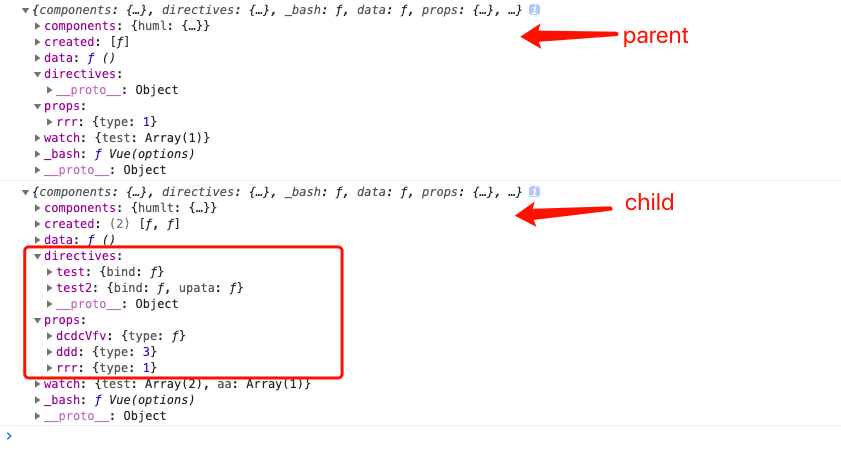
以上为个人学习总结,如有问题,请回复。
【js】 vue 2.5.1 源码学习(五) props directives规范化 props 合并策略的更多相关文章
- 如何实现全屏遮罩(附Vue.extend和el-message源码学习)
[Vue]如何实现全屏遮罩(附Vue.extend和el-message源码学习) 在做个人项目的时候需要做一个类似于电子相册浏览的控件,实现过程中首先要实现全局遮罩,结合自己的思路并阅读了(饿了么) ...
- 【js】vue 2.5.1 源码学习 (四) 钩子函数 资源选项 watch 的合并策略
大体思路 (三) 1.钩子函数 自定义策略 LIFECYCLE_HOOKS= [] created = [function(){} , function(){}] 组装方法 ...
- 【js】vue 2.5.1 源码学习 (三) Vue.extend 和 data的合并策略
大体思路 (三) 1. 子类父类 2.Vue.extend() //创建vue的子类 组件的语法器 Vue.extend(options) Profile().$mount('#app' ...
- 【js】vue 2.5.1 源码学习(二) 策略合并
一. 整体思路 1 首先是代码的大体构造,先判断引入代码的环境,即对应amd 和cmd的处理 2 vue_init 需要借助 initMinxin ==>>> ...
- 【js】 vue 2.5.1 源码学习(十二)模板编译
大体思路(十) 本节内容: 1. baseoptions 参数分析 2. options 参数分析 3. parse 编译器 4. parseHTNL 函数解析 // parse 解析 parser- ...
- 【js】vue 2.5.1 源码学习 (十) $mount 挂载函数的实现
大体思路(九) 本节内容: 1. $mount 挂载函数的实现. // 将Vue.prototype.$mount 缓存下来 ==>mountComponet(this,el) { // 组建挂 ...
- 【js】vue 2.5.1 源码学习 (九) 响应数组对象的变
大体思路(八) 本节内容: 1.Observe 如何响应数组的变化 代理原型 数组变异方法 shell cacheArrProto methods 新添加的数组需要加到显示系统里面,拦截 push等的 ...
- 【js】Vue 2.5.1 源码学习 (八)响应式入口observe
大体思路(七) 本节内容: deps 依赖收集的数组对象 => Dep 构造函数 /** ==> observe() * var ob * ==> if --isObject * = ...
- 【js】vue 2.5.1 源码学习 (七) 初始化之 initState 响应式系统基本思路
大体思路(六) 本节内容: 一.生命周期的钩子函数的实现 ==> callHook(vm , 'beforeCreate') beforeCreate 实例创建之后 事件数据还未创建 二.初始化 ...
随机推荐
- Leetcode868.Binary Gap二进制间距
给定一个正整数 N,找到并返回 N 的二进制表示中两个连续的 1 之间的最长距离. 如果没有两个连续的 1,返回 0 . 示例 1: 输入:22 输出:2 解释: 22 的二进制是 0b10110 . ...
- Hashkell 第一篇
心情极差.................. 无事可做,其实是没心情去做事情,只好又翻起了haskell入门 记下几点,以备查询: 1. 函数名首字符是不可以大写的, 而且名称中可以有单引号,这也是合 ...
- 利用JDBC连接Oracle数据库(转)
http://blog.csdn.net/wahaha1_/article/details/8512438 JDBC是Sun公司制定的一个可以用Java语言连接数据库的技术. 一.JDBC基础知识 J ...
- 软件测试 → 第一章 基础-> 软件与软件危机
一. 软件概念 1.软件是计算机系统中与硬件相互依存的另一部分,它是包括程序,数据及其相关文档的完整集合.2.程序是按事先设计的功能和性能要求执行的指令序列.3.数据是使程序能正常操纵信息的数据结构. ...
- iOS 微信支付如果遇到跳转只有一个确定请看这里
http://www.cocoachina.com/bbs/read.php?tid-321546.html 今天在联调微信支付,不得不说,和它比起来,阿里的支付sdk真的是太好用了.果然和后端同学在 ...
- material-ui里面的withStyles是什么?
export default withStyles(styles, { name: 'MuiAppBar' })(AppBar); //这里的作用是什么? withStyles 是一个 HOC 组件, ...
- linux驱动开发满三年,回首一下基本看不到其它选择
刚刚搞完一个处理器BSP项目,准备搞下一个自研处理器.说不上来什么喜悦,仅仅有些许茫然.没有刚毕业时对这个行业的痴迷,慢慢认同这仅仅是个谋生工具的想法. 回忆当初编写第一个驱动,就像上了战场.被长官踢 ...
- oracle回滚机制深入研究
这篇文章主要描写叙述oracle的回滚机制,篇幅可能较长,由于对于oracle的回滚机制来说,要讨论和描写叙述的实在太多,仅仅能刷选自己觉得最有意义的一部分进行深入研究和分享 一.我们来看一个DML语 ...
- docker查看运行容器详细信息
使用docker ps命令可以查看所有正在运行中的容器列表, 使用docker inspect命令我们可以查看更详细的关于某一个容器的信息. $ docker inspect 容器id/image
- SQL if语句简要
if语句 可以作为表达式用 可以在存储过程中作为流程控制语句用 表达式 IF(条件,条件true,条件false) 示例 sex字段m,f 互换 update salary set sex = if( ...