
0002 Django工程创建
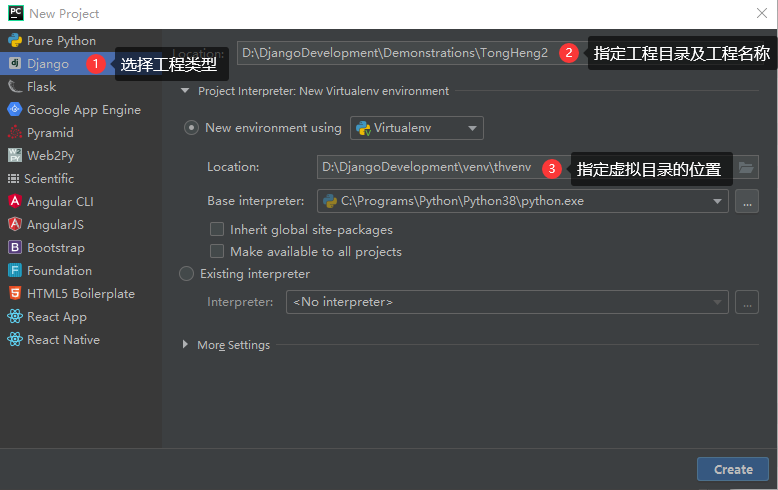
1 创建一个目录,用于专门存放Django工程的虚拟环境
PyCharm默认虚拟环境在工程内,从而导致打包的时候,会把虚拟环境一起打包。
同时,虚拟环境中的插件较多,一个工程创建了一个虚拟环境,以后,其它的工程可以共享这个虚拟环境。
2 打开PyCharm,选择创建Django工程。
3 安装pip
pip在开发环境中已安装,但在虚拟环境中PyCharm只安装了开发环境中的相应版本的Django,而没有安装pip,故虚拟环境中需要重新安装。
安装方法同样是在pypi.org上下载一个pip-20.0.2包,用7Zip解压后,进入目录执行:python setup.py install
4 安装工程插件
开源软件官方网站几乎都在国外,速度慢,为了提交效率,一般用国内镜像源安装。
国内镜像源很多,以下使用清华镜像源。地址为:https://pypi.tuna.tsinghua.edu.cn/simple
4.01 安装DRF框架(即djangorestframework框架)
DRF框架是基于Django框架之上的一个框架。
pip install -i https://pypi.tuna.tsinghua.edu.cn/simple djangorestframework
4.02 python3 安装操作mysql数据库的包
pip install -i https://pypi.tuna.tsinghua.edu.cn/simple --upgrade mysqlclient
4.03 添加django-fitlter扩展来增强支持
pip install -i https://pypi.tuna.tsinghua.edu.cn/simple django-filter
4.04 自动生成接口文档
pip install -i https://pypi.tuna.tsinghua.edu.cn/simple coreapi
4.05 安装Markdown插件
Markdown插件主要用于把文本渲染成HTML格式。此处主要用于对coreapi中注释文本换行。
pip install -i https://pypi.tuna.tsinghua.edu.cn/simple Markdown
4.06 安装图像处理库
pip install -i https://pypi.tuna.tsinghua.edu.cn/simple Pillow
4.07 安装Redis工具包
pip install -i https://pypi.tuna.tsinghua.edu.cn/simple redis
4.08 安装redis缓存工具包
pip install -i https://pypi.tuna.tsinghua.edu.cn/simple django-redis
4.09 安装异步处理工具包
pip install -i https://pypi.tuna.tsinghua.edu.cn/simple celery
4.10 win10下面启动celery需要安装eventlet包:
pip install -i https://pypi.tuna.tsinghua.edu.cn/simple eventlet
4.11 安装跨域CORS
pip install -i https://pypi.tuna.tsinghua.edu.cn/simple django-cors-headers
4.12 安装Json Web Token认证
pip install -i https://pypi.tuna.tsinghua.edu.cn/simple djangorestframework-jwt
4.13 安装itsdangerous生成凭据access_token
pip install -i https://pypi.tuna.tsinghua.edu.cn/simple itsdangerous
4.14 安装缓存扩展
pip install -i https://pypi.tuna.tsinghua.edu.cn/simple drf-extensions
4.15 安装xmltodict工具包
pip install -i https://pypi.tuna.tsinghua.edu.cn/simple xmltodict
4.16 安装xadmin包
pip install -i https://pypi.tuna.tsinghua.edu.cn/simple future

pip install -i https://pypi.tuna.tsinghua.edu.cn/simple six

pip install -i https://pypi.tuna.tsinghua.edu.cn/simple httplib2

pip install -i https://pypi.tuna.tsinghua.edu.cn/simple django-import-export
4.17 安装微信插件
pip install -i https://pypi.tuna.tsinghua.edu.cn/simple wechatpy

pip install -i https://pypi.tuna.tsinghua.edu.cn/simple cryptography
4.18 让django restfull支持xml解析
pip install -i https://pypi.tuna.tsinghua.edu.cn/simple djangorestframework-xml
4.19 安装腾讯云短信SDK
pip install qcloudsms_py
4.20 安装fastDFS插件
pip install -i https://pypi.tuna.tsinghua.edu.cn/simple py3Fdfs
pip install -i https://pypi.tuna.tsinghua.edu.cn/simple djangorestframework

pip install -i https://pypi.tuna.tsinghua.edu.cn/simple django-filter

pip install -i https://pypi.tuna.tsinghua.edu.cn/simple coreapi

pip install -i https://pypi.tuna.tsinghua.edu.cn/simple Markdown

pip install -i https://pypi.tuna.tsinghua.edu.cn/simple Pillow

pip install -i https://pypi.tuna.tsinghua.edu.cn/simple redis

pip install -i https://pypi.tuna.tsinghua.edu.cn/simple django-redis

pip install -i https://pypi.tuna.tsinghua.edu.cn/simple celery

pip install -i https://pypi.tuna.tsinghua.edu.cn/simple django-celery-results

pip install -i https://pypi.tuna.tsinghua.edu.cn/simple django-celery-beat

pip install -i https://pypi.tuna.tsinghua.edu.cn/simple django-cors-headers

pip install -i https://pypi.tuna.tsinghua.edu.cn/simple djangorestframework-jwt

pip install -i https://pypi.tuna.tsinghua.edu.cn/simple itsdangerous

pip install -i https://pypi.tuna.tsinghua.edu.cn/simple drf-extensions

pip install -i https://pypi.tuna.tsinghua.edu.cn/simple xmltodict

pip install -i https://pypi.tuna.tsinghua.edu.cn/simple wechatpy

pip install -i https://pypi.tuna.tsinghua.edu.cn/simple cryptography

pip install -i https://pypi.tuna.tsinghua.edu.cn/simple djangorestframework-xml

pip install -i https://pypi.tuna.tsinghua.edu.cn/simple qcloudsms_py

pip install -i https://pypi.tuna.tsinghua.edu.cn/simple requests

pip install -i https://pypi.tuna.tsinghua.edu.cn/simple py3Fdfs

pip install -i https://pypi.tuna.tsinghua.edu.cn/simple future

pip install -i https://pypi.tuna.tsinghua.edu.cn/simple six

pip install -i https://pypi.tuna.tsinghua.edu.cn/simple httplib2

pip install -i https://pypi.tuna.tsinghua.edu.cn/simple django-import-export

pip install -i https://pypi.tuna.tsinghua.edu.cn/simple --upgrade mysqlclient
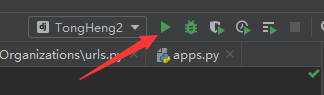
5 运行工程
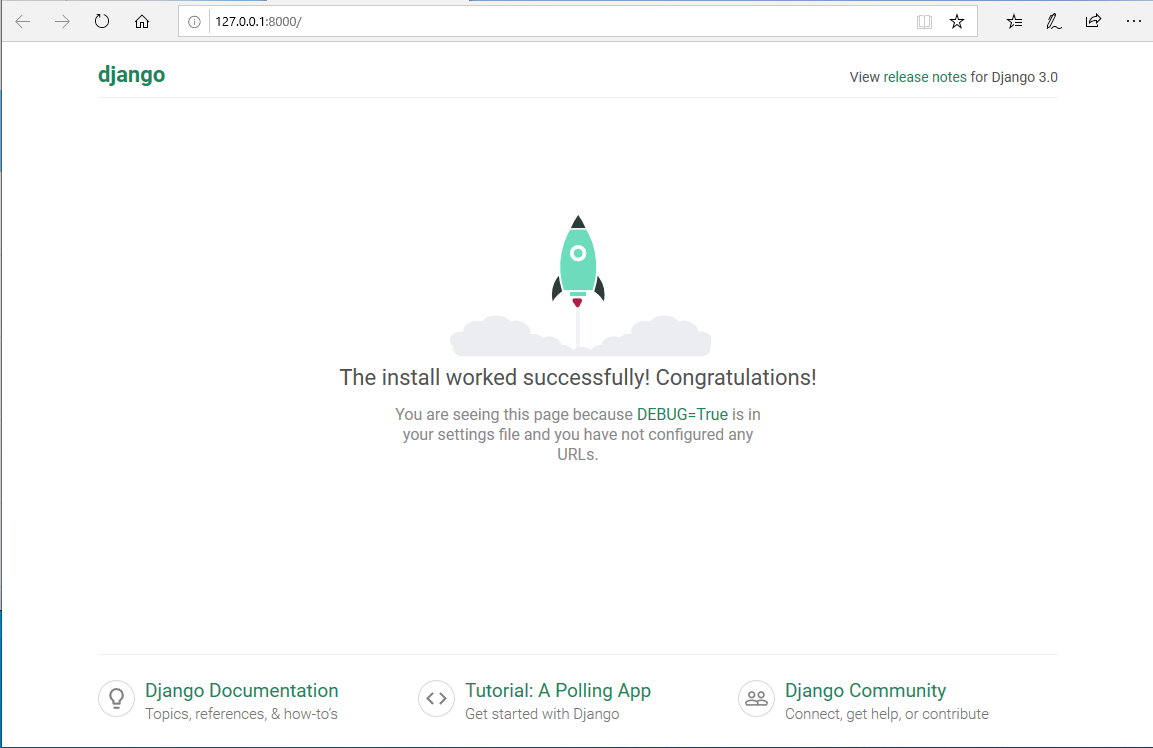
看到以下欢迎页面,表示工程创建成功!
0002 Django工程创建的更多相关文章
- python web框架 django 工程 创建 目录介绍
# 创建Django工程django-admin startproject [工程名称] 默认创建django 项目都会自带这些东西 django setting 配置文件 django可以配置缓存 ...
- Django工程创建
方法一: 1.win+r进入cmd命令窗口: 2.找到Django的安装地址: 3.cmd窗口中利用cd 进入相应的文件夹,再输入命令如下: django-admin.exe startproject ...
- Django—工程创建以及models数据库易错点
Python的WEB框架有Django.Tornado.Flask 等多种,Django相较与其他WEB框架其优势为:大而全,框架本身集成了ORM.模型绑定.模板引擎.缓存.Session等诸多功能. ...
- Django工程
一.Django工程创建 1.Django安装: pip3 install django 安装成功后,会在python的安装目录下“Scripts"中生成”django-admin.exe& ...
- Django后台创建
1.首先创建Django工程 创建Django有两种方法我用的是pycharm的创建 2.查看url.py 如下 from django.contrib import admin from djang ...
- Django初探——工程创建以及models数据库相关配置
Python的WEB框架有Django.Tornado.Flask 等多种,Django相较与其他WEB框架其优势为:大而全,框架本身集成了ORM.模型绑定.模板引擎.缓存.Session等诸多功能. ...
- 第1天:Django框架简介与工程创建
Django简介 Django特点 环境搭建 创建工程 启动服务 使用pycharm打开工程 创建子应用 Django简介 Django,是用Python语言写的开源web开发框架,并遵循MVC设计. ...
- django学习笔记【001】django版本的确定&创建一个django工程
2.3 查看当前的django版本 python3. -m django --version 2.3.1 创建一个django工程 django-admin startproject mysite 在 ...
- Django基于Pycharm开发之一【创建django工程】
Django的工程结构,可以通过pycharm里面,选择创建django工程来直接创建,也可以通过命令行通过pip来安装. 一.通过命令行安装的步骤 Install Python. Install a ...
随机推荐
- oracle-11g-R2监听文件配置
客户端连接oracle数据库时出现如下错误: Listener refused the connection with the following error: ORA-, TNS:listener ...
- ORB-SLAM2 论文&代码学习 —— LoopClosing 线程
转载请注明出处,谢谢 原创作者:Mingrui 原创链接:https://www.cnblogs.com/MingruiYu/p/12369339.html 本文要点: ORB-SLAM2 LoopC ...
- Python学习小记(4)---class
1.名称修改机制 大概是会对形如 __parm 的成员修改为 _classname__spam 9.6. Private Variables “Private” instance variables ...
- centos6.8 安装.net core2.1 sdk 或 .net core2.1 runtime
前段时间看.net core 更更更新了,大家反应都挺好,想有机会也学习一下,正好这两天要写一个简单的服务在centos上面跑,于是决定放弃使用java,直接.net core走起来,事情进行的非常顺 ...
- 【01】HTML_day01_01-前言&WEB标准
typora-copy-images-to: media 第01阶段.前端基础.认识WEB 基础班学习目标 目标: 能根据psd文件,用HTML+CSS 布局出符合W3C规范的网页. 网站首页 列表页 ...
- webstorm 添加代码模板
file>setting>Live Templates>选择文件类型
- 浅谈python的第三方库——numpy(终)
本文作为numpy系列的总结篇,继续介绍numpy中常见的使用小贴士 1 手动转换矩阵规格 转换矩阵规格,就是在保持原矩阵的元素数量和内容不变的情况下,改变原矩阵的行列数目.比如,在得到一个5x4的矩 ...
- AOV拓扑排序实验总结-1
AOV拓扑排序实验总结-1 实验数据:1.实验输入数据在input.txt文件中2.对于n是指有顶点n个,数据的结束标志是一行0 0. 实验目的:获取优秀的AOV排序算法模板 数据结构安排 ...
- Projected coordinate systems 和 wkid
Projected coordinate systems Well-known ID Name Well-known text 2000 Anguilla_1957_British_West_Indi ...
- JSP数据交互2
application对象 application对象负责提供应用程序在服务器中运行时的一些全局信息,常用的方法有getMimeType和getRealPath等. 运用实例:网页访问计数器. < ...