
vue 实现邮戳边缘
效果:
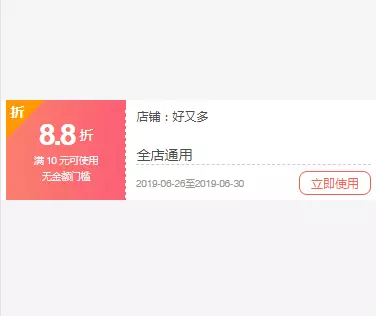
vue:
<template>

    <div class="couponItem">

        <div class="itemLeft">

            <span class="tagDiv">

                <span class="tagLeft">折</span>

            </span>

            <div>

                <p class="price"><strong class="priceNum">{{coupon.cdiscount}}</strong>

                    <span class="priceIcon">折</span></p>

                <p class="coupon">满 {{coupon.minimum}} 元可使用</p>

                <p class="coupon">无金额门槛</p>

            </div>

        </div>

        <div class="itemRight">

            <p class="couponName"><span class="shopTag">店铺:</span>{{coupon.deptname}}</p>

            <p class="useRluer">{{coupon.cname}}</p>

            <p class="useTime"><i class="timeEnd">{{coupon.validstart}}至{{coupon.validend}}</i><span class="rightBtn">立即使用</span></p>

        </div>

    </div>

</template>

<script>

    export default {

        data() {

            return {

                coupon: {

                    'cdiscount': 8.8,

                    'minimum': 10,

                    'deptname': '好又多',

                    'cname': '全店通用',

                    'validstart': '2019-06-26',

                    'validend': '2019-06-30'

                }

            }

        },

        methods: {},

    }

</script>

<style scoped>

    i {

        font-style: normal;

    }

    .couponItem {

        width: 100%;

        height: 1rem;

        font-size: .14rem;

        position: relative;

        overflow: hidden;

        background: #fff;

        padding: 0 .05rem;

        box-sizing: border-box;

        text-align: left;

        display: flex;

        align-items: center;

        display: -webkit-box;

        display: -ms-flexbox;

        display: -moz-flexbox;

        margin: 1rem 0;

    }

    .itemLeft {

        width: 33%;

        height: 100%;

        background: -webkit-linear-gradient(left, #fa7f6d, #fc5e75);

        /* Safari 5.1 - 6.0 */

        background: -o-linear-gradient(right, #fa7f6d, #fc5e75);

        /* Opera 11.1 - 12.0 */

        background: -moz-linear-gradient(right, #fa7f6d, #fc5e75);

        /* Firefox 3.6 - 15 */

        background: linear-gradient(to right, #fa7f6d, #fc5e75);

        /* 标准的语法 */

        display: flex;

        flex-direction: column;

        justify-content: center;

        align-items: center;

        position: relative;

        overflow: hidden;

        margin-right: .1rem;

        text-align: center;

    }

    .itemLeft:before {

        content: ' ';

        width: 0;

        height: 100%;

        position: absolute;

        top: 10px;

        right: -2px;

        border-right: 3px dotted white;/* 控制右边花纹大小 */

    }

    .itemRight {

        flex: 1;

        -webkit-box-flex: 1;

        -ms-flex: 1;

        -moz-flex: 1;

    }

    .rightBtn {

        width: .7rem;

        color: #fa644b;

        border: 1px solid #fa644b;

        text-align: center;

        font-size: .12rem;

        border-radius: 8px;

        padding: .03rem 0;

    }

    .coupon {

        font-size: .12rem;

        text-align: center;

        color: #f4f4f4;

        white-space: nowrap;

        -webkit-transform: scale(0.80);

    }

    .priceIcon {

        font-size: .14rem;

        margin-left: .05rem;

        color: #ffffff;

    }

    .itemLeftBttom {

        font-size: .12rem;

    }

    .price {

        display: flex;

        align-items: center;

        justify-content: center;

    }

    .priceNum {

        font-size: .3rem;

        letter-spacing: -2px;

        color: #ffffff;

    }

    .couponName {

        font-size: .12rem;

        padding: .05rem 0;

        margin: .01rem 0 .16rem 0;

        white-space: nowrap;

        overflow: hidden;

        text-overflow: ellipsis;

        color: rgb(77, 77, 77);

    }

    .useRluer {

        font-size: .14rem;

        color: #4d4d4d;

        margin-bottom: .03rem;

        border-bottom: 1px dashed #cccccc;

    }

    .useTime {

        height: .3rem;

        display: flex;

        justify-content: space-between;

        align-items: center;

        font-size: .12rem;

        color: #999;

    }

    .timeEnd {

        font-size: .12rem;

        -webkit-transform-origin-x: 0;

        -ms-transform: scale(0.8);

        /* IE 9 */

        -moz-transform: scale(0.8);

        /* Firefox */

        -webkit-transform: scale(0.8);

        /* Safari 和 Chrome */

        -o-transform: scale(0.8);

    }

    .tagDiv {

        background: #ff9900;

        color: #fff;

        position: absolute;

        transform: rotate(-45deg);

        font-size: .12rem;

        left: -.2rem;

        text-align: center;

        top: -.05rem;

        padding: 0 .28rem;

        height: .3rem;

        line-height: .3rem;

    }

    .tagLeft {

        position: absolute;

        top: .035rem;

        left: .22rem;

        transform: rotate(45deg);

        font-size: .14rem;

        font-weight: bold;

    }

</style>
vue 实现邮戳边缘的更多相关文章
- React 还是 Vue: 你应该选择哪一个Web前端框架?
学还是要学的,用的多了,也就有更多的认识了,开发中遇到选择的时候也就简单起来了. 本文作者也做了总结: 如果你喜欢用(或希望能够用)模板搭建应用,请使用Vue 如果你喜欢简单和“能用就行”的东西 ...
- vue UI库iview源码解析(2)
上篇问题 在上篇<iview源码解析(1)>中的index.js 入口文件的源码中有一段代码有点疑惑: /** * 在浏览器环境下默认加载组件 */ // auto install if ...
- 一个能拖动,能调整大小,能更新bind值的vue指令-vuedragx
一. 背景说明 开发一个可自定义组件化门户配置页面,期间采用了vue框架作为前端视图引擎,作为一个刚入手vue的萌新,开发第一个功能就遇到了拦路虎.需要一个拖动并且可改变大小的容器盒子.当时查看vue ...
- Vue.Draggable 文档总结
本文章转自https://blog.csdn.net/zjiang1994/article/details/79809687 Vue.Draggable学习总结 Draggable为基于Sortabl ...
- vue和react全面对比(详解)
vue和react对比(详解) 放两张图镇压小妖怪 本文先讲共同之处, 再分析区别 大纲在此: 共同点: a.都使用虚拟dom b.提供了响应式和组件化的视图组件 c.注意力集中保持在核心库,而将其他 ...
- Vue修饰符
为了方便大家写代码,vue.js给大家提供了很多方便的修饰符,比如我们经常用到的取消冒泡,阻止默认事件等等~ 目录 表单修饰符 事件修饰符 鼠标按键修饰符 键值修饰符 v-bind修饰符(实在不知道叫 ...
- 浅尝Vue.js组件(一)
本篇目录: 组件名 组件注册 全局注册 基础组件的自动化全局注册 局部注册 在模块系统中局部注册 Prop 单向数据流 Prop验证 类型检查 非Prop特性 替换/合并已有的特性 禁用特性继承 自定 ...
- vue案例 - vue-awesome-swiper实现h5滑动翻页效果
说到h5的翻页,很定第一时间想到的是swiper.但是我当时想到的却是,vue里边怎么用swiper?! 中国有句古话叫:天塌下来有个高的顶着. 在前端圈里,总有前仆后继的仁人志士相继挥洒着热汗(这里 ...
- vue深入了解组件——自定义事件
一.事件名 跟组件和prop不同,事件名不存在任何自动化的大小写转换.而是触发的事件名需要完全匹配监听这个事件所用的名称.举个例子,如果重复啊一个camelCase名字的事件: this.$emit( ...
随机推荐
- springmvc常用知识总结,不定期更新
1.@Controller 注解到类名上,表示该类是控制器. 2.@RequestMapping("/xxxx") 可以放在类名/方法名之上,表示访问请求该方法时的映射url.如果 ...
- node---处理get请求
const http=require('http') const querystring=require('querystring') const server = http.createServer ...
- 概率+后效性处理——cf930B好题
之前题目看错了.. 先用双倍字符串处理后效性 首先要确定一个结论:如果原串s中相距为d的ch1和ch2只有一对,那么如果第一个翻开ch1,第二个翻开ch2,就能确定k 现在要求的是当我们第一次翻开的是 ...
- duilib教程之duilib入门简明教程14.部分bug 2
上一个教程中提到了ActiveX的Bug,即如果主窗口直接用变量生成,则关闭窗口时会产生崩溃 如果用new的方式生成,则不会崩溃,所以给出一个临时的快速解决方案,即主窗口都用new生成,_t ...
- go操作空指针导致supervisor进程服务挂机的坑
一.起因 在数据库中直接手动插入了某条记录,但由于该记录的某个字段的空值,与另一个字段的状态码不符合,在go程序中,突然操作了该空字段的指针,导致程序panic挂机. panic: runtime e ...
- 杂项-IM:IM(即时通讯),一种基于互联网的即时交流消息的业务
ylbtech-杂项-IM:IM(即时通讯),一种基于互联网的即时交流消息的业务 即时通讯(Instant Messaging)是目前Internet上最为流行的通讯方式,各种各样的即时通讯软件也层出 ...
- System.Web.Mvc.HttpOptionsAttribute.cs
ylbtech-System.Web.Mvc.HttpOptionsAttribute.cs 1.程序集 System.Web.Mvc, Version=5.2.3.0, Culture=neutra ...
- HDU 1147 /// 判断两线段相交
题目大意: 给定n条线段的端点 依次放上n条线段 判断最后在最上面(不被覆盖)的线段有哪些 到当前线段后 直接与之前保存的未被覆盖的线段判断是否相交就可以了 #include <cstdio&g ...
- 能量项链 /// oj23800
题目大意: N( 4 ≤ N ≤ 100 ),表示项链上珠子的个数 第二行是N个用空格隔开的正整数,所有的数均不超过1000. 第 i 个数为第 i 颗珠子的头标记( 1 ≤ i ≤ N ), 当 1 ...
- 使用Flume+Kafka+SparkStreaming进行实时日志分析
每个公司想要进行数据分析或数据挖掘,收集日志.ETL都是第一步的,今天就讲一下如何实时地(准实时,每分钟分析一次)收集日志,处理日志,把处理后的记录存入Hive中,并附上完整实战代码 1. 整体架构 ...