
Python格式化字符串知多少
formatStr = "Hello %s. Today is %s, Are there any activities today?"

#  初始化字符串格式化参数值,此处必须使用元组,不能使用列表

values = ('Mike', 'Wednesday')

#  格式化字符串

print(formatStr % values)

from string import Template

template = Template("$s $s $s ")

template.substitute(s = "Hello")
# 引用string模块中的Template类

from string import Template

template1 = Template("$s是我最喜欢的编程语言, $s非常容易学习,而且功能强大")

# 指定格式化参数s的值是Python

print(template1.substitute(s='Python'))

# 当格式化参数是一个字符串的一部分时,为了和字符串的其他部分区分开,

# 需要用一对大括号将格式化参数变量括起来

template2 = Template("${s}stitute")

print(template2.substitute(s='sub'))

template3 = Template("$dollar$$相当于多少$pounds")

# 替换两个格式化参数变量

print(template3.substitute(dollar=20,pounds='英磅'))

template4 = Template("$dollar$$相当于多少$pounds")

data = {}

data['dollar'] = 100

data['pounds'] = '英磅'

# 使用字典指定格式化参数值

print(template4.substitute(data))

print("{} {} {}".format(1,2,3)) # 运行结果:1 2 3
print("{a} {b} {c}".format(a = 1,c = 2,b = 3)) # 运行结果:1 3 2
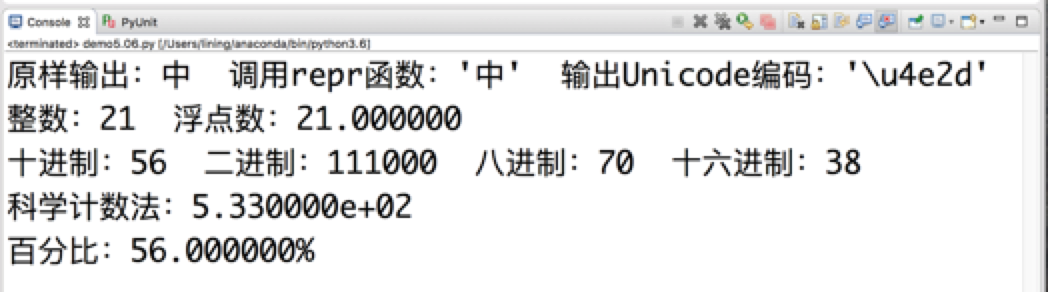
print("{first!s} {first!r} {first!a}".format(first = "中"))
# 运行结果:原样输出:中  调用repr函数:'中'  输出Unicode编码:'\u4e2d'

print("原样输出:{first!s}  调用repr函数:{first!r}  输出Unicode编码:{first!a}".format(first = "中"))

#  将21按浮点数输出,运行结果:整数:21  浮点数:21.000000

print("整数:{num}  浮点数:{num:f}".format(num = 21))

#  将56按十进制、二进制、八进制和十六进制格式输出

#  运行结果:十进制:56  二进制:111000  八进制:70  十六进制:38

print("十进制:{num}  二进制:{num:b}  八进制:{num:o}  十六进制:{num:x}".format(num = 56))

#  将533按科学计数法格式输出,运行结果:科学计数法:5.330000e+02

print("科学计数法:{num:e}".format(num = 533))

#  将0.56按百分比格式输出,运行结果:百分比:56.000000%

print("百分比:{num:%}".format(num = 0.56))
#  运行结果:第04章

print("第{chapter:02.0f}章".format(chapter = 4));
# 让1、2、3分别以左对齐、中对齐和右对齐方式显示

print('{:<10.2f}\n{:^10.2f}\n{:>10.2f}'.format(1,2,3))
# “井号”在宽度为20的区域内中心对齐,并左右两侧添加若干个井号(#),两侧各添加8个井号

#  运行结果:######## 井号 ########

print("{:#^20}".format(" 井号 "))
# 在5.43和负号(-)之间显示“^”,运行结果:-^^^^^5.43

print("{0:^=10.2f}".format(-5.43))
#  运行结果:101011

print("{:b}".format(43))
name = 'Bill'

age = 30

print(f'姓名:{name}, 年龄:{age}')

Python格式化字符串知多少的更多相关文章
- Python格式化字符串~转
Python格式化字符串 在编写程序的过程中,经常需要进行格式化输出,每次用每次查.干脆就在这里整理一下,以便索引. 格式化操作符(%) "%"是Python风格的字符串格式化操作 ...
- Python格式化字符串和转义字符
地址:http://blog.chinaunix.net/uid-20794157-id-3038417.html Python格式化字符串的替代符以及含义 符 号 说 明 ...
- Python格式化字符串
在编写程序的过程中,经常需要进行格式化输出,每次用每次查.干脆就在这里整理一下,以便索引. 格式化操作符(%) "%"是Python风格的字符串格式化操作符,非常类似C语言里的pr ...
- Python格式化字符串--format
format格式化字符串方法相较于老版%格式方法的优点: 1.不需要理会数据类型的问题,在%方法中'%s'只能替代字符串类型. 2.单个参数可以多次输出,参数顺序可以不相同. 3.填充方式十分灵活,对 ...
- Python - 格式化字符串的用法
0. 摘要 Python支持多种格式化字符串的方法,包括%-fromatting.str.format().f-strings三种,f-strings是Python3.6以后出现的一种新方法,相比其他 ...
- 【转】Python格式化字符串str.format()
原文地址:http://blog.xiayf.cn/2013/01/26/python-string-format/ 每次使用Python的格式字符串(string formatter),2.7及以上 ...
- 18.Python格式化字符串(格式化输出)
Python 提供了“%”对各种类型的数据进行格式化输出,例如如下代码: price = 108 print ("the book's price is %s" % price) ...
- Python格式化字符串(格式化输出)
熟悉C语言 printf() 函数的读者能够轻而易举学会 Python print() 函数,它们是非常类似的. print() 函数使用以%开头的转换说明符对各种类型的数据进行格式化输出,具体请看下 ...
- Python格式化字符串(f,F,format,%)
# 格式化字符串: 在字符串前加上 f 或者 F 使用 {变量名} 的形式来使用变量名的值 year = 2020 event = 'Referendum' value = f'Results of ...
随机推荐
- HCTF2018-admin[Unicode欺骗]
看源码发现 在修改密码,登录,注册时都有都用strlower()来转小写 看了网上师傅的wp,经验之谈,python中自带转小写函数lower(),但这里使用strlower(),可能存在猫腻. 跟进 ...
- actiBPM插件的办法
1.下载actiBPM到本地 从IDEA官网下载actiBPM.jar包 IDEA官网:https://plugins.jetbrains.com/ 官网搜索actiBPM 2.从本地安装actiBP ...
- Sql Server:创建用户并指定该用户只能看指定的视图,除此之外的都不让查看
1,在sql server中选择好要操作的数据库 2,--当前数据库创建角色 exec sp_addrole 'seeview' --创建了一个数据库角色,名称为:[seeview] 3,- ...
- xshell如何将Windows文件上传到linux
1. 首先先将你xshell配置好用户名及密码等,必须使用有权限下载的账号进行操作. 使用 yum provides */rz 这条命令,查看你系统自带的软件包的信息. 2.在输出的信息中可 ...
- Ubuntu, 更新Sourses.list
1.备份原文件 sudo cp /etc/apt/sources.list /etc/apt/sources_list.bak 2.加载文件 vim:vim sourses.list ubuntu d ...
- MyEclipse 安装 emmet 插件
1.在线安装 地址:http://download.emmet.io/eclipse/updates/ 安装完成后重新启动myeclipse 2.离线安装 下载jar包:https://github. ...
- 通过恢复目录(Catalogue)进行PDB级别的PITR恢复
数据库版本:Oracle 12.2.0.1 本篇为<执行PDB的PITR恢复失败的说明 (文档 ID 2435452.1)>的证明篇,通过当前控制文件,无法在PDB级别进行PITR(Poi ...
- cURL是什么
原文链接:https://www.leiue.com/what-is-curl cURL 是一个利用 URL 语法在命令行下工作的文件传输工具,1997 年首次发行.它支持文件上传和下载,所以是综合传 ...
- MySQL关于GTID的一些功能限制
参考文献:https://www.cnblogs.com/luckcs/articles/6295992.html 更新非事务引擎: Case重现: master:对一个innodb表做一个多sql更 ...
- AcWing 842. 排列数字
深搜的一道水题 https://www.acwing.com/problem/content/844/ 正确输入输出 #include<bits/stdc++.h> using nam ...