
vue 父子组件、兄弟组件传值
参考文章:
Vue2.0子同级组件之间数据交互
1、父组件可以使用 props 把数据传给子组件。
2、子组件可以使用 $emit 触发父组件的自定义事件。
(一)父组件给子组件传值,关键字:props
父组件:
<template>

  <div>

    <h1>父组件</h1>
  <!-- 引入子组件 -->

    <child :sendMsg="fatherMsg"></child>

  </div>

</template>

<script>

import child from '@/components/child'

export default {

  name: 'father',

  components: {

    child

  },

  data() {

    return {

      fatherMsg: '嗨,儿子' // 传递给子组件的值

    }

  }

}

</script>
子组件:通过props拿到父组件传递过来的值
<template>

  <div>

    <h1>子组件</h1>

    <span>获取父组件传值:{{sendMsg}}</span>

  </div>

</template>

<script>

export default {

  name: 'child',

  data() {

    return {

    }

  },

  props: ['sendMsg'] // 拿到父组件绑定到sendMsg的值,然后在子组件下显示出来

}

</script>
(二)子组件给父组件传值:通过触发事件传递值
以上面的示例代码作为基础修改,子组件:
<template>

  <div>

    <h1>子组件</h1>

    <span>获取父组件传值:{{sendMsg}}</span><hr>

    <button @click="sendToFather">子组件给父组件传值</button>

  </div>

</template>

<script>

export default {

  name: 'child',

  data() {

    return {

      childMsg: '这是来自子组件的数据'

    }

  },

  props: ['sendMsg'],

  methods: {

    sendToFather: function() {

      this.$emit('getChildValue', this.childMsg); // 参数1 getChildValue作为中间状态,参数2 this.childMsg即为传递给父组件的数据

    }

  }

}

</script>
父组件:
<template>

  <div>

    <h1>父组件</h1>

    <!-- 引入子组件 定义一个on的方法监听子组件的状态,然后通过getChild方法获取子组件传递的数据-->

    <child :sendMsg="fatherMsg" v-on:getChildValue="getChild"></child>

    <span>这是来自子组件的数据:{{childValue}}</span>

  </div>

</template>

<script>

import child from '@/components/child'

export default {

  name: 'father',

  components: {

    child

  },

  data() {

    return {

      fatherMsg: '嗨,儿子',

      childValue: ''

    }

  },

  methods: {

    getChild: function(data) { // 此时的参数data为子组件传递的值,即this.$emit()的第二个参数

      this.childValue = data;

    }

  }

}

</script>
(三)同级组件传递数据
对于同级组件传值用的较多的情况,推荐直接使用vuex进行状态管理会比较方便。
补充:面试被问到同级组件传递参数,平时很少去用这个,没答上来(尴尬),回来百度了下,原来就是通过一个中间桥接的方式进行传递(遭不住,之前看到过,没引起重视)
其原理是先建立一个中间事件总线center.js,放在tools文件夹下,如下:
import Vue from 'vue'

export default new Vue()
center.js中我们只创建了一个新的Vue实例,以后它就承担起了组件之间通信的桥梁了,也就是中央事件总线
然后创建第一个子组件first.vue:
<template>

  <div class="first-vue-box">

    <p>this is firstChild vue</p>

    <button @click="sendMsg">发送</button>

  </div>

</template>

<script>

import bridge from '../tools/center'

export default {

  data () {

    return {}

  },

  methods: {

    sendMsg () {

      bridge.$emit('firstChildMsg', 'this is firstChild Msg')

    }

  }

}

</script>

<style lang="scss" scoped>

.first-vue-box {

  border: 1px solid blue;

}

</style>
这里先引入事件总线,通过事件总线点击按钮后将first.vue的信息通过事件firstChildMsg的形式发布出去了(我个人的理解是相当于通过事件总线,将first.vue的firstChildMsg这个事件暴露出去),用法跟子组件向父组件传参的模式一样
然后再创建第二个组件second.vue:
<template>

  <div class="second-child">

    <h4>this is second child vue</h4>

    <p>从first.vue获取同级组件传递过来的信息:{{message}}</p>

  </div>

</template>

<script>

import bridge from '../tools/center'

export default {

  data () {

    return {

      message: '默认值'

    }

  },

  mounted () {

    let _this = this

    bridge.$on('firstChildMsg', function (msg) {

      _this.message = msg

    })

  }

}

</script>
在second.vue中再引入事件总线,然后通过$on(functionName, callback)监听first.vue暴露出来的firstChildMsg事件,通过回调函数获取first.vue传递出来的值(我个人是这么理解的)
引入两个子组件:
<template>

  <div class="detail-div">

    <h3>首页详情</h3>

    <first-child></first-child>

    <second-child></second-child>

  </div>

</template>

<script>

import firstChild from './first'

import secondChild from './second'

export default {

  data () {

    return {}

  },

  components: {

    firstChild,

    secondChild

  },

  mounted () {

    // console.log('详情页面...')

  }

}

</script>
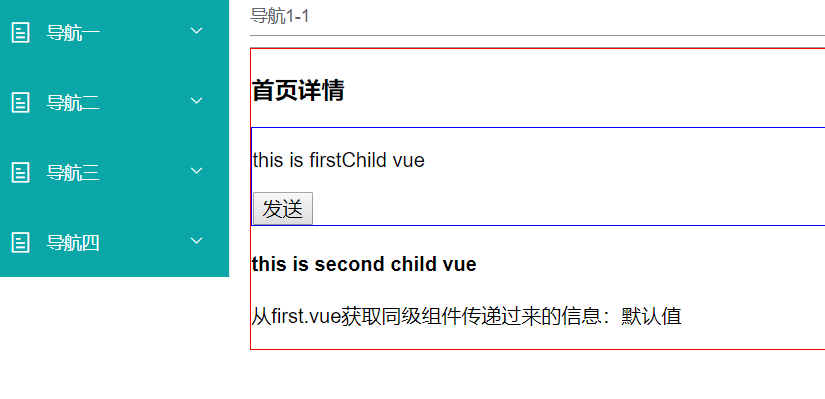
第二个子组件通过中央事件总线bridge,监听事件first.vue发布的事件firstChildMsg,获取到子组件first.vue发送过来的信息,如下图所示:
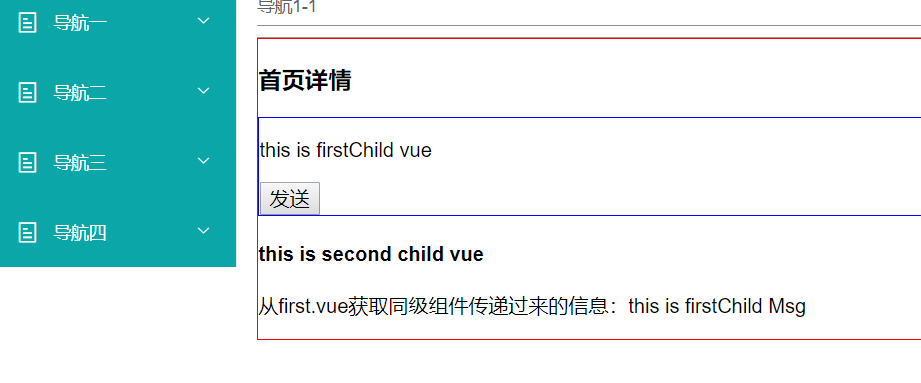
点击发送按钮后second.vue获取到first.vue传递过来的值:
之前在项目中没这样用过同级组件之间的传值,这次是个教训,以后得注意一下每一个细节的地方。这里我看了参考文章,自己写个示例来验证的,最好是能自己验证一下,记忆才比较深刻。
vue 父子组件、兄弟组件传值的更多相关文章
- 20、解决Vue使用bus兄弟组件间传值,第一次监听不到数据
1.新建bus.js文件: import Vue from 'vue' export default new Vue; 2.在需要通信组件A,B中引入bus: A组件: import Bus from ...
- 在npm Vue单页面的环境下,兄弟组件之间通信Bus
参考1:https://www.cnblogs.com/wangruifang/p/7772631.html 参考2:https://www.jianshu.com/p/b3d09c6c87bf 在m ...
- Vue兄弟组件(非父子组件)状态共享与传值
前言:网上大部分文章写的有点乱,很少有讲得易懂的文章. 所以,我写了篇在我能看得懂的基础上又照顾到大家的文章 =.= 作者:X1aoYE 备注:此文原创,转载请注明~ 内容里的<br> ...
- vue 父子组件传值,兄弟组件传值
父子组件中的传值 父向子 v-bind props <!-- 组件使用v-bind传值 --> <router :msg="msg"></rou ...
- vue兄弟组件传值
vue中除了父子组件传值,父传子用props,子传父用$emit,有时候兄弟组件之间也需要传值 1. 先定义一个中间件,src下面新建self.js import Vue from 'vue'; le ...
- 简述在Vue脚手架中,组件以及父子组件(非父子组件)之间的传值
1.组件的定义 组成: template:包裹HTML模板片段(反映了数据与最终呈现给用户视图之间的映射关系) 只支持单个template标签: 支持lang配置多种模板语法: script:配置Vu ...
- vue父子组件之间传值
vue父子组件进行传值 vue中的父子组件,什么是父组件什么是子组件呢?就跟html标签一样,谁包裹着谁谁就是父组件,被包裹的元素就是子组件. 父组件向子组件传值 下面用的script引入的方式,那种 ...
- vue父子组件的传值总结
久违的博客园我又回来了.此篇文章写得是vue父子组件的传值,虽然网上已经有很多了.写此文章的目的就是记录下个人学习的一部分.接下来我们就进入主题吧! 在开发vue项目中,父子组件的传值是避免不掉的. ...
- vue中父子组件之间的传值、非父子组件之间的传值
在Vue实例中每个组件之间都是相互独立的,都有自己的作用域,所以组件之间是不能直接获取数据.在项目开发中一个组件可能需要获取另一个组件的值,我们可以通过其他方法间接的获取.所以,获取的方法有以下几种: ...
随机推荐
- 2、使用siege进行服务端性能测试
先查看siege帮助 输入siege -h 翻译一下常用命令 -c 指定并发数 -r 指定重复次数 -d 指定请求的延迟时间,注意每个请求间随机延迟 -f 指定url列表,可以一次给多个地址加压 -t ...
- POJ 3130 How I Mathematician Wonder What You Are! (半平面交)
题目链接:POJ 3130 Problem Description After counting so many stars in the sky in his childhood, Isaac, n ...
- Linux 一些常识命令
linux的性能优化: .CPU,MEM .DISK--RAID .网络相关的外设,网卡 linux系统性能分析: top:linux系统的负载,CPU,MEM,SWAP,占用CPU和内存比较的进程, ...
- AVR446步进电机算法推导及应用
https://blog.csdn.net/Renjiankun/article/details/80513839?utm_source=copy
- mimikaz获取明文密码
一.windows2008以上不保存明文密码解决办法 mimikatz.exe "privilege::debug" "sekurlsa::logonpasswords& ...
- 干货满满!10分钟看懂Docker和K8S
2010年,几个搞IT的年轻人,在美国旧金山成立了一家名叫“dotCloud”的公司. 这家公司主要提供基于PaaS的云计算技术服务.具体来说,是和LXC有关的容器技术. LXC,就是Linux容器虚 ...
- 论文阅读笔记:《Generating Question-Answer Hierarchies》
题目: <Generating Question-Answer Hierarchies> 作者: Kalpesh Krishna & Mohit Iyyer What: 1.SQU ...
- python_django_中间件
什么是中间件? 可以介入django的请求和响应的轻量级的底层插件,它其实就是一个python类,我们在settings配置文件中的↓↓↓↓,都是中间件 MIDDLEWARE = [ 'django. ...
- ajax 工作原理
Ajax的优缺点及工作原理? 定义和用法: AJAX = Asynchronous JavaScript and XML(异步的 JavaScript 和 XML).Ajax 是一种用于创建快速动态网 ...
- MyBatis中大于和小于号的转义写法
mybatis 中 SQL 写在mapper.xml文件中,而xml解析 < .>.<=.>= 时会出错,这时应该使用转义写法. 方式一 < <= > > ...