
安装metasploitable3的经验总结
一个月没有写学习记录了,但是这一个月一直没闲着,抽空写写自己装metasploitable3的经验教训(提示:只要你的环境配置没错,步骤没错,多试几次就会成功了,我总共测试了15次,,短的耗时30分钟,长的3个小时以上。失败激起了我的好胜心,终于在今天凌晨5点大家还在睡觉的时候突然成功了,瞬间不困了,嘿嘿)
最近两天在win10系统下装metasploitable3,两天尝试了各种方法,总结如下:
在你喜欢的地方建一个文件夹metasploitable3文件夹用来放git下来的文件
第一种环境配置:
win10(1089)
VMware-workstation15 pro
packer
vagrant
vagrant-reload
git(如果没有这个可以下载zip包,自己解压也可)
这种方法可以按照https://github.com/rapid7/metasploitable3上的具体步骤手动安装
在powershell(路径要在metasploitable3下)中执行packer build --only=vmware-iso ./packer/templates/windows_2008_r2.json
然后全称自动安装配置,无需干涉,这个过程的快慢取决你的网速。
结束之后执行vagrant box add packer/builds/windows_2008_r2_*_0.1.0.box --name=metasploitable3-win2k8
如何你已经安装vagrant-reload可以省略再次执行vagrant plugin install vagrant-reload命令
最后一步vagrant up大功告成
自动安装期间虚拟机的变化如图:
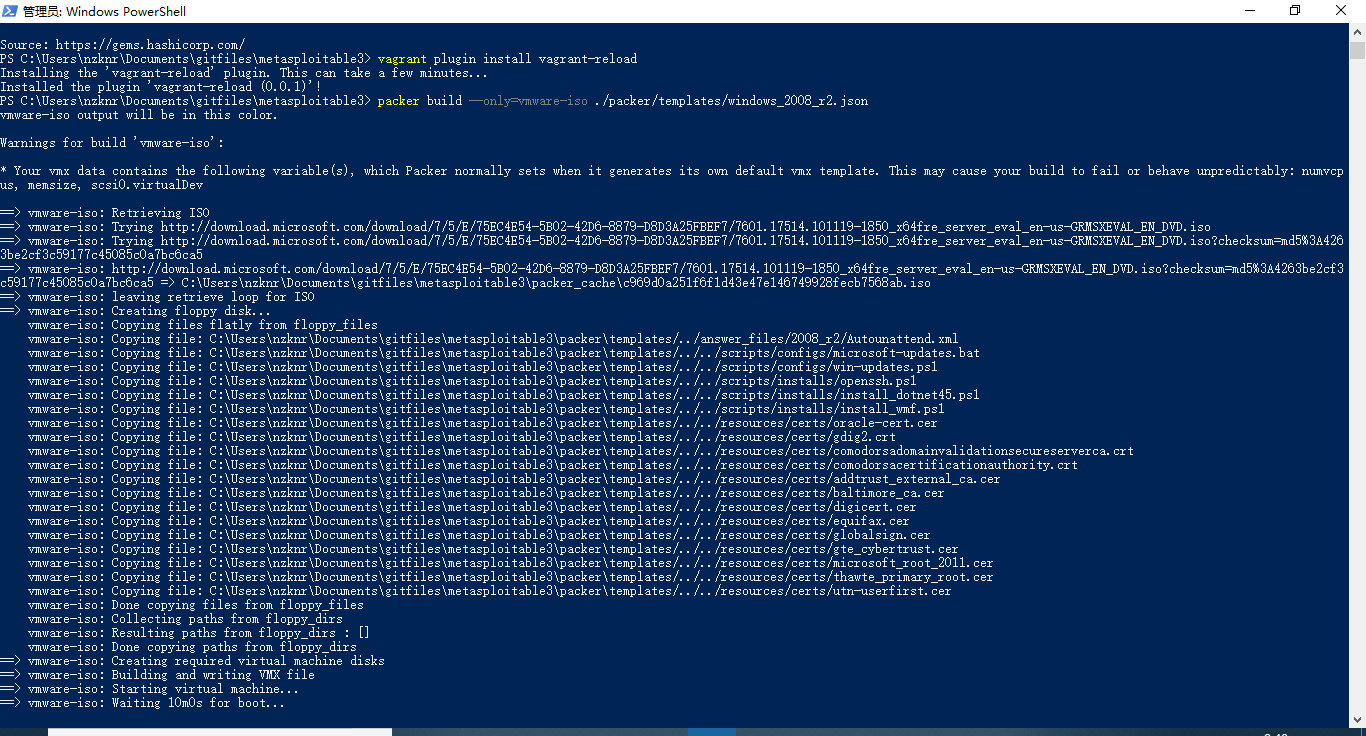


后边的就是安装界面,省略了
第二种环境配置
virtualbox(我只是把VMware删除了,然后就直接按照官网指导制动安装了)
win10(1089)
packer
vagrant
vagrant-reload
在powershell((路径要在metasploitable3下))中执行.\build.ps1 windows2008
和第一种环境一样全程自动(自动安装期间虚拟机变化和上边的一样),无需干涉
结束后执行vagrant up win2k8
大功告成
以上两种方式是自己安装做box的,可以保证和在自己的机器环境配置完美运行,可是这种方式太费神,容易失败。不适合小白,和追求效率的伙伴。
下面有一种方式是直接的,就是用人家已经做好的box,这样虽然简单有效,但是无法保证下好的box是否和自己的机器环境符合,也无法保证别人是否在里边留下什么东西。
环境要求:vagrant
virtualbox或者vmware-workststion
去https://app.vagrantup.com/boxes/search?utf8=%E2%9C%93&sort=downloads&provider=&q=metasploitable3寻找自己喜欢的box,这里有很多个人做好的box,建议选择rapid7/metasploitable3-win2k8
步骤1:在metasploitable3文件夹下打开powershell,运行vagrant init rapid7/metasploitable3-win2k8 --box-version 0.1.0-weekly命令
会生成一个vagrant的文件,自动配置好了信息
然后直接 vagrant up 自动下载。
以上是我这两天亲身实践的结果,最重要的一点就是网速一定要超级好,网速一定要超级好,网速一定要超级好。重要事情说三遍!!!
如果你在装的时候经常报错,提示不是没有这个文件就是没有那个文件,那十有八九就是网速不好造成的。不要灰心,按一下键盘上的向上键,重来。
祝你们好运!
PS C:\Users\nzknr\metasploitable3> vagrant init rapid7/metasploitable3-win2k8 --box-version 0.1.0-weekly
A `Vagrantfile` has been placed in this directory. You are now
ready to `vagrant up` your first virtual environment! Please read
`vagrantup.com` for more information on using Vagrant.
PS C:\Users\nzknr\metasploitable3> vagrant up
Bringing machine 'default' up with 'virtualbox' provider...
==> default: Box 'rapid7/metasploitable3-win2k8' could not be found. Attempting to find and install...
default: Box Provider: virtualbox
default: Box Version: 0.1.0-weekly
==> default: Loading metadata for box 'rapid7/metasploitable3-win2k8'
default: URL: https://vagrantcloud.com/rapid7/metasploitable3-win2k8
==> default: Adding box 'rapid7/metasploitable3-win2k8' (v0.1.0-weekly) for provider: virtualbox
default: Downloading: https://vagrantcloud.com/rapid7/boxes/metasploitable3-win2k8/versions/0.1.0-weekly/providers/virtualbox.box
==> default: Box download is resuming from prior download progress
default: Download redirected to host: vagrantcloud-files-production.s3.amazonaws.com
default: Progress: 0% (Rate: 5d/s, Estimated time remaining: 0:31:12)
后边附上自己造box四次失败反馈信息,总结返现每次都不一样,均是网络异常造成的数据丢失。
第一次安装失败反馈失败信息
vagrant2.4
C:\Users\vagrant>sc config "domain1" obj= "NT Authority\LOCAL SERVICE"
[SC] OpenService FAILED 1060:(这是错误根源)
vmware-iso:
vmware-iso: The specified service does not exist as an installed service.
vmware-iso:
==> vmware-iso: Stopping virtual machine...
==> vmware-iso: Deleting output directory...
Build 'vmware-iso' errored: Script exited with non-zero exit status: 36.Allowed exit codes are: [0]
==> Some builds didn't complete successfully and had errors:
--> vmware-iso: Script exited with non-zero exit status: 36.Allowed exit codes are: [0]
==> Builds finished but no artifacts were created.
第二次安装失败 vagrant 1.9.0
C:\Users\vagrant>cmd /c ""C:\Program Files\7-Zip\7z.exe" x "C:\Windows\Temp\openjdk-1.6.0-unofficial-b27-windows-amd64.zip" -oC:\openjdk6"
==> vmware-iso:
==> vmware-iso: ERROR: The system cannot find the file specified. (错误根源)
vmware-iso:
==> vmware-iso: C:\Windows\Temp\openjdk-1.6.0-unofficial-b27-windows-amd64.zip
vmware-iso: 7-Zip 19.00 (x64) : Copyright (c) 1999-2018 Igor Pavlov : 2019-02-21
==> vmware-iso:
vmware-iso:
vmware-iso: Scanning the drive for archives:
==> vmware-iso:
==> vmware-iso:
==> vmware-iso: System ERROR:
==> vmware-iso: The system cannot find the file specified.
==> vmware-iso: Stopping virtual machine...
==> vmware-iso: Deleting output directory...
Build 'vmware-iso' errored: Script exited with non-zero exit status: 2.Allowed exit codes are: [0]
==> Some builds didn't complete successfully and had errors:
--> vmware-iso: Script exited with non-zero exit status: 2.Allowed exit codes are: [0]
==> Builds finished but no artifacts were created.
第三次
vmware-iso: C:\Users\vagrant>if exist a:\vagrant.pub (copy a:\vagrant.pub C:\Users\vagrant\.ssh\authorized_keys ) else (powershell -Command "(New-Object System.Net.WebClient).DownloadFile('https://raw.githubusercontent.com/mitchellh/vagrant/master/keys/vagrant.pub', 'C:\Users\vagrant\.ssh\authorized_keys')" 0<NUL )
==> vmware-iso: Exception calling "DownloadFile" with "2" argument(s): "Unable to connect to the remote server" (不能连接远程服务器)
==> vmware-iso: At line:1 char:47
==> vmware-iso: + (New-Object System.Net.WebClient).DownloadFile <<<< ('https://raw.githubuserc
==> vmware-iso: ontent.com/mitchellh/vagrant/master/keys/vagrant.pub', 'C:\Users\vagrant\.ssh\a
==> vmware-iso: uthorized_keys')
==> vmware-iso: + CategoryInfo : NotSpecified: (:) [], MethodInvocationException
==> vmware-iso: + FullyQualifiedErrorId : DotNetMethodException
==> vmware-iso:
==> vmware-iso: Stopping virtual machine...
==> vmware-iso: Deleting output directory...
Build 'vmware-iso' errored: Script exited with non-zero exit status: 1.Allowed exit codes are: [0]
==> Some builds didn't complete successfully and had errors:
--> vmware-iso: Script exited with non-zero exit status: 1.Allowed exit codes are: [0]
==> Builds finished but no artifacts were created.
PS C:\Users\nzknr\Documents\gitfiles\metasploitable3>
第四次
vmware-iso: jdk8 v8.0.211 [Approved]
vmware-iso: jdk8 package files install completed. Performing other installation steps.
vmware-iso: Downloading JDK from https://javadl.oracle.com/webapps/download/GetFile/1.8.0_211-b12/478a62b7d4e34b78b671c754eaaf38ab/windows-i586/jdk-8u211-windows-x64.exe(下载文件,等了有一个小时没下载成功,直接失败)
==> vmware-iso: Stopping virtual machine...
==> vmware-iso: Deleting output directory...
Build 'vmware-iso' errored: Script exited with non-zero exit status: 2300218.Allowed exit codes are: [0]
==> Some builds didn't complete successfully and had errors:
--> vmware-iso: Script exited with non-zero exit status: 2300218.Allowed exit codes are: [0]
==> Builds finished but no artifacts were created.
安装metasploitable3的经验总结的更多相关文章
- 华为RH2285安装过程及经验总结
安装测试 1.由于服务器为二手服务器,噪音相对较大,如果未经改造无法正常使用,当机器第一次运行的时候,我的血压一下升高不少. 第一步 服务器的远程端口和路由器连接在一起 第二步 设置服务器的bio ...
- 总结一下安装linux系统经验-版本选择-安装ubuntu
linux版本选择: 初次接触,建议选 Ubuntu 或者 Fedora,这两个发行版都很容易上手,而且两者都有很强大的中文社区,遇到问题比较容易解决,而且都有国内的源,安装或者更新软件时体验相对会好 ...
- 第一次安装myeclipse+tomcat经验
在网上找了很多资料,这里记录一下验证有用的资料,避免以后走弯路 1.安装myeclipse 参考如下URL,亲测有用 https://blog.csdn.net/qingjianduoyun/arti ...
- 安装python sklearn经验总结
1. 需要安装 numpy, scipy, 和sklearn和ipython,Cython sklearn,ipython, Cython都可以通过pip来安装.但scipy,可能还有numpy必须通 ...
- GTX650Ti,GT610安装黑苹果之经验与步骤
安装这两个显卡的黑苹果都是10.9以上的版本,一个是10.9.2,一个是10.9.4,最后都完美.主板一个是Z77,一个是H61. 1. 开始安装完以后,显卡不工作,能够安全模式进去. 2. 删除Ap ...
- VS2015在Windows 10 下面安装经验
实体机环境:Windows 10 专业版(2017年2月28日 官方下载版本) VS2015:cn_visual_studio_enterprise_2015_with_update_3_x86_x6 ...
- 安装angular-cli
最近在学习angular2,并尝试用这个框架来做公司的一个新项目. 终于要开始开发了,等了1个多月. 因为第一次用这个新框架做项目,不太熟悉,就找了angular-cli这个脚手架来搭建项目. 安装了 ...
- [原创]Macbook Pro Retina 15吋安装Windows 7和Windows 8.1方法
前言 本以为有Bootcamp神器在手,Macbook装Win系统应该是不在话下,没想到着实折腾了一番.期间因为误操作导致OSX也挂掉进不去只得磁盘全部抹掉网络恢复安装.为了让大家少走弯路,提供个人安 ...
- Android之genymotion模拟器安装于配置
今天是双休日,可怜没人陪,只好一个人玩电脑了,之前别人一直给我推荐genymotion模拟器,说各种方便,秒杀Android自带模拟器,所以就趁这个周末搞了一下,总体感觉还挺不错的,确实比Androi ...
随机推荐
- C# keybd_event用法 模拟键盘输入
最近有业务需求,需要模拟键盘输入,所以了解了一下C#中keybd_event函数的用法.该函数能够产生WM_KEYUP或WM_KEYDOWN消息,即可以触发键盘事件. 函数引用如下: [DllImpo ...
- 我已经写了DAL层的代码生成器
(1)创建您自己的解决方案 文件夹结构如以下: (2)编写代码: (要使用数据库 建议创建随意数据库就可以) 创建配置文件App.config代码例如以下: <?xml version=&quo ...
- Web 存储之localStorage
1.localStorage的浏览器支持情况 localStorage属于永久性存储,不移除永久存在:sessionStorage属于会话结束就消失. localStorage存储的大小在5M左右,不 ...
- Store-exclusive instruction conflict resolution
A data processing system includes a plurality of transaction masters (4, 6, 8, 10) each with an asso ...
- 深入了解Java虚拟机
一.垃圾收集 Java虚拟机堆不停的运转java由程序创建的所有对象.当一个对象不再被引用,它使用堆空间能够被回收,以便兴许的新对象所使用. 垃圾收集器必须能够断定哪些对象是不再被引用的,而且能够把它 ...
- 分享 WebBrowser显示Html内容3点细节技巧,解决刷新后空白
直接显示Html内容,不像直接导航网址容易处理: 问题:按微软的控件属性提示,可以用WebBrowser.DocumentText 属性赋值 ,但是这种赋值,只是首次有效,后续切换都没啥作用. 下面给 ...
- 3DTools TrackballDecorator实现3D漫游
原文:3DTools TrackballDecorator实现3D漫游 版权声明:本文为博主原创文章,未经博主允许不得转载. https://blog.csdn.net/m0_37591671/art ...
- JDBC学习笔记——增删改查
1.数据库准备 要用JDBC操作数据库,第一步当然是建立数据表: ? 1 2 3 4 5 6 CREATE TABLE `user` ( `id` int(11) NOT NULL AUTO_I ...
- 亲串 (hdu 2203 KMP)
亲串 Time Limit: 3000/1000 MS (Java/Others) Memory Limit: 32768/32768 K (Java/Others) Total Submiss ...
- cross-compile-openssl-windows.sh,cross-compile-curl-windows.sh,cross-compile-zlib-windows.sh,build-zlib-visual-studio-2015-cli.bat
https://gist.github.com/artynet build zlib with Visual Studio CLI toolhttps://gist.github.com/artyne ...