
JavaScript使用构造函数获取变量的类型名
在JavaScript中,如何准确获取变量的类型名是一个经常使用的问题.
但是常常不能获取到变量的精确名称,或者必须使用jQuery 中的方法,这里 我通过 typeof ,jQuery.type 和 通过构造函数来获取变量类型 这三种方法详细介绍一遍.
希望可以对你提供帮助.
看到题目的第一眼,有些同学可能会想到 typeof 运算符.
使用 typeof 获取基本的类型
在JavaScript语言中,给出了使用 typeof 运算符来获取基本的类型名.(注意不是基本类型)
这是 typeof 的全部用法
01-typeof.htm
console.log('typeof of 10 ~~~~' +typeof 10);

console.log('typeof of "a" ~~~~' +typeof 'a');

console.log('typeof of true ~~~~' +typeof true);

console.log('typeof of {} ~~~~' +typeof {});

console.log('typeof of /123/ ~~~~' +typeof /123/);

console.log('typeof of function(){} ~~~~' +typeof function(){});

console.log('typeof of undefined ~~~~' +typeof undefined);

console.log('typeof of null ~~~~' +typeof null);
这是结果

按照上面的打印结果,总结出下面要注意的几点
typeof (引用类型) 除了函数, 都是 'object',比如 typeof /123/
typeof null 为'object'
typeof undefined 为 'undefined',通常, 如果使用两等号, null == undefined 为真.
转换为数字的常见用法 "10"-0, 如果没有转换成功,返回NaN,由于NaN 的一个特性: NaN != NaN,故判断转换成功与否的常见做法: (这也是我参见 jQuery的源码发现的,jQuery源码读100遍都不为过)
  ("10x" - 0) == ("10x" - 0);

  // 结果为假!

使用jQuery中的方法$.type()
现在看看jQuery是怎么做的
// 先申明一个对象,目的是用来做映射

var class2type = {};

// 申明一个core_toString() 的方法,得到最原始的toString() 方法,因为在很多对象中,toStrintg() 已经被重写

var core_toString() = class2type.toString;
// 这里为 toStrintg() 后的结果和类型名做一个映射,申明一个core_toString() 后的结果,而值就是类型名

jQuery.each("Boolean Number String Function Array Date RegExp Object Error".split(" "), function(i, name) {

	class2type[ "[object " + name + "]" ] = name.toLowerCase();

});
因为 Object.prototype.toString() 方法调用结果如下
var core_toString = {}.toString;

console.log( core_toString.call(1) );

console.log( core_toString.call("11") );

console.log( core_toString.call(/123/) );

console.log( core_toString.call({}) );

console.log( core_toString.call(function(){}) );

console.log( core_toString.call([]) );

console.log( core_toString.call(true) );

console.log( core_toString.call(new Date()) );

console.log( core_toString.call(new Error() ));

console.log( core_toString.call(null) );

console.log( core_toString.call(undefined) );

console.log( String(null) );

console.log( String(undefined) );

上面的打印结果与
class2type[ "[object " + name + "]" ] = name.toLowerCase();
不谋而合!
这是jQuery.type 的核心方法
type: function( obj ) {

    if ( obj == null ) {

        return String( obj );

    }

    // Support: Safari <= 5.1 (functionish RegExp)

    return typeof obj === "object" || typeof obj === "function" ?

        class2type[ core_toString.call(obj) ] || "object" :

        typeof obj;

},
注意,为什么把 null 或者 undefined 单独讨论呢,因为 在一些版本浏览器中
console.log(core_toString.call(null));

console.log(core_toString.call(undefined));
这是会报错的!
如果是对象类型,另:由于 在一些低版本的浏览器中,typeof /123/ 会返回的是 "function" 而不是 "object",所以这里要判断是否是函数,要明白 这里的 typeof obj === function 不是为了函数讨论的,因为函数本身就可以通过typeof 来得到类型.
 typeof obj === "object" || typeof obj === "function" ?

        class2type[ core_toString.call(obj) ]
就直接返回class2type 中键值对的结果,,如果不是,那么一定就是基本类型, 通过 typeof 就可以啦.
class2type[ core_toString.call(obj) ] || "object" :

// 这是防止一些未知情况的,如果未取到,就返回object
但是 **jQuery.type ** 有一个很大的缺陷
这是一个自定义类型
function Person(){

   this.name = 'pawn';

}

var p = Person.toString();
// 注意,这里会打印 [object Object],通过上面的方法,无法得到精确的自定义类型
这也是 它的一个大缺陷了!
下面,我们通过构造函数的方式来获取精确类型
通过构造函数来获取类型
这种方式 是蒋坤老师( jk ) 教会我的,非常感谢他.
在理解这个方法之前,需要理解两个点
prorotype 原型属性
我们知道,任何对象或者函数都直接或者间接的继承自Object 或者 Function, (其实最终Function 是继承自 Object 的,这属于原型链的知识了)。那么,任何一个对象都具有原型对象 _proto_ (这个对象只在chrome 和 firefox 暴露,但是在其他浏览器中也是存在的),这个原型对象就是这个对象的构造函数的原型属性(这里可能有点绕).
由于 任何函数都具有 原型属性prototype,并且这个原型属性具有一个默认属性 constructor,它是这个函数的引用,看下面的代码
  function Person(){

      this.name = 'pawn';

  }

  console.log(Person.prototype.constructor === Person);

发现,这两个东西其实一个东西
但是,在某些情况下,需要这么写
  function Person(){

      this.name = 'pawn';

  }

  Person.protype = {

      XX: ... ,

      xx: ... ,

      ...

  }
这么做,就会覆盖原本的 protype 方法,那么construcor 就不存在了,这是,必须要显示的申明这个对象
  Person.protype = {

      construction: Person,

      XX: ... ,

      xx: ... ,

      ...

  }
在jQuery的中,就是这么做的,
  jQuery.fn = jQuery.prototype = {

  	constructor: jQuery,

  	init: function( selector, context, rootjQuery ) {

  		var match, elem;
关于 jQuery对象封装的方式 也是非常值得研究
Function.prototype.toString()

注意,这里已经不是熟悉 [object Object],而是 已经重写了.
也就是,如果调用一个函数的toString() 方法.那么就会打印这个函数的函数体.
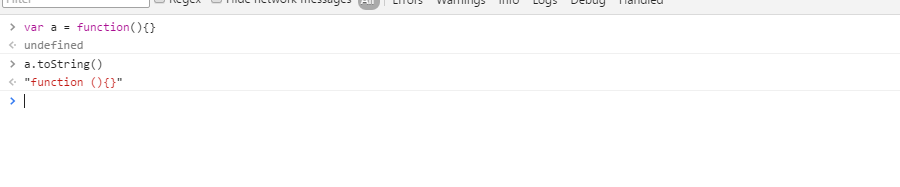
好了,经过上面两个步骤,你明白我要做什么了吗?
如何通过构造函数来获得变量的类型?
判断是否是基本类型
   var getType = function(obj){

       if(obj == null){

          return String(obj);

       }

       if(typeof obj === 'object' || typeof obj === 'fucntion'){

           ...

       }else{

           // 如果不是引用类型,那么就是基本类型

           return typeof obj

       }

   }
如果是对象或者函数类型
   function Person(){

       this.name = 'pawn';

   }

   var p = new Person();

   console.log(p.constructor);

现在要做的事 : 如何将Person 提取出来呢?
毋庸置疑,字符串切割那一套肯定可以办到,但是太 low 啦!
这里,我使用正则将Person提取出来
var regex = /function\s(.+?)\(/
   function Person(){

    this.name = 'pawn';

   }

   var p = new Person();

   var c = p.constructor

   var regex = /function\s(.+?)\(/;

   console.log('|' + regex.exec(c)[1] + '|');

使用name
其实,除了上面的正则,每个函数还有一个name属性,返回函数名,但是ie8 是不支持的.
因此上面的代码可以写为:
var getType = function(obj){

    if(obj == null){

        return String(obj);

    }

    if(typeof obj === 'object' || typeof obj === 'function'){

        var constructor = obj.constructor;

        if(constructor && constructor.name){

            return constructor.name;

        }

        var regex = /function\s(.+?)\(/;

        return regex.exec(c)[1];

    }else{

        // 如果不是引用类型,那么就是基本;类型

        return typeof obj;

    }

};
但是上面的代码太丑啦,将其简化
简化
var getType = function(obj){

    if(obj == null){

        return String(obj);

    }

    if(typeof obj === 'object' || typeof obj === 'function'){

        return obj.constructor && obj.constructor.name.toLowerCase() ||

          /function\s(.+?)\(/.exec(obj.constructor)[1].toLowerCase();

    }else{

        // 如果不是引用类型,那么就是基本类型

        return typeof obj;

    }

};
还是比较麻烦,继续简化
var getType = function(obj){

    if(obj == null){

       return String(obj);

    }

    return typeof obj === 'object' || typeof obj === 'function' ?

      obj.constructor && obj.constructor.name && obj.constructor.name.toLowerCase() ||

          /function\s(.+?)\(/.exec(obj.constructor)[1].toLowerCase():

      typeof obj;

};
好了,已经全部弄完了,写个代码测试一下:
function Person(){

    this.name = 'pawn';

}

var p = new Person();

console.log(getType(p));

console.log(getType(1));

console.log(getType("a"));

console.log(getType(false));

console.log(getType(/123/));

console.log(getType({}));

console.log(getType(function(){}));

console.log(getType(new Date()));

console.log(getType(new Error()));

console.log(getType( null));

console.log(getType( undefined));

好了,关于如何获取变量的类型名就介绍到这里,希望能对你提供帮助.
JavaScript使用构造函数获取变量的类型名的更多相关文章
- java获取变量的类型
对于简单类型变量,是无法直接获得变量类型的://要想获取,必须自定义函数进行返回 对于包装类型变量,是可以直接获得的,变量名称.getClass().getName(); java中获取变量的类型可以 ...
- java之获取变量的类型
java要获取变量的类型必须自己定义一个函数: public class Test{ public static void main(String[] args) { short a = 1; a + ...
- JAVA中如何获取变量的类型
JAVA中如何获取变量的类型? package xiya; public class Demo { public static void main(String[] args) { String ty ...
- JavaScript基础系列(变量与类型)
以下内容将JavaScript简称为JS 打开本文时不管你是零基础的初学者还是其他语言的老兵,我都想说程序语言的基础支撑起了整个网络世界,不把这些基础学透之后稍复杂的内容会让你寸步难行. 现在先给编程 ...
- javascript中检测一个变量的类型
/** * 怎么检测一个变量的类型? * 在js中检测对象类型主要有三种:typeof, instanceof, constructor, 这几种都可以检测对象的类型. * 另外还可以适应jQuery ...
- Python3基础 type获取变量的类型
镇场诗:---大梦谁觉,水月中建博客.百千磨难,才知世事无常.---今持佛语,技术无量愿学.愿尽所学,铸一良心博客.------------------------------------------ ...
- JavaScript根据参数获取url中参数名的值
//假设ulr如下var localhost="http://127.0.0.1?name=tom&sex=男&id=1";//正则方法封装function Get ...
- 前端知识体系:JavaScript基础-变量和类型
前端工程师自检清单 1. JavaScript规定了几种语言类型 2. JavaScript对象的底层数据结构是什么 3. Symbol类型在实际开发中的应用.可手动实现一个简单的 Symbo 4. ...
- 使用typeid(变量或类型).name()来获取常量或变量的类型---gyy整理
使用typeid(变量或类型).name()来获取常量或变量的类型 <typeinfo> 该头文件包含运行时类型识别(在执行时确定数据类型)的类 typeid的使用 typeid操作 ...
随机推荐
- Myeclipse 不能保存汉字
window-->首选项-->content type-->Text-->Default encoding改为UTF-8,点击update
- 关于click和submit的笔记
click主要用于元素的点击时的响应事件,而submit是指表单元素form的提交事件. 但是,当click加入到表单的提交按钮时,事情似乎就有点复杂,总是忘记了.这两天搜了下,又实践了一下. 主要用 ...
- 测试 MathJax 排版功效
这是第一篇博文,用于检测博客园提供的数学排版功能,下面是一些数学公式. \[ \text{sgn}(\mathbf{w}^T\phi(\mathbf{x})+b) = \text{sgn}\left( ...
- css3 linear-gradient实现页面加载进度条效果
最终效果图: html结构: <div> <p class="p1"> <span></span> < ...
- [收藏]C++简单五子棋
#include<iostream> #include<iomanip> using namespace std; ; //棋盘行数 ; //棋盘列数 char p[X][Y] ...
- 初步认识Less
LESS 是一个流行的样式表语言,它提供了 CSS3 也未曾实现的多种功能,让您编写 CSS 更加方便,更加直观.LESS 已经被广泛使用在多种框架中 ( 例如:BootStrap).本文将介绍 LE ...
- springmvc入门的第一个小例子
今天我们探讨一下springmvc,由于是初学,所以简单的了解一下 springmvc的流程,后续会持续更新... 由一个小例子来简单的了解一下 springmvc springmvc是spring框 ...
- windows或mac上对iOS设备截图
1.需要在设备上安装插件“设置”--“开发者”的选项 2.启动"com.apple.mobile.screenshotr"服务 3.和设备scoket通讯,拿到截图.
- 分布式数据库中的Paxos 算法
分布式数据库中的Paxos 算法 http://baike.baidu.com/link?url=ChmfvtXRZQl7X1VmRU6ypsmZ4b4MbQX1pelw_VenRLnFpq7rMvY ...
- CYQ.Data+EasyUI开发:几个相关的问题CheckBox、Tree、TreeGrid
前言: 话说到新的公司已经呆了三个星期了,从上班的第二天开始就一直在写项目文档和给开发人员培训,以至于我的QQ签名从"我不是来搞培训的“到最后直接换成”我是来搞培训的“. 虽然挂名开发经理, ...