
wpf控件开发基础(5) -依赖属性实践
知识回顾
接上篇,回顾这三篇讲了什么东西
首先说明了属性的现存问题,然后介绍了依赖属性的基本用法及其解决方案,由于依赖属性以静态属性的方式存在,进而又介绍了可重写的属性元数据的使用.这是以上三篇所说明的问题.当然依赖属性的特性依然没有说完整.这两天也一直在想依赖属性,然后就是头疼,呵呵.由于WPF的依赖属性系统与整体功能都有关联,所以接下来等讲到某个特性的时候然后再来讲依赖属性.这篇我们来个简单的实践,增加点乐趣.
定义RadioButtonList和CheckBoxList
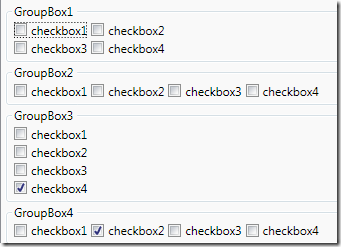
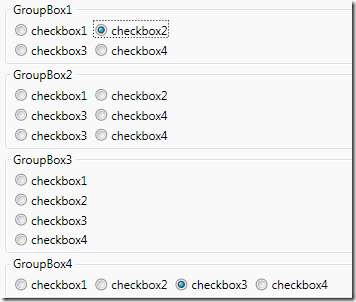
WPF内置没有这两个控件,但实际开发时,用到的会比较多.下面我们一起来创建这两个控件.
- 明确控件需求
- 定义依赖属性
- 重写默认样式属性元数据
- 用xaml定义控件样式
一.明确控件需求
控件功能如下:
- 可以垂直,水平排列
- 可以分行,列
- 为子项设置Margin
二.定义依赖属性
为避免重复定义属性,为两个控件定义公共类ListControl,从ListBox继承

然后定义依赖属性
namespace WPF.Controls

{

    /// <summary>

    /// this is a base class for CheckBoxList and RadioButtonList

    /// this class define some common property

    /// </summary>

    public abstract class ListControl : ListBox

    {

        #region Orientation

        /// <summary>

        /// Gets or sets a value that indicates the dimension by which child elements are stacked.

        /// This is a dependency property.

        /// </summary>

        public Orientation Orientation

        {

            get { return (Orientation)GetValue(OrientationProperty); }

            set { SetValue(OrientationProperty, value); }

        }

        public static readonly DependencyProperty OrientationProperty =

            DependencyProperty.Register("Orientation", typeof(Orientation), typeof(ListControl),

            new UIPropertyMetadata(Orientation.Vertical, new PropertyChangedCallback(OrientationChangedCallback)));

        public static void OrientationChangedCallback(DependencyObject d, DependencyPropertyChangedEventArgs e)

        {

            ListControl control = d as ListControl;

            if (control.Orientation == Orientation.Horizontal)

            {

                control.Columns = 0;

                control.Rows = 1;

            }

            else if (control.Orientation == Orientation.Vertical)

            {

                control.Rows = 0;

                control.Columns = 1;

            }

        }

        #endregion

        #region Columns

        /// <summary>

        /// Get or set a value that indicates which Columns list item should appear in.

        /// This is a dependency property.

        /// </summary>

        public int Columns

        {

            get { return (int)GetValue(ColumnsProperty); }

            set { SetValue(ColumnsProperty, value); }

        }

        public static readonly DependencyProperty ColumnsProperty =

            DependencyProperty.Register("Columns", typeof(int), typeof(ListControl), new UIPropertyMetadata(1));

        #endregion

        #region Rows

        /// <summary>

        /// Get or set a value that indicates which Rows list item should appear in.

        /// This is a dependency property.

        /// </summary>

        public int Rows

        {

            get { return (int)GetValue(RowsProperty); }

            set { SetValue(RowsProperty, value); }

        }

        public static readonly DependencyProperty RowsProperty =

            DependencyProperty.Register("Rows", typeof(int), typeof(ListControl), new UIPropertyMetadata(0));

        #endregion

        public Thickness SubMargin

        {

            get { return (Thickness)GetValue(SubMarginProperty); }

            set { SetValue(SubMarginProperty, value); }

        }

        public static readonly DependencyProperty SubMarginProperty =

            DependencyProperty.Register("SubMargin", typeof(Thickness), typeof(ListControl),

            new UIPropertyMetadata(new Thickness(2,2,2,0)));

    }

}
以上依赖属性定义的非常简单,之所以定义成依赖属性是因为可以进行属性绑定操作.
三.重写默认样式属性元数据
/// <summary>

/// Represents a control that a user can choose one from list options in a group radiobutton

/// </summary>

public class RadioButtonList : ListControl

{

    static RadioButtonList()

    {

        DefaultStyleKeyProperty.OverrideMetadata(typeof(RadioButtonList)

            , new FrameworkPropertyMetadata(typeof(RadioButtonList)));

    }

}

/// <summary>

/// Contains a list of selectable CheckBox items

/// Represents a control that a user can choose from a list options in a group of CheckBox

/// </summary>

public class CheckBoxList : ListControl

{

    static CheckBoxList()

    {

        DefaultStyleKeyProperty.OverrideMetadata(typeof(CheckBoxList)

            , new FrameworkPropertyMetadata(typeof(CheckBoxList)));

    }

}
四.用xaml定义控件样式
默认项目中会有一个Generic.xaml文件,我们要把样式定义在此文件中
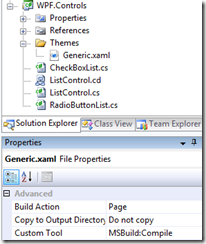
控件样式定义
(1)ListControl
<Style TargetType="{x:Type local:ListControl}" BasedOn="{StaticResource {x:Type ListBox}}">

    <Setter Property="ItemsPanel">

        <Setter.Value>

            <ItemsPanelTemplate>

                <UniformGrid HorizontalAlignment="Left" VerticalAlignment="Top"

                    Rows="{Binding Path=Rows,RelativeSource={RelativeSource FindAncestor,AncestorType={x:Type local:ListControl}}}"

                    Columns="{Binding Path=Columns,RelativeSource={RelativeSource FindAncestor,AncestorType={x:Type local:ListControl}}}"></UniformGrid>

            </ItemsPanelTemplate>

        </Setter.Value>

    </Setter>

    <Setter Property="BorderThickness" Value="0" />

    <Setter Property="Background" Value="Transparent" />

</Style>
(2)RadioButtonList
<Style TargetType="{x:Type local:RadioButtonList}" BasedOn="{StaticResource {x:Type local:ListControl}}">

    <Style.Resources>

        <Style TargetType="ListBoxItem">

            <Setter Property="Margin" Value="2, 2, 2, 0" />

            <Setter Property="Template">

                <Setter.Value>

                    <ControlTemplate TargetType="ListBoxItem">

                            <RadioButton

                                Margin="{Binding Path=SubMargin,RelativeSource={RelativeSource FindAncestor,AncestorType={x:Type local:RadioButtonList}}}"

                                IsChecked="{Binding IsSelected, RelativeSource={RelativeSource TemplatedParent},Mode=TwoWay}">

                                <RadioButton.Content>

                                    <ContentPresenter/>

                                </RadioButton.Content>

                            </RadioButton>

                    </ControlTemplate>

                </Setter.Value>

            </Setter>

        </Style>

    </Style.Resources>

</Style>
(3)CheckBoxList
<Style TargetType="{x:Type local:CheckBoxList}" BasedOn="{StaticResource {x:Type local:ListControl}}">

    <Setter Property="SelectionMode" Value="Multiple"></Setter>

    <Style.Resources>

        <Style TargetType="ListBoxItem">

            <Setter Property="Margin" Value="2, 2, 2, 0" />

            <Setter Property="Template">

                <Setter.Value>

                    <ControlTemplate TargetType="ListBoxItem">

                            <CheckBox

                                Margin="{Binding Path=SubMargin,RelativeSource={RelativeSource FindAncestor,AncestorType={x:Type local:RadioButtonList}}}"

                                IsChecked="{Binding IsSelected, RelativeSource={RelativeSource TemplatedParent},Mode=TwoWay}">

                                <CheckBox.Content>

                                    <ContentPresenter/>

                                </CheckBox.Content>

                            </CheckBox>

                    </ControlTemplate>

                </Setter.Value>

            </Setter>

        </Style>

    </Style.Resources>

</Style>
OK,到这里就完事了.我们发现我们并不需要写多少代码,就可以实现一个控件.而且RadioButtonList和CheckBoxList几乎没有代码,仅仅只是重写了样式而已,这也是WPF定义控件的基本概念,一些变的都是如此简单.
wpf控件开发基础(5) -依赖属性实践的更多相关文章
- wpf控件开发基础(3) -属性系统(2)
原文:wpf控件开发基础(3) -属性系统(2) 上篇说明了属性存在的一系列问题. 属性默认值,可以保证属性的有效性. 属性验证有效性,可以对输入的属性进行校验 属性强制回调, 即不管属性有无发生变化 ...
- wpf控件开发基础(4) -属性系统(3)
原文:wpf控件开发基础(4) -属性系统(3) 知识回顾 接上篇,上篇我们真正接触到了依赖属性的用法,以及依赖属性的属性元数据的用法,并且也实实在在地解决了之前第二篇提到的一系列问题.来回顾一下 属 ...
- wpf控件开发基础(2) -属性系统(1)
原文:wpf控件开发基础(2) -属性系统(1) 距离上篇写的时间有1年多了.wpf太大,写的东西实在太多,我将依然围绕着自定义控件来展开与其相关的技术点. 也欢迎大家参与讨论.这篇我们将要讨论的是W ...
- wpf控件开发基础
wpf控件开发基础(3) -属性系统(2) http://www.cnblogs.com/Clingingboy/archive/2010/02/01/1661370.html 这个有必要看看 wpf ...
- asp.net控件开发基础(1)(转)原文更多内容
asp.net本身提供了很多控件,提供给我们这些比较懒惰的人使用,我认为控件的作用就在此,因为我们不想重复工作,所以要创建它,这个本身便是一个需求的关系,所以学习控件开发很有意思. wrox网站上有本 ...
- WPF控件开发(2) 自动完成(AutoComplete)-1
自动完成功能使用范围很广,多以TextBox或ComboBox的形式出现,在输入的同时给予候选词,候选词一般有两种方式获取. 一种类似Baidu,Google,Bing之类的搜索引擎所用的直接给予前十 ...
- 跟我一起学WPF(2):WPF控件基础
WPF控件简介 通过上一篇XAML语言的介绍,我们知道,XAML是一个树形结构,同样,WPF控件作为构成整个XAML树的一部分,也是一个树形结构.我们看一个简单的例子. <Button.Cont ...
- WinForm控件开发总结目录
WinForm控件开发总结(一)------开篇 WinForm控件开发总结(二)------使用和调试自定义控件 WinForm控件开发总结(三)------认识WinForm控件常用的Attrib ...
- WPF 使用依赖属性(DependencyProperty) 定义用户控件中的Image Source属性
原文:WPF 使用依赖属性(DependencyProperty) 定义用户控件中的Image Source属性 如果你要自定义一个图片按钮控件,那么如何在主窗体绑定这个控件上图片的Source呢? ...
随机推荐
- 卫星网络中使用TCP协议的劣势(所以才有TCP优化版用来卫星通信啊,比如TCP-Peach和ADolar)
卫星网络中使用TCP协议的劣势 为了避免产生网络拥塞,原TCP协议综合采用了慢启动.拥塞避免.快速重传以及快速恢复等算法.但这些算法应用的前提是网络发生拥塞造成丢包,然而在误码率相对较高的卫星通信系统 ...
- php实现 查找输入整数二进制中1的个数
php实现 查找输入整数二进制中1的个数 一.总结 一句话总结: 1.if($j&intval($num)){}的作用是什么? 1 <?php 2 while($num=trim(fge ...
- Identity of indiscernibles(不可分与同一性)
不可区分的对象或者实体,全部性质都相同.也就是说,实体 x 与实体 y是同一的,如果对 x 成立的全部断言,对 y 同样成立(反之亦然). 注意区分如下的两个概念: 同一性的不可分性(The indi ...
- [Angular] Creating an Observable Store with Rx
The API for the store is really simple: /* set(name: string, state: any); select<T>(name: stri ...
- AHB接口转APB
AHB接口转APB 情景 有一个以AHB接口时序设计的IP,现在需将其移至APB总线上,即将使用APB接口时序驱动该IP. 基本思路 将APB的接口信号映射到AHB的接口信号 要点 APB挂接在AHB ...
- 奇虎360Java笔试题
1题 运行下面程序后的输出结果是() public class Test { public static void main(String[] args) { StringBuffer a = new ...
- 并发队列ConcurrentLinkedQueue 和 阻塞队列LinkedBlockingQueue用法
在Java多线程应用中,队列的使用率很高,多数生产消费模型的首选数据结构就是队列(先进先出).Java提供的线程安全的Queue可以分为阻塞队列和非阻塞队列,其中阻塞队列的典型例子是BlockingQ ...
- 使用Opencv中matchTemplate模板匹配方法跟踪移动目标
模板匹配是一种在图像中定位目标的方法,通过把输入图像在实际图像上逐像素点滑动,计算特征相似性,以此来判断当前滑块图像所在位置是目标图像的概率. 在Opencv中,模板匹配定义了6种相似性对比方式: C ...
- js javascript正则
var re = new RegExp("^[0-9]$"); 或者 var re2 = /^\d$/;//这个好像兼容性更好,比如你在上面的语句里面写\d,就总是返回false, ...
- CentOS下安装和配置MySQL-JDK-Tomcat-Nginx(个人官网环境搭建手册)
今天,重新弄我的个人云主机的环境,准备运营自己用Java写的个人官网等网站. 服务器环境:阿里云CentOS 6.4位 包括以下脚本在内的绝大部分命令和脚本,都是我亲自执行过,靠谱的. 完整的&quo ...