
Flask项目之手机端租房网站的实战开发(十一)
说明:该篇博客是博主一字一码编写的,实属不易,请尊重原创,谢谢大家!
接着上一篇博客继续往下写 :https://blog.csdn.net/qq_41782425/article/details/86512594
目录
一丶用户房屋管理后端编写
1.需求分析:在我的房源界面显示出房东发布的房源信息,在前端中就需要从后端接口中发送获取用户id,房屋标题,图片以及房屋信息,显示在前端页面中
2.逻辑编写
- step1 在houses.py中定义接口
@api.route("/user/houses", methods=["GET"])
@login_required
def get_user_houses():
    """
    获取房东发布的房源信息
    :return:
    """
pass- step2 获取用户id
user_id = g.user_id- step3 通过用户id从数据库USER中获取用户对象,通过user对象来获取用户发布的房屋
try:
    user = User.query.get(user_id)
    houses = user.houses
except Exception as e:
    current_app.logger.error(e)
return jsonify(errno=RET.DBERR, errmsg="获取数据失败")- step4 在models.py中house里面定义一个to_basic_dict方法,将房屋基本信息转换成字典数据
def to_basic_dict(self):
    """将基本信息转换为字典数据"""
    house_dict = {
        "house_id": self.id,
        "title": self.title,
        "price": self.price,
        "area_name": self.area.name,
        "img_url": constants.QINIU_URL_DOMAIN + self.index_image_url if self.index_image_url else "",
        "room_count": self.room_count,
        "order_count": self.order_count,
        "address": self.address,
        "user_avatar": constants.QINIU_URL_DOMAIN + self.user.avatar_url if self.user.avatar_url else "",
        "ctime": self.create_time.strftime("%Y-%m-%d")
    }
return house_dict- step5 将查询到的房屋信息转换成字典数据,添加到定义的houses_list列表中
houses_list = []
for house in houses:
    houses_list.append(house.to_basic_dict())
- step6 最后返回正确响应数据
return jsonify(errno=RET.OK, errmsg="OK", data={"houses":houses_list})二丶用户房屋管理前端编写
1.在myhouse.js中通过get请求方式向后端接口发送请求,通过后端返回的正确响应以及data数据,传到前端html中的template模本进行数据显示,如下编写
$.get("/api/v1.0/user/houses", function(resp){
            if ("0" == resp.errno) {
                $("#houses-list").html(template("houses-list-tmpl", {houses:resp.data.houses}));
            } else {
                $("#houses-list").html(template("houses-list-tmpl", {houses:[]}));
            }
});2.引入template.js模板,在my.html中进行如下编写
<script id="houses-list-tmpl" type="text/html">
    <li>
        <div class="new-house">
            <a href="/newhouse.html">发布新房源</a>
        </div>
    </li>
    {{each houses as house}}
    <li>
        <a href="/detail.html?id={{house.house_id}}">
            <div class="house-title">
                <h3>房屋ID:{{house.house_id}} —— {{house.title}}</h3>
            </div>
            <div class="house-content">
                <img src="{{house.img_url}}">
                <div class="house-text">
                    <ul>
                        <li>位于:{{house.area_name}}</li>
                        <li>价格:¥{{(house.price/100.0).toFixed(0)}}/晚</li>
                        <li>发布时间:{{house.ctime}}</li>
                    </ul>
                </div>
            </div>
        </a>
    </li>
    {{/each}}
</script>
三丶测试用户管理后端接口
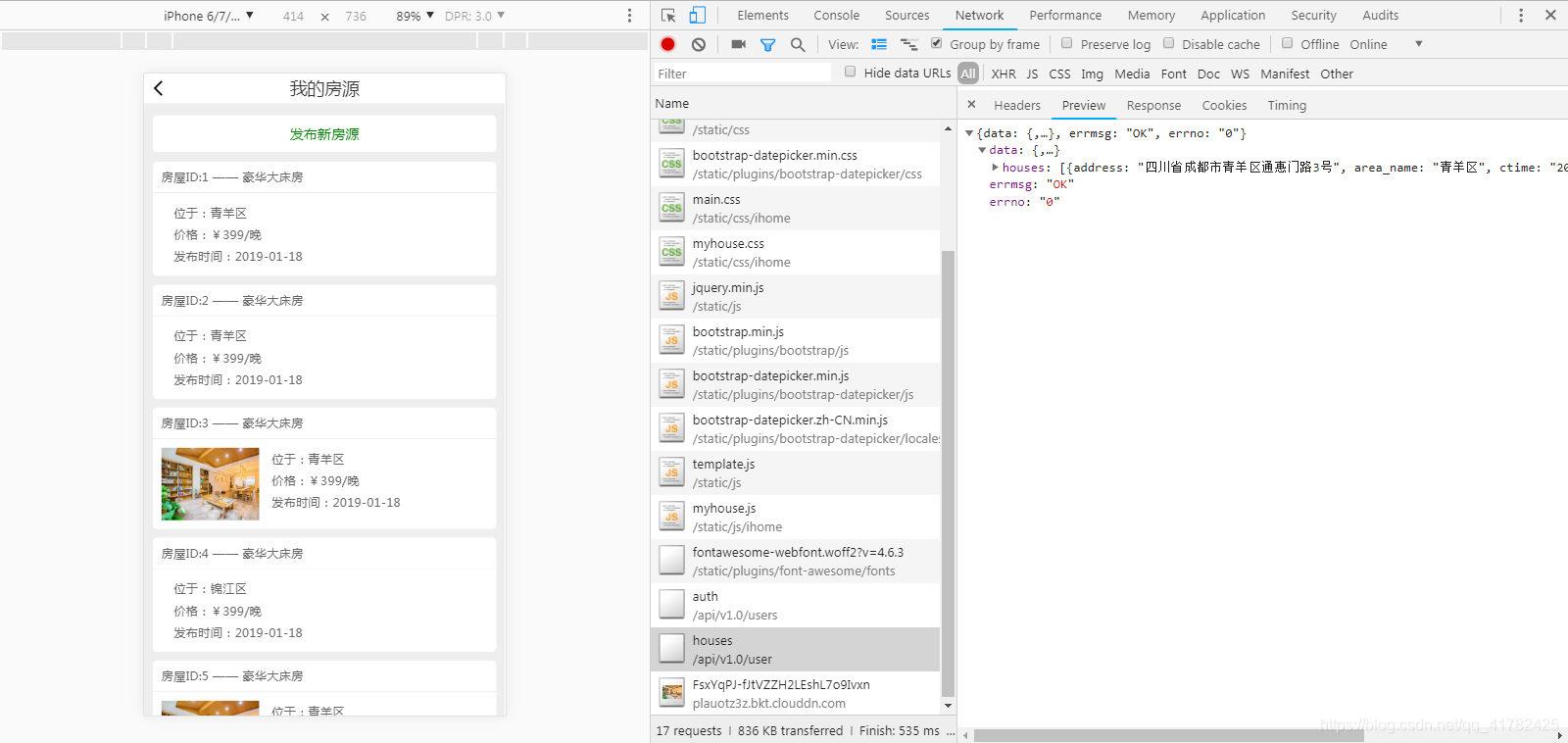
1.之前在编写发布房源接口时,已经发布过房源信息了,所以当进入我的房源页面时,就会向后端接口发送请求,获取房源数据,显示在页面上,如下图所示
2.查看数据库房屋信息表ih_house_info

四丶主页幻灯片房屋信息后端编写
1.分析:首先主页幻灯片上显示的房屋信息,需要在后端定义一个接口,在这个接口中我们需要在数据库中将房屋订单数目最多的5条数据查询出来,展示到主页上,这个需求也是刚开始开发项目的需求,因为主页时用户大量访问的,所以这5条数据需要缓存到redis数据库中,减少我们对数据库的查询
2.逻辑编写(具体实现)
- step1 定义视图函数,此接口因为是在主页所以不需要用户登录验证
@api.route("/houses/index", methods=["GET"])
def get_house_index():
    """
    获取主页幻灯片房屋信息
    :return:
    """
pass- step2 查询数据库获取房屋订单数目最多的5条数据
try:
    # 查询房屋订单倒序排序并显示5条
    houses = House.query.order_by(House.order_count.desc()).limit(constants.HOME_PAGE_MAX_HOUSES)
except Exception as e:
    current_app.logger.error(e)
return jsonify(errno=RET.DBERR, errmsg="查询数据失败")- step3 判断数据是否存在,不存在则返回异常错误信息
if not houses:
return jsonify(errno=RET.NODATA, errmsg="无相关数据")- step4 将查询到的房屋信息转换成字典数据,添加到定义的houses_list列表中,如过房屋未设置主图片,则跳过
houses_list = []
for house in houses:
    if not house.index_image_url:
        continue
houses_list.append(house.to_basic_dict())- step5 将列表数据转换从json格式的数据,并存到redis数据库中
try:
    json_houses = json.dumps(houses_list)
    redis_store.setex("home_page_data", constants.HOME_PAGE_DATA_REDIS_EXPIRES, json_houses)
except Exception as e:
current_app.logger.error(e)- step6 返回正确响应数据
return '{"errno":"0", "errmsg":"OK", "data":%s}' % json_houses, 200, {"Content-Type":"application/json"}- step7 因为第一次是不存在缓存数据的,所以我们在进入函数时,就先从redis中拿取数据
try:
    ret = redis_store.get("home_page_data")
except Exception as e:
    current_app.logger.error(e)
ret = None- step8 此时需要对获取数据进行判断,当获取数据结果不为空时,则返回给前端正确响应数据,不存在时else就在数据库中进行数据查询,再将查询结果写入到redis数据库
# 当ret获取数据结果不为空时,则返回给前端正确响应数据,不存在时else就在数据库中进行数据查询,再将查询结果写入到redis数据库
if ret:
    current_app.logger.info("house index info from redis")
    # 因为redis中保存的是json字符串,所以直接进行字符串拼接返回
    return '{"errno":0, "errmsg":"OK", "data":%s}' % ret, 200, {"Content-Type": "application/json"}
else:
    # 查询数据库获取房屋订单数目最多的5条数据
    try:
        # 查询房屋订单倒序排序并显示5条
        houses = House.query.order_by(House.order_count.desc()).limit(constants.HOME_PAGE_MAX_HOUSES)
    except Exception as e:
        current_app.logger.error(e)
        return jsonify(errno=RET.DBERR, errmsg="查询数据失败")
五丶主页幻灯片房屋信息前端编写
1.在主页前端index.js中,需要向后端接口发送请求来获取主页幻灯片要展示的房屋信息
// 获取幻灯片要展示的房屋基本信息
$.get("/api/v1.0/houses/index", function(resp){
    if ("0" == resp.errno) {
        $(".swiper-wrapper").html(template("swiper-houses-tmpl", {houses:resp.data}));

        // 设置幻灯片对象,开启幻灯片滚动
        var mySwiper = new Swiper ('.swiper-container', {
            loop: true,
            autoplay: 2000,
            autoplayDisableOnInteraction: false,
            pagination: '.swiper-pagination',
            paginationClickable: true
        });
    }
});2.在主页页面中选择区县按钮块,需要从后端接口获取区县信息
// 获取区县信息
$.get("/api/v1.0/areas", function(resp){
    if ("0" == resp.errno) {
        $(".area-list").html(template("area-list-tmpl", {areas:resp.data}));
        $(".area-list a").click(function(e){
            $("#area-btn").html($(this).html());
            $(".search-btn").attr("area-id", $(this).attr("area-id"));
            $(".search-btn").attr("area-name", $(this).html());
            $("#area-modal").modal("hide");
        });
    }
});3.在主页index.html中进行一个模板使用,将后端返回的响应数据显示在模板中,幻灯片部分如下
<script id="swiper-houses-tmpl" type="text/html">
    {{each houses as house}}
    <div class="swiper-slide">
        <a href="/detail.html?id={{house.house_id}}"><img src="{{house.img_url}}"></a>
        <div class="slide-title">{{house.title}}</div>
    </div>
    {{/each}}
</script>4.在主页index.html中区县模板,编写如下
<script id="area-list-tmpl" type="text/html">
{{each areas as area}}
    <a href="#" area-id="{{area.aid}}">{{area.aname}}</a>
{{/each}}
</script>
六丶测试主页幻灯片接口和区县信息以及房屋信息缓存
1.幻灯片接口

2.区县信息显示
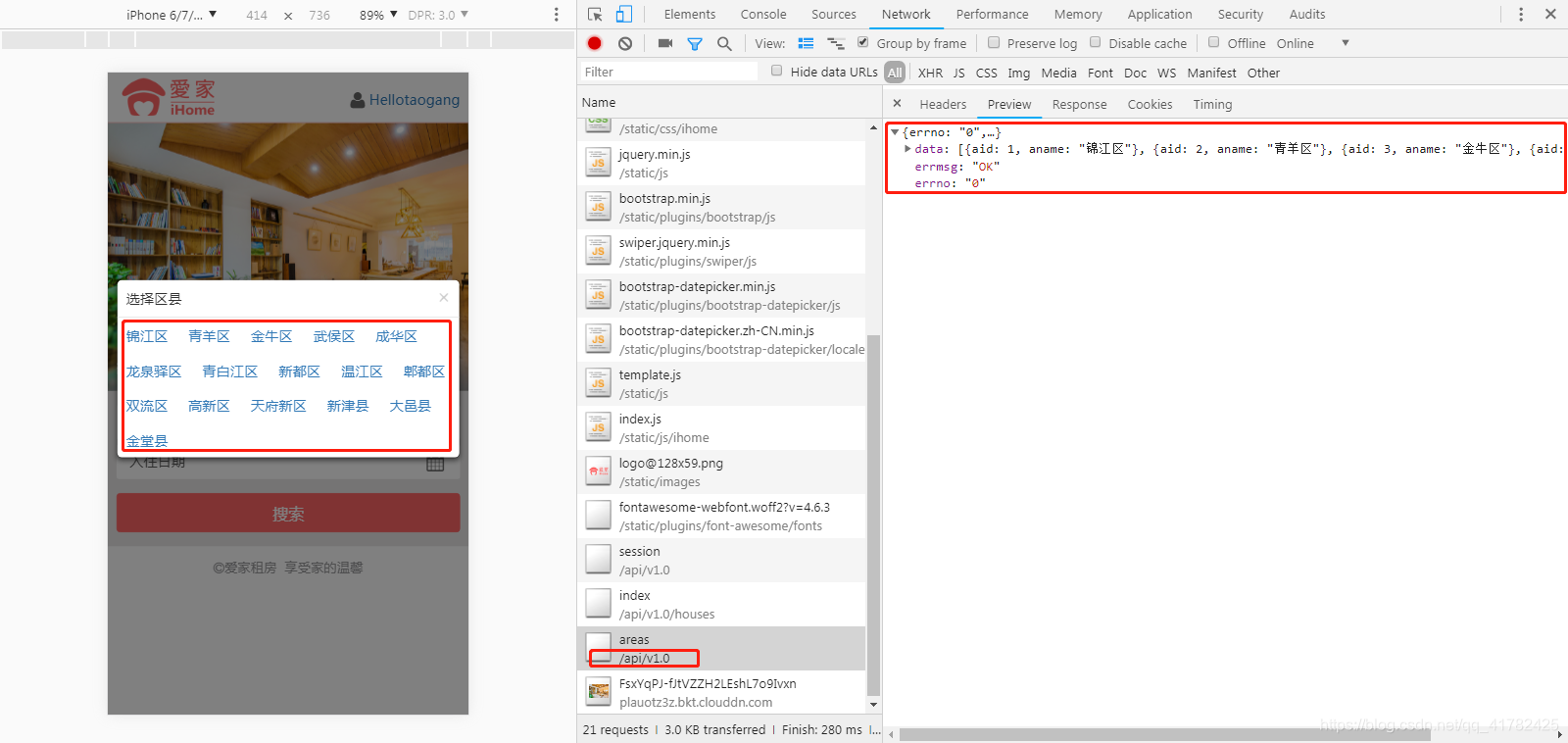
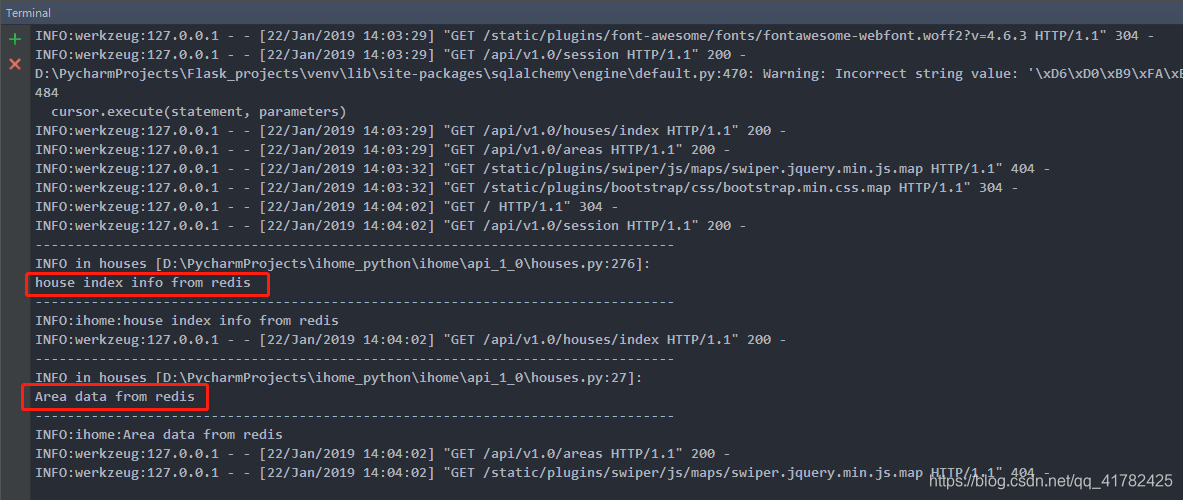
3.查看项目运行日志
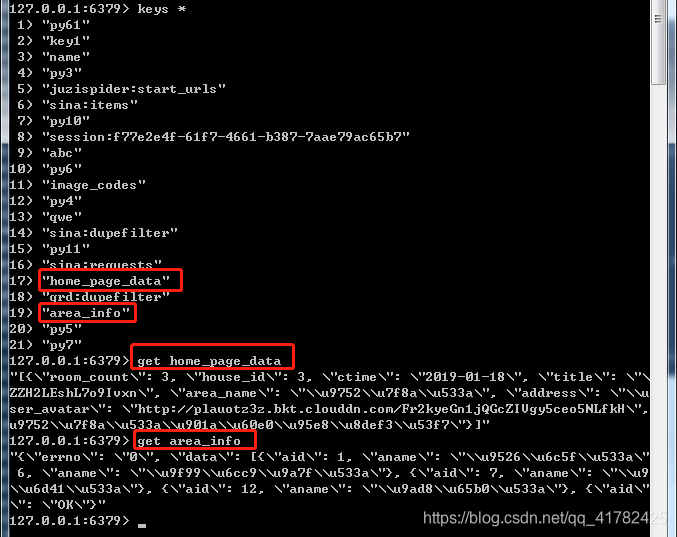
4.此时查看数据库缓存
七丶房屋详情页后端编写
1.分析:①在房屋详情页面,角色分为房东以及客户,当客户进入时对于前端页面来说需显示预定功能按钮,如是房东角色进入就不展示此功能按钮;②对于角色来说,那么就需要用到user_id了;③尝试从session中去获取用户id,如果存在,说明用户为登录状态,那么将用户id返回给前端,不存在返回user_id = -1
2.逻辑编写
- step1 创建视图函数,需要前端给后端传递房屋id
@api.route("/houses/<int:house_id>", methods=["GET"])
def get_house_detail(house_id):
    """
    获取房屋详情
    :param house_id:
    :return:
    """
pass- step2 从session中尝试获取用户id,没有则赋值-1
user_id = session.get("user_id", "-1")- step3 校验house_id, 不存在则返回错误信息提示
if not house_id:
return jsonify(errno=RET.PARAMERR, errmsg="参数缺失")- step4 通过house_id 查询数据库获取房屋对象
try:
    house = House.query.get(house_id)
except Exception as e:
    current_app.logger.error(e)
return jsonify(errno=RET.DBERR, errmsg="查询数据失败")- step5 判断对象是否存在
if not house:
return jsonify(errno=RET.NODATA, errmsg="房屋不存在")- step6 在models.py文件House类中定义to_full_dict方法,用作于将详细信息转换为字典数据;在这个方法里面需要将房屋图片,房屋设施以及评论信息,单独添加到列表中,最后在将该列表以值的方式保存到字典house_dict中
    def to_full_dict(self):
        """将详细信息转换为字典数据"""
        house_dict = {
            "hid": self.id,
            "user_id": self.user_id,
            "user_name": self.user.name,
            "user_avatar": constants.QINIU_URL_DOMAIN + self.user.avatar_url if self.user.avatar_url else "",
            "title": self.title,
            "price": self.price,
            "address": self.address,
            "room_count": self.room_count,
            "acreage": self.acreage,
            "unit": self.unit,
            "capacity": self.capacity,
            "beds": self.beds,
            "deposit": self.deposit,
            "min_days": self.min_days,
            "max_days": self.max_days,
        }

        # 房屋图片
        img_urls = []
        for image in self.images:
            img_urls.append(constants.QINIU_URL_DOMAIN + image.url)
        house_dict["img_urls"] = img_urls

        # 房屋设施
        facilities = []
        for facility in self.facilities:
            facilities.append(facility.id)
        house_dict["facilities"] = facilities

        # 评论信息
        comments = []
        orders = Order.query.filter(Order.house_id == self.id, Order.status == "COMPLETE", Order.comment != None) \
            .order_by(Order.update_time.desc()).limit(constants.HOUSE_DETAIL_COMMENT_DISPLAY_COUNTS)
        for order in orders:
            comment = {
                "comment": order.comment,  # 评论的内容
                "user_name": order.user.name if order.user.name != order.user.mobile else "匿名用户",  # 发表评论的用户
                "ctime": order.update_time.strftime("%Y-%m-%d %H:%M:%S")  # 评价的时间
            }
            comments.append(comment)
        house_dict["comments"] = comments
return house_dict- step7 将查询到的房屋对象转换成字典
try:
    house_data = house.to_full_dict()
except Exception as e:
    current_app.logger.error(e)
return jsonify(errno=RET.DATAERR, errmsg="数据错误")- step8 将房屋详情数据转换成json格式的数据,并存到redis数据库中
json_houses = json.dumps(house_data)
try:
    redis_store.setex("house_info_%s" % house_id, constants.HOUSE_DETAIL_REDIS_EXPIRE_SECOND, json_houses)
except Exception as e:
current_app.logger.error(e)- step9 构造响应数据, 并返回
resp = '{"errno":"0", "errmsg":"OK", "data":{"user_id":%s, "house":%s}}' %(user_id, json_houses), 200, {"Content-Type": "application/json"}
return resp- step10 尝试从redis数据库中获取房屋详情信息, 出现异常则使ret为None,所以需要在进入函数后,那么需要从去数据库中获取房屋详情信息
try:
    ret = redis_store.get("house_info_%s" % house_id)
except Exception as e:
    current_app.logger.error(e)
ret = None- step11 对ret进行判断, 存在不为None 则直接返回正确响应数据即可
if ret:
    current_app.logger.info("house info from redis")
    return '{"errno":"0", "errmsg":"OK", "data":{"user_id":%s, "house":%s}}' % (user_id, ret), 200, {"Content-Type": "application/json"}
八丶房屋详情页前端编写
1.在detail.js文件中
- step1 定义decodeQuery函数,用作于解析提取url中的查询字符串参数
function decodeQuery(){
    var search = decodeURI(document.location.search);
    return search.replace(/(^\?)/, '').split('&').reduce(function(result, item){
        values = item.split('=');
        result[values[0]] = values[1];
        return result;
    }, {});
}- step2 在$(document).ready(function(){}回调函数中,获取详情页面要展示的房屋编号
var queryData = decodeQuery();
var houseId = queryData["id"];- step3 获取房屋详细信息
$.get("/api/v1.0/houses/" + houseId, function(resp){
    if ("0" == resp.errno) {
        $(".swiper-container").html(template("house-image-tmpl", {img_urls:resp.data.house.img_urls, price:resp.data.house.price}));
        $(".detail-con").html(template("house-detail-tmpl", {house:resp.data.house}));

        // resp.user_id为访问页面用户,resp.data.user_id为房东
        if (resp.data.user_id != resp.data.house.user_id) {
            $(".book-house").attr("href", "/booking.html?hid="+resp.data.house.hid);
            $(".book-house").show();
        }
        var mySwiper = new Swiper ('.swiper-container', {
            loop: true,
            autoplay: 2000,
            autoplayDisableOnInteraction: false,
            pagination: '.swiper-pagination',
            paginationType: 'fraction'
        });
    }
})2.在detail.html文件中
- step1 房屋详情页面中幻灯片房屋信息编写如下
<script id="house-image-tmpl" type="text/html">
    <ul class="swiper-wrapper">
        {{each img_urls as img_url}}
        <li class="swiper-slide"><img src="{{img_url}}"></li>
        {{/each}}
    </ul>
    <div class="swiper-pagination"></div>
    <div class="house-price">¥<span>{{(price/100.0).toFixed(0)}}</span>/晚</div>
</script>- step2 房屋标题,房屋地址,房屋详情,配套设施以及评价信息编写如下
<script id="house-detail-tmpl" type="text/html">
    <div class="detail-header layout-style">
        <h2 class="house-title">{{house.title}}</h2>
        <div class="landlord-pic"><img src="{{house.user_avatar}}"></div>
        <h2 class="landlord-name">房东: <span>{{house.user_name}}</span></h2>
    </div>
    <div class="house-info layout-style">
       <h3>房屋地址</h3>
       <ul class="house-info-list text-center">
            <li>{{house.address}}</li>
       </ul>
    </div>
    <ul class="house-type layout-style">
        <li>
            <span class="icon-house"></span>
            <div class="icon-text">
                <h3>出租{{house.room_count}}间</h3>
                <p>房屋面积:{{house.acreage}}平米</p>
                <p>房屋户型:{{house.unit}}</p>
            </div>
        </li>
        <li>
            <span class="icon-user"></span>
            <div class="icon-text">
                <h3>宜住{{house.capacity}}人</h3>
            </div>
        </li>
        <li>
            <span class="icon-bed"></span>
            <div class="icon-text">
                <h3>卧床配置</h3>
                <p>{{house.beds}}</p>
            </div>
        </li>
    </ul>
    <div class="house-info layout-style">
        <h3>房间详情</h3>
        <ul class="house-info-list">
            <li>收取押金<span>{{(house.deposit/100.0).toFixed(0)}}</span></li>
            <li>最少入住天数<span>{{house.min_days}}</span></li>
            <li>最多入住天数<span>{{if house.max_days==0}}无限制{{else}}{{house.max_days}}{{/if}}</span></li>
        </ul>
    </div>
    <div class="house-facility layout-style">
        <h3>配套设施</h3>
        <ul class="house-facility-list clearfix">
            <li><span class="{{if house.facilities.indexOf(1)>=0}}wirelessnetwork-ico{{else}}jinzhi-ico{{/if}}"></span>无线网络</li>
            <li><span class="{{if house.facilities.indexOf(2)>=0}}shower-ico{{else}}jinzhi-ico{{/if}}"></span>热水淋浴</li>
            <li><span class="{{if house.facilities.indexOf(3)>=0}}aircondition-ico{{else}}jinzhi-ico{{/if}}"></span>空调</li>
            <li><span class="{{if house.facilities.indexOf(4)>=0}}heater-ico{{else}}jinzhi-ico{{/if}}"></span>暖气</li>
            <li><span class="{{if house.facilities.indexOf(5)>=0}}smoke-ico{{else}}jinzhi-ico{{/if}}"></span>允许吸烟</li>
            <li><span class="{{if house.facilities.indexOf(6)>=0}}drinking-ico{{else}}jinzhi-ico{{/if}}"></span>饮水设备</li>
            <li><span class="{{if house.facilities.indexOf(7)>=0}}brush-ico{{else}}jinzhi-ico{{/if}}"></span>牙具</li>
            <li><span class="{{if house.facilities.indexOf(8)>=0}}soap-ico{{else}}jinzhi-ico{{/if}}"></span>香皂</li>
            <li><span class="{{if house.facilities.indexOf(9)>=0}}slippers-ico{{else}}jinzhi-ico{{/if}}"></span>拖鞋</li>
            <li><span class="{{if house.facilities.indexOf(10)>=0}}toiletpaper-ico{{else}}jinzhi-ico{{/if}}"></span>手纸</li>
            <li><span class="{{if house.facilities.indexOf(11)>=0}}towel-ico{{else}}jinzhi-ico{{/if}}"></span>毛巾</li>
            <li><span class="{{if house.facilities.indexOf(12)>=0}}toiletries-ico{{else}}jinzhi-ico{{/if}}"></span>沐浴露、洗发露</li>
            <li><span class="{{if house.facilities.indexOf(13)>=0}}icebox-ico{{else}}jinzhi-ico{{/if}}"></span>冰箱</li>
            <li><span class="{{if house.facilities.indexOf(14)>=0}}washer-ico{{else}}jinzhi-ico{{/if}}"></span>洗衣机</li>
            <li><span class="{{if house.facilities.indexOf(15)>=0}}elevator-ico{{else}}jinzhi-ico{{/if}}"></span>电梯</li>
            <li><span class="{{if house.facilities.indexOf(16)>=0}}iscook-ico{{else}}jinzhi-ico{{/if}}"></span>允许做饭</li>
            <li><span class="{{if house.facilities.indexOf(17)>=0}}pet-ico{{else}}jinzhi-ico{{/if}}"></span>允许带宠物</li>
            <li><span class="{{if house.facilities.indexOf(18)>=0}}meet-ico{{else}}jinzhi-ico{{/if}}"></span>允许聚会</li>
            <li><span class="{{if house.facilities.indexOf(19)>=0}}accesssys-ico{{else}}jinzhi-ico{{/if}}"></span>门禁系统</li>
            <li><span class="{{if house.facilities.indexOf(20)>=0}}parkingspace-ico{{else}}jinzhi-ico{{/if}}"></span>停车位</li>
            <li><span class="{{if house.facilities.indexOf(21)>=0}}wirednetwork-ico{{else}}jinzhi-ico{{/if}}"></span>有线网络</li>
            <li><span class="{{if house.facilities.indexOf(22)>=0}}tv-ico{{else}}jinzhi-ico{{/if}}"></span>电视</li>
            <li><span class="{{if house.facilities.indexOf(23)>=0}}hotbathtub-ico{{else}}jinzhi-ico{{/if}}"></span>浴缸</li>
        </ul>
    </div>
    {{if house.comments }}
    <div class="house-info layout-style">
        <h3>评价信息</h3>
        <ul class="house-comment-list">
            {{ each house.comments as comment}}
            <li>
                <p>{{comment.user_name}}<span class="fr">{{comment.ctime}}</span></p>
                <p>{{comment.comment}}</p>
            </li>
            {{/each}}
        </ul>
    </div>
    {{/if}}
</script>
九丶测试房屋详情页面显示正确数据是否成功
1.运行项目,在浏览器输入http://127.0.0.1:5000,即进入网站主页,如下图所示

2.点击主页任意幻灯片,进入房屋详情页面

3.前端房屋完整信息图如下
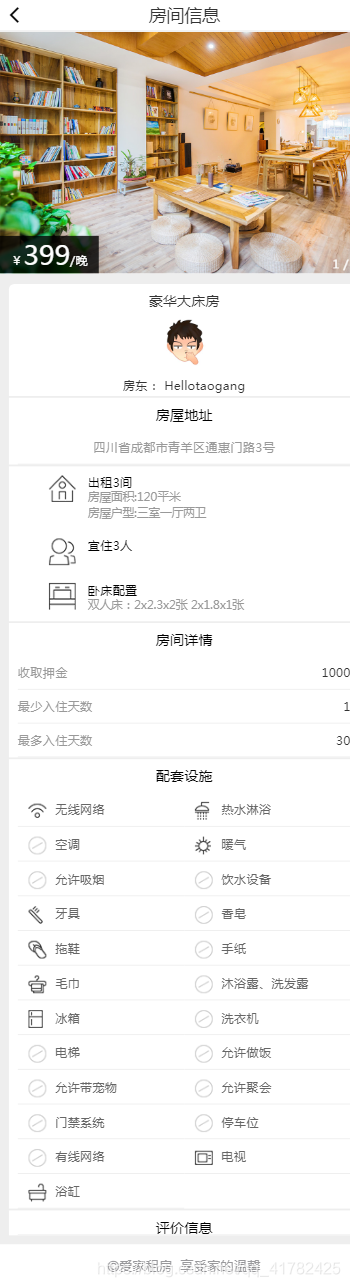
4.查询数据库中房屋信息表以及设备设施表id和house_id为3的数据与前端页面显示数据进行对比
- step1 在ih_house_info 房屋信息表中查看id=3的数据

- step2 在ih_house_facility 房屋设备表中,查看house_id为3的设备数据为9条,与前端页面house_id为3的设备信息一致
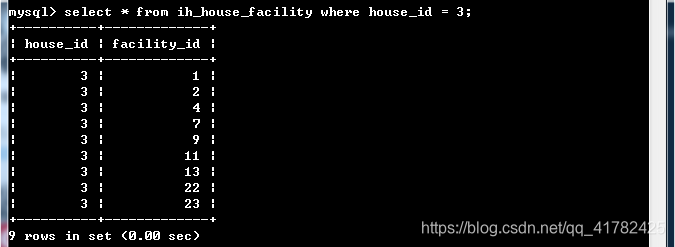
- step3 将step2 查询结果与ih_facility_info设备表进行一一对应,然后与第3点前端房屋完整信息图进行对比验证

5.查看redis数据库中缓存的房屋详情数据
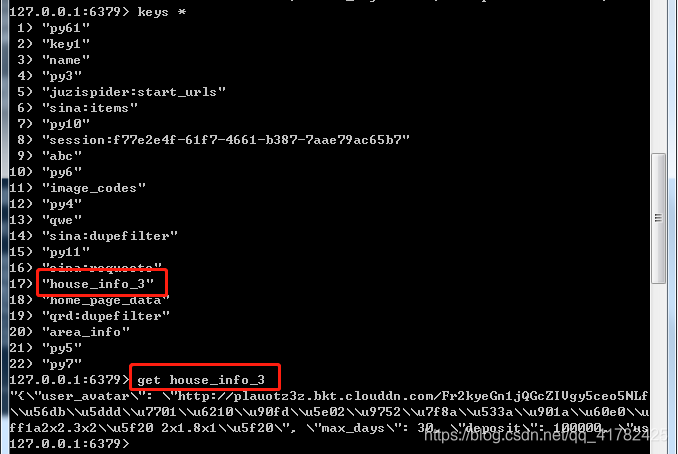
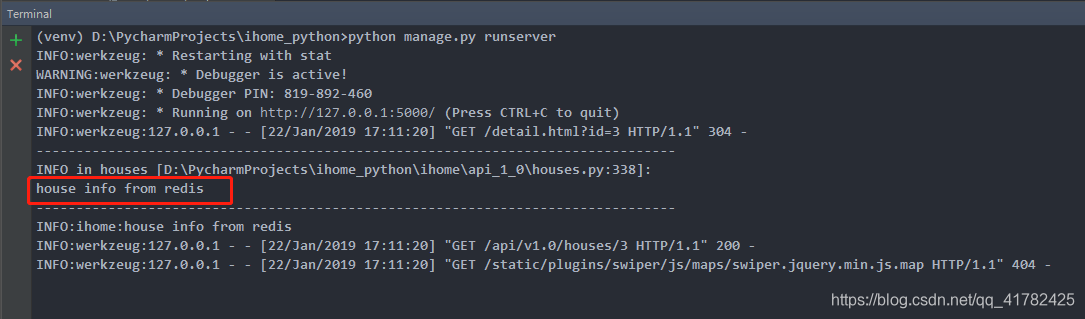
6.查看项目运行日志,显示成功说明本次进入房屋详情页使用的页面数据为缓存数据
Flask项目之手机端租房网站的实战开发(十一)的更多相关文章
- Flask项目之手机端租房网站的实战开发(三)
说明:该篇博客是博主一字一码编写的,实属不易,请尊重原创,谢谢大家! 接着上一篇博客继续往下写 :https://blog.csdn.net/qq_41782425/article/details/8 ...
- Flask项目之手机端租房网站的实战开发(一)
说明:该篇博客是博主一字一码编写的,实属不易,请尊重原创,谢谢大家! 一丶项目介绍 产品:关于手机移动端的租房网站 角色:在这个产品中用户包括房东与房客 功能:房东可以在这个平台发布自己的房屋,房客可 ...
- Flask项目之手机端租房网站的实战开发(二)
说明:该篇博客是博主一字一码编写的,实属不易,请尊重原创,谢谢大家! 接着上一篇博客继续往下写 :https://blog.csdn.net/qq_41782425/article/details/8 ...
- Flask项目之手机端租房网站的实战开发(十四)
说明:该篇博客是博主一字一码编写的,实属不易,请尊重原创,谢谢大家! 接着上一篇博客继续往下写 :https://blog.csdn.net/qq_41782425/article/details/8 ...
- Flask项目之手机端租房网站的实战开发(六)
说明:该篇博客是博主一字一码编写的,实属不易,请尊重原创,谢谢大家! 接着上一篇博客继续往下写 :https://blog.csdn.net/qq_41782425/article/details/8 ...
- Flask项目之手机端租房网站的实战开发(十)
说明:该篇博客是博主一字一码编写的,实属不易,请尊重原创,谢谢大家! 接着上一篇博客继续往下写 :https://blog.csdn.net/qq_41782425/article/details/8 ...
- Flask项目之手机端租房网站的实战开发(九)
说明:该篇博客是博主一字一码编写的,实属不易,请尊重原创,谢谢大家! 接着上一篇博客继续往下写 :https://blog.csdn.net/qq_41782425/article/details/8 ...
- Flask项目之手机端租房网站的实战开发(八)
说明:该篇博客是博主一字一码编写的,实属不易,请尊重原创,谢谢大家! 接着上一篇博客继续往下写 :https://blog.csdn.net/qq_41782425/article/details/8 ...
- Flask项目之手机端租房网站的实战开发(四)
说明:该篇博客是博主一字一码编写的,实属不易,请尊重原创,谢谢大家! 接着上一篇博客继续往下写 :https://blog.csdn.net/qq_41782425/article/details/8 ...
随机推荐
- Cisco交换机IOS配置介绍
一.模式• 用户模式(>):• 特权模式(#):• 全局配置模式(config#):• 接口配置模式(config-if#):• 线路模式(#config-line): 二.基本IOS命令结构• ...
- Node测试文章收藏
1.Nodejs实战—测试Node程序 讲解了TDD与BDD,TDD的基本原则,单元测试常用框架及使用,例如assert断言库, chai断言库, should.js断言库,断言库搭配测试框架(m ...
- JS之预编译和执行顺序(全局和函数)
预编译的两种情况 全局: 1.全局 直接是script标签中的代码,不包括函数执行 执行前: 1.首先生成一个GO(global object)对象,看不到,但是可以模拟出来用来分析 2.分析变量声明 ...
- jQuery 判断是否包含在数组中 jQuery.inArray()
var arr = [ "mysql", "php", "css", "js" ]; $.inArray(" ...
- udacity android 学习笔记: lesson 4 part a
udacity android 学习笔记: lesson 4 part a 作者:干货店打杂的 /titer1 /Archimedes 出处:https://code.csdn.net/titer1 ...
- Volley简单学习使用五—— 源代码分析三
一.Volley工作流程图: 二.Network 在NetworkDispatcher中须要处理的网络请求.由以下进行处理: NetworkResponse networkResponse = ...
- Mysql第八天 分区与分表
分区表 主要提供例如以下的特性,或者适合如此场景: 数据量非常大, 或者仅仅有表中最后的部分有热点数据.其它均为历史数据 分区表数据更easy维护,能够对独立的分区删除等操作 分区表的数据能够分布在不 ...
- HDU 4405 概率期望DP
有 0到 n 个格子.掷骰子走路,求出到终点的数学期望,有飞行的路线. dp[i] 存储在i位置走到终点的期望. 转移方程dp[i]=(dp[i+1] ----> dp[i+6])/6+1; 有 ...
- 76.QT槽的机制
按钮点击获取文本框输入 void Dialog::on_pushButton_clicked() { //获取文本输入 QString vstr = ui->lineEdit->text( ...
- asp.net大数据导出execl实现分开压缩并下载
asp.net大数据导出execl实现分开压缩并下载 /// <summary> /// 导出数据到EXCEL 多个表的 /// </summary> /// <para ...