
CUDA入门1
1GPUs can handle thousands of concurrent threads.
2The pieces of code running on the gpu are called kernels
3A kernel is executed by a set of threads.
4All threads execute the same code (SPMD)
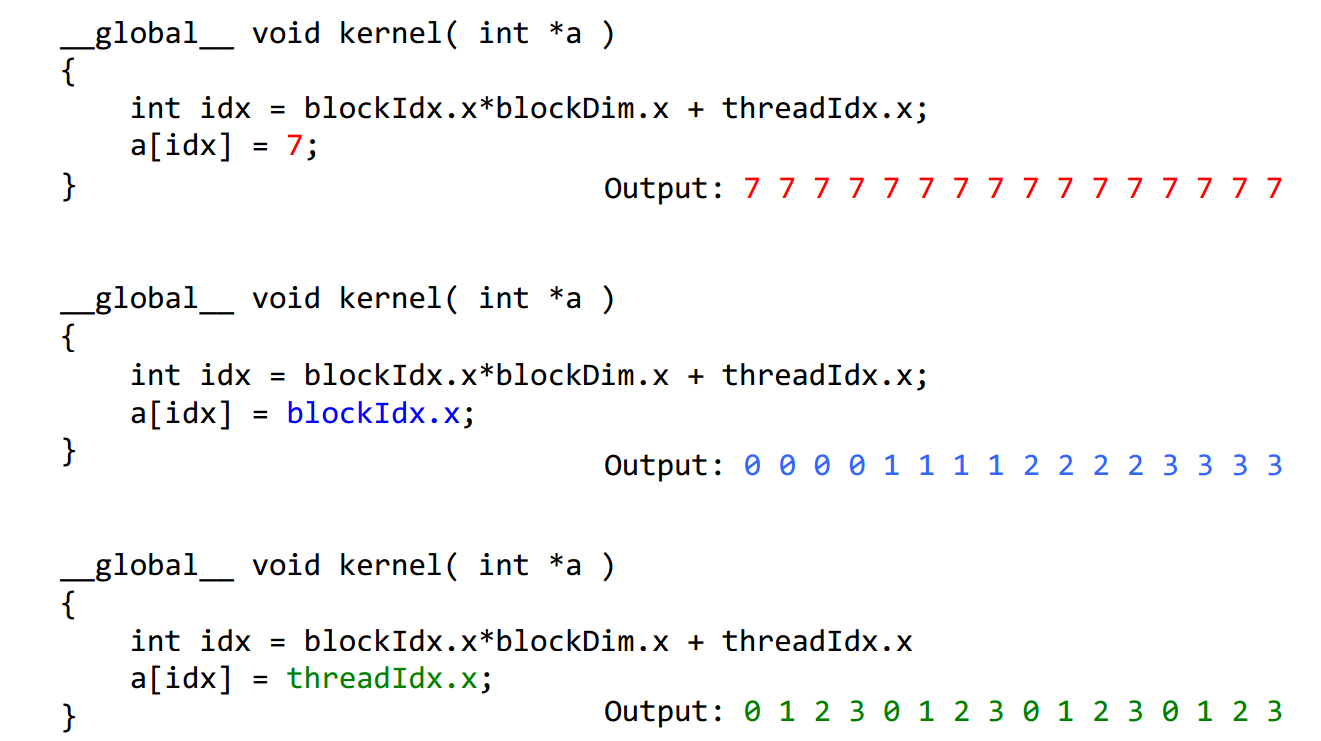
5Each thread has an index that is used to calculate memory addresses that this will access.


1Threads are grouped into blocks
2 Blocks are grouped into a grid
3 A kernel is executed as a grid of blocks of threads
Built-in variables ⎯ threadIdx, blockIdx ⎯ blockDim, gridDim
CUDA的线程组织即Grid-Block-Thread结构。一组线程并行处理可以组织为一个block,而一组block并行处理可以组织为一个Grid。下面的程序分别为线程并行和块并行,线程并行为细粒度的并行,而块并行为粗粒度的并行。addKernelThread<<<1, size>>>(dev_c, dev_a, dev_b);
 #include "cuda_runtime.h"

 #include "device_launch_parameters.h"

 #include <stdio.h>

 #include <time.h>

 #include <stdlib.h>

 #define MAX 255

 #define MIN 0

 cudaError_t addWithCuda(int *c, const int *a, const int *b, size_t size,int type,float* etime);

 __global__ void addKernelThread(int *c, const int *a, const int *b)

 {

   int i = threadIdx.x;

  c[i] = a[i] + b[i];

 }

 __global__ void addKernelBlock(int *c, const int *a, const int *b)

 {

   int i = blockIdx.x;

  c[i] = a[i] + b[i];

 }

 int main()

 {

     const int arraySize = ;

     int a[arraySize] = { , , , ,  };

    int b[arraySize] = { , , , ,  };

     for (int i = ; i< arraySize ; i++){

         a[i] = rand() % (MAX +  - MIN) + MIN;

         b[i] = rand() % (MAX +  - MIN) + MIN;

     }

     int c[arraySize] = {  };

     // Add vectors in parallel.

     cudaError_t cudaStatus;

     int num = ;

     float time;

     cudaDeviceProp prop;

     cudaStatus = cudaGetDeviceCount(&num);

     for(int i = ;i<num;i++)

     {

         cudaGetDeviceProperties(&prop,i);

     }

     cudaStatus = addWithCuda(c, a, b, arraySize,,&time);

     printf("Elasped time of thread is : %f \n", time);

     printf("{%d,%d,%d,%d,%d} + {%d,%d,%d,%d,%d} = {%d,%d,%d,%d,%d}\n",a[],a[],a[],a[],a[],b[],b[],b[],b[],b[],c[],c[],c[],c[],c[]);

     cudaStatus = addWithCuda(c, a, b, arraySize,,&time);

     printf("Elasped time of block is : %f \n", time);

     if (cudaStatus != cudaSuccess)

     {

         fprintf(stderr, "addWithCuda failed!");

         return ;

     }

     printf("{%d,%d,%d,%d,%d} + {%d,%d,%d,%d,%d} = {%d,%d,%d,%d,%d}\n",a[],a[],a[],a[],a[],b[],b[],b[],b[],b[],c[],c[],c[],c[],c[]);

     // cudaThreadExit must be called before exiting in order for profiling and

     // tracing tools such as Nsight and Visual Profiler to show complete traces.

     cudaStatus = cudaThreadExit();

     if (cudaStatus != cudaSuccess)

     {

         fprintf(stderr, "cudaThreadExit failed!");

         return ;

     }

     return ;

 }

 // Helper function for using CUDA to add vectors in parallel.

 cudaError_t addWithCuda(int *c, const int *a, const int *b, size_t size,int type,float * etime)

 {

     int *dev_a = ;

     int *dev_b = ;

     int *dev_c = ;

     clock_t start, stop;

     float time;

     cudaError_t cudaStatus;

     // Choose which GPU to run on, change this on a multi-GPU system.

     cudaStatus = cudaSetDevice();

     if (cudaStatus != cudaSuccess)

     {

         fprintf(stderr, "cudaSetDevice failed!  Do you have a CUDA-capable GPU installed?");

         goto Error;

     }

     // Allocate GPU buffers for three vectors (two input, one output)    .

     cudaStatus = cudaMalloc((void**)&dev_c, size * sizeof(int));

     if (cudaStatus != cudaSuccess)

     {

         fprintf(stderr, "cudaMalloc failed!");

         goto Error;

     }

     cudaStatus = cudaMalloc((void**)&dev_a, size * sizeof(int));

     if (cudaStatus != cudaSuccess)

     {

         fprintf(stderr, "cudaMalloc failed!");

         goto Error;

     }

     cudaStatus = cudaMalloc((void**)&dev_b, size * sizeof(int));

     if (cudaStatus != cudaSuccess)

     {

         fprintf(stderr, "cudaMalloc failed!");

         goto Error;

     }

     // Copy input vectors from host memory to GPU buffers.

     cudaStatus = cudaMemcpy(dev_a, a, size * sizeof(int), cudaMemcpyHostToDevice);

     if (cudaStatus != cudaSuccess)

     {

         fprintf(stderr, "cudaMemcpy failed!");

         goto Error;

     }

     cudaStatus = cudaMemcpy(dev_b, b, size * sizeof(int), cudaMemcpyHostToDevice);

     if (cudaStatus != cudaSuccess)

     {

         fprintf(stderr, "cudaMemcpy failed!");

         goto Error;

     }

     // Launch a kernel on the GPU with one thread for each element.

     if(type == ){

         start = clock();

         addKernelThread<<<, size>>>(dev_c, dev_a, dev_b);

     }

     else{

         start = clock();

         addKernelBlock<<<size, >>>(dev_c, dev_a, dev_b);

     }

     stop = clock();

     time = (float)(stop-start)/CLOCKS_PER_SEC;

     *etime = time;

   // cudaThreadSynchronize waits for the kernel to finish, and returns

     // any errors encountered during the launch.

     cudaStatus = cudaThreadSynchronize();

     if (cudaStatus != cudaSuccess)

     {

         fprintf(stderr, "cudaThreadSynchronize returned error code %d after launching addKernel!\n", cudaStatus);

         goto Error;

     }

     // Copy output vector from GPU buffer to host memory.

     cudaStatus = cudaMemcpy(c, dev_c, size * sizeof(int), cudaMemcpyDeviceToHost);

     if (cudaStatus != cudaSuccess)

     {

         fprintf(stderr, "cudaMemcpy failed!");

         goto Error;

     }

 Error:

     cudaFree(dev_c);

     cudaFree(dev_a);

     cudaFree(dev_b);

     return cudaStatus;

 }
运行的结果是
Elasped time of thread is : 0.000010
{103,105,81,74,41} + {198,115,255,236,205} = {301,220,336,310,246}
Elasped time of block is : 0.000005
{103,105,81,74,41} + {198,115,255,236,205} = {301,220,336,310,246}
CUDA入门1的更多相关文章
- CUDA入门
CUDA入门 鉴于自己的毕设需要使用GPU CUDA这项技术,想找一本入门的教材,选择了Jason Sanders等所著的书<CUDA By Example an Introduction to ...
- 一篇不错的CUDA入门
鉴于自己的毕设需要使用GPU CUDA这项技术,想找一本入门的教材,选择了Jason Sanders等所著的书<CUDA By Example an Introduction to Genera ...
- CUDA入门需要知道的东西
CUDA刚学习不久,做毕业要用,也没时间研究太多的东西,我的博客里有一些我自己看过的东西,不敢保证都特别有用,但是至少对刚入门的朋友或多或少希望对大家有一点帮助吧,若果你是大牛请指针不对的地方,如果你 ...
- Cuda入门笔记
最近在学cuda ,找了好久入门的教程,感觉入门这个教程比较好,网上买的书基本都是在掌握基础后才能看懂,所以在这里记录一下.百度文库下载,所以不知道原作者是谁,向其致敬! 文章目录 1. CUDA是什 ...
- CUDA 入门(转)
CUDA(Compute Unified Device Architecture)的中文全称为计算统一设备架构.做图像视觉领域的同学多多少少都会接触到CUDA,毕竟要做性能速度优化,CUDA是个很重要 ...
- CUDA编程->CUDA入门了解(一)
安装好CUDA6.5+VS2012,操作系统为Win8.1版本号,首先下个GPU-Z检測了一下: 看出本显卡属于中低端配置.关键看两个: Shaders=384.也称作SM.或者说core/流处理器数 ...
- CUDA中Bank conflict冲突
转自:http://blog.csdn.net/smsmn/article/details/6336060 其实这两天一直不知道什么叫bank conflict冲突,这两天因为要看那个矩阵转置优化的问 ...
- 【CUDA】CUDA框架介绍
引用 出自Bookc的博客,链接在此http://bookc.github.io/2014/05/08/my-summery-the-book-cuda-by-example-an-introduct ...
- 转:ubuntu 下GPU版的 tensorflow / keras的环境搭建
http://blog.csdn.net/jerr__y/article/details/53695567 前言:本文主要介绍如何在 ubuntu 系统中配置 GPU 版本的 tensorflow 环 ...
随机推荐
- IBATIS动态SQL(转)
直接使用JDBC一个非常普遍的问题就是动态SQL.使用参数值.参数本身和数据列都是动态SQL,通常是非常困难的.典型的解决办法就是用上一堆的IF-ELSE条件语句和一连串的字符串连接.对于这个问题,I ...
- PHP学习笔记:MySQL数据库的操纵
Update语句 Update 表名 set 字段1=值1, 字段2=值2 where 条件 练习: 把用户名带 ‘小’的人的密码设置为123456@ 语句:UPDATE crm_user SE ...
- Durandal介绍
Durandal是一个JS框架用于构建客户端single page application(SPAs).它支持MVC,MVP与MVVM前端构架模式.使用RequireJS做为其基本约定层,D ...
- MySQL Cluster配置概述
一. MySQL Cluster概述 MySQL Cluster 是一种技术,该技术允许在无共享的系统中部署“内存中”数据库的 Cluster .通过无共享体系结构,系统能够使用廉价的硬件,而 ...
- 最短路径—大话Dijkstra算法和Floyd算法
Dijkstra算法 算法描述 1)算法思想:设G=(V,E)是一个带权有向图,把图中顶点集合V分成两组,第一组为已求出最短路径的顶点集合(用S表示,初始时S中只有一个源点,以后每求得一条最短路径 , ...
- iOS App上线的秘密
App上线需要准备几个证书:首先是是CSR证书,要创建这个证书需要在自己电脑上找到钥匙串访问(在应用程序->其他 里面).钥匙串访问->证书助理->从证书颁发机构请求证书如下: 创建 ...
- mac下eclipse的svn(即svn插件)怎么切换账号?
以mac os x为例(Unix/Linux类似) 打开命令行窗口,即用户的根目录(用户的home目录) cd ~ 即可进入home目录. 执行命令 ls -al 会列出home目录下的所有文件及文件 ...
- JavaScript基础15——js的DOM对象
<!DOCTYPE html> <html> <head> <meta charset="UTF-8"> <title> ...
- CLEAR REFRESH FEEE的区别
clear,refresh,free都有用来清空内表的作用,但用法还是有区别的.clear itab,清空内表行以及工作区,但保存内存区.clear itab[],清空内表行,但不清空工作区,但保存内 ...
- Sharepoint学习笔记—习题系列--70-573习题解析 -(Q73-Q76)
Question 73You create a Web Part that calls a function named longCall.You discover that longCall tak ...