
CUDA入门1
1GPUs can handle thousands of concurrent threads.
2The pieces of code running on the gpu are called kernels
3A kernel is executed by a set of threads.
4All threads execute the same code (SPMD)
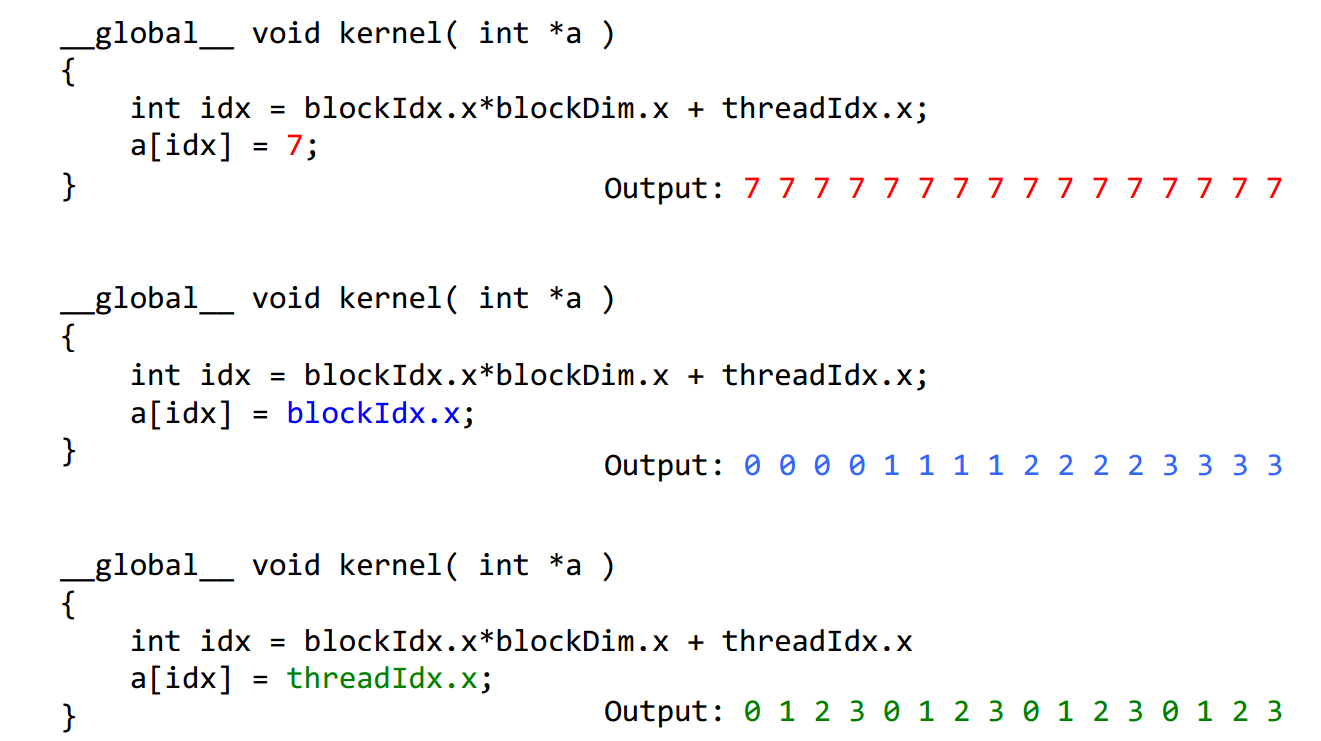
5Each thread has an index that is used to calculate memory addresses that this will access.


1Threads are grouped into blocks
2 Blocks are grouped into a grid
3 A kernel is executed as a grid of blocks of threads
Built-in variables ⎯ threadIdx, blockIdx ⎯ blockDim, gridDim
CUDA的线程组织即Grid-Block-Thread结构。一组线程并行处理可以组织为一个block,而一组block并行处理可以组织为一个Grid。下面的程序分别为线程并行和块并行,线程并行为细粒度的并行,而块并行为粗粒度的并行。addKernelThread<<<1, size>>>(dev_c, dev_a, dev_b);
 #include "cuda_runtime.h"

 #include "device_launch_parameters.h"

 #include <stdio.h>

 #include <time.h>

 #include <stdlib.h>

 #define MAX 255

 #define MIN 0

 cudaError_t addWithCuda(int *c, const int *a, const int *b, size_t size,int type,float* etime);

 __global__ void addKernelThread(int *c, const int *a, const int *b)

 {

   int i = threadIdx.x;

  c[i] = a[i] + b[i];

 }

 __global__ void addKernelBlock(int *c, const int *a, const int *b)

 {

   int i = blockIdx.x;

  c[i] = a[i] + b[i];

 }

 int main()

 {

     const int arraySize = ;

     int a[arraySize] = { , , , ,  };

    int b[arraySize] = { , , , ,  };

     for (int i = ; i< arraySize ; i++){

         a[i] = rand() % (MAX +  - MIN) + MIN;

         b[i] = rand() % (MAX +  - MIN) + MIN;

     }

     int c[arraySize] = {  };

     // Add vectors in parallel.

     cudaError_t cudaStatus;

     int num = ;

     float time;

     cudaDeviceProp prop;

     cudaStatus = cudaGetDeviceCount(&num);

     for(int i = ;i<num;i++)

     {

         cudaGetDeviceProperties(&prop,i);

     }

     cudaStatus = addWithCuda(c, a, b, arraySize,,&time);

     printf("Elasped time of thread is : %f \n", time);

     printf("{%d,%d,%d,%d,%d} + {%d,%d,%d,%d,%d} = {%d,%d,%d,%d,%d}\n",a[],a[],a[],a[],a[],b[],b[],b[],b[],b[],c[],c[],c[],c[],c[]);

     cudaStatus = addWithCuda(c, a, b, arraySize,,&time);

     printf("Elasped time of block is : %f \n", time);

     if (cudaStatus != cudaSuccess)

     {

         fprintf(stderr, "addWithCuda failed!");

         return ;

     }

     printf("{%d,%d,%d,%d,%d} + {%d,%d,%d,%d,%d} = {%d,%d,%d,%d,%d}\n",a[],a[],a[],a[],a[],b[],b[],b[],b[],b[],c[],c[],c[],c[],c[]);

     // cudaThreadExit must be called before exiting in order for profiling and

     // tracing tools such as Nsight and Visual Profiler to show complete traces.

     cudaStatus = cudaThreadExit();

     if (cudaStatus != cudaSuccess)

     {

         fprintf(stderr, "cudaThreadExit failed!");

         return ;

     }

     return ;

 }

 // Helper function for using CUDA to add vectors in parallel.

 cudaError_t addWithCuda(int *c, const int *a, const int *b, size_t size,int type,float * etime)

 {

     int *dev_a = ;

     int *dev_b = ;

     int *dev_c = ;

     clock_t start, stop;

     float time;

     cudaError_t cudaStatus;

     // Choose which GPU to run on, change this on a multi-GPU system.

     cudaStatus = cudaSetDevice();

     if (cudaStatus != cudaSuccess)

     {

         fprintf(stderr, "cudaSetDevice failed!  Do you have a CUDA-capable GPU installed?");

         goto Error;

     }

     // Allocate GPU buffers for three vectors (two input, one output)    .

     cudaStatus = cudaMalloc((void**)&dev_c, size * sizeof(int));

     if (cudaStatus != cudaSuccess)

     {

         fprintf(stderr, "cudaMalloc failed!");

         goto Error;

     }

     cudaStatus = cudaMalloc((void**)&dev_a, size * sizeof(int));

     if (cudaStatus != cudaSuccess)

     {

         fprintf(stderr, "cudaMalloc failed!");

         goto Error;

     }

     cudaStatus = cudaMalloc((void**)&dev_b, size * sizeof(int));

     if (cudaStatus != cudaSuccess)

     {

         fprintf(stderr, "cudaMalloc failed!");

         goto Error;

     }

     // Copy input vectors from host memory to GPU buffers.

     cudaStatus = cudaMemcpy(dev_a, a, size * sizeof(int), cudaMemcpyHostToDevice);

     if (cudaStatus != cudaSuccess)

     {

         fprintf(stderr, "cudaMemcpy failed!");

         goto Error;

     }

     cudaStatus = cudaMemcpy(dev_b, b, size * sizeof(int), cudaMemcpyHostToDevice);

     if (cudaStatus != cudaSuccess)

     {

         fprintf(stderr, "cudaMemcpy failed!");

         goto Error;

     }

     // Launch a kernel on the GPU with one thread for each element.

     if(type == ){

         start = clock();

         addKernelThread<<<, size>>>(dev_c, dev_a, dev_b);

     }

     else{

         start = clock();

         addKernelBlock<<<size, >>>(dev_c, dev_a, dev_b);

     }

     stop = clock();

     time = (float)(stop-start)/CLOCKS_PER_SEC;

     *etime = time;

   // cudaThreadSynchronize waits for the kernel to finish, and returns

     // any errors encountered during the launch.

     cudaStatus = cudaThreadSynchronize();

     if (cudaStatus != cudaSuccess)

     {

         fprintf(stderr, "cudaThreadSynchronize returned error code %d after launching addKernel!\n", cudaStatus);

         goto Error;

     }

     // Copy output vector from GPU buffer to host memory.

     cudaStatus = cudaMemcpy(c, dev_c, size * sizeof(int), cudaMemcpyDeviceToHost);

     if (cudaStatus != cudaSuccess)

     {

         fprintf(stderr, "cudaMemcpy failed!");

         goto Error;

     }

 Error:

     cudaFree(dev_c);

     cudaFree(dev_a);

     cudaFree(dev_b);

     return cudaStatus;

 }
运行的结果是
Elasped time of thread is : 0.000010
{103,105,81,74,41} + {198,115,255,236,205} = {301,220,336,310,246}
Elasped time of block is : 0.000005
{103,105,81,74,41} + {198,115,255,236,205} = {301,220,336,310,246}
CUDA入门1的更多相关文章
- CUDA入门
CUDA入门 鉴于自己的毕设需要使用GPU CUDA这项技术,想找一本入门的教材,选择了Jason Sanders等所著的书<CUDA By Example an Introduction to ...
- 一篇不错的CUDA入门
鉴于自己的毕设需要使用GPU CUDA这项技术,想找一本入门的教材,选择了Jason Sanders等所著的书<CUDA By Example an Introduction to Genera ...
- CUDA入门需要知道的东西
CUDA刚学习不久,做毕业要用,也没时间研究太多的东西,我的博客里有一些我自己看过的东西,不敢保证都特别有用,但是至少对刚入门的朋友或多或少希望对大家有一点帮助吧,若果你是大牛请指针不对的地方,如果你 ...
- Cuda入门笔记
最近在学cuda ,找了好久入门的教程,感觉入门这个教程比较好,网上买的书基本都是在掌握基础后才能看懂,所以在这里记录一下.百度文库下载,所以不知道原作者是谁,向其致敬! 文章目录 1. CUDA是什 ...
- CUDA 入门(转)
CUDA(Compute Unified Device Architecture)的中文全称为计算统一设备架构.做图像视觉领域的同学多多少少都会接触到CUDA,毕竟要做性能速度优化,CUDA是个很重要 ...
- CUDA编程->CUDA入门了解(一)
安装好CUDA6.5+VS2012,操作系统为Win8.1版本号,首先下个GPU-Z检測了一下: 看出本显卡属于中低端配置.关键看两个: Shaders=384.也称作SM.或者说core/流处理器数 ...
- CUDA中Bank conflict冲突
转自:http://blog.csdn.net/smsmn/article/details/6336060 其实这两天一直不知道什么叫bank conflict冲突,这两天因为要看那个矩阵转置优化的问 ...
- 【CUDA】CUDA框架介绍
引用 出自Bookc的博客,链接在此http://bookc.github.io/2014/05/08/my-summery-the-book-cuda-by-example-an-introduct ...
- 转:ubuntu 下GPU版的 tensorflow / keras的环境搭建
http://blog.csdn.net/jerr__y/article/details/53695567 前言:本文主要介绍如何在 ubuntu 系统中配置 GPU 版本的 tensorflow 环 ...
随机推荐
- 泛函编程(16)-泛函状态-Functional State
初接触泛函状态觉着很不习惯.主要是在使用State数据类型时很难理解其中的原理,特别是泛函状态变迁机制(state transition mechanism):怎么状态就起了变化,实在难以跟踪.我想这 ...
- [moka同学笔记]yii2场景的使用(摘录)
前半部分为自己使用的过程,下边为转载的,具体地址见:http://blog.sina.com.cn/s/blog_88a65c1b0101j717.html 1.在model中 public func ...
- 【转】 StringUtils中 isNotEmpty 和isNotBlank的区别
[转自]http://blog.csdn.net/foamflower/article/details/5713604 isNotEmpty将空格也作为参数,isNotBlank则排除空格参数 Str ...
- ahjesus 让Boot Camp支持创建win7 u盘安装盘
通过修改BootCamp助理成功创建USB的windows7的安装盘. 以下将方法共享出来. 准备工作: 找到自己电脑的Boot Rom 版本.(点左上角那个小苹果标志 然后点 [关于本机] 然后点 ...
- OWIN概述
关于OWIN OWIN defines a standard interface between .NET web servers and web applications. The goal of ...
- C++ Static(静态成员)的作用总结
Static是C++中一个常见的关键字,它被用来控制变量的存储方式和可见性. 在类定义中,它的成员(包括数据成员和成员函数)可以用关键字static申明为静态成员.静态成员的特性是不管这个类创建了多少 ...
- jQuery owlcarousel 旋转木马
owlcarousel是一款猫头鹰旋转木马插件.OwlCarousel优势兼容所有浏览器支持响应式支持 CSS3 过度支持触摸事件支持 JSON 及自定义 JSON 格式支持进度条支持自定义事件支持延 ...
- 某网SQL注入漏洞实战
root@kali:~# sqlmap -u http://dn.you.com/shop.php?id=10 -v 1 --dbs available databases [8]: [*] ...
- Python基础(7)--函数
本篇文章将介绍如何将语句组织成函数,以及参数概念以及在程序中的用途 本文地址:http://www.cnblogs.com/archimedes/p/python-function.html,转载请注 ...
- iOS第三方类库JSPatch(热更新)
---------------------------------------------------------------------------------------------------- ...