
android简单的夜间模式
现在android项目values下打
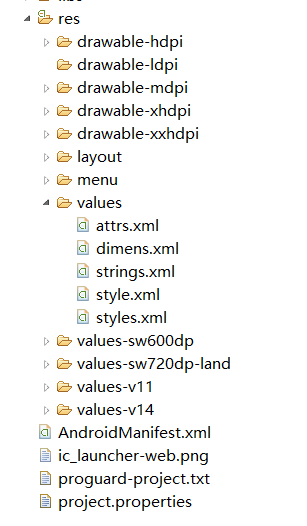
attrs.xml
<?xml version="1.0" encoding="utf-8"?>

<resources>

   <attr name="bookimage" format="reference|color" />

    <attr name="tvcolor" format="reference|color" />

</resources>
style.xml

<?xml version="1.0" encoding="utf-8"?>

<resources>

        <!-- 默认风格 -->

    <style name="BrowserThemeDefault" parent="@android:style/Theme.Black.NoTitleBar">

        <item name="bookimage">@android:color/white</item>

         <item name="tvcolor">@android:color/darker_gray</item>

    </style>

    <!-- 夜间模式 -->

    <style name="BrowserThemeNight" parent="@android:style/Theme.Black.NoTitleBar">

        <item name="bookimage">@android:color/transparent</item>

         <item name="tvcolor">@android:color/white</item>

    </style>

</resources>
layout下activity_main
<RelativeLayout xmlns:android="http://schemas.android.com/apk/res/android"

    android:layout_width="match_parent"

    android:layout_height="match_parent"
       //界面颜色改变

      android:background="?bookimage"

     >

    <TextView

        android:id="@+id/textView1"

        android:layout_width="wrap_content"

        android:layout_height="wrap_content"

        android:text="@string/hello_world"
        //字体颜色改变

        android:textColor="?tvcolor"/>

    <Button

        android:id="@+id/button1"

        android:layout_width="wrap_content"

        android:layout_height="wrap_content"

        android:layout_centerHorizontal="true"

        android:layout_centerVertical="true"
        //监听方法

        android:onClick="btonclick"

        android:text="日/夜间模式切换" />

    <Button

        android:id="@+id/button2"

        android:layout_width="wrap_content"

        android:layout_height="wrap_content"

        android:layout_below="@+id/textView1"

        android:layout_centerHorizontal="true"

        android:layout_marginTop="116dp"

        android:onClick="btonclick2"

        android:text="跳转其他页面" />

</RelativeLayout>
MainActivity
package com.example.zdndemo;

import android.os.Bundle;

import android.app.Activity;

import android.content.Intent;

import android.content.SharedPreferences;

import android.content.SharedPreferences.Editor;

import android.view.Menu;

import android.view.MenuInflater;

import android.view.MenuItem;

import android.view.View;

public class MainActivity extends Activity {

    private static boolean blFlag = false;

    @Override

    protected void onCreate(Bundle savedInstanceState) {

        super.onCreate(savedInstanceState);

        SharedPreferences preferences = getSharedPreferences("default_night",

                MODE_PRIVATE);

           blFlag = preferences.getBoolean("default_night",true);

        if (blFlag) {

             this.setTheme(R.style.BrowserThemeDefault);

        }

        else {

            this.setTheme(R.style.BrowserThemeNight);

        }

        //上面的代码必须要放在setContentView之上

        setContentView(R.layout.activity_main);

    }

    public void btonclick(View view) {

        SharedPreferences preferences = getSharedPreferences("default_night",MODE_PRIVATE);

        Editor editor = preferences.edit();

        if (blFlag) {

            this.setTheme(R.style.BrowserThemeNight);

            blFlag =false;

            editor.putBoolean("default_night",false);

        } else {

            this.setTheme(R.style.BrowserThemeDefault);

            blFlag = true;

            editor.putBoolean("default_night",true);

        }

      // 提交修改

         editor.commit();

        this.setContentView(R.layout.activity_main);
     //不行的话在跳下本页面


    }

    public void btonclick2(View view) {

        Intent intent = new Intent();

        intent.setClass(this, breakactivity.class);

        startActivity(intent);

    }

}
android简单的夜间模式的更多相关文章
- Android白天/夜间模式Day/Night Mode标准原生SDK实现
Android白天/夜间模式Day/Night Mode标准原生SDK实现 章节A:Android实现白天/夜间模式主要控制器在于UiModeManager,UiModeManager是Andr ...
- Android 利用an框架快速实现夜间模式的两种套路
作者:Bgwan链接:https://zhuanlan.zhihu.com/p/22520818来源:知乎著作权归作者所有.商业转载请联系作者获得授权,非商业转载请注明出处. 网上看到过大多实现夜间模 ...
- 【android】夜间模式简单实现
完整代码,请参考我的博客园客户端,git地址:http://git.oschina.net/yso/CNBlogs 关于阅读类的app,有个夜间模式真是太重要了. 那么有两种方式可以实现夜间模式 1: ...
- Android 之夜间模式(多主题)的实现
引言 夜间模式其实属于多主题切换的一种,不过是最麻烦的一种.因为在夜间模式下不仅要切换主色调,次要色调等等,还要覆盖一些特殊的颜色,因为在夜间模式下总不能什么都是黑的把,那不得丑死-.-,所以当你夜间 ...
- Android 夜间模式changeskin小结
@author vivian8725118 @CSDN http://blog.csdn.net/vivian8725118 @简书 http://www.jianshu.com/p/832e9776 ...
- Android夜间模式的几种实现
一.直接修改widget颜色,这种方式实现起来最简单,但需要每个控件都去修改,太过复杂.例如: /** * 相应交互,修改控件颜色 * @param view */public void onMeth ...
- Android实现夜间模式小结
随着APP实现的功能越来越丰富, 看小说看视频上网等等, 如今不少人花在手机平板等移动终端上的时间越来越长了. 但手机和平板的屏幕并不像Kindle那类电纸书的水墨屏那么耐看, 因为自发光的屏幕特性, ...
- android夜间模式实现
一.概述 android夜间模式实现分为两大类 重启activity的实现 不重启activity的实现 二.正文 1.重启activity实现夜间模式[在界面文件中的实现部分] 1.1在attrs. ...
- Android主题切换—夜间/白天模式探究
现在市面上众多阅读类App都提供了两种主题:白天or夜间. 上述两幅图片,正是两款App的夜间模式效果,所以,依据这个功能,来看看切换主题到底是怎么实现的(当然现在github有好多PluginThe ...
随机推荐
- Selenium2学习-013-WebUI自动化实战实例-011-WebElement.getText()值为空问题探索及解决
今天有个朋友在群里问 WebElement.getText() 值为空,当你发现取到的值为空的时候,会不会郁闷呢?明明看到的值不为空,脚本看着也没有问题啊,为何取到的值为空呢!!!万千纠结啊,若是长时 ...
- angularJs:动态效果之:显示与隐藏(该例对比了普通赋值,层次赋值,事件的写法对比)
testShowAndHiddern.html <!DOCTYPE html> <html ng-app="MyModule"> <head> ...
- JS手册目录
1.控件篇1.1 文本框 1.2 文本域 1.3 单选按钮 1.4 复选按钮 1.5 下拉列表框 1.6 文件上传组件 1.7 提交按钮 版权所有,转载请注明作者出处. 2016年7月26日15:54 ...
- LeetCode Dungeon Game
原题链接在这里:https://leetcode.com/problems/dungeon-game/ 这是一道DP题,保存当前格到右下格所需要的最小体力,m*n的dp数组保存. 更新是Math.mi ...
- jquery中奖实例代码
<!doctype html> <html> <head> <meta http-equiv="Content-Type" content ...
- Spring中的@response和@request注解
@response 标注对象返回的格式为json文本 @requestBody将json对象转换为对应的java类
- POJ 1032问题描述
Description New convocation of The Fool Land's Parliament consists of N delegates. According to the ...
- 数据库字段Pointer的操作方法
多数情况下要要是Pointer字段实现了类似传统关系数据库的关联操作,联合查询能够减少提交次数,今天带来几种过滤器的使用方法: 首先确定2个Class,也就是表: A表:user表,用户个人信息,字段 ...
- 分享一下怎么开发一款图片视频类App,秒拍和prisma
第一步,分解短视频App的功能 我们在秒拍官网看到如此描述: [视频拍摄及导入]支持直接拍摄及导入手机本地的视频 [照片电影]照片专属特效,轻松创作照片电影 [MV特效]10余款全新MV特效,让普通视 ...
- Sublime用户如何快速高效开发跨平台App
2015年9月15日,APICloud举办了一周年开源分享会,发布开源插件支持Sublime用户开发跨平台App,APICloud 开源技术负责人周兴海分享了Sublime关于插件方面相关的内容. S ...