
ASP.NET MVC5--为数据库新增字段(涉及数据库迁移技术)
Setting up Code First Migrations for Model Changes--为模型更改做数据库迁移。
1.打开资源管理器,在App_Data文件夹下,找到movies.mdf数据库文件,如果没有看到点击显示所有文件。
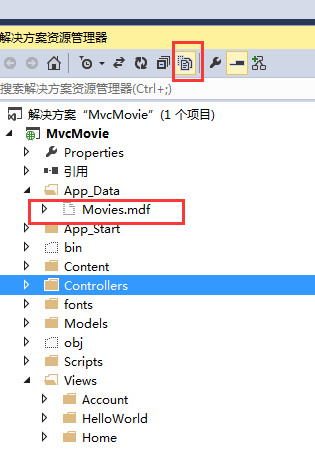
2.删掉movies.mdf数据库文件,并编译项目。确保没有报错。
3.找到工具菜单栏下面的NuGet程序包管理器---程序包管理器控制台,如图所示:
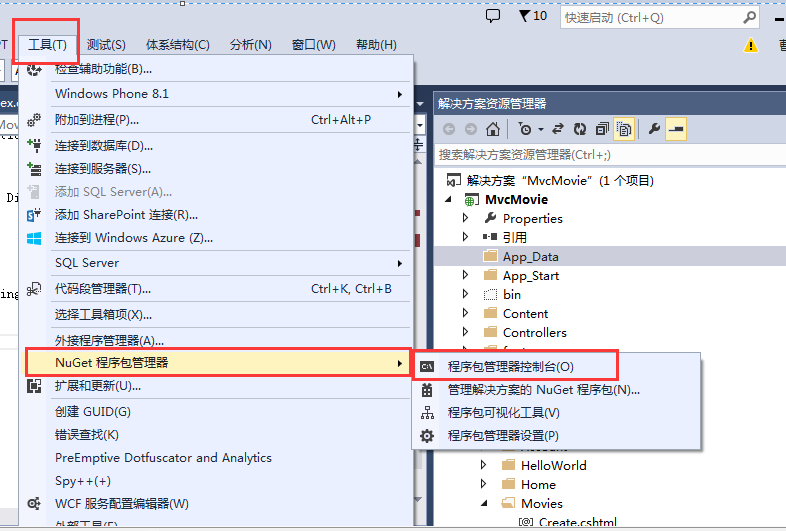
4,在程序包管理器控制台中,输入:Enable-Migrations -ContextTypeName MvcMovie.Models.MovieDBContext
(注意: MvcMovie.Models.MovieDBContext 项目名.Models.项目数据上下文)
按enter键之后,可以看到:

5,数据库迁移之后,VS中自动为我们生成了一个Migrations文件夹,里面有一个Configuration.cs文件
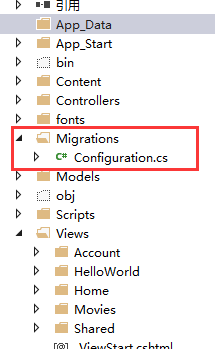
6.打开Configuration.cs文件,引用命名空间:
using MvcMovie.Models;
然后在Seed方法中写上:
 protected override void Seed(MvcMovie.Models.MovieDBContext context)

 {

     context.Movies.AddOrUpdate( i => i.Title,

         new Movie

         {

             Title = "When Harry Met Sally",

             ReleaseDate = DateTime.Parse("1989-1-11"),

             Genre = "Romantic Comedy",

             Price = 7.99M

         },

          new Movie

          {

              Title = "Ghostbusters ",

              ReleaseDate = DateTime.Parse("1984-3-13"),

              Genre = "Comedy",

              Price = 8.99M

          },

          new Movie

          {

              Title = "Ghostbusters 2",

              ReleaseDate = DateTime.Parse("1986-2-23"),

              Genre = "Comedy",

              Price = 9.99M

          },

        new Movie

        {

            Title = "Rio Bravo",

            ReleaseDate = DateTime.Parse("1959-4-15"),

            Genre = "Western",

            Price = 3.99M

        }

    );

 }
7.Code First Migrations calls the Seed method after every migration (that is, calling update-database in the Package Manager Console), and this method updates rows that have already been inserted, or inserts them if they don't exist yet.
这句话的意思是:在每一次数据库迁移的时候,这个seed方法都会被调用,这个方法更新已经插入的行数据,或者插入行,如果这个行数据不存在。
8.下面的方法起到了一个更新插入的作用:
 context.Movies.AddOrUpdate(i => i.Title,

     new Movie

     {

         Title = "When Harry Met Sally",

         ReleaseDate = DateTime.Parse("1989-1-11"),

         Genre = "Romantic Comedy",

         Rating = "PG",

         Price = 7.99M

     }
9.*因为Seed方法,在每次数据库迁移的时候,都会执行。你不能仅仅是插入数据,因为你将要插入的数据,将在第一次数据库迁移结束之后,已经存在数据库中;
*更新插入的操作可以预防错误,通过阻止你,插入已经存在的数据到数据库中。但是它有个缺点:它重载了,所有你在测试项目时候改变的数据;
因为有些测试数据,你不想改变:比如,你测试的时候,改变了数据,但是你不想这个数据在数据库更新的时候,发生改变。这个时候你可以做一个新增的操作:新增一个数据库中不存在的数据。
10.看一下这句代码吧:context.Movies.AddOrUpdate(i => i.Title,这第一个传到AddOrUpdate方法的参数,指定了一个属性,用来检查是否已经存在相同的行数据,对于我这个项目来说,我这个Title,可以做为这个属性,因为它在List中每次都是唯一的;This code assumes that titiles are unique. If you manually add a duplicate title, you'll get the following exception the next time you perform a migration.
Sequence contains more than one element 我们假想Title是唯一的,如果你手动添加了重复的Title,你将会在下次数据库迁移的时候,报一个错误,了解更多,请参考链接的文章,哈哈,纯人工翻译的哦。因为博主喜欢英语,所以还是看外国人的资料学习编程了。MSDN很不错的,
For more information about the AddOrUpdate method, see Take care with EF 4.3 AddOrUpdate Method..
11.现在我们来编译一下整个项目吧,如果这这里不编译的话,后面的步骤中将会出错误。
12.The next step is to create a DbMigration class for the initial migration. This migration creates a new database, that's why you deleted the movie.mdf file in a previous step.
这句话的意思是:我们接下来要为初始化数据库迁移,创建一个DBMigration类,这个数据库迁移创建一个新的数据库,这也就是我们前面删掉Movie.mdf文件的原因。
13.在程序包管理器控制台中输入:
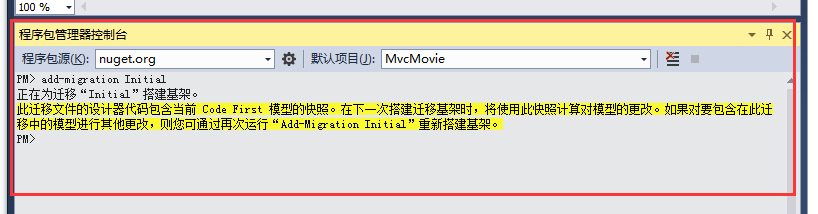
add-migration Initial
我们看到:
14.Code First Migrations creates another class file in the Migrations folder (with the name {DateStamp}_Initial.cs ), and this class contains code that creates the database schema. The migration filename is pre-fixed with a timestamp to help with ordering. Examine the {DateStamp}_Initial.cs file, it contains the instructions to create the Movies table for the Movie DB. When you update the database in the instructions below, this {DateStamp}_Initial.cs file will run and create the the DB schema. Then the Seed method will run to populate the DB with test data.
这段话的意思是:Code First迁移,在Migration文件下,创建了另外一个类(类的文件名称是:时间_Initiaal.cs),并且这个类包含了创建数据库的代码。这个文件以时间的命名方式便于排序管理。检查这个文件,它包含了怎么为MovieDB创建Moviess数据库表。当你按照下面的指令(等会我在控制器管理控制台中输入的指定),更新数据库的时候,这个文件会执行,并且创建数据库,然后这个Seed方法,也将会执行,为数据库生成测试数据。
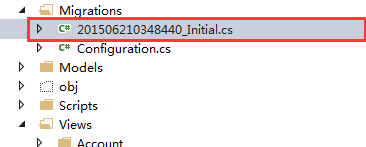
先看看看这个文件里面的代码是啥样的吧:
 namespace MvcMovie.Migrations

 {

     using System;

     using System.Data.Entity.Migrations;

     public partial class Initial : DbMigration

     {

         public override void Up()

         {

             CreateTable(

                 "dbo.Movies",

                 c => new

                     {

                         ID = c.Int(nullable: false, identity: true),

                         Title = c.String(),

                         ReleaseDate = c.DateTime(nullable: false),

                         Genre = c.String(),

                         Price = c.Decimal(nullable: false, precision: , scale: ),

                     })

                 .PrimaryKey(t => t.ID);

         }

         public override void Down()

         {

             DropTable("dbo.Movies");

         }

     }

 }
同样看看我们之前的Migration里面Configuration.cs代码吧:
 namespace MvcMovie.Migrations

 {

     using MvcMovie.Models;

     using System;

     using System.Data.Entity;

     using System.Data.Entity.Migrations;

     using System.Linq;

     internal sealed class Configuration : DbMigrationsConfiguration<MvcMovie.Models.MovieDBContext>

     {

         public Configuration()

         {

             AutomaticMigrationsEnabled = false;

         }

         protected override void Seed(MvcMovie.Models.MovieDBContext context)

         {

             context.Movies.AddOrUpdate(i => i.Title,

         new Movie

         {

             Title = "When Harry Met Sally",

             ReleaseDate = DateTime.Parse("1989-1-11"),

             Genre = "Romantic Comedy",

             Price = 7.99M

         },

          new Movie

          {

              Title = "Ghostbusters ",

              ReleaseDate = DateTime.Parse("1984-3-13"),

              Genre = "Comedy",

              Price = 8.99M

          },

          new Movie

          {

              Title = "Ghostbusters 2",

              ReleaseDate = DateTime.Parse("1986-2-23"),

              Genre = "Comedy",

              Price = 9.99M

          },

        new Movie

        {

            Title = "Rio Bravo",

            ReleaseDate = DateTime.Parse("1959-4-15"),

            Genre = "Western",

            Price = 3.99M

        }

    );

         }

     }

 }
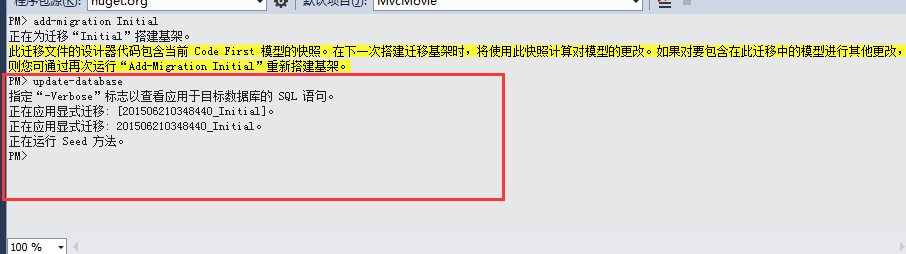
现在我们在,程序包管理器控制台中输入这个指令来创建数据库,并运行seed方法:
update-database
我们可以看到:
If you get an error that indicates a table already exists and can't be created, it is probably because you ran the application after you deleted the database and before you executed update-database. In that case, delete theMovies.mdf file again and retry the update-database command. If you still get an error, delete the migrations folder and contents then start with the instructions at the top of this page (that is delete the Movies.mdf file then proceed to Enable-Migrations).
这句话的意思是:如果你运行上面的update-database指定,初始化数据表错误显示:数据表已经存在不能被创建,很可能是因为你在删除movie.mdf数据库文件之后,运行了项目,没有先执行updata-database指令。这种情况下,你可以再次删除movie.mdf文件,然后重新执行update-database命令。如果仍然报错,删除这个Migration文件夹和里面的内容,重新按照我这篇文章刚开始的步骤,做一遍。。。
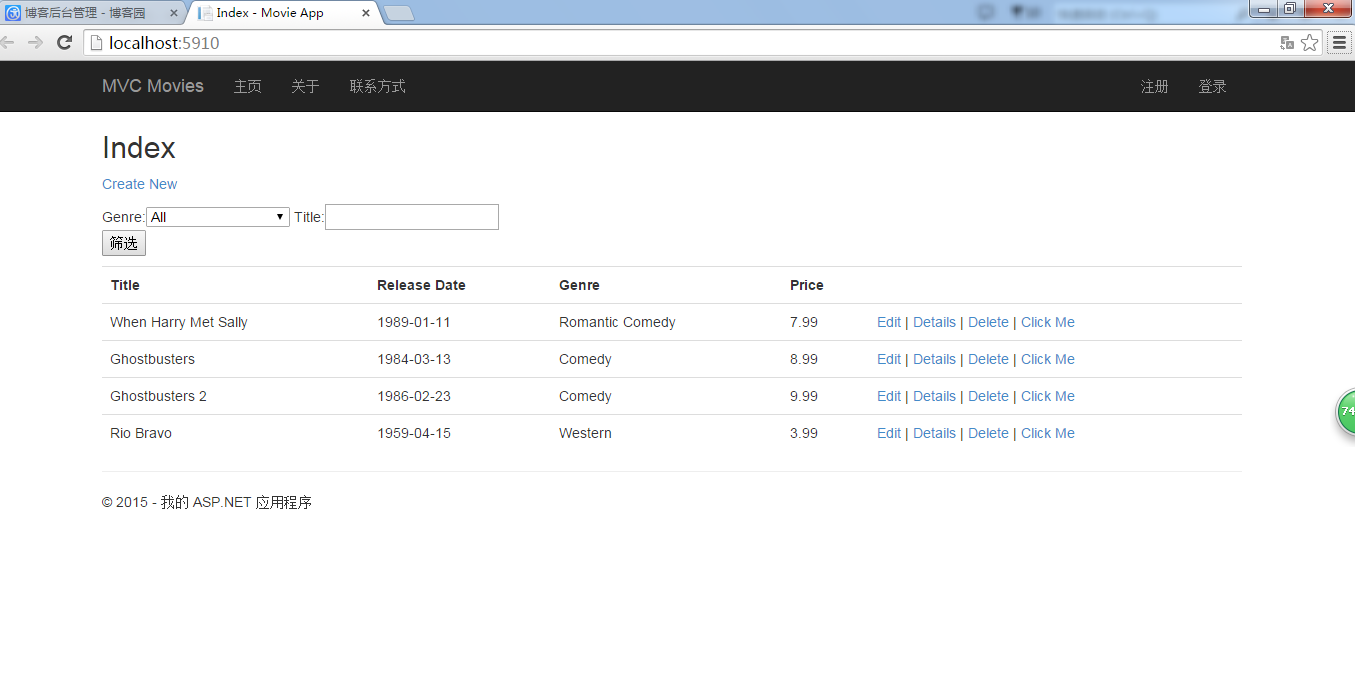
15.运行项目:在地址栏中输入Movie。(我这里就不输入Movie了,因为我改了路由配置,默认是Movie控制器下面的Index方法)可以看到seed方法里面的数据,都显示出来了。
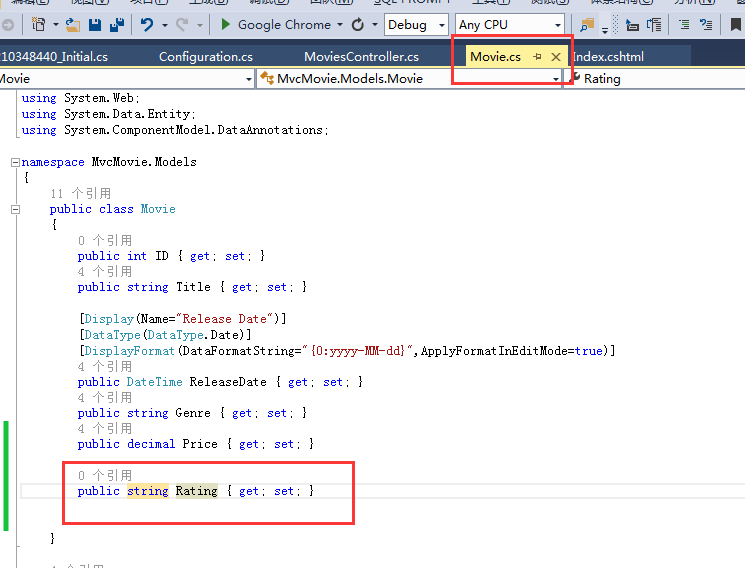
16.现在让我们开始今天真正的任务:给Model添加一个新字段
打开Models文件夹下面的Movie.cs文件,在里面加入如图所示的字段:
接着我们编译一下项目吧。
17.Because you've added a new field to the Movie class, you also need to update the the binding white list so this new property will be included. Update the bind attribute for Create and Edit action methods to include the Ratingproperty:
这句话的意思是:因为你新增了一个字段到Movie类中,你同样需要去为Create方法和Edit方法更新绑定Bind:
[Bind(Include = "ID,Title,ReleaseDate,Genre,Price,Rating")]
18.You also need to update the view templates in order to display, create and edit the new Rating property in the browser view.
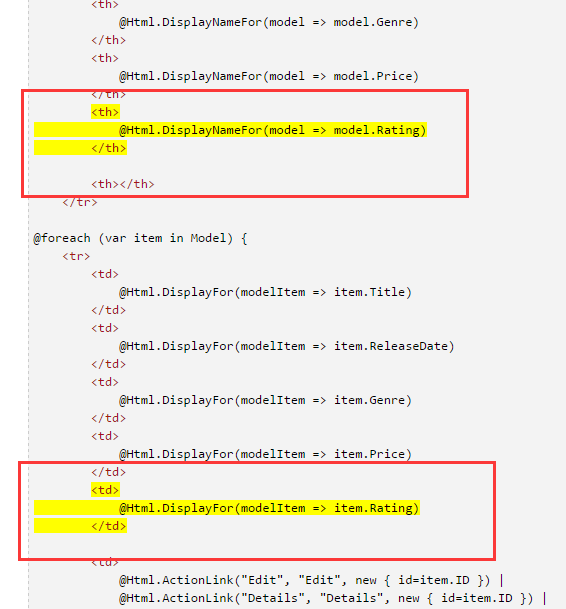
Open the \Views\Movies\Index.cshtml file and add a <th>Rating</th> column heading just after the Price column. Then add a <td> column near the end of the template to render the @item.Rating value. Below is what the updated Index.cshtml view template looks like:
你同样需要去更新视图模板为了在新增和编辑的时候,去显示你刚才添加的字段。 打开\Views\Movies\Index.cshtml文件,在Price字段后面,去新增一个<th>Rating</th>列标题,然后在这个视图模板的后面,写上要显示的数据 @item.Rating,具体看图片所示;
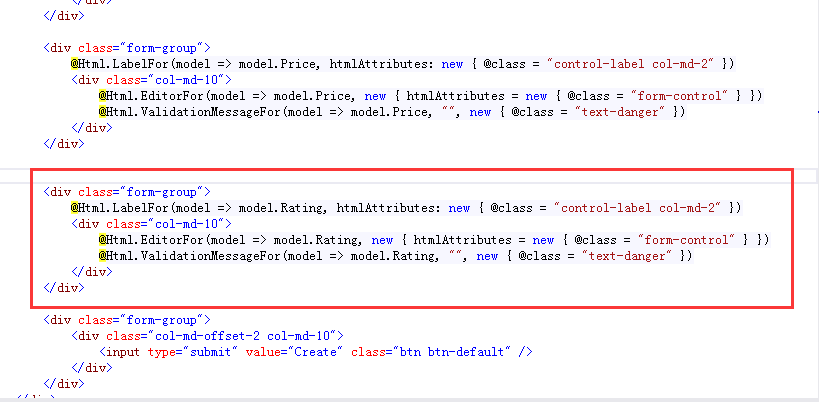
19.Next, open the \Views\Movies\Create.cshtml file and add the Rating field with the following highlighed markup. This renders a text box so that you can specify a rating when a new movie is created.
这句话的意思是:打开\Views\Movies\Create.cshtml 新增页面,添加Rating字段,使用下面的高亮显示的代码,这会生成一个文本框,所以在新增的时候,你可以指定一个Rating就可以添加到数据库中了。
如图:
现在已经完成了新增字段的功能任务了,我们来运行一下项目》》》
可以看到:

又报错了,数据库迁移方面的错误。。
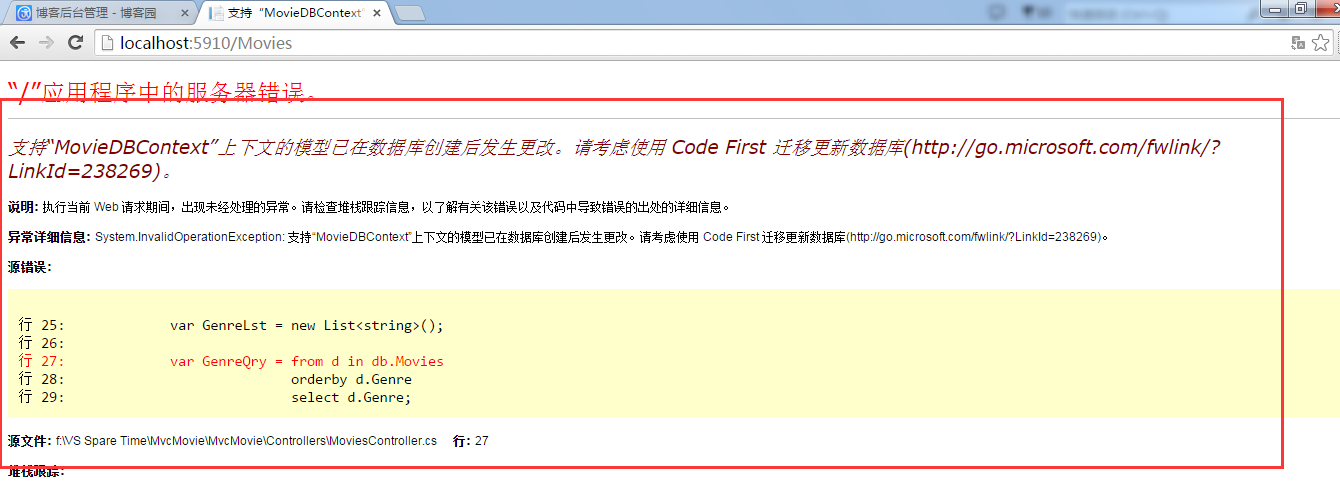
20.You're seeing this error because the updated Movie model class in the application is now different than the schema of the Movie table of the existing database. (There's no Rating column in the database table.)
这句话的意思是:你看到这个错误,是因为你更新了模型中的Movie,它现在和已经存在的Movie表中的不一样,已经存在的Movie表中,是没有Rating字段的!!!
21.
There are a few approaches to resolving the error:
- Have the Entity Framework automatically drop and re-create the database based on the new model class schema. This approach is very convenient early in the development cycle when you are doing active development on a test database; it allows you to quickly evolve the model and database schema together. The downside, though, is that you lose existing data in the database — so you don't want to use this approach on a production database! Using an initializer to automatically seed a database with test data is often a productive way to develope an application. For more information on Entity Framework database initializers, see Tom Dykstra's fantastic ASP.NET MVC/Entity Framework tutorial.
- Explicitly modify the schema of the existing database so that it matches the model classes. The advantage of this approach is that you keep your data. You can make this change either manually or by creating a database change script.
- Use Code First Migrations to update the database schema.
这里有一些方法,来解决这个问题:
1.让EF基于新的实体类,自动的删除和再创建数据库。这个方法在开发项目的早期,是很方便实用的。但是这会让你丢失之前已经存在数据库中的数据,所以使用一个初始化器,来存储数据库中的测试数据是很好的一个解决方法。要了解更多,请看链接文章。
2.根据你的Model结构,修改数据库结构。这个方法的优点是你的数据不会丢失。你可以手动修改数据库,或者写数据库脚本来修改。
3.使用Code First Migration技术,来升级数据库。
这个教程,我们使用方法3,即Code First Migration技术来升级数据库。
22.Update the Seed method so that it provides a value for the new column. Open Migrations\Configuration.cs file and add a Rating field to each Movie object.
打开Configuration文件,在里面添加我们刚才新增的Rating字段到每一个Movie对象中。
 namespace MvcMovie.Migrations

 {

     using MvcMovie.Models;

     using System;

     using System.Data.Entity;

     using System.Data.Entity.Migrations;

     using System.Linq;

     internal sealed class Configuration : DbMigrationsConfiguration<MvcMovie.Models.MovieDBContext>

     {

         public Configuration()

         {

             AutomaticMigrationsEnabled = false;

         }

         protected override void Seed(MvcMovie.Models.MovieDBContext context)

         {

             context.Movies.AddOrUpdate(i => i.Title,

         new Movie

         {

             Title = "When Harry Met Sally",

             ReleaseDate = DateTime.Parse("1989-1-11"),

             Genre = "Romantic Comedy",

             Price = 7.99M,

             Rating="PG"

         },

          new Movie

          {

              Title = "Ghostbusters ",

              ReleaseDate = DateTime.Parse("1984-3-13"),

              Genre = "Comedy",

              Price = 8.99M,

              Rating = "PG"

          },

          new Movie

          {

              Title = "Ghostbusters 2",

              ReleaseDate = DateTime.Parse("1986-2-23"),

              Genre = "Comedy",

              Price = 9.99M,

              Rating = "PG"

          },

        new Movie

        {

            Title = "Rio Bravo",

            ReleaseDate = DateTime.Parse("1959-4-15"),

            Genre = "Western",

            Price = 3.99M,

            Rating = "PG"

        }

    );

         }

     }

 }
Code First Migration
然后,我们编译一下项目。接着打开“程序包控制器管理台”,输入下面的指令:
add-migration Rating
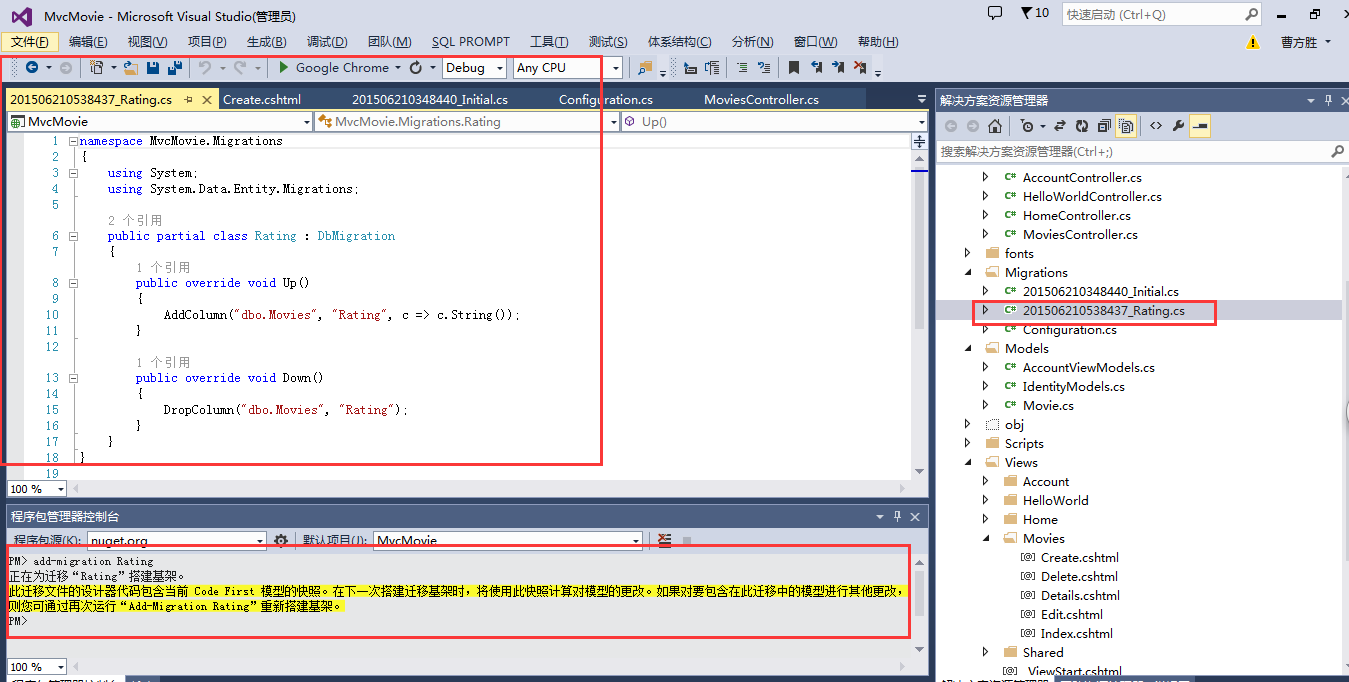
23.The add-migration command tells the migration framework to examine the current movie model with the current movie DB schema and create the necessary code to migrate the DB to the new model. The name Rating is arbitrary and is used to name the migration file. It's helpful to use a meaningful name for the migration step.
When this command finishes, Visual Studio opens the class file that defines the new DbMIgration derived class, and in the Up method you can see the code that creates the new column.
这个add-migration Rating指令,告诉migration框架,用当前的MovieDB数据结构,去检查当前的movie model,为数据库迁移创建必要的代码。这个Rating字段用来写这个添加指令。使用有意义的名字,来进行这个步骤,是很有必要的。当这个指令完成后,VS打开这个类文件,并定义一个部分类,来继承DbMigration类。看代码就知道了:
24.我们再次运行项目吧,激动人心的时刻来了。。。错!!!我们应该先要执行这个:
Build the solution, and then enter the update-database command in the Package Manager Console window.(这一步坑死我了,我忘记执行了)。
新增字段运行新增的指令,之后,还得运行更新数据库的指令。就和db.SaveChanges()方法类似。这不执行完之后,才能是大功告成!!!
25.喜忧参半,之后,我们来运行项目吧。
可以看到:
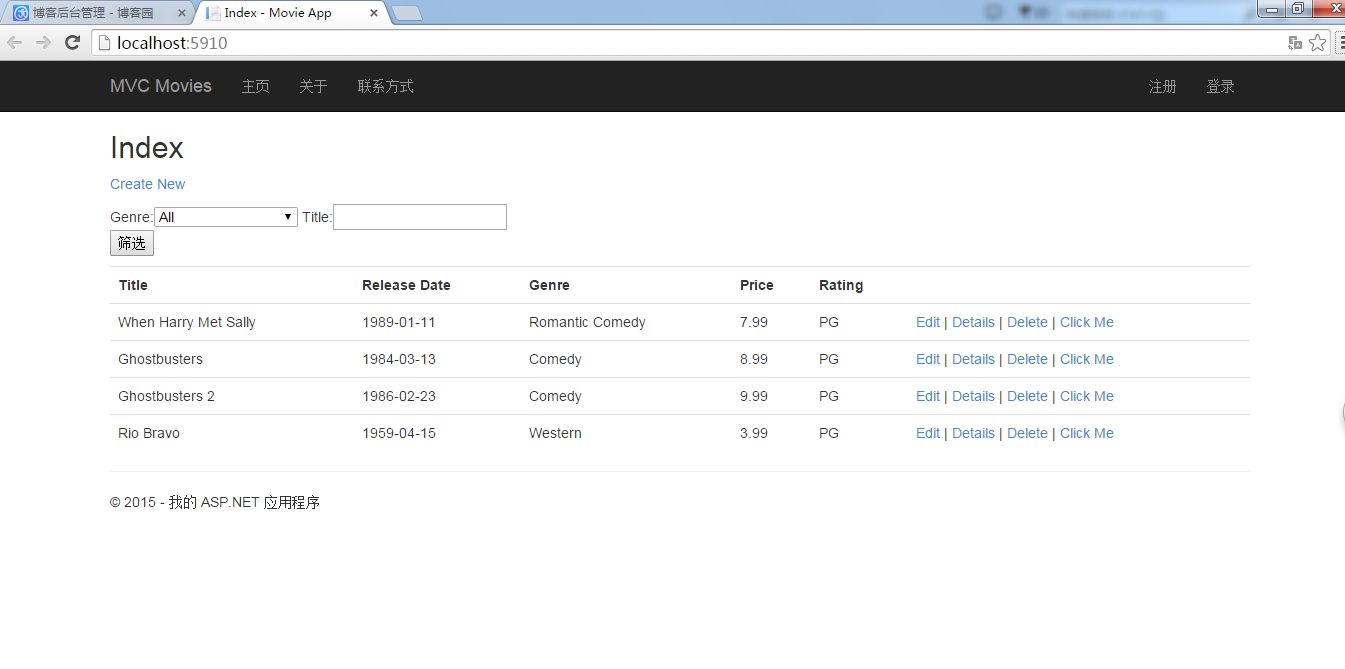
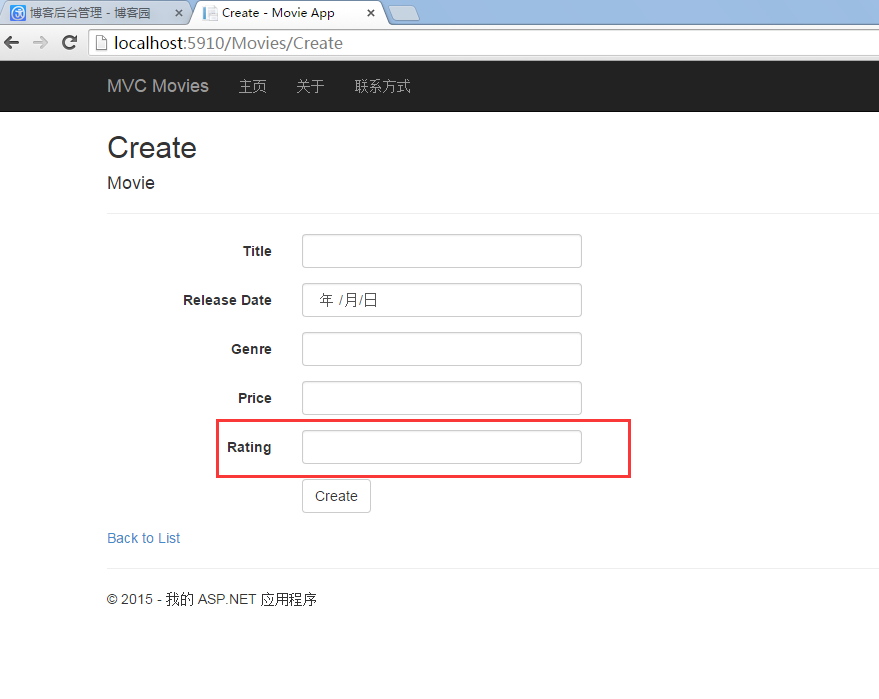
这样就完成了数据库迁移技术的学习。欢迎大家评论,转载,我是@放飞梦想的翅膀,毕业于武汉软件工程职业学院。
ASP.NET MVC5--为数据库新增字段(涉及数据库迁移技术)的更多相关文章
- 用ASP.NET MVC5 +SQLSERVER2014搭建多层架构的数据库管理系统
用http://ASP.NET MVC5 +SQLSERVER2014搭建多层架构的数据库管理系统 背景:前段时间,给一家公司做外包(就是图标是朵菊花那家).为了尽快实现交付,网上四处寻找适合中小型企 ...
- 关于ddl(新增字段)对数据库锁表|读写操作的影响_资料
1.对一个表执行ddl(新增字段)会不会阻塞表,影响读写? 在一次项目升级之前需要执行一个新增字段的脚本(alter table...),表的数据量是260多万,执行时间是72秒,感觉略长,不知道会不 ...
- ASP.net MVC5 Code First填充测试数据到数据库
问题的产生 最近在看Adam Freeman的“Pro ASP.NET MVC5”,于是在工作机上面搭建了相应的运行环境,但是在自己的机器上面只有代码,没有数据库.记得在code first中可以新 ...
- ASP.NET MVC5总结(四)登陆中常用技术解析之验证码
在应用软件中,登陆系统我们往往会用到验证码技术,下面将介绍在MVC中用到的验证码技术. 1.前端代码段及前端效果图如下 <div class="row"> <in ...
- ASP.NET MVC5总结(三)登陆中常用技术解析之session与cookie
1.session机制 session机制是在服务器端保持状态的方案,在做系统登陆时,我们往往会用到session来存储一些用户登录的重要信息,而这些信息是不能存在cookie中的. 当访问量增多时, ...
- C#实现多级子目录Zip压缩解压实例 NET4.6下的UTC时间转换 [译]ASP.NET Core Web API 中使用Oracle数据库和Dapper看这篇就够了 asp.Net Core免费开源分布式异常日志收集框架Exceptionless安装配置以及简单使用图文教程 asp.net core异步进行新增操作并且需要判断某些字段是否重复的三种解决方案 .NET Core开发日志
C#实现多级子目录Zip压缩解压实例 参考 https://blog.csdn.net/lki_suidongdong/article/details/20942977 重点: 实现多级子目录的压缩, ...
- 在ASP.NET MVC5 及 Visual Studio 2013 中为Identity账户系统配置数据库链接及Code-First数据库迁移
在ASP.NET MVC5 及 Visual Studio 2013 中为Identity账户系统配置数据库链接及Code-First数据库迁移 最近发布的ASP.NET MVC 5 及Visual ...
- asp.net core异步进行新增操作并且需要判断某些字段是否重复的三种解决方案
之前碰到asp.net core异步进行新增操作并且需要判断某些字段是否重复的问题,进行插入操作的话会导致数据库中插入重复的字段!下面把我的解决方法记录一下,如果对您有所帮助,欢迎拍砖! 场景:EFC ...
- 五、 创建连接串连接本地数据库(ASP.NET MVC5 系列)
1. 创建连接串连接本地SQLServer数据库 上节讲到MovieDBContext类,这个类的作用是连接数据库并将Movie对象迁移到数据库记录中.不过你会问一个问题:如何知道这个对象将连接哪个数 ...
随机推荐
- Android--ColorMatrix改变图片颜色
前言 本篇博客讲解如何通过改变图片像素点RGB的值的方式,在Android中改变图片的颜色.在最后将以一个简单的Demo来作为演示. 本篇博客的主要内容: ColorMatrix 使用ColorMat ...
- SQL Server-游标使用
IF EXISTS(SELECT *FROM sysobjects WHERE name='sp_ContestSubmit') DROP PROC sp_ContestSubmit GO -- == ...
- MediaElement视频控制:播放、暂停、停止、后退、快进、跳转、音量
/* ================================================= * Author: Micro * Date: 2016=03-25 ...
- 关于execel单元格中的数字变成文本(左上角带绿色三角形标志)的办法
对于很多软件,需要将数字变成文本,才能导入到该系统当中.在excel当中,如果数字是以文本的形式存储,在左上角是带有绿色的三角形标志的.如果对于大批量数据,操作方法如下:1将目标列数据copy到记事本 ...
- Windows Live Writer配置步骤
推荐文档: [超详细教程]使用Windows Live Writer 2012和Office Word 2013 发布文章到博客园全面总结 Live Writer 使用小贴示:发博客时始终使用图片原始 ...
- Win 8.1 下 安装 SQL2005
1.http://blog.csdn.net/lvjin110/article/details/25122879 2.SQL2005版本 需要是 SQL2005开发版
- android学习者优秀网址推荐
非常漂亮的android UI库集合,别人整理的,如果感觉不错,赶快收藏吧!! https://github.com/wasabeef/awesome-android-ui https://githu ...
- 构建基于WinRT的WP8.1 App 02:数据绑定新特性
基于WinRT的Windows Phone 8.1以及Windows 8.1中Xaml数据绑定增加了一些新特性. FallBackValue属性:FallBackValue在绑定的值属性值不存在时,可 ...
- hibernate下载包中配置文件路径
路径:hibernate-release-5.0.2.Final\project\hibernate-ehcache\src\test\resources\hibernate-config 文件:hi ...
- QT编写DLL给外部程序调用,提供VC/C#/C调用示例(含事件)
最近这阵子,接了个私活,封装一个开发包俗称的SDK给客户调用,查阅了很多人家的SDK,绝大部分用VC编写,而且VC6.0居多,估计也是为了兼容大量的XP用户及IE浏览器,XP自带了VC6.0运行库,所 ...