
PureBasic 集成Form设计器的使用
The PureBasic IDE has a very powerful integrated form designer, which allows to design easily windows and arrange gadgets on them. It supports almost all native PureBasic gadgets, menu and even status bar. A form file is a regular PureBasic file, so it can be easily modified without even open the form designer. The code parser isn't the same used by the compiler and therefore doesn't support all features, so when doing manual changes to a form file, it has to remain basic.
Contents of the "Form" menu:
New Form
Create a new empty form. It will bring automatically the form panel tool on top.Switch Code/Design View
Change the form view, switch from design mode to code view. A form is built from code, so if a change is made directly in code view, it will be reflected visually.Duplicate Object
Duplicate the currently selected object.Image manager
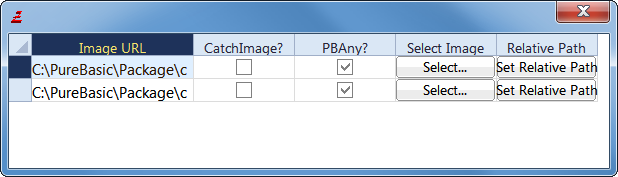
Display all the images currently used by the form. The image and its path can be changed easily here.

Form design panel
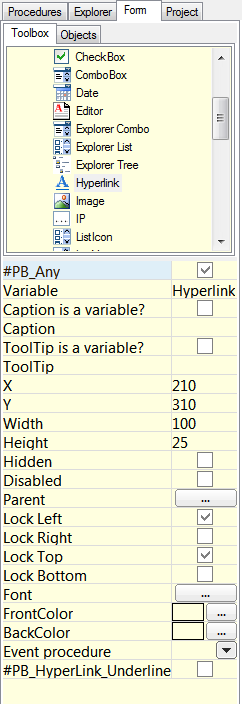
This panel list all available gadgets. Select one, and draw directly on the form the size needed. When a gadget is selected on the form, its properties are display on this panel and can be modified here.
Using the form designer in real world projects
The form designer has been created to allow modular forms and easy maintenance. Each form has to be in its own file. It can not have two form in the file (in other words, it should never have two OpenWindow() in the same file). An event procedure can be assigned to every gadget, and will be handled automatically in the event loop. The event procedures needs to be defined somewhere in the source code. Every form file should be named with the '.pbf' extension, so it will be correctly opened by the IDE. Form files can also be added to a project.
For example, to build a program which handle two windows, we will have to create two form files and one main file. The directory structure could look like that:
  Main.pb        ; The main PureBasic file, which will includes the two forms file, and defines the events

  MainWindow.pbf ; The main window

  DateWindow.pbf ; Another window
If we assume MainWindow.pbf has two buttons ('OK' and 'Cancel') and DateWindow.pbf has one calendar gadget, here is how the main file would look like (the main file is not handled by the form designer, it has to be written manually):
  XIncludeFile "MainWindow.pbf" ; Include the first window definition

  XIncludeFile "DateWindow.pbf" ; Include the second window definition

  OpenMainWindow() ; Open the first window. This procedure name is always 'Open' followed by the window name

  OpenDateWindow() ; Open the second window

  ; The event procedures, as specified in the 'event procedure' property of each gadget

  Procedure OkButtonEvent(EventType)

    Debug "OkButton event"

  EndProcedure

  Procedure CancelButtonEvent(EventType)

    Debug "CancelButton event"

  EndProcedure

  Procedure TrainCalendarEvent(EventType)

    Debug "TrainCalendar event"

  EndProcedure

  ; The main event loop as usual, the only change is to call the automatically

  ; generated event procedure for each window.

  Repeat

    Event = WaitWindowEvent()

    Select EventWindow()

      Case MainWindow

        MainWindow_Events(Event) ; This procedure name is always window name followed by '_Events'

      Case DateWindow

        DateWindow_Events(Event)

    EndSelect

  Until Event = #PB_Event_CloseWindow ; Quit on any window close
As seen, it's easy to integrate visually designed forms in a program. Indeed it's also possible to continue to create window manually, or mix the two. To have all the control over the generated code, just switch to code mode and inspect it.
例子:
main.pbf:
XIncludeFile "pp.pbf"

OpenWindow_()

Procedure OkButtonEvent(EventType)

    Select EventType()

                 Case #PB_EventType_LeftClick        : Debug "Click with left mouse button"

                 Case #PB_EventType_RightClick       : Debug "Click with right mouse button"

                 Case #PB_EventType_LeftDoubleClick  : Debug "Double-click with left mouse button"

                 Case #PB_EventType_RightDoubleClick : Debug "Double-click with right mouse button"

               EndSelect

  EndProcedure

 Procedure PButtonEvent(EventType)

    Debug "pkButton event"

  EndProcedure

Repeat

    Event = WaitWindowEvent()

    Select EventWindow()

      Case Window_

        Select EventGadget()

          Case  Button_

            OkButtonEvent(EventType)

          Case  Button_

            PButtonEvent(EventType)

        EndSelect

    EndSelect

  Until Event = #PB_Event_CloseWindow ; Quit on any window close
pp.pb:
Global Window_

Global Button_, Button_

Procedure OpenWindow_()

  Window_ = OpenWindow(#PB_Any, , , , , "", #PB_Window_SystemMenu | #PB_Window_Tool | #PB_Window_BorderLess)

  Button_ = ButtonGadget(#PB_Any, , , , , "")

  Button_ = ButtonGadget(#PB_Any, , , , , "")

EndProcedure

Procedure Window__Events(event)

  Select event

    Case #PB_Event_CloseWindow

      ProcedureReturn #False

    Case #PB_Event_Menu

      Select EventMenu()

      EndSelect

    Case #PB_Event_Gadget

      Select EventGadget()

      EndSelect

  EndSelect

  ProcedureReturn #True

EndProcedure

PureBasic 集成Form设计器的使用的更多相关文章
- Springboot2集成Activiti设计器并去除security
前言 鉴于项目需要将acitiviti设计器整合到原工程中,在网上查了不少资料都不太适用,经过借鉴和自己倒腾终于搞定了,分享一下经验,如果有问题,可以在留言区咨询. 文中用到的资源代码链接: http ...
- C#自定义运行时窗体设计器Runtime FormDesigner
写在前面:因为业务的需要,有时会使用到自定义运行时窗体设计器Runtime FormDesigner,实现的功能,就是IDE设计器的简化.设想一下,如果可以在程序运行时,再设计一个Form,然后编译代 ...
- Activiti(二) springBoot2集成activiti,集成activiti在线设计器
摘要 本篇随笔主要记录springBoot2集成activiti流程引擎,并且嵌入activiti的在线设计器,可以通过浏览器直接编辑出我们需要的流程,不需要通过eclipse或者IDEA的actiB ...
- 如何在CRM系统中集成ActiveReports最终报表设计器
有时候,将ActiveReports设计器集成到业务系统中,为用户提供一些自定义的数据表,用户不需要了解如何底层的逻辑关系和后台代码,只需要选择几张关联的数据表,我们会根据用户的选择生成可供用户直接使 ...
- java 工作流项目源码 SSM 框架 Activiti-master springmvc 集成web在线流程设计器
即时通讯:支持好友,群组,发图片.文件,消息声音提醒,离线消息,保留聊天记录 (即时聊天功能支持手机端,详情下面有截图) 工作流模块---------------------------------- ...
- .NET 开源工作流: Slickflow流程引擎高级开发(十) -- BpmnJS流程设计器集成
前言: 在Slickflow产品开发过程中,前端流程设计器经历了几个不同的版本(jsPlumb, mxGraph等),目的是为了在设计流程时的用户体验更加良好,得到客户的好评和认可.BpmnJS流程设 ...
- SSH框架集成Activiti Modeler在线设计器页面出现问号及乱码的解决办法
文·原创/朱季谦 工作流是一个针对企业用户.开发人员.系统管理员的轻量级工作流业务管理平台,其核心是使用Java开发的快速.稳定的BPMN2.0流程引擎.在我们日常开发当中,例如oa系统里的请假功能, ...
- YbSoftwareFactory 代码生成插件【十六】:Web 下灵活、强大的审批流程实现(含流程控制组件、流程设计器和表单设计器)
程序=数据结构+算法,而企业级的软件=数据+流程,流程往往千差万别,客户自身有时都搞不清楚,随时变化的情况更是家常便饭,抛开功能等不谈,需求变化很大程度上就是流程的变化,流程的变化会给开发工作造成很大 ...
- F2工作流引擎之-纯JS Web在线可拖拽的流程设计器(八)
Web纯JS流程设计器无需编程,完全是通过鼠标拖.拉.拽的方式来完成,支持串行.并行.分支.异或分支.M取N路分支.会签.聚合.多重聚合.退回.传阅.转交,都可以非常方便快捷地实现,管理员 ...
随机推荐
- hdu 4001 dp 2011大连赛区网络赛A
题意:给一些指定长宽高的砖,求能累出的最大高度,不同砖有不同编号,每种编号对下面的砖做出了限制 dp 注意输出要用%I64d,否则会wa,以后不用%lld了 Sample Input 3 10 10 ...
- Struts2中ActionContext和ServletActionContext
转自:http://blog.sina.com.cn/s/blog_6c9bac050100y9iw.html 在Web应用程序开发中,除了将请求参数自动设置到Action的字段中,我们往往也需要在A ...
- poj 1114 完全背包 dp
如果可以每个物品拿多件,则从小到大遍历,否则从大到小遍历. G - Piggy-Bank Time Limit:1000MS Memory Limit:32768KB 64bit IO ...
- A Complete Guide to the <Picture> Element
If you’ve ever struggled building responsive websites, this post is for you. It’s part of a series o ...
- Origami
Origami 是一个来自 Facebook 设计团队的作品,是 Quartz Composer 的免费工具包,可在无需编程的情况下轻松实现与设计原型进行交互.
- BZOJ 1856 字符串(组合)
题目链接:http://61.187.179.132/JudgeOnline/problem.php?id=1856 题意:有n个1和m个0组成的串,使得任意前k个中1的个数不少于0的个数.有多少种这 ...
- TAT,我的LCT转双旋了
这里是rotate和splay函数 void rotate(int x) { ]==x; ch[y][d^]=ch[x][d];pre[ch[x][d]]=y; ch[z][ch[z][]==y]=x ...
- C#设计模式——抽象工厂模式(原文转自:http://blog.jobbole.com/78059/)
一.引言 在上一专题中介绍了工厂方法模式,工厂方法模式是为了克服简单工厂模式的缺点而设计出来的,简单工厂模式的工厂类随着产品类的增加需要增加额外的代码),而工厂方法模式每个具体工厂类只完成单个实例的创 ...
- JS - 超强大文本动画插件Textillate.js
http://www.yyyweb.com/demo/textillate/ Textillate.js AsimplepluginforCSS3textanimations.
- workerman是一个高性能的PHP socket服务器框架
workerman-chatorkerman是一款纯PHP开发的开源高性能的PHP socket服务器框架.被广泛的用于手机app.手游服务端.网络游戏服务器.聊天室服务器.硬件通讯服务器.智能家居. ...