
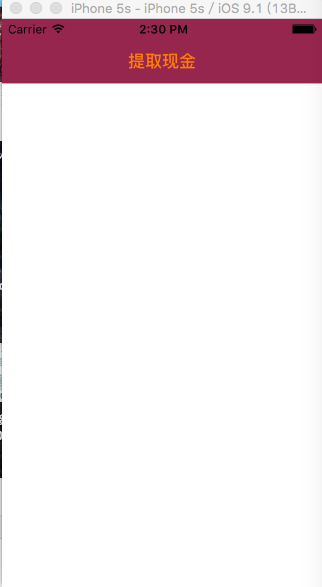
iOS 设置导航栏的颜色和导航栏上文字的颜色
#import <UIKit/UIKit.h>

@interface AppDelegate : UIResponder <UIApplicationDelegate>

@property (strong, nonatomic) UIWindow *window;

@end
#import "AppDelegate.h"

#import "KeyViewController.h"

@interface AppDelegate ()

@end

@implementation AppDelegate

- (BOOL)application:(UIApplication *)application didFinishLaunchingWithOptions:(NSDictionary *)launchOptions {

    self.window = [[UIWindow alloc] initWithFrame:[[UIScreen mainScreen] bounds]];

    // Override point for customization after application launch.

    self.window.backgroundColor = [UIColor whiteColor];

    //初始化导航

    UINavigationController *navi = [[UINavigationController alloc] initWithRootViewController:[[KeyViewController alloc] init]];

    //设置导航栏的背景颜色(iOS7之后)

    [[UINavigationBar appearance] setBarTintColor:[[UIColor alloc] initWithRed:/255.0 green: blue:/255.0 alpha:]];

    //使用背景图片来设置导航栏的颜色(iOS7之后)

//    [[UINavigationBar appearance] setBackgroundImage:[UIImage imageNamed:@"顶栏背景"] forBarMetrics:UIBarMetricsDefault];

    //设置导航栏上文字的颜色(iOS7之后)

    [[UINavigationBar appearance] setTitleTextAttributes:@{NSForegroundColorAttributeName:[UIColor orangeColor]}];

    self.window.rootViewController = navi;

    [self.window makeKeyAndVisible];

    return YES;

}

@end
#import <UIKit/UIKit.h>

@interface KeyViewController : UIViewController

@end
#import "KeyViewController.h"

@interface KeyViewController ()

@end

@implementation KeyViewController

- (void)viewDidLoad {

    [super viewDidLoad];

    self.title = @"提取现金";

}

- (void)didReceiveMemoryWarning {

    [super didReceiveMemoryWarning];

    // Dispose of any resources that can be recreated.

}

@end
iOS 设置导航栏的颜色和导航栏上文字的颜色的更多相关文章
- iOS 设置导航栏之二(设置导航栏的颜色、文字的颜色、左边按钮的文字及颜色)
#import <UIKit/UIKit.h> @interface AppDelegate : UIResponder <UIApplicati ...
- [BS-03] 统一设置UITabBarController管理的所有VC的tabBarItem图标文字的颜色大小等属性
1. 统一设置UITabBarController管理的所有VC的tabBarItem图标文字的颜色大小等属性 . 统一设置UITabBarController管理的所有VC的tabBarItem图标 ...
- ios - 设置一个VC的navigationController的显示图案或文字,其他navigationController依旧不变
1. override func viewDidLoad() { super.viewDidLoad() self.navigationController?.delegate = self } 2. ...
- MPAndroidChart柱子上的文字的颜色dataSet.setValueTextColors
版本:MPAndroidChart v3.1.0 这是个很强大的图表,不同的版本对应的API会不一样. 需求描述: 用了柱状图,但要实现这样的功能,通过不同的门店来区分不同的柱子的颜色,并且柱子上文字 ...
- iOS之旅--隐藏(去除)导航栏底部横线
iOS之旅--隐藏(去除)导航栏底部横线 iOS开发大部分情况下会使用到导航栏,由于我司的app导航栏需要与下面紧挨着的窗口颜色一致,导航栏底部的横线就会影响这个美观,LZ使用了以下方法.觉得不错,分 ...
- iOS筛选菜单、分段选择器、导航栏、悬浮窗、转场动画、启动视频等源码
iOS精选源码 APP启动视频 自定义按钮,图片可调整图文间距SPButton 一款定制性极高的轮播图,可自定义轮播图Item的样式(或只... iOS 筛选菜单 分段选择器 仿微信导航栏的实现,让你 ...
- iOS侧滑返回到隐藏导航栏的VC,导航栏会闪现一次
VCA:是一个隐藏导航栏的页面:VCA在ViewWillAppear生命周期函数中设置导航栏隐藏: //隐藏导航栏 [self.navigationController setNavigationBa ...
- android 开发 修改系统背景(状态栏颜色、导航栏颜色、标题栏颜色等等)
1.打开values下的styles.xml 发现有以下代码: <resources> <!-- Base application theme. --> <style n ...
- iOS开发UI篇—多控制器和导航控制器简单介绍
iOS开发UI篇—多控制器和导航控制器简单介绍 一.多控制器 一个iOS的app很少只由一个控制器组成,除非这个app极其简单.当app中有多个控制器的时候,我们就需要对这些控制器进行管理 有多个vi ...
随机推荐
- Windows中杀死占用某个端口的进程
Windows中杀死占用某个端口的进程 netstat -ano | findstr //列出进程极其占用的端口,且包含 80 tasklist | findstr taskkill -PID < ...
- 彻底搞清楚字符编码: ASCII, ISO_8859, GB2312,UCS, Unicode, Utf-8
彻底搞清楚字符编码: ASCII, ISO_8859, GB2312,UCS, Unicode, U 1.ASCII: 0-127(128-255未使用),美国标准 2.IS0-8859-1(lati ...
- Alamofire数据请求
let stringurl = "http://www.huiyunche.cn/kyleuat/banner/list" Alamofire.request(.GET,strin ...
- [转]SQLBulkCopy使用
SQLBulkCopy,用于数据库之间大批量的数据传递.通常用于新,旧数据库之间数据的更新.即使表结构完全不同,也可以通过字段间的对应关系,顺利的将数据导过来. 首先,SQLBulkCopy需要2个连 ...
- spring-3-mvc-hello-world-example
http://www.mkyong.com/spring3/spring-3-mvc-hello-world-example/
- Java ArrayListSerialise
import java.io.*; import java.util.*; //ArrayListSerialise public class A { public static void main( ...
- 取url的键值对,location的search:从?开始的字符串
function urlArgs(){ var args=""; var query=location.search.substring(1);//去除问号 var pairs=q ...
- PIC12F629帮我用C语言写个程序,控制三个LED亮灭
http://power.baidu.com/question/240873584599025684.html?entry=browse_difficult PIC12F629帮我用C语言写个程序,控 ...
- Cloudera Hadoop什么是CDH及CDH版本介绍
本文引用自:Cloudera Hadoop什么是CDH及CDH版本介绍http://www.aboutyun.com/thread-6788-1-1.html(出处: about云开发) 云技术新兴的 ...
- Largest Number || LeetCode
#include <stdio.h> #include <stdlib.h> #include <string.h> #define MAX 1000 int cm ...