
background的属性和背景图片定位的实例
本文内容:
1.背景图片定位示例
2.background常用的属性值
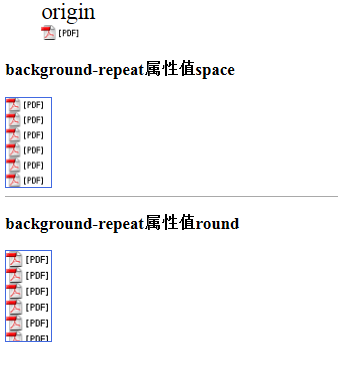
3.background-repeat新增的round、space属性
4.background-size的属性值(着重介绍contain、cover)
5.background-origin属性值(borde-box、padding-box、content-box)
6.多背景图片示例
背景图片定位(background-position)原理
A. 语法:Background-position:水平位置 垂直位置
B. 水平位置/垂直位置设置方法:
1) 数值(px)正负值都可以,正数值表示向右移动或向下移动,负数值表示向左或向上移动;
2) 百分比(%)范围:0%—100%
3) 关键词:水平位置:left(左) center(中) right(右)
垂直位置:top(上) center(中) bottom(下)
默认情况下,background-position的原点位于左上角,换句话说,元素的左上角和图片的左上角是对齐的,随后图片向各个方向重复,都是以左上角为起点。
注意:当只设置一个值时:代表水平位置,垂直位置默认居中
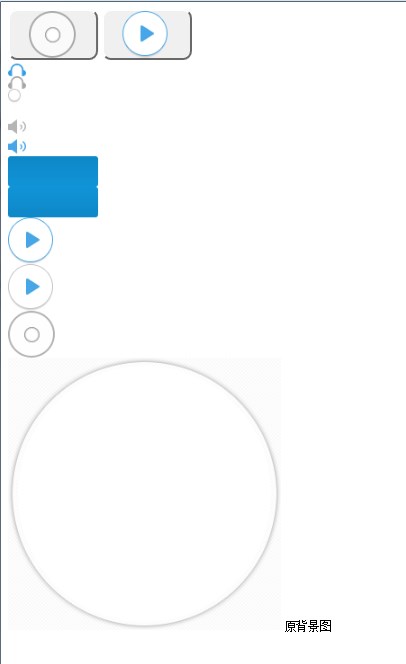
<style>input[type="button"]{width:100px;height:56px;border-radius:10px;}.btn1{background-image: url("allbgs2.png");background-position:21px355px;/*第一,第二属性值表示以图片左上角(left top)位置为原点的坐标(21px,355px),即向右移动21px,向下移动355px*/}.btn2{background-repeat:no-repeat;background-image: url("allbgs2.png");background-position:21px-175px;/*(21px,-225px),即向右移动21px,向上移动-175px*/}img{width:100px;. height:200 px;}img:hover{height:auto;width:auto;}</style><form><inputtype="button"class="btn1"><inputtype="button"class="btn2"><br/><imgsrc="allbgs2.png"><small>原背景图</small></form>
背景属性的缩写 backgroud:green url(“image/background.jpg”) top left<style>figcaption{font-size:25px;}div.div1{background-color: aliceblue;width:50px;height:100px;background: url(".idea/pdf_icon.gif");border: solid 1px royalblue;background-repeat: space;/*space 尽可能地重复图片以占满背景,不行时则加大图片的边距*/}div.div2{background-color: aliceblue;width:50px;height:100px;background: url(".idea/pdf_icon.gif");border: solid 1px royalblue;background-repeat: round;/*round 尽可能地重复图片以占满背景,不行时则拉伸图片*/}</style><figure><figcaption>origin</figcaption><imgsrc=".idea/pdf_icon.gif"></figure><h3>background-repeat属性值space</h3><divclass="div1"></div><hrcolor="darkgray"/><h3>background-repeat属性值round</h3><divclass="div2"></div>
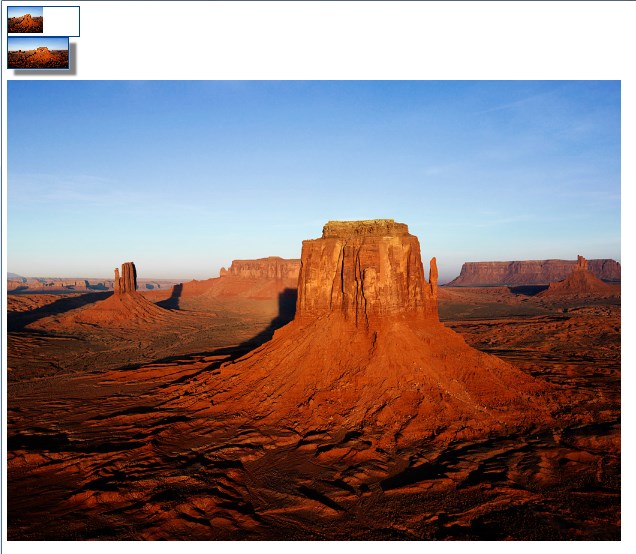
<style>div.div1{width:120px;height:50px;background:url("Desert.jpg")no-repeat;background-size:50%;/*将背景图像缩放成父级元素的50%,主要是背景图片的width是父级元素width的一半*/border:1px solid #00408f;}div.div2{width:100px;height:50px;background: url("Desert.jpg");background-size:100px50px;/*将背景图像设置成宽度为100px,高度为50px*/border:2px solid #00408f;box-shadow:12px10px5px gray;}</style><divclass="div1"></div><divclass="div2"></div><br/><imgsrc="Desert.jpg">

 )
)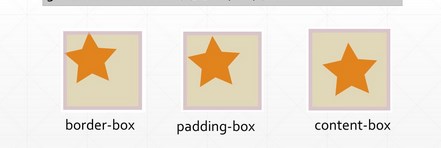
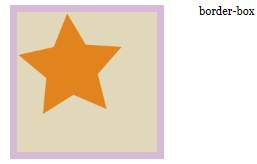
<styletype="text/css">body {margin:0;padding:0;font:100%Georgia,"Times New Roman",Times, serif;background:#3c6b92;}#wrapper {margin:0auto;width:960px;height:400px;background:#fff;padding:50px00200px;}#wrapper div {float: left;margin-right:50px;background:#e1d8b9;padding:25px;}#wrapper #one {width:150px;height:150px;border:10px solid rgba(212,178,220,.8);background:#e1d8b9 url(star_icon_large.png) no-repeat;/*因为背景图片是透明的,所以设置了背景颜色*//*在此试验各种值,比如border-box*/background-clip: content-box;/*background-clip: padding-box;background-clip: border-box;*/}</style></head><body><divid="wrapper"><divid="one"></div><span>content-box</span></div></body>




background的属性和背景图片定位的实例的更多相关文章
- CSS常用背景图片定位方法
CSS背景图片定位其实对于每一位学习前端的同学来说,都已经非常熟悉了.网上铺天盖地的最常见的一种方案就是在父元素中relative,然后子元素absolute.这种方案当然好,不过带来的一个缺点就是会 ...
- CSS背景图片定位
原文:CSS背景图片定位 在网页开发中我们经常需要对图片进行分割(如下图)来使用,而不是分别提供单独的图片来调用,常见的如页面背景,按钮图标等,这样做的好处就是减少请求次数,节省时间和带宽. 对背景图 ...
- CSS 背景图像 背景图片定位
背景图片定位 background-position属性可以给背景图片定位. background-position属性有两个值,第一个值是水平位置,第二个值是垂直位置.这两个值可以使用百分比来表示( ...
- css 背景(background)属性、背景图定位
background属性: Background属性是css中应用比较多,且比较重要的一个属性,它是负责给盒子设置背景图上和背景颜色的,background是一个复合属性,它可以分解成如下几个设置项: ...
- (转)HTML&CSS——background: url() no-repeat 0 -64px;CSS中背景图片定位方法
http://blog.csdn.net/oscar92420aaa/article/details/51304067 CSS中背景图片的定位,困扰我很久了.今天总算搞懂了,一定要记下来. 在CSS中 ...
- HTML&CSS——background: url() no-repeat 0 -64px;CSS中背景图片定位方法
CSS中背景图片的定位,困扰我很久了.今天总算搞懂了,一定要记下来. 在CSS中,背景图片的定位方法有3种: 1)关键字:background-position: top left; 2)像素:bac ...
- 移动端适配之雪碧图(sprite)背景图片定位
为了减少网络请求个数量,提高网站的访问速度,我们一般都会把一些小的图片合并成一张sprite图,然后根据background-position来进行定位.在web端由于是固定的大小与left .top ...
- css背景图片定位练习(二): background-position的百分比
background-position:x y; 百分比定位并不能直观的看出来,需要通过计算. background-position百分比计算公式: (容器宽度—背景图片的宽度)*x%=xpx(容器 ...
- css背景图片定位练习(一)
首先准备一张雪碧图,Like this 背景图片的定位方法有3种,比较常用的两种为 关键字:background-position: top left; (top/bottom/cennter/lef ...
随机推荐
- 对于程序开发者看书(指实在的书而不是PDF)的好处。(个人看法而已)
书是实在的东西.不同PDF.他能带你进入一种学习态度的环境 书上已经所列了知识点.看了.那些知识点就是你的. 第一次看,未必完全理解到里面的东西.说不定过几天,几周,几个月,甚至几年.再看.就有可能看 ...
- 正则指引-字符组demo
class Program { static void Main(string[] args) { string str = "b"; var result1 = Regex.Is ...
- akka cluster sharding source code 学习 (2/5) handle off
一旦 shard coordinator(相当于分布式系统的 zookeeper) 启动,它就会启动一个定时器,每隔一定的时间尝试平衡一下集群中各个节点的负载,平衡的办法是把那些负载较重的 actor ...
- Maxdos 9.3不能引导系统进入Maxdos
一.故障描述 最近安装一台新电脑安装的系统版本是windows7_professional_with_sp1_x64,安装完成后想用Maxdos对系统进行备份.出现错误:Warning: the hi ...
- 原生DOM探究 -- NodeList v.s. HTMLCollection
涉及获取元素的主要API 在获取原生DOM元素的时候,主要涉及这几个DOM API(链接为Living Standard): Node及对应集合NodeList Element(继承Node)及对应集 ...
- centos6.5+jexus5.6.3+mono 3.10实践,让asp.net在linux上飞一会儿
备忘,这是给自己看的,用ubuntu server装mono 3.10老是卡在了编译libgdiplus上面,从来就没成功过,郁闷啊,零零散散搞了好几天,作罢.后来试了OpenSUSE 11很容易搞好 ...
- iOS 7新功能例子
参考https://github.com/shu223/iOS7-Sampler Code examples for the new functions of iOS 7. Contents Dyna ...
- linux_脚本应用
linux下三个有用的 Python 脚本 2010年4月29日 import os, sys def pyc_clean(dir): findcmd = 'find %s -name ...
- 【C语言】zz优先队列的实现
做一个题目时,看见解法中使用了优先队列,http://hawstein.com/posts/3.6.html . 颇为好奇,找资料学习了一下,顺便做个摘要. c++的用法: 转自:http://blo ...
- 资源 | 数十种TensorFlow实现案例汇集:代码+笔记
选自 Github 机器之心编译 参与:吴攀.李亚洲 这是使用 TensorFlow 实现流行的机器学习算法的教程汇集.本汇集的目标是让读者可以轻松通过案例深入 TensorFlow. 这些案例适合那 ...