
springboot整合swagger。完爆前后端调试
web接口开发时在调试阶段最麻烦的就是参数调试,前端需要咨询后端。后端有时候自己也不是很了解。这时候就会造成调试一次接口就需要看一次代码。Swagger帮我们解决对接的麻烦
springboot接入swagger
- springboot 引入swagger只需要引入jar包,然后配置swagger启动。并配合swagger的注解使用就可以实现文档自动生成了。我们先来看看效果
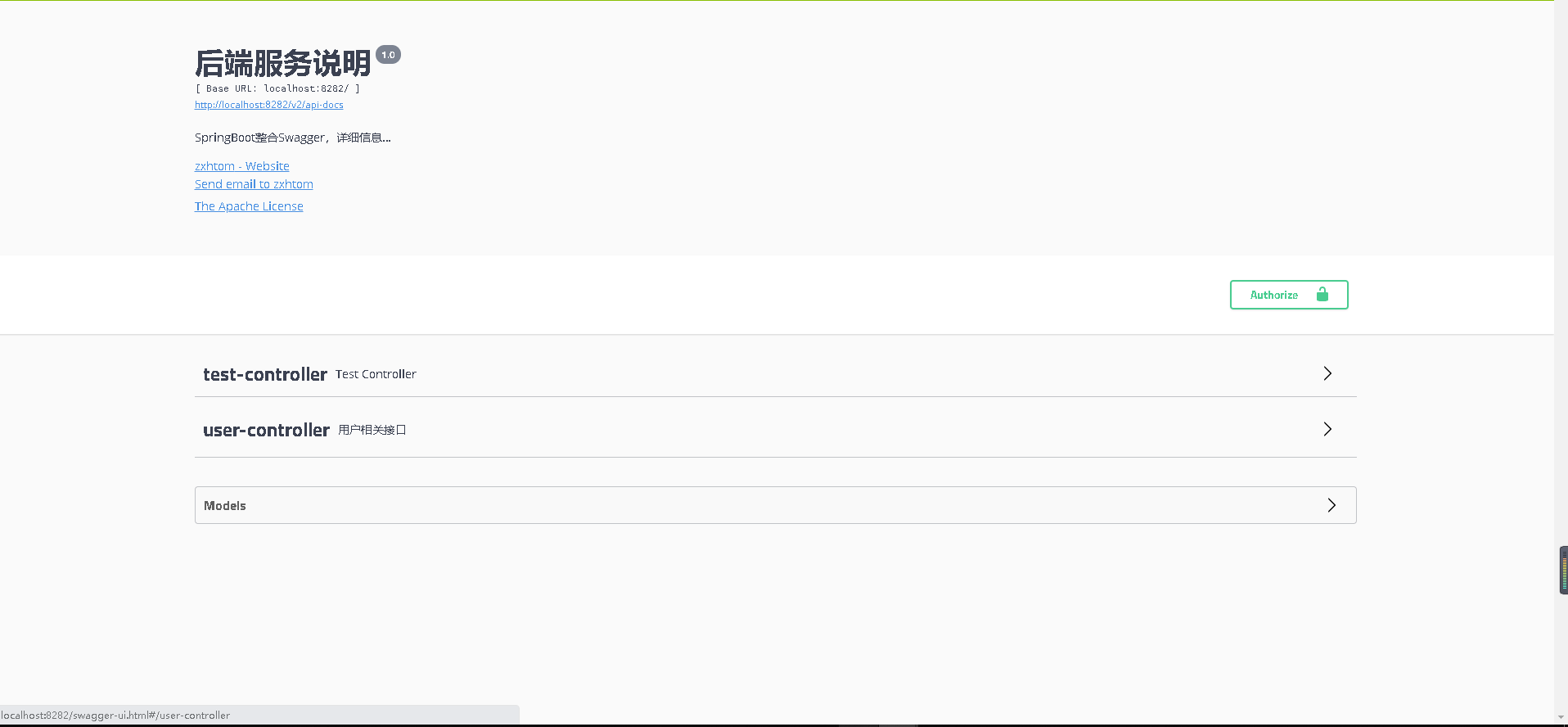
环境准备
代码还是基于spring仓库开发。分支为
feature/0004/springboot-swaggerswagger.version=2.9.2
<dependency>

    <groupId>io.springfox</groupId>

    <artifactId>springfox-swagger2</artifactId>

    <version>${swagger.version}</version>

</dependency>

<dependency>

    <groupId>io.springfox</groupId>

    <artifactId>springfox-swagger-ui</artifactId>

    <version>${swagger.version}</version>

</dependency>
配置
@Configuration

@EnableSwagger2

public class SwaggerConfig2 {

    @Bean

    public Docket createRestApi() {

        // 添加请求参数,我们这里把token作为请求头部参数传入后端

        ParameterBuilder parameterBuilder = new ParameterBuilder();

        List<Parameter> parameters = new ArrayList<Parameter>();

        parameterBuilder.name("token").description("令牌")

                .modelRef(new ModelRef("string")).parameterType("header").required(false).build();

        parameters.add(parameterBuilder.build());

        return new Docket(DocumentationType.SWAGGER_2)

                .pathMapping("/")

                .select()

                .apis(RequestHandlerSelectors.basePackage("com"))

                .paths(Predicates.not(PathSelectors.regex("/error.*")))

                .build().apiInfo(new ApiInfoBuilder()

                        .title("后端服务说明")

                        .description("SpringBoot整合Swagger,详细信息......")

                        .version("1.0")

                        .contact(new Contact("zxhtom", "zxhtom.blog.csdn.net", "870775401@qq.com"))

                        .license("The Apache License")

                        .licenseUrl("http://zxhtom.gitee.io")

                        .build())

                .useDefaultResponseMessages(false)

                .securitySchemes(securitySchemes())

                .securityContexts(securityContexts())

                .globalOperationParameters(parameters);

    }

    private List<ApiKey> securitySchemes() {

        List<ApiKey> apiKeyList = new ArrayList();

        apiKeyList.add(new ApiKey("Authorization", "token", "header"));

        return apiKeyList;

    }

    private List<SecurityContext> securityContexts() {

        List<SecurityContext> securityContexts = new ArrayList<>();

        securityContexts.add(

                SecurityContext.builder()

                        .securityReferences(defaultAuth())

                        .forPaths(PathSelectors.regex("^(?!auth).*$"))

                        .build());

        return securityContexts;

    }

    List<SecurityReference> defaultAuth() {

        AuthorizationScope authorizationScope = new AuthorizationScope("global", "accessEverything");

        AuthorizationScope[] authorizationScopes = new AuthorizationScope[1];

        authorizationScopes[0] = authorizationScope;

        List<SecurityReference> securityReferences = new ArrayList<>();

        securityReferences.add(new SecurityReference("Authorization", authorizationScopes));

        return securityReferences;

    }

}
添加请求头
securitySchemes(securitySchemes())

securityContexts(securityContexts())
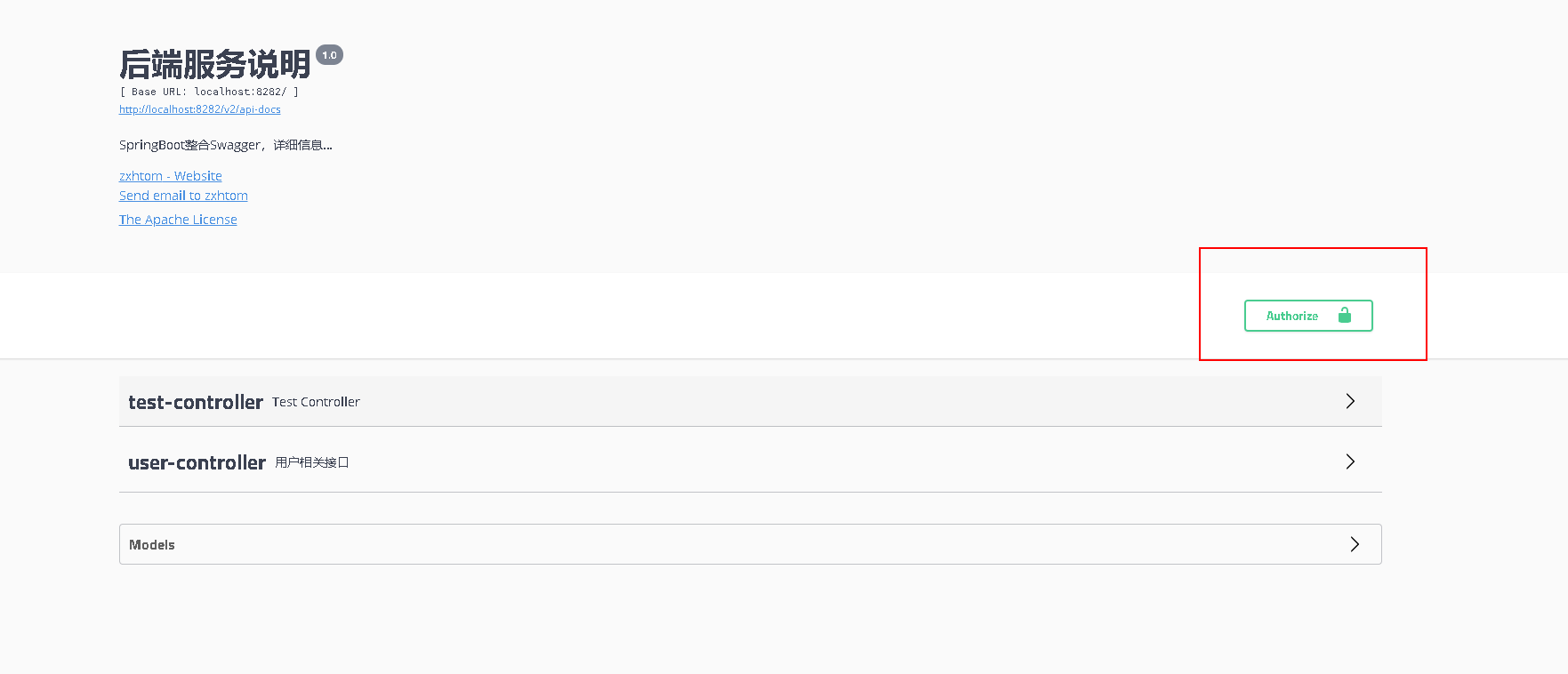
- 在上面的两端配置就是加入全局的token设置的。在swagger-ui界面显示是右上角有一把锁的标志


接口使用

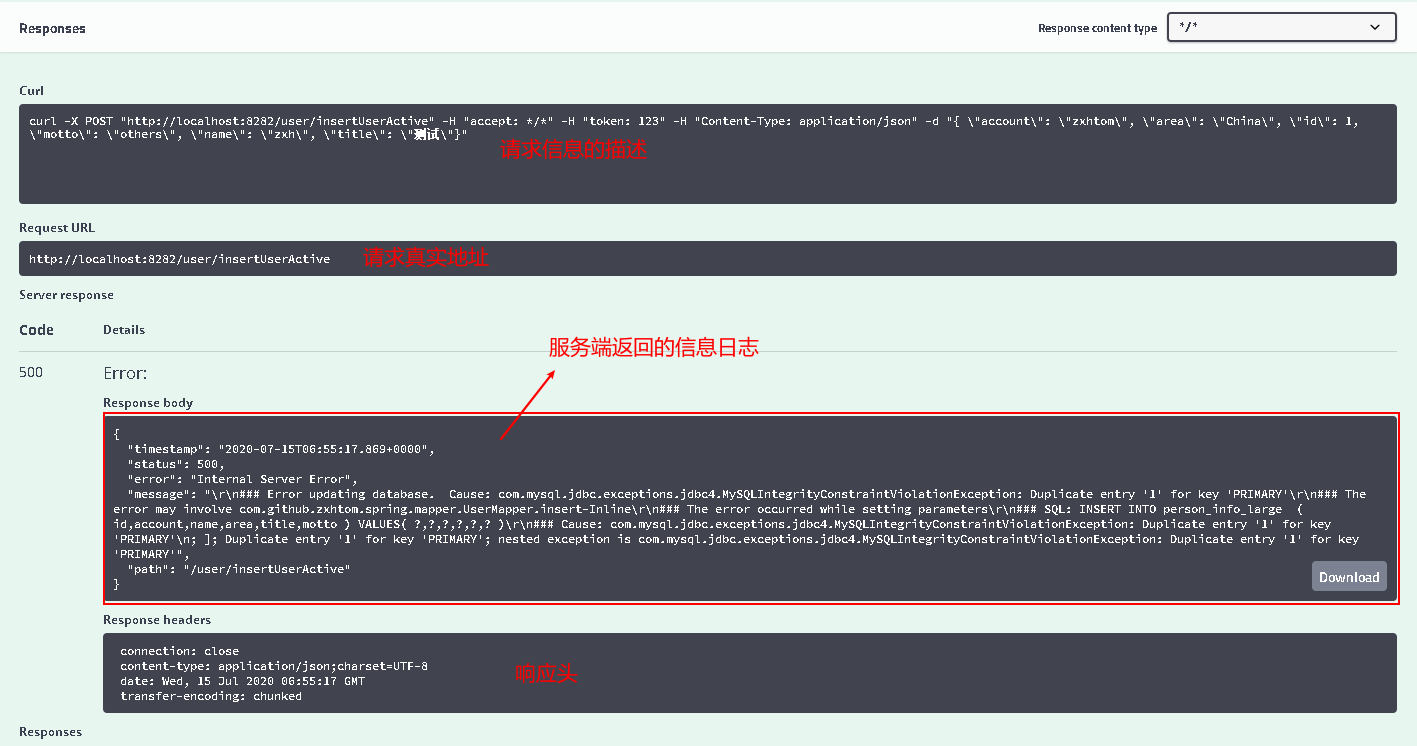
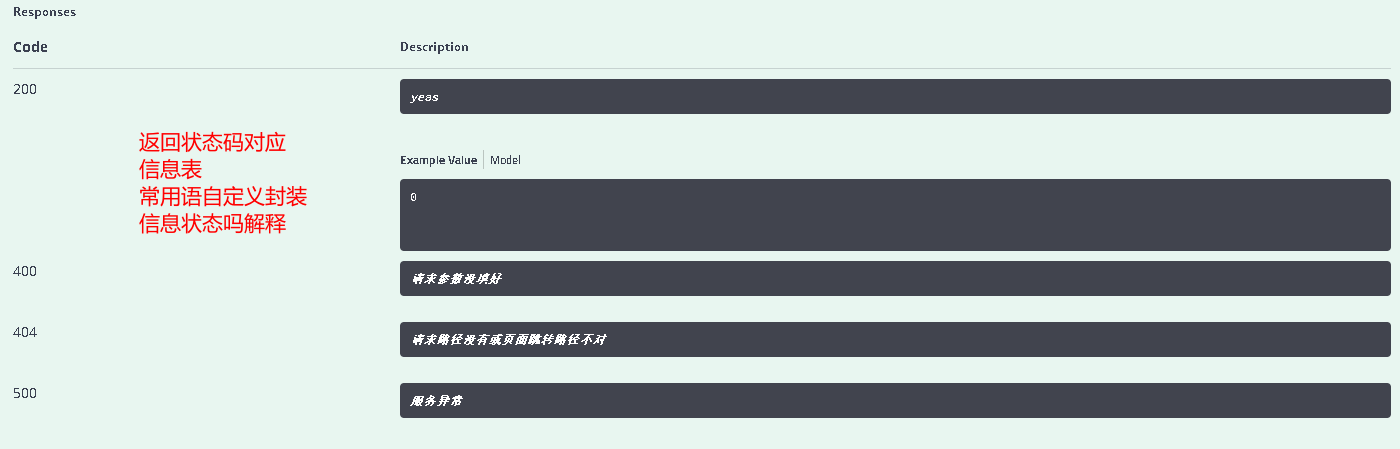
注解使用
| 注解 | 功能 |
|---|---|
| @Api() | 用在请求的类上。表示该类的请求类用于文档标注 |
| @ApiOperation() | 用于方法上。对一个http请求的具体说明,出参入参说明 |
| @ApiModel() | 对请求实体的一个说明 |
| @ApiModelProperty | 对实体内属性说明,也可以设置默认值 |
| @ApiImpliciParams() | 用于请求的方法上,里面是ApiImpliciParam数组 |
| @ApiImpliciParam() | 表示单独请求参数。可以设置form表单中参数单独设置 |
| @ApiParam() | 对请求方法中参数的单独设置 类似ApiImpliciParam |
| @ApiResponses() | 对请求方法上根据响应码设置说明 |
| @ApiResponse | 单个响应码说明 |
| @ApiIgnore() | 对该请求的忽略 |
- 具体使用可以查看源码。源码上面有给出。
自定义swaggerUI
- 这里需要首先介绍下spring资源的加载顺序。
src/main/resources/META-INF/resources
src/main/resources/static
src/main/resources/public
- 这三个优先级依次降低。欢句话说spring首先会在src/main/resources/META-INF/resources下寻找资源。所以这也是我们自定义swaggerUI的策略。我们只需要在META-INF下重新绘画swaggerUI的页面就行了。这里只是提供思路。不具体实现(懒)
# 加入战队
微信公众号

springboot整合swagger。完爆前后端调试的更多相关文章
- SpringBoot 整合swagger
springBoot 整合swagger 1.pom.xml 配置 <dependency> <groupId>io.springfox</groupId> < ...
- SpringBoot整合Swagger和Actuator
前言 本篇文章主要介绍的是SpringBoot整合Swagger(API文档生成框架)和SpringBoot整合Actuator(项目监控)使用教程. SpringBoot整合Swagger 说明:如 ...
- 【SpringBoot | Swagger】SpringBoot整合Swagger
SpringBoot整合Swagger 1. 什么是Swagger Swagger 是一个规范和完整的框架,用于生成.描述.调用和可视化 RESTful 风格的 Web 服务.简单说就是项目跑起来了, ...
- SpringBoot整合Swagger实战
源码地址:https://github.com/laolunsi/spring-boot-examples 目前SpringBoot常被用于开发Java Web应用,特别是前后端分离项目.为方便前后端 ...
- SpringBoot整合Swagger测试api构建
@Author:SimpleWu 什么是Swagger? Swagger是什么:THE WORLD'S MOST POPULAR API TOOLING 根据官网的介绍: Swagger Inspec ...
- springboot入门系列(二):SpringBoot整合Swagger
上一篇<简单搭建SpringBoot项目>讲了简单的搭建SpringBoot 项目,而 SpringBoot 和 Swagger-ui 搭配在持续交付的前后端开发中意义重大,Swagger ...
- SpringBoot整合swagger
Swagger使用 Swagger有什么用? swagger是一个流行的API开发框架,这个框架以“开放API声明”(OpenAPI Specification,OAS)为基础, 对整个API的开发周 ...
- SpringBoot整合Swagger初探
当下的Web项目大都采用前后端分离+分布式微服务的架构.前后端分离式的开发中,前端开发人员要与后端开发人员协商通信接口,约定接口规范.因此对于开发人员来说能够维持一份及时更新且完整全面的API文档会大 ...
- SpringBoot整合WebSocket实现前后端互推消息
小编写这篇文章是为了记录实现WebSocket的过程,受不了啰嗦的同学可以直接看代码. 前段时间做项目时设计了一个广播的场景,具体业务不再赘述,最终要实现的效果就是平台接收到的信息实时发布给所有的用户 ...
随机推荐
- linux下操作memcache的操作命令
1.连接memcache linux下一般使用telnet连接memcache服务 [root@localhost ~]# telnet 127.0.0.1 11266 Trying 127.0.0. ...
- cb18a_c++_修改string对象的方法
cb18a_c++_修改string对象的方法s.insert(p,t)s.insert(p, 'A'); //迭代器前插入As.insert<p,n,t)s.insert(p, 3, 'B') ...
- vulstack红队评估(四)
一.环境搭建: ①根据作者公开的靶机信息整理 虚拟机密码: ubuntu: ubuntu:ubuntu win7: douser:Dotest123 Win2008 DC: administr ...
- 前端笔记:div只显示两行内容,多出内容以...显示
代码: text-overflow: -o-ellipsis-lastline;overflow: hidden;text-overflow: ellipsis;display: -webkit-bo ...
- skywalking7 源码解析 (3) :agent启动服务分析以及性能影响
skywalking必看的文章,转载自https://blog.csdn.net/u010928589/article/details/106608864/
- IWAB0398E Error in generating WSDL from Java: java.lang.ClassNotFoundException
今天想用Eclipse创建WebService,报错信息 IWAB0398E Error in generating WSDL from Java: java.lang.ClassNotFoundEx ...
- java中“”==“” equals hashcode的关系
ava中的数据类型,可分为两类: 1.基本数据类型,也称原始数据类型.byte,short,char,int,long,float,double,boolean 他们之间的比较,应用双等号(==),比 ...
- Eclipse配置maven环境1
一.什么是maven? Maven是一个项目管理工具,它包含了一个项目对象模型 (Project Object Model),一组标准集合,一个项目生命周期(Project Lifecycle),一个 ...
- 理解与使用Javascript中的回调函数
在Javascript中,函数是第一类对象,这意味着函数可以像对象一样按照第一类管理被使用.既然函数实际上是对象:它们能被“存储”在变量中,能作为函数参数被传递,能在函数中被创建,能从函数中返回. 因 ...
- Redundant Paths 分离的路径【边双连通分量】
Redundant Paths 分离的路径 题目描述 In order to get from one of the F (1 <= F <= 5,000) grazing fields ...