
istio:在vs中实现ab测试和路径切割
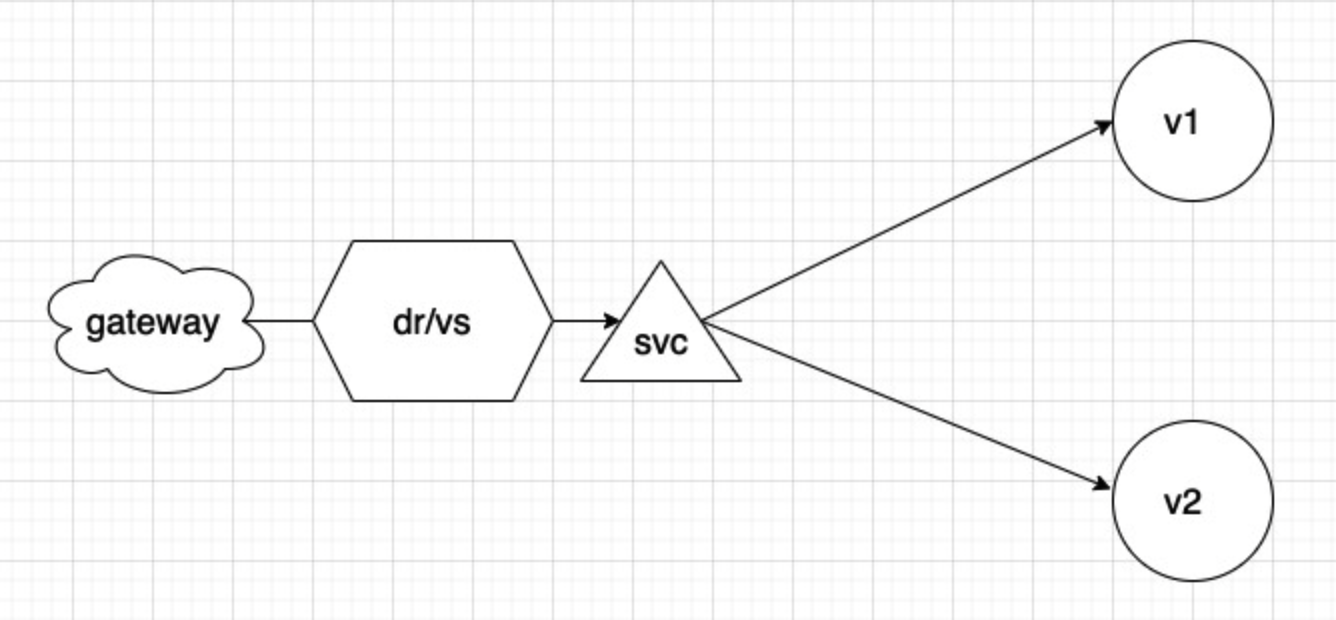
- 此篇内容
主要目的是总结vs中的match的有关规则和在istio中如何实现路径切割(当下版本1.8.2)
实验demo
main.go
package main

import (

	"github.com/gin-gonic/gin"

	"net/http"

)

func main() {

	//1.创建路由

	r := gin.Default()

	//2.绑定路由规则,执行的函数

	r.GET("/zisefeizhu", func(context *gin.Context) {

		context.String(http.StatusOK, "Hello Zisefeizhu V1!")

// v1版本为context.String(http.StatusOK, "Hello Zisefeizhu V1!")

// v2版本为context.String(http.StatusOK, "Hello Zisefeizhu V2!")

	})

	//3.监听端口,默认8080

	r.Run(":8080")

}
Dockerfile
FROM registry.cn-shenzhen.aliyuncs.com/realibox-baseimage/golang:1.15.2-alpine as builder

WORKDIR /app

RUN go env -w GO111MODULE=on \

    && go env -w GOPROXY=https://goproxy.cn,direct

COPY go.mod go.sum ./

RUN go mod download

COPY . .

RUN CGO_ENABLED=0 go build -ldflags "-s -w"  -o server main.go

FROM alpine:latest

WORKDIR /app

COPY --from=builder /app/server /app

CMD ["./server"]
deployment.yaml
- v1 v2版本的不同之处在于version
apiVersion: apps/v1

kind: Deployment

metadata:

  name: goproject

  namespace: zisefeizhu

  labels:

    app: goproject

    version: v1

spec:

  replicas: 1

  selector:

    matchLabels:

      app: goproject

      version: v1

  template:

    metadata:

      labels:

        app: goproject

        version: v1

    spec:

      containers:

      - image: registry.cn-shenzhen.aliyuncs.com/zisefeizhu/goproject:goproject-zisefeizhu-5425

        imagePullPolicy: IfNotPresent

        livenessProbe:

          failureThreshold: 3

          initialDelaySeconds: 5

          periodSeconds: 30

          successThreshold: 1

          tcpSocket:

            port: 8080

          timeoutSeconds: 2

        name: goproject

        ports:

        - containerPort: 8080

          protocol: TCP

        readinessProbe:

          failureThreshold: 3

          initialDelaySeconds: 10

          periodSeconds: 30

          successThreshold: 1

          tcpSocket:

            port: 8080

      imagePullSecrets:

      - name: business-secret
svc.yaml
- svc中没有version标签
apiVersion: v1

kind: Service

metadata:

  labels:

    app: goproject

  name: goproject

  namespace: zisefeizhu

spec:

  ports:

  - name: http

    port: 8080

    protocol: TCP

    targetPort: 8080

  selector:

    app: goproject

  type: ClusterIP
istio配置清单
gateway.yaml
- istio-system 名称空间下
- 使用cert-manager 自动生成、续签证书
apiVersion: networking.istio.io/v1beta1

kind: Gateway

metadata:

  name: www-zisefeizhu-gateway

  namespace: istio-system

spec:

  selector:

    istio: ingressgateway

  servers:

  - hosts:

    - www.zisefeizhu.com

    port:

      name: http

      number: 80

      protocol: HTTP

    tls:

      httpsRedirect: true  # 301跳转https

  - hosts:

    - www.zisefeizhu.com

    port:

      name: https

      number: 443

      protocol: HTTPS

    tls:

      credentialName: www-zisefeizhu-com  # cert-manager生成的证书的certificate namespace

      mode: SIMPLE
dr.yaml
- 定义子集
kind: DestinationRule

apiVersion: networking.istio.io/v1alpha3

metadata:

  name: goproject

  namespace: zisefeizhu

spec:

  host: goproject

  subsets:

    - labels:

        version: v12.3

      name: v1

    - labels:

        version: v12.4

      name: v2
vr.yaml
- 重点来了
kind: VirtualService

apiVersion: networking.istio.io/v1alpha3

metadata:

  name: goproject

  namespace: zisefeizhu

spec:

  hosts:

    - www.zisefeizhu.com

  gateways:

    - istio-system/www-zisefeizhu-gateway #跨namespace

  http:

    - match:                          #ab test 条件匹配块  这里设置的测试条件为user-agent字段,设置了两个客户地址

        - headers:                    #目前istio对于多条件的匹配需要写多个headers

            user-agent:

              exact: Mozilla/5.0

          uri:

            prefix: /api/            #访问www.zisefeizhu.com/api/zisefeizhu 跳转到www.zisefeizhu.com/zisefeizhu

        - headers:                   #istio 没有类似kong的 ``konghq.com/strip-path`` 注解

            user-agent:

              exact: Mozilla/6.0

          uri:

            prefix: /api/

      rewrite:                       #此处需要注意:https://github.com/istio/istio/issues/8076

        uri: /

      route:

        - destination:

            host: goproject

            subset: v2              #匹配到进入v2版本

    - match:                        #此匹配块为``切割``路由路径匹配块掩饰

        - uri:

            prefix: /api/

      rewrite:

        uri: /

      route:

        - destination:

            host: goproject

            subset: v1

    - route:                        #默认路由

        - destination:

            host: goproject

            subset: v1
验证
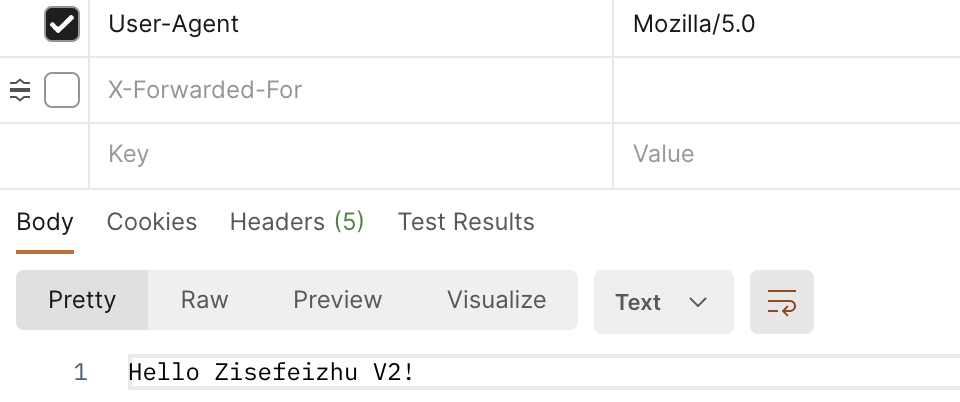
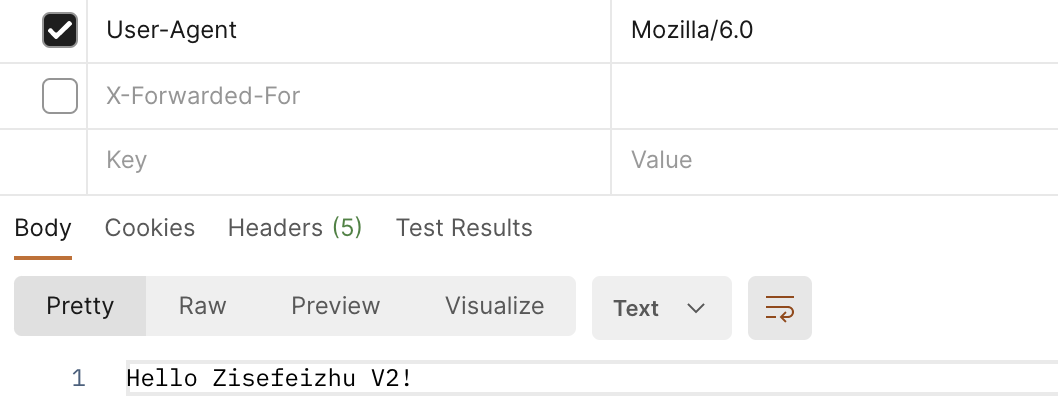
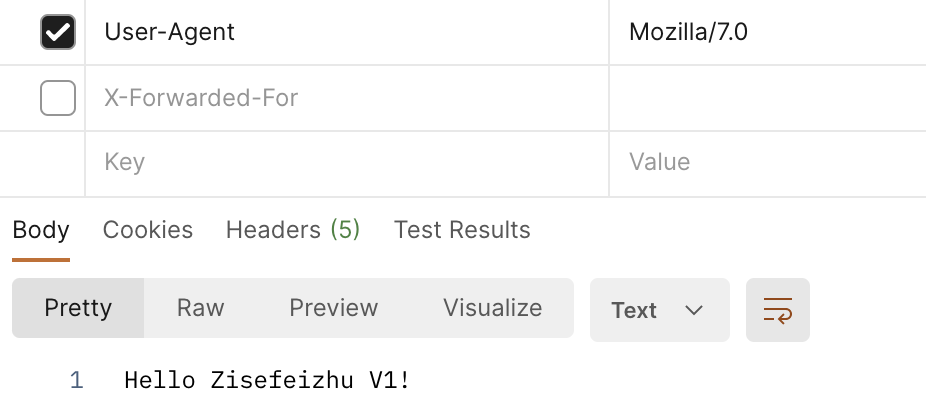
- 工具为:postman
- 访问地址http:www.zisefeizhu.com/api/zisefeizhu
user-agent: Mozilla/5.0
user-agent: Mozilla/6.0
user-agent: Mozilla/7.0
!
总结
此篇需要注意点:
1、匹配块 match
匹配要激活的规则要满足的条件。单个匹配块内的所有条件都具有AND语义,而匹配块列表具有OR语义。如果任何一个匹配块成功,则匹配该规则。
2、标头操作 headers
目前对多条件的匹配似乎还不能写在一个headers中需要分开写
3、路由切割
istio目前对于路由切割似乎没有类似kong 和nginxde的方法
ps:kong nginx:底层一样
使用rewrite重写可以做到
istio:在vs中实现ab测试和路径切割的更多相关文章
- PHP使用Apache中的ab测试网站的压力性能及mpm介绍
打开Apache安装的bin目录 shift+鼠标右键 复制粘贴以下代码->回车 ab -n 1000 -c 100 http://localhost/test.php 上例表示总共访问http ...
- PHP使用Apache中的ab测试网站的压力性能
打开Apache服务器的安装路径(我用的是 WampServer),在bin目录中有一个ab.exe的可执行程序,它就是要介绍的压力测试工具. 在Windows系统的命令行下,进入ab.exe程序所在 ...
- 算法效果AB测试中的PV-UV不对称性
(转载请注明原创于潘多拉盒子) 算法效果的AB测试,是指在相同的应用场景下,对比不同算法的效果.通常的做法是,按照PV或UV随机分配流量到算法上,计算算法的CTR或转化率进行对比.为了表述简单,我们假 ...
- PHP使用Apache中的ab(ApacheBench)测试网站的并发量
AB(ApacheBench) 是 Apache 自带的超文本传输协议 (HTTP) 性能测试工具. 其设计意图是描绘当前所安装的 Apache 的执行性能, 主要是显示 Apache 每秒可以处理多 ...
- 【转载】AB测试结果分析
AB测试,200个请求,20个并发.这样的测试强度,CPU占了70-80%,w3p占用了70多M内存,本想多测几次,看看它的内存会不会涨上去,没 有测试机器没办法,开发机要干活.我估计CPU就有问题了 ...
- Apache 的ab测试
<!-- 博主所有文章仅是作为自己的笔记 如有不足 请见谅--> Apache的ab测试 和 ab测试 不是一个东西(百度 ab测试可以了解) 网站性能压力测试是服务器网站性能调优过程 ...
- ab测试出现error: connection reset by peer的解决方案
我们在使用一些开源程序之前,可能会使用ab工具在服务器或者本地进行一次性能评估,但是很多时候却总是会以失败告终,因为,服务器会拒绝你的ab工具发出的http请求, 出现 error: connecti ...
- Apache ab测试工具使用方法(无参、get传参、post传参)
Ab测试工具是apache自带的测试工具,具有简单易上手的特性,下面我总结一下我的使用方法,首先去官方下载apache程序包,我下的最新版本apache2.4.23,下载地址http://httpd. ...
- 多臂机测试, AB测试
bandit 强盗,土匪:恶棍:敲诈者 ['bændɪt] 多臂机 multi-armed bandit MAB 简写. one-arm bandit tiger ji 是一种自动AB测试的方 ...
随机推荐
- CSS margin collapsing All In One
CSS margin collapsing All In One margin collapsing margin 塌陷 / margin 合并 会出现 margin collapsing 的 3 种 ...
- Vue Learning Paths
Vue Learning Paths Vue Expert refs https://vueschool.io/articles/vuejs-tutorials/exciting-new-featur ...
- Chrome & console.log & color & js
Chrome & console.log & color & js console.log & color // OK log(`%cchat_list =\n%c${ ...
- Azure Functions(二)集成 Azure Blob Storage 存储文件
一,引言 上一篇文章有介绍到什么是 SeverLess ,ServerLess 都有哪些特点,以及多云环境下 ServerLess 都有哪些解决方案.在这众多解决方案中就包括 Function App ...
- lms微服务框架介绍
lms 框架简介 Lms是一个旨在通过.net平台快速构建微服务开发的框架.具有稳定.安全.高性能.易扩展.使用方便的特点.lms内部通过dotnetty实现高性能的rpc通信,使用zookeeper ...
- Android 开发学习进程0.28 腾讯TBS接入和相关问题
TBS 的接入和使用 TBS 的接入 腾讯TBS是X5内核的升级版,可以当作webview 来打开 网页,可以以用来打开docx doc pdf 等文件,这里主要使用的是文件功能. 依赖接入 api ...
- SpringMVC异步处理的 5 种方式
作者:丁仪 来源:https://chengxuzhixin.com/blog/post/SpringMVC-yi-bu-chu-li-de-5-zhong-fang-shi.html 前段时间研究了 ...
- if...else和switch...case
一.位运算 class Demo01 { public static void main(String[] args) { int a = 5; int b = 3; /* 0000 0101 |00 ...
- 破解 Android 上 airpods 连接软件的pro版
0x00 起因 起因是在Android上用了一段时间的AndPods觉得不太好用之后,换到了另一个Play商店推荐的App.动画.连接和电量提示都用的很满意,就是每次连接的弹窗和APP里面都有广告,就 ...
- Hi3559AV100的VI细节处理说明
因为项目后期涉及到MPP平台下的VI接口,现把有关视频输入VI模块的实现细节总结,也方便大家进一步了解. 1.整体概述 视频输入(VI)模块实现的功能:通过 MIPI Rx(含 MIPI 接口.LVD ...