
Java各版本新增特性, Since Java 8
Java各版本新增特性, Since Java 8
作者:Grey
原文地址:
Java 8
Reactor of Java 这一章来自于《Spring in Action, 5th》 的笔记,因为这本书讲Reactor of Java讲的太好了,所以作为笔记摘抄了下来。
Reactor of Java
In an imperative programming model, the code would look something like this:
String name = "Craig";

String capitalName = name.toUpperCase();

String greeting = "Hello, " + capitalName + "!";

System.out.println(greeting);
In the imperative model, each line of code performs a step, one right after the other, and definitely in the same thread. Each step blocks the executing thread from moving to the next step until complete. In contrast, functional, reactive code could achieve the same thing like this:
Mono.just("Craig")

        .map(n -> n.toUpperCase())

        .map(n -> "Hello, " + n + " !")

        .subscribe(System.out::println);
The Mono in the example is one of Reactor’s two core types. Flux is the other. Both are implementations of Reactive Streams’ Publisher.
A Flux represents** a pipeline of zero, one, or many (potentially infinite) data items**.
A Mono is a specialized reactive type that’s optimized for when the dataset is known to have no more than one data item.
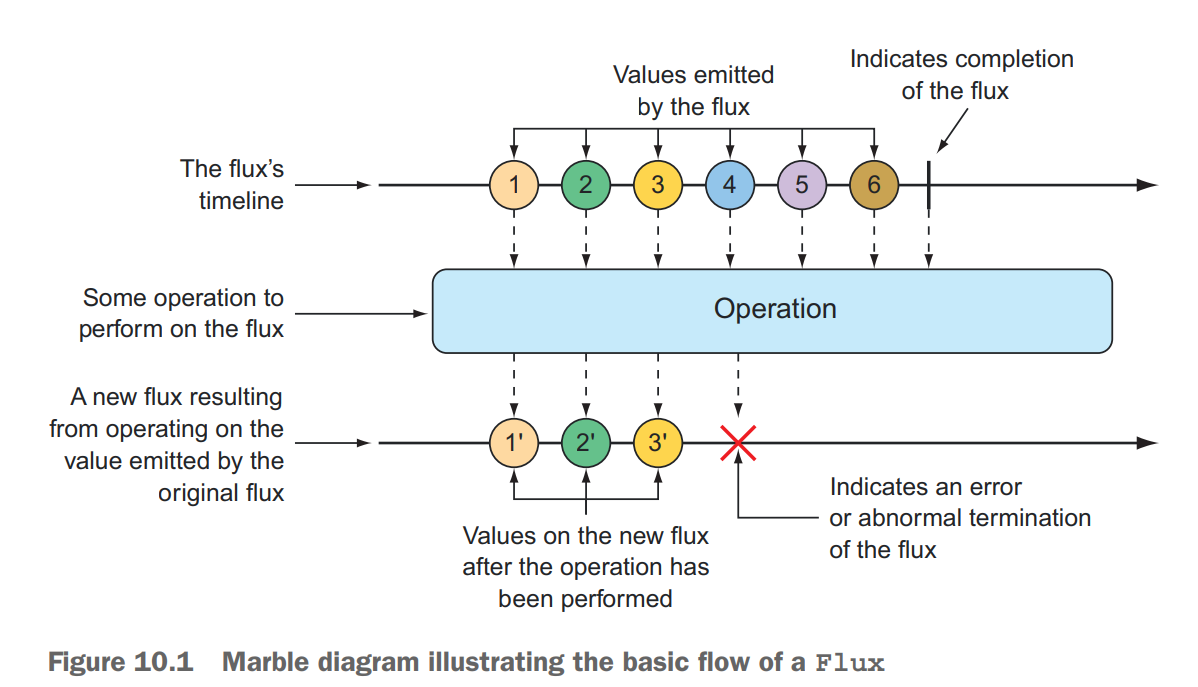
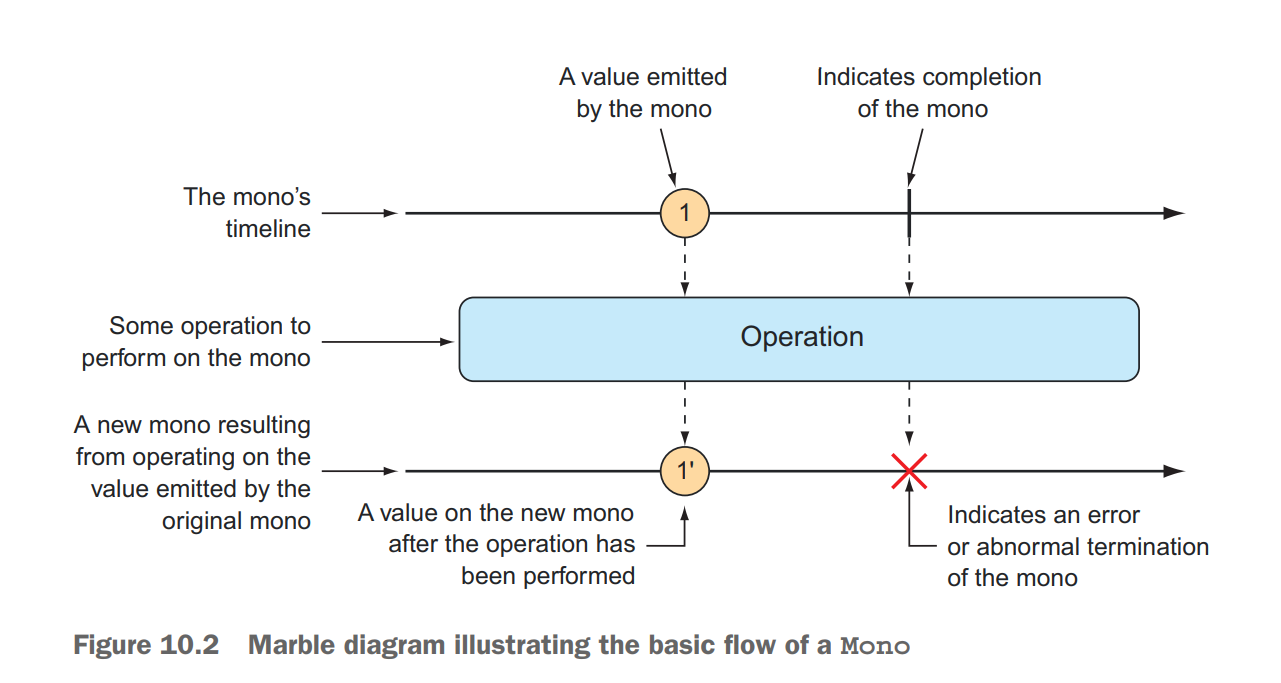
CREATING FROM OBJECTS
Flux<String> fruitFlux = Flux

        .just("Apple", "Orange", "Grape", "Banana", "Strawberry");

        fruitFlux.subscribe(f -> System.out.println("Hello " + f));

// for test

        StepVerifier.create(fruitFlux)

        .expectNext("Apple")

        .expectNext("Orange")

        .expectNext("Grape")

        .expectNext("Banana")

        .expectNext("Strawberry")

        .verifyComplete();
CREATING FROM COLLECTIONS
Stream<String> fruitStream = Stream.of("Apple", "Orange", "Grape", "Banana", "Strawberry");

        Flux<String> fruitFlux2 = Flux.fromStream(fruitStream);

        fruitFlux2.subscribe(s -> System.out.println(s));

        List<String> fruitList = new ArrayList<>();

        fruitList.add("Apple");

        fruitList.add("Orange");

        fruitList.add("Grape");

        fruitList.add("Banana");

        fruitList.add("Strawberry");

        Flux<String> fruitFlux3 = Flux.fromIterable(fruitList);

        fruitFlux3.subscribe(s -> System.out.println(s));

        String[] fruits = new String[] {"Apple", "Orange", "Grape", "Banana", "Strawberry" };

        Flux<String> fruitFlux = Flux.fromArray(fruits);

        fruitFlux.subscribe(s -> System.out.println(s));

        StepVerifier.create(fruitFlux)

        .expectNext("Apple")

        .expectNext("Orange")

        .expectNext("Grape")

        .expectNext("Banana")

        .expectNext("Strawberry")

        .verifyComplete();
GENERATING FLUX DATA
Flux<Integer> intervalFlux =

Flux.range(1, 5);

intervalFlux.subscribe(integer -> System.out.println(integer));

StepVerifier.create(intervalFlux)

.expectNext(1)

.expectNext(2)

.expectNext(3)

.expectNext(4)

.expectNext(5)

.verifyComplete();

Flux<Long> intervalFlux =

Flux.interval(Duration.ofSeconds(1))

.take(5);

intervalFlux.subscribe(i -> System.out.println(i));

StepVerifier.create(intervalFlux)

.expectNext(0L)

.expectNext(1L)

.expectNext(2L)

.expectNext(3L)

.expectNext(4L)

.verifyComplete();
MERGING REACTIVE TYPES
Flux<String> characterFlux = Flux

.just("Garfield", "Kojak", "Barbossa")

.delayElements(Duration.ofMillis(500));

Flux<String> foodFlux = Flux

.just("Lasagna", "Lollipops", "Apples")

.delaySubscription(Duration.ofMillis(250))

.delayElements(Duration.ofMillis(500));

Flux<String> mergedFlux = characterFlux.mergeWith(foodFlux);

mergedFlux.subscribe(s -> System.out.println(s));

StepVerifier.create(mergedFlux)

.expectNext("Garfield")

.expectNext("Lasagna")

.expectNext("Kojak")

.expectNext("Lollipops")

.expectNext("Barbossa")

.expectNext("Apples")

.verifyComplete();

Flux<String> characterFlux = Flux

.just("Garfield", "Kojak", "Barbossa");

Flux<String> foodFlux = Flux

.just("Lasagna", "Lollipops", "Apples");

Flux<Tuple2<String, String>> zippedFlux =

Flux.zip(characterFlux, foodFlux);

zippedFlux.subscribe(x -> System.out.println(x));

StepVerifier.create(zippedFlux)

.expectNextMatches(p ->

p.getT1().equals("Garfield") &&

p.getT2().equals("Lasagna"))

.expectNextMatches(p ->

p.getT1().equals("Kojak") &&

p.getT2().equals("Lollipops"))

.expectNextMatches(p ->

p.getT1().equals("Barbossa") &&

p.getT2().equals("Apples"))

.verifyComplete();

Flux<String> characterFlux = Flux

.just("Garfield", "Kojak", "Barbossa");

Flux<String> foodFlux = Flux

.just("Lasagna", "Lollipops", "Apples");

Flux<String> zippedFlux =

Flux.zip(characterFlux, foodFlux, (c, f) -> c + " eats " + f);

zippedFlux.subscribe(x -> System.out.println(x));

StepVerifier.create(zippedFlux)

.expectNext("Garfield eats Lasagna")

.expectNext("Kojak eats Lollipops")

.expectNext("Barbossa eats Apples")

.verifyComplete();
SELECTING THE FIRST REACTIVE TYPE TO PUBLISH
Flux<String> slowFlux = Flux.just("tortoise", "snail", "sloth")

.delaySubscription(Duration.ofMillis(100));

Flux<String> fastFlux = Flux.just("hare", "cheetah", "squirrel");

Flux<String> firstFlux = Flux.first(slowFlux, fastFlux);

StepVerifier.create(firstFlux)

.expectNext("hare")

.expectNext("cheetah")

.expectNext("squirrel")

.verifyComplete();
FILTERING DATA FROM REACTIVE TYPES
Flux<String> skipFlux = Flux.just(

"one", "two", "skip a few", "ninety nine", "one hundred")

.skip(3);

StepVerifier.create(skipFlux)

.expectNext("ninety nine", "one hundred")

.verifyComplete();

Flux<String> skipFlux = Flux.just(

"one", "two", "skip a few", "ninety nine", "one hundred")

.delayElements(Duration.ofSeconds(1))

.skip(Duration.ofSeconds(4));

StepVerifier.create(skipFlux)

.expectNext("ninety nine", "one hundred")

.verifyComplete();

Flux<String> nationalParkFlux = Flux.just(

"Yellowstone", "Yosemite", "Grand Canyon",

"Zion", "Grand Teton")

.take(3);

StepVerifier.create(nationalParkFlux)

.expectNext("Yellowstone", "Yosemite", "Grand Canyon")

.verifyComplete();

Flux<String> nationalParkFlux = Flux.just(

"Yellowstone", "Yosemite", "Grand Canyon",

"Zion", "Grand Teton")

.delayElements(Duration.ofSeconds(1))

.take(Duration.ofMillis(3500));

StepVerifier.create(nationalParkFlux)

.expectNext("Yellowstone", "Yosemite", "Grand Canyon")

.verifyComplete();

Flux<String> nationalParkFlux = Flux.just(

"Yellowstone", "Yosemite", "Grand Canyon",

"Zion", "Grand Teton")

.filter(np -> !np.contains(" "));

StepVerifier.create(nationalParkFlux)

.expectNext("Yellowstone", "Yosemite", "Zion")

.verifyComplete();

Flux<String> animalFlux = Flux.just(

"dog", "cat", "bird", "dog", "bird", "anteater")

.distinct();

StepVerifier.create(animalFlux)

.expectNext("dog", "cat", "bird", "anteater")

.verifyComplete();
MAPPING REACTIVE DATA
Flux<Player> playerFlux = Flux

.just("Michael Jordan", "Scottie Pippen", "Steve Kerr")

.map(n -> {

String[] split = n.split("\\s");

return new Player(split[0], split[1]);

});

StepVerifier.create(playerFlux)

.expectNext(new Player("Michael", "Jordan"))

.expectNext(new Player("Scottie", "Pippen"))

.expectNext(new Player("Steve", "Kerr"))

.verifyComplete();

Flux<Player> playerFlux = Flux

.just("Michael Jordan", "Scottie Pippen", "Steve Kerr")

.flatMap(n -> Mono.just(n)

.map(p -> {

String[] split = p.split("\\s");

return new Player(split[0], split[1]);

})

.subscribeOn(Schedulers.parallel())

);

List<Player> playerList = Arrays.asList(

new Player("Michael", "Jordan"),

new Player("Scottie", "Pippen"),

new Player("Steve", "Kerr"));

StepVerifier.create(playerFlux)

.expectNextMatches(p -> playerList.contains(p))

.expectNextMatches(p -> playerList.contains(p))

.expectNextMatches(p -> playerList.contains(p))

.verifyComplete();
BUFFERING DATA ON A REACTIVE STREAM
Flux<String> fruitFlux = Flux.just(

"apple", "orange", "banana", "kiwi", "strawberry");

Flux<List<String>> bufferedFlux = fruitFlux.buffer(3);

StepVerifier

.create(bufferedFlux)

.expectNext(Arrays.asList("apple", "orange", "banana"))

.expectNext(Arrays.asList("kiwi", "strawberry"))

.verifyComplete();

Buffering values from a reactive Flux into non-reactive List collections seems counterproductive. But when you combine buffer() with flatMap(), it enables each of the List collections to be processed in parallel:

Flux.just(

"apple", "orange", "banana", "kiwi", "strawberry")

.buffer(3)

.flatMap(x ->

Flux.fromIterable(x)

.map(y -> y.toUpperCase())

.subscribeOn(Schedulers.parallel())

.log()

).subscribe();

Flux<String> fruitFlux = Flux.just(

"apple", "orange", "banana", "kiwi", "strawberry");

Mono<List<String>> fruitListMono = fruitFlux.collectList();

StepVerifier

.create(fruitListMono)

.expectNext(Arrays.asList(

"apple", "orange", "banana", "kiwi", "strawberry"))

.verifyComplete();

Flux<String> animalFlux = Flux.just(

"aardvark", "elephant", "koala", "eagle", "kangaroo");

Mono<Map<Character, String>> animalMapMono =

animalFlux.collectMap(a -> a.charAt(0));

StepVerifier

.create(animalMapMono)

.expectNextMatches(map -> {

return

map.size() == 3 &&

map.get('a').equals("aardvark") &&

map.get('e').equals("eagle") &&

map.get('k').equals("kangaroo");

})

.verifyComplete();

Performing logic operations on reactive types

Flux<String> animalFlux = Flux.just(

"aardvark", "elephant", "koala", "eagle", "kangaroo");

Mono<Boolean> hasAMono = animalFlux.all(a -> a.contains("a"));

StepVerifier.create(hasAMono)

.expectNext(true)

.verifyComplete();

Mono<Boolean> hasKMono = animalFlux.all(a -> a.contains("k"));

StepVerifier.create(hasKMono)

.expectNext(false)

.verifyComplete();

Flux<String> animalFlux = Flux.just(

"aardvark", "elephant", "koala", "eagle", "kangaroo");

Mono<Boolean> hasAMono = animalFlux.any(a -> a.contains("a"));

StepVerifier.create(hasAMono)

.expectNext(true)

.verifyComplete();

Mono<Boolean> hasZMono = animalFlux.any(a -> a.contains("z"));

StepVerifier.create(hasZMono)

.expectNext(false)

.verifyComplete();
Spring MVC change to Spring WebFlux
@GetMapping("/recent")

public Iterable<Taco> recentTacos() {

PageRequest page = PageRequest.of(

0, 12, Sort.by("createdAt").descending());

return tacoRepo.findAll(page).getContent();

}

@GetMapping("/recent")

public Flux<Taco> recentTacos() {

return Flux.fromIterable(tacoRepo.findAll()).take(12);

}

@PostMapping(consumes="application/json")

@ResponseStatus(HttpStatus.CREATED)

public Taco postTaco(@RequestBody Taco taco) {

return tacoRepo.save(taco);

}

@PostMapping(consumes="application/json")

@ResponseStatus(HttpStatus.CREATED)

public Mono<Taco> postTaco(@RequestBody Mono<Taco> tacoMono) {

return tacoRepo.saveAll(tacoMono).next();

}

public interface TacoRepository

extends ReactiveCrudRepository<Taco, Long> {

}

@GetMapping("/{id}")

public Taco tacoById(@PathVariable("id") Long id) {

Optional<Taco> optTaco = tacoRepo.findById(id);

if (optTaco.isPresent()) {

return optTaco.get();

}

return null;

}

@GetMapping("/{id}")

public Mono<Taco> tacoById(@PathVariable("id") Long id) {

return tacoRepo.findById(id);

}
WORKING WITH RXJAVA TYPES
@GetMapping("/recent")

public Observable<Taco> recentTacos() {

return tacoService.getRecentTacos();

}

@GetMapping("/{id}")

public Single<Taco> tacoById(@PathVariable("id") Long id) {

return tacoService.lookupTaco(id);

}
Developing Reactive APIs
@Configuration

public class RouterFunctionConfig {

@Autowired

private TacoRepository tacoRepo;

@Bean

public RouterFunction<?> routerFunction() {

return route(GET("/design/taco"), this::recents)

Testing reactive controllers 279

.andRoute(POST("/design"), this::postTaco);

}

public Mono<ServerResponse> recents(ServerRequest request) {

return ServerResponse.ok()

.body(tacoRepo.findAll().take(12), Taco.class);

}

public Mono<ServerResponse> postTaco(ServerRequest request) {

Mono<Taco> taco = request.bodyToMono(Taco.class);

Mono<Taco> savedTaco = tacoRepo.save(taco);

return ServerResponse

.created(URI.create(

"http://localhost:8080/design/taco/" +

savedTaco.getId()))

.body(savedTaco, Taco.class);

}

}
Test Reactive Rest APIs
// Test Get Method

Taco[] tacos = {

testTaco(1L), testTaco(2L),

testTaco(3L), testTaco(4L),

testTaco(5L), testTaco(6L),

testTaco(7L), testTaco(8L),

testTaco(9L), testTaco(10L),

testTaco(11L), testTaco(12L),

testTaco(13L), testTaco(14L),

testTaco(15L), testTaco(16L)};

Flux<Taco> tacoFlux = Flux.just(tacos);

TacoRepository tacoRepo = Mockito.mock(TacoRepository.class);

when(tacoRepo.findAll()).thenReturn(tacoFlux);

WebTestClient testClient = WebTestClient.bindToController(

new DesignTacoController(tacoRepo))

.build();

testClient.get().uri("/design/recent")

.exchange()

.expectStatus().isOk()

.expectBody()

.jsonPath("$").isArray()

.jsonPath("$").isNotEmpty()

.jsonPath("$[0].id").isEqualTo(tacos[0].getId().toString())

.jsonPath("$[0].name").isEqualTo("Taco 1").jsonPath("$[1].id")

.isEqualTo(tacos[1].getId().toString()).jsonPath("$[1].name")

.isEqualTo("Taco 2").jsonPath("$[11].id")

.isEqualTo(tacos[11].getId().toString())

.jsonPath("$[11].name").isEqualTo("Taco 12").jsonPath("$[12]")

.doesNotExist().jsonPath("$[12]").doesNotExist();

// Test POST Method

TacoRepository tacoRepo = Mockito.mock(

TacoRepository.class);

Mono<Taco> unsavedTacoMono = Mono.just(testTaco(null));

Taco savedTaco = testTaco(null);

savedTaco.setId(1L);

Mono<Taco> savedTacoMono = Mono.just(savedTaco);

when(tacoRepo.save(any())).thenReturn(savedTacoMono);

WebTestClient testClient = WebTestClient.bindToController(

new DesignTacoController(tacoRepo)).build();

testClient.post()

.uri("/design")

.contentType(MediaType.APPLICATION_JSON)

.body(unsavedTacoMono, Taco.class)

.exchange()

.expectStatus().isCreated()

.expectBody(Taco.class)

.isEqualTo(savedTaco);

// Testing with a live server

@RunWith(SpringRunner.class)

@SpringBootTest(webEnvironment=WebEnvironment.RANDOM_PORT)

public class DesignTacoControllerWebTest {

@Autowired

private WebTestClient testClient;

@Test

public void shouldReturnRecentTacos() throws IOException {

testClient.get().uri("/design/recent")

.accept(MediaType.APPLICATION_JSON).exchange()

.expectStatus().isOk()

.expectBody()

.jsonPath("$[?(@.id == 'TACO1')].name")

.isEqualTo("Carnivore")

.jsonPath("$[?(@.id == 'TACO2')].name")

.isEqualTo("Bovine Bounty")

.jsonPath("$[?(@.id == 'TACO3')].name")

.isEqualTo("Veg-Out");

}

}
Consume Reactive APIs
Flux ingredients = WebClient.create()

.get()

.uri("http://localhost:8080/ingredients")

.retrieve()

.bodyToFlux(Ingredient.class);

ingredients.subscribe(i -> { ...})

Flux<Ingredient> ingredients = WebClient.create()

.get()

.uri("http://localhost:8080/ingredients")

.retrieve()

.bodyToFlux(Ingredient.class);

ingredients

.timeout(Duration.ofSeconds(1))

.subscribe(

i -> { ... },

e -> {

// handle timeout error

})

//Handing errors

ingredientMono.subscribe(

ingredient -> {

// handle the ingredient data

...

},

error-> {

// deal with the error

...

});

Mono<Ingredient> ingredientMono = webClient

.get()

.uri("http://localhost:8080/ingredients/{id}", ingredientId)

.retrieve()

.onStatus(HttpStatus::is4xxClientError,

response -> Mono.just(new UnknownIngredientException()))

.bodyToMono(Ingredient.class);
Java 9
无法用单个下划线作为变量名称
int _ = 3; // java9 or above , error
String a = Objects.requireNonNullElse(m,"Bc"); // 若m不为null,则a = m,若m为null,则a = "Bc"
-cp, -classpath, --class-path(Java9新增)
Multi-Release JAR Files
--release

--class-path instead of -classpath

--version instead of -version

--module-path option has a shortcut -p
更多,见jeps
Java8中,接口可以有静态方法的默认实现,例:
public interface Test {

    public static void print() {

        System.out.println("interface print");

    }

    default void pout() {

        System.out.println();

    }

}
Java9中,可以支持private的静态方法实现。
public interface Test {

    private static void print() {

        System.out.println("interface print");

    }

    static void pout() {

        print();

    }

}
Optional.ofNullable(date).orElseGet(() -> newDate()); // date为null,才会执行newDate()方法,否则不执行newDate()方法

Optional.ofNullable(date).orElse(newDate()); // 无论date是否为null,都会执行newDate()方法
Java7中,可以使用try-with-Resources
try(Resouce res = ...) {

    work with res

}
res.close()会被自动执行
例:
try (var in = new Scanner(new FileInputStream("C:\\Users\\Young\\Desktop\\新建文件夹\\1.tx.txt"), StandardCharsets.UTF_8);

             var out = new PrintWriter("C:\\Users\\Young\\Desktop\\新建文件夹\\out.txt", StandardCharsets.UTF_8)) {

            while (in.hasNext()) {

                out.println(in.next().toUpperCase());

            }

        }
in 和 out执行完毕后都会自动关闭资源
在Java9 中,你可以在try中预先声明资源
例:
  public static void printAll(String[] lines, PrintWriter out) {

       try (out) { // effectively final variable

           for (String line : lines) {

               out.println(line);

           } // out.close() called here

       }

   }
StackWalker用法示例
public class App {

    /**

     * Computes the factorial of a number

     *

     * @param n a non-negative integer

     * @return n! = 1 * 2 * . . . * n

     */

    public static int factorial(int n) {

        System.out.println("factorial(" + n + "):");

        var walker = StackWalker.getInstance();

        walker.forEach(System.out::println);

        int r;

        if (n <= 1) {

            r = 1;

        } else {

            r = n * factorial(n - 1);

        }

        System.out.println("return " + r);

        return r;

    }

    public static void main(String[] args) {

        try (var in = new Scanner(System.in)) {

            System.out.print("Enter n: ");

            int n = in.nextInt();

            factorial(n);

        }

    }

}
Java 9 expands the use of the diamond syntax to situations where it was previously not accepted. For example , you can now use diamonds with anonymous subclasses.
ArrayList<String> list = new ArrayList<>(){

            @Override

            public String get(int index) {

                return super.get(index).replaceAll(".","*");

            }

        };
Java 10
无需定义变量类型,通过var关键字+初始化的值,可以推测出变量类型
var a = 2; // a表示int

var b = "hello"; // b 表示String

var date = new java.util.Date();

var obj = new Custome(); // 自定义对象
Java 11
String repeated = "Java".repeat(3); // 三个Java字符串连接
JDK提供了jdeprscan 来检查你的代码是否使用了deprecated的方法
专题
Lambda Expression
| Method Reference | Equivalent Lambda Expression | Notes |
|---|---|---|
| separator::equals | x -> separator.equals(x) | This is a method expression with an object and an instance method. The lambda parameter is passed as the explicit parameter of the method |
| String::trim | x -> x.trim() | This is a method expression with a class and an instance method. The lambda parameter becomes the explicit parameter of the method |
| String::concat | (x, y) -> x.concat(y) | Again, we have an instance method, but this time, with an explicit parameter. As before, the first lambda parameter becomes the implicit parameter, and the remaining ones are passed to the method |
| Integer::valueOf | x -> Integer::valueOf(x) | This is a method expression with a static method. The lambda parameter is passed to the static method |
| Integer::sum | (x, y) -> Integer::sum(x, y) | This is another static method, but this time with two parameters. Both lambda parameters are passed to the static method. The Integer.sum method was specifically created to be used as a method reference. As a lmbda, you could just write (x, y)->x + y |
| Integer::new | x -> new Integer(x) | This is a constructor reference. The lambda parameters are passed to the constructor |
| Integer[]::new | n -> new Integer[n] | This is an array constructor reference. The lambda paramter is the array length |
| Functional Interface | Parameter Types | Return Types | Abstract Method Name | Description | Other Method |
|---|---|---|---|---|---|
| Runnable | none | void | run | Runs an action without arguments or return value | |
| Supplier | none | T | get | Supplies a value of type T | |
| Consumer | T | void | accept | Consumes a value of type T | andThen |
| BiConsumer<T,U> | T,U | void | accept | Consumes value of types T and U | andThen |
| Function<T,R> | T | R | apply | A function with argument of type T | compose, andThen, identity |
| BiFunction<T,U,R> | T,U | R | apply | A function with arguments of types T and U | andThen |
| UnaryOperator | T | T | apply | A unary operator on the type T | compose, andThen, identity |
| BinaryOperator | T,T | T | apply | A binary operator on the type T | andThen, maxBy, minBy |
| Predicate | T | boolean | test | A boolean-valued function | and, or, negate, isEqual |
| BiPredicate<T,U> | T,U | boolean | test | A boolean-valued function with two argumnets | and,or,negate |
Functional interfaces for Primitive Types
p, q is int ,long double; P, Q is Int, Long, Double
| Functional Interface | Parameter Types | Return Types | Abstract Method Name |
|---|---|---|---|
| BooleanSupplier | none | boolean | getAsBoolean |
| PSupplier | none | p | getAsP |
| PConsumer | p | void | accept |
| ObjPConsumer | T,p | void | accept |
| PFunction | p | T | apply |
| PToQFunction | p | q | applyAsQ |
| ToPFunction | T | p | applyAsP |
| ToPBiFunction<T,U> | T,U | p | applyAsP |
| PUnaryOperator | p | p | applyAsP |
| PBinaryOperator | p,p | p | applyAsP |
| PPredicate | p | boolean | test |
Service Loaders
Proxies
Logging
Generic Programming
- E for the element type of a collection
- K and V for key and value type of a table
- T(and the neighboring letters U and S, if neccessary) for "any type at all"
Pair<String> a = new Pair<>("A", "B");

Pair<Double> b = new Pair<>(1.1, 1.11);

System.out.println(a.getClass() == b.getClass()); // TRUE
in Java8
public static <T> Pair<T> makePair(Supplier<T> constr) {

    return new Pair<>(constr.get(), constr.get());

}

Pair<String> p = Pair.makePair(String:new);
In general, there is no relationship between Pair<S> and Pair<T>, no matter how S and T are related.
BUT
var managerBuiddies = new Pair<Manager>(ceo, cfo);

Pair<? extends Employee> buddies = managerBuddies;
Collections
Concurrency
Stream
Java 8
// 流操作

List<Integer> list = new ArrayList<>();

list.add(1);

list.add(2);

list.parallelStream().filter(i -> i > 1).count();

list.stream().filter(i -> i > 1).count();

Stream<String> words = Stream.of(contents.split(","));

// 创建流

var limits = new BigInteger("1000");

Stream<BigInteger> integerStream = Stream.iterate(BigInteger.ZERO, n -> n.compareTo(limits) < 0, n -> n.add(BigInteger.ONE));

System.out.println(integerStream.count());
如果我们持有的iterable对象不是集合,那么可以通过下面的调用将其转换成一个流
StreamSupport.stream(iterable.spliterator(),false);
如果我们持有的是Iterator对象,并且希望得到一个由它的结果构成的流,那么可以使用下面的语句
StreamSupport.stream(Spliterators.spliteratorUnknowSize(iterator, Spliterator.ORDERED),false);
至关重要的是,在执行流的操作时,我们并没有修改流背后的集合。记住,流并没有收集其数据,数据一直存储在单独的集合中
Optional
String result = optionalString.orElse(""); // The wrapped string , or "" if none

String result = optionalString.orElseGet(() -> System.getProperty("myapp.default"));

String result = optionalString.orElseThrow(IllegalStateException::new);
消费Optinal值
optionalValue.ifPresent(v -> result.add(v));

optionalValue.ifPresentOrElse(v -> System.out.println("Found" + v),

()-> logger.warning("no match"));
管道化Optional
Optional<String> transformed = optionalString.filter(s -> s.length() >= 8).map(String::toUpperCase);
in Java9
// 如果optionalString的值存在,那么result为optionalString,如果值不存在,那么就会计算lambda表达式,并使用计算出来的结果

Optional<String> transformed = optionalString.or(() -> alternatives.stream().findFirst());
参考资料
Java各版本新增特性, Since Java 8的更多相关文章
- Java SE 8 新增特性
Java SE 8 新增特性 作者:Grey 原文地址: Java SE 8 新增特性 源码 源仓库: Github:java_new_features 镜像仓库: GitCode:java_new_ ...
- Java SE 10 新增特性
Java SE 10 新增特性 作者:Grey 原文地址:Java SE 10 新增特性 源码 源仓库: Github:java_new_features 镜像仓库: GitCode:java_new ...
- Java SE 11 新增特性
Java SE 11 新增特性 作者:Grey 原文地址:Java SE 11 新增特性 源码 源仓库: Github:java_new_features 镜像仓库: GitCode:java_new ...
- Java SE 12 新增特性
Java SE 12 新增特性 作者:Grey 原文地址:Java SE 12 新增特性 源码 源仓库: Github:java_new_features 镜像仓库: GitCode:java_new ...
- Java SE 19 新增特性
Java SE 19 新增特性 作者:Grey 原文地址: 博客园:Java SE 19 新增特性 CSDN:Java SE 19 新增特性 源码 源仓库: Github:java_new_featu ...
- Java SE 9 新增特性
Java SE 9 新增特性 作者:Grey 原文地址: Java SE 9 新增特性 源码 源仓库: Github:java_new_features 镜像仓库: GitCode:java_new_ ...
- Java SE 13 新增特性
Java SE 13 新增特性 作者:Grey 原文地址:Java SE 13 新增特性 源码 源仓库: Github:java_new_features 镜像仓库: GitCode:java_new ...
- Java SE 14 新增特性
Java SE 14 新增特性 作者:Grey 原文地址:Java SE 14 新增特性 源码 源仓库: Github:java_new_features 镜像仓库: GitCode:java_new ...
- Java SE 15 新增特性
Java SE 15 新增特性 作者:Grey 原文地址:Java SE 15 新增特性 源码 源仓库: Github:java_new_features 镜像仓库: GitCode:java_new ...
随机推荐
- Spring MVC——项目的开发流程
创建项目(IDEA下) 打开IDEA,我们开始创建一个简单的Spring MVC项目,流程如下: 这里要注意一下,我们是基于Maven开发项目,当然是要配置Maven环境的,如果大家之前从来没有配置过 ...
- guitar pro系列教程(二十七):Guitar Pro教程之理解记谱法
前面的章节我们讲解了很多关于Guitar Pro'的功能使用,今天小编还是采用图文结合的方式为大家讲解它的理解记谱法,对于很多新人来说,在我们看谱之前,我们肯定要先熟悉他的一些功能如何使用以及一些关于 ...
- Vegas转场功能的妙用,让片头转场更酷炫
如今视频剪辑已经是一件非常平常的事情了,很多时候我们制作一段或者剪辑一段视频,其实都比较简单,但是如果想要视频显得高级些,这时候就可以给自己的视频制作一个好看的片头了,具体该怎么做呢? 用视频剪辑软件 ...
- [工具推荐]制作基于Dash的本地文档方便搜索文档api和内容
[版权声明]:本文章由danvid发布于http://danvid.cnblogs.com/,如需转载或部分使用请注明出处 最近在看es的文档,发现查起api来真的很麻烦,很多现在开源的文档都没有查询 ...
- 这可能是项目中最实用的java8示例了,还不来看?
一.组成及特点 数据源.中间操作.终端操作 流只能使用一次 并行流 和 串行流 二.可以产生流的数据源 集合.文件 三.中间操作 字符串操作拼接joining(""),底层实现是 ...
- Codeforces Round #674 (Div. 3) C、D 题解
C.Increase and Copy #枚举 题目链接 题意 最初你有仅包含一个数字\(1\)的数组\(a\),一次操作中可对该数组进行两类操作: 从数组中选择一个元素,将该元素\(+1\): 从数 ...
- sentinel快速入门
转载:https://blog.csdn.net/noaman_wgs/article/details/103328793 https://github.com/alibaba/Sentinel/wi ...
- 安全的字符串拷贝strcpy_s的实现与理解
在C标准库中提供了字符串拷贝函数strcpy,而微软则为为它提供了一个更安全的版本strcpy_s,其函数原型为 errno_t __cdecl strcpy_s( char* _Destinatio ...
- 第1.2节 Python学习环境的使用
Python的环境安装好以后,可以通过IDLE(Python 3.7 64-bit)进入图形界面使用Python,也可以通过Python 3.7 64-bit进入命令行交互式界面,两者都可以使用,不过 ...
- 第10.1节 Python的模块及模块导入
一. 什么是模块 Python中的模块即单个的Python代码文件,为什么称为模块呢?这是因为在Python中,每个独立的Python文件都可以作为被其他代码导入的模块使用,导入的模块有自己的名字空间 ...