
重写简易的confirm函数
<!DOCTYPE html>

<html lang="en">

<head>

    <meta charset="UTF-8">

    <script src="http://code.jquery.com/jquery-3.5.1.min.js"></script>

    <title>Title</title>

</head>

<body>

<!--    <div style="position: absolute; width: 300px; height: 100px; margin-left: auto; margin-right: auto; left: 0; right: 0; border: 1px solid #e2e2e2; border-radius: 5px; font-family: YouYuan">-->

<!--        <div style="background-color: deepskyblue; height: 30px; line-height: 30px; border-radius: 5px 5px 0 0; padding-left: 10px">温馨提示</div>-->

<!--        <div style="padding: 10px 5px">这是一条消息</div>-->

<!--        <div id="more" style="display: none">这是更多消息</div>-->

<!--        <div style="position: absolute; bottom: 10%; right: 5%">-->

<!--            <button style="background-color:deepskyblue; border-radius: 5px; width: 50px; height: 30px; padding: 0; margin: 0; border: 1px transparent; outline: none">确定</button>-->

<!--            <button style="border-radius: 5px; width: 50px; height: 30px; padding: 0; margin: 0; border: 1px transparent; outline: none">取消</button>-->

<!--        </div>-->

<!--    </div>-->

<button onclick="up()">confirm</button>

</body>

</html>

<script>

    function up() {

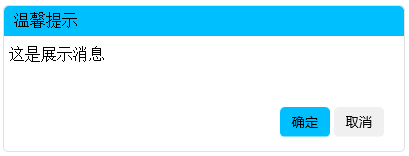
        var message = "这是展示消息";

        myConfirm(message);

    }

    function myConfirm(message) {

        var html = ' <div id="popup" style="position: absolute; width: 400px; height: 145px; margin-left: auto; margin-right: auto; left: 0; right: 0; border: 1px solid #e2e2e2; border-radius: 5px; font-family: YouYuan">\n' +

            '        <div style="background-color: #00bfff; height: 30px; line-height: 30px; border-radius: 5px 5px 0 0; padding-left: 10px">温馨提示</div>\n' +

            '        <div style="padding: 10px 5px">' + message + '</div>\n' +

            '        <div id="more" style="display: none; padding: 0px 5px">这是更多消息</div>\n' +

            '        <div style="position: absolute; bottom: 10%; right: 5%">\n' +

            '            <button style="background-color:deepskyblue; border-radius: 5px; width: 50px; height: 30px; padding: 0; margin: 0; border: 1px transparent; outline: none" onclick="yes()">确定</button>\n' +

            '            <button style="border-radius: 5px; width: 50px; height: 30px; padding: 0; margin: 0; border: 1px transparent; outline: none" onclick="no()">取消</button>\n' +

            '        </div>\n' +

            '    </div>';

            $("body").prepend(html);

    }

    function yes() {

        // $("#popup").css({display: "none"})

        // if (document.getElementById("more").style.display === "none") {

        //     $("#more").css({display: "block"});

        //     $("#popup").css({height: "140px"});

        // }else{

        //     $("#more").css({display: "none"});

        //     $("#popup").css({height: "100px"});

        // }

        window.

        $("#popup").css({display: "none"});

        alert("点击了“确定”");

    }

    function no() {

        $("#popup").css({display: "none"});

        alert("点击了“取消”");

    }

</script>
重写简易的confirm函数的更多相关文章
- javascript confirm()函数的用法
javascript confirm()函数的用法 confirm():确认消息对话框.用于允许用户做选择的动作.弹出的对话框中包含一确定按钮和一取消按钮. confirm(str) 参数说明: st ...
- 重写Oracle的wm_concat函数,自定义分隔符、排序
oracle中,wm_concat函数是一个聚合函数,和mysql中的group_concat函数类似,不过group_concat函数比较强大,可以定义分隔符和排序,当然所谓强大是相对的,这里假使我 ...
- 重写QSqlTableModel的flags函数实现tableview中某些列不可编辑,某些可以编辑
Qt中使用QsqlTableModel和QTableView来显示数据库的查询结果是非常方便的,但是为了使QTableView中某些了列不可用,就需要重写 Qt::ItemFlags flags(co ...
- [Winform]Cefsharp重写alert与confirm弹窗
摘要 在使用winform内嵌cefsharp浏览本地页面的时候,如果出现alert弹窗,会在标题栏显示页面所在目录.所以想起来重写alert的样式,通过winform的MessageBox进行提示. ...
- 重写Alert和confirm方法去除地址显示
//重写alert方法,去掉地址显示window.alert = function(name){var iframe = document.createElement("IFRAME&quo ...
- js confirm函数 删除提示
<a href="del.php" onclick="return confirm('是否将此留言信息删除?')">删除留言</a>
- JS~重写alter与confirm,让它们变成fancybox风格
插件与系统命令 对于很多JS弹框插件来说,都提供了alter,confirm等功能,如fancybox,Boxy等插件,今天来介绍一下如何将系统的alter和confirm替换成指定插件的alter和 ...
- 用scheme重写Python的三大函数map reduce 和filter
重写过程中,发现这种做法能加深对递归的理解,而且reduce还体现了函数式编程是如何通过参数传递来实现命令式编程中的状态改变的. (define (imap f x . y) (if (null? y ...
- Cef 重写alert与confirm弹窗
在使用form内嵌cef浏览本地页面的时候,如果出现alert弹窗,会在标题栏显示页面所在目录.所以想起来重写alert的样式,通过MessageBox进行提示,或者自己写一个弹窗. 以下代码基于 3 ...
随机推荐
- 12-21 Request庫
- PHP mysqli_set_charset() 函数
设置默认客户端字符集: <?php 高佣联盟 www.cgewang.com // 假定数据库用户名:root,密码:123456,数据库:RUNOOB $con=mysqli_connect( ...
- Skill 脚本演示 ycFloatUpLayer.il
https://www.cnblogs.com/yeungchie/ ycFloatUpLayer.il 将选中 instance 中的指定 lpp "上浮". 回到目录
- CF R 630 div2 1332 F Independent Set
LINK:Independent Set 题目定义了 独立集和边诱导子图.然而和题目没有多少关系. 给出一棵树 求\(\sum_{E'\neq \varnothing,E'\subset E}w(G( ...
- 【01python基础】
1.python的环境搭建(Python3 下载) Python 官网:https://www.python.org/ Python文档下载地址:https://www.python.org/doc/ ...
- 实验09——java基于TCP实现客户端与服务端通信
TCP通信 需要先创建连接 - 并且在创建连接的过程中 需要经过三次握手 底层通过 流 发送数据 数据没有大小限制 可靠的传输机制 - 丢包重发 包的顺序的 ...
- python4.1定义函数
def add(a,b,c,d): e=a+b+c-d return e result=add(21,32,43,56)print("加和结果是:",result) def zzj ...
- 前端面试基础题:Ajax原理
Ajax 的原理简单来说是在⽤户和服务器之间加了—个中间层( AJAX 引擎),通过XmlHttpRequest 对象来向服务器发异步请求,从服务器获得数据,然后⽤ javascrip t 来操作 D ...
- GPS位置显示在地图上
源码分析博客地址:https://blog.csdn.net/wuquan_1230/article/details/79614974 工具下载地址:http://download.csdn.net/ ...
- 6、单例模式 Singleton模式 只有一个实例 创建型模式
1.了解Singleton模式 程序在运行时,通常都会生成很多实例.例如,表示字符串的java . lang . string类的实例与字符串是- -对- -的关系,所以当有1000个字符串的时候,会 ...