
Android | 玩转AppBarLayout,设置scrollFlags滑动属性详解
CoordinatorLayout与AppBarLayout的配合使用,在之前的文章中我们也经常使用,主要是专门用来打造各种炫酷的效果。
有童鞋看了之前的文章反馈对AppBarLayout中的scrollFlags属性的设置不是很明白,这篇文章我们具体来讲讲这个属性的用法效果。
我们先简单了解一下AppBarLayout:
AppBarLayout继承自LinearLayout,布局方向为垂直方向。所以你可以把它当成垂直布局的LinearLayout来使用。AppBarLayout是在LinearLayou上加了一些材料设计的概念,它可以让你定制当某个可滚动View的滚动手势发生变化时,其内部的子View实现何种动作。
这里说得其内部的子View实现任何动作,就是可以通过scrollFlags属性进行设置达到想要的效果。
那么app:layout_scrollFlags可以设置哪些动作呢?
下面我们通过XML布局文件代码和对应的效果图进行解析:
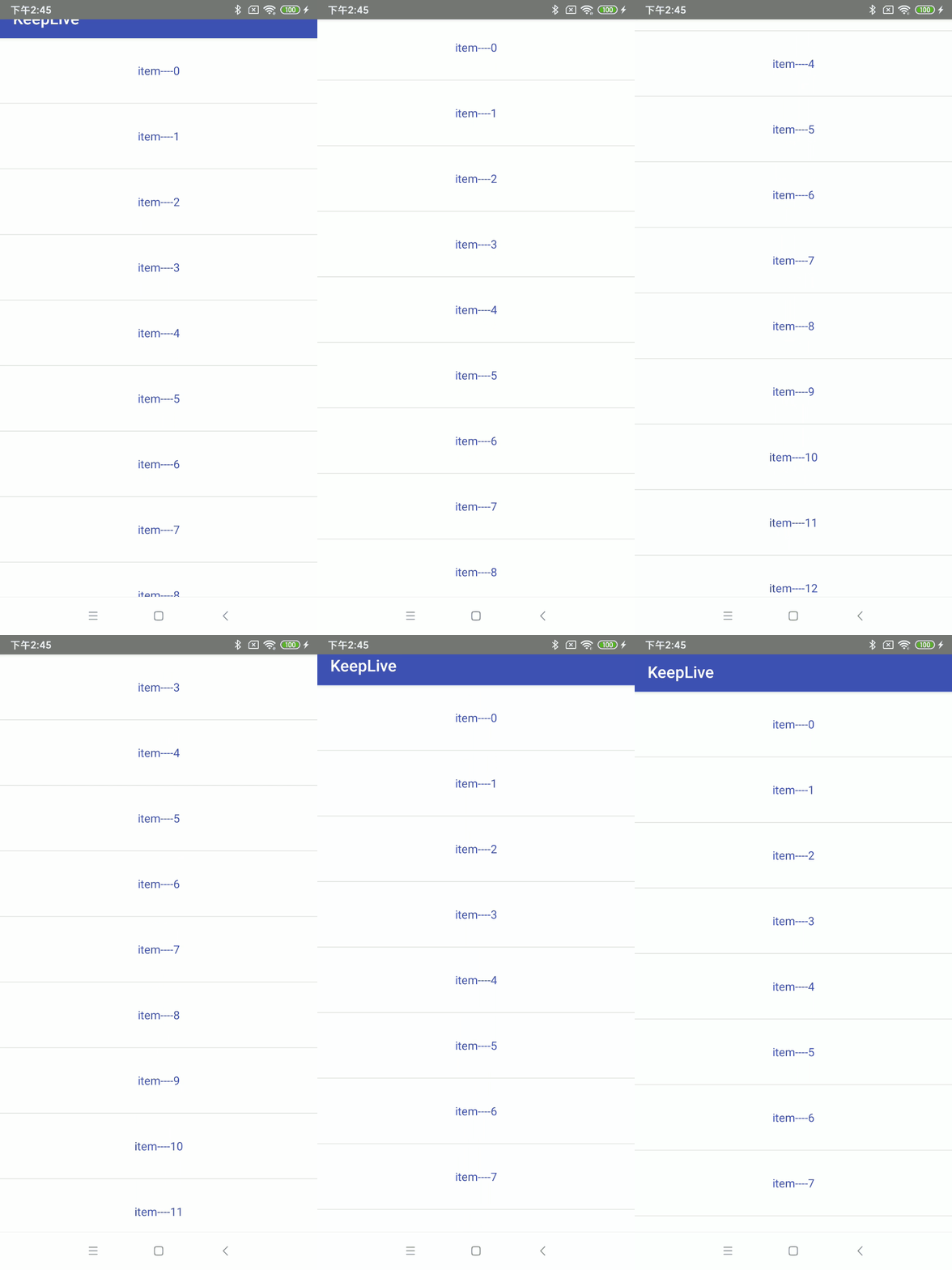
1、scroll
子View会跟随滚动事件一起发生移动而滚出或滚进屏幕。注意两点:第一点,如果使用了其他值,必定要使用这个值才能起作用;第二点:如果在这个子View前面的任何其他子View没有设置这个值,那么这个子View的设置将失去作用。
布局文件:
<android.support.design.widget.CoordinatorLayout xmlns:android="http://schemas.android.com/apk/res/android"

    xmlns:app="http://schemas.android.com/apk/res-auto"

    android:layout_width="match_parent"

    android:layout_height="match_parent"

    android:fitsSystemWindows="true">

    <android.support.design.widget.AppBarLayout

        android:id="@+id/appbar"

        android:layout_width="match_parent"

        android:layout_height="wrap_content"

        android:theme="@style/ThemeOverlay.AppCompat.Dark.ActionBar">

        <android.support.v7.widget.Toolbar

            android:id="@+id/tb_toolbar"

            android:layout_width="match_parent"

            android:layout_height="50dp"

            android:background="@color/colorPrimary"

            app:layout_scrollFlags="scroll"

            app:title="@string/app_name" />

    </android.support.design.widget.AppBarLayout>

    <android.support.v7.widget.RecyclerView

        android:id="@+id/recyclerView"

        android:layout_width="match_parent"

        android:layout_height="wrap_content"

        app:layout_behavior="@string/appbar_scrolling_view_behavior" />

</android.support.design.widget.CoordinatorLayout>
对应效果图:
2、enterAlways
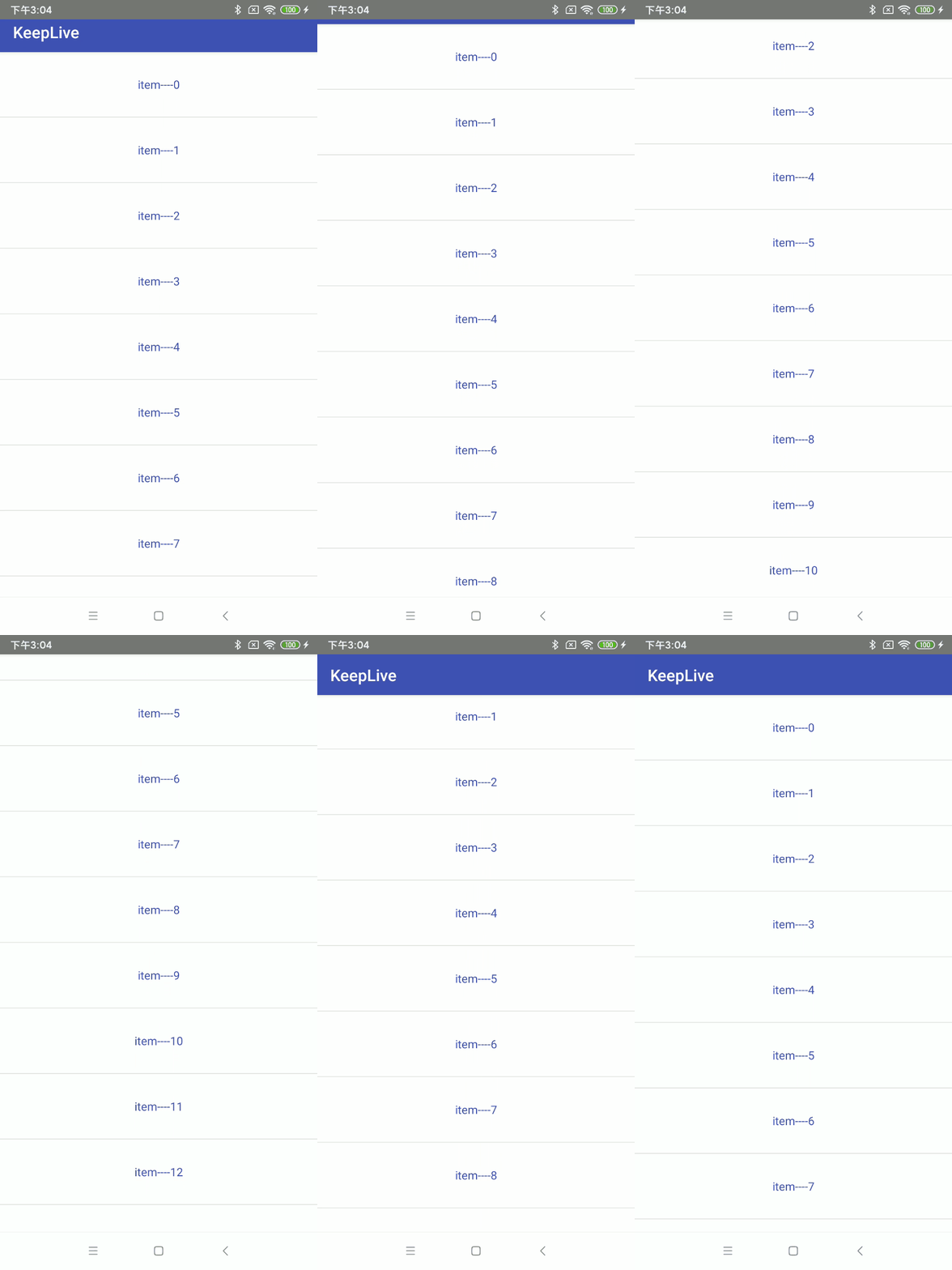
和scroll相比较,其实就是向下滚动时优先级问题,scroll首先滑动的是列表,列表的数据全部滚动完毕,才开始toolbar滑动。而scroll | enterAlways首先滑动的是toolbar ,然后再去滑动其他的view。只是优先级先后的问题。
布局文件:代码类型,只是改变属性值,这里就不赘述了
......................

 <android.support.v7.widget.Toolbar

            android:id="@+id/tb_toolbar"

            android:layout_width="match_parent"

            android:layout_height="50dp"

            android:background="@color/colorPrimary"

            app:layout_scrollFlags="scroll|enterAlways"

            app:title="@string/app_name" />

 ......................
对应效果图:
3、enterAlwaysCollapsed
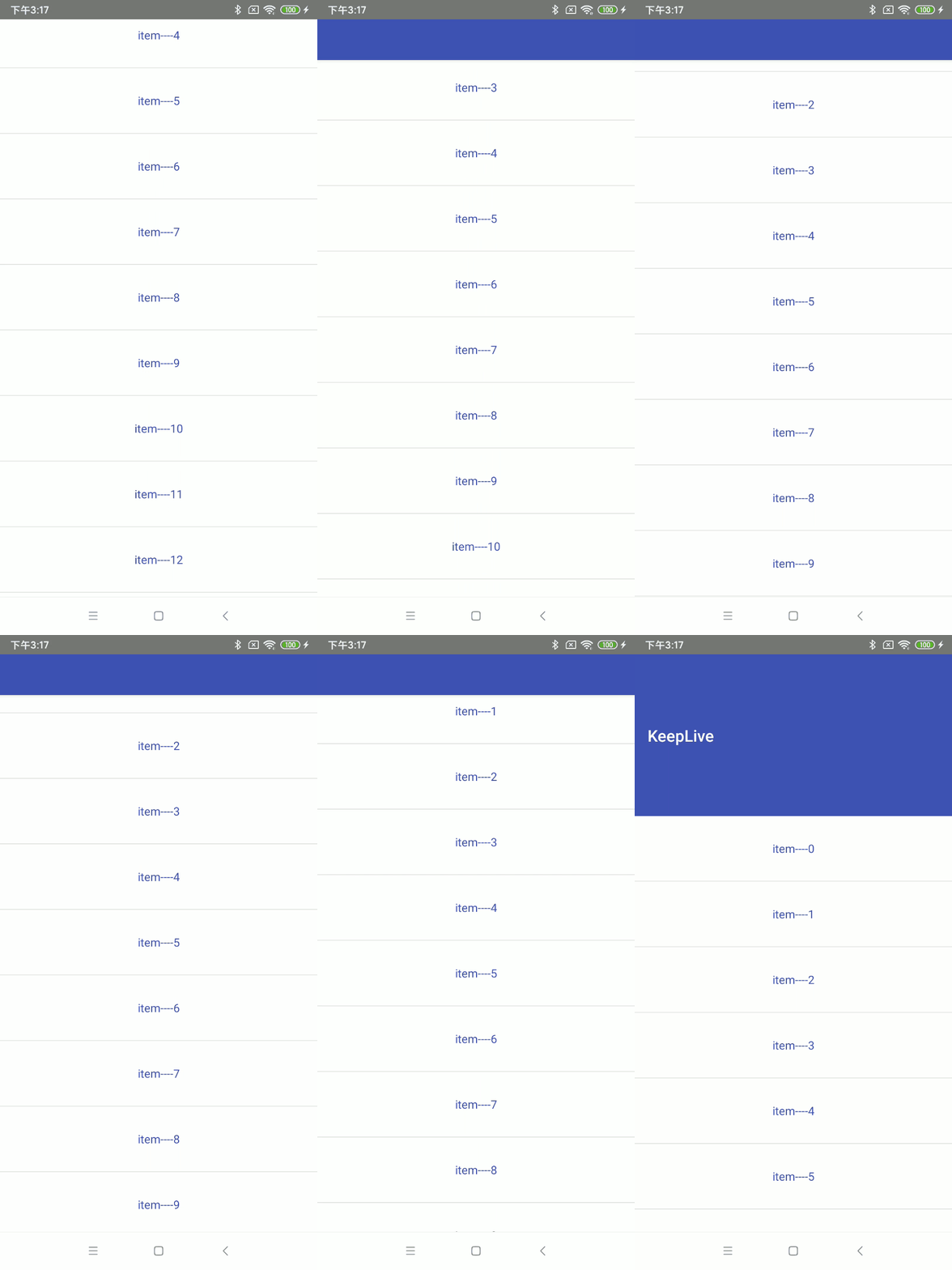
enterAlwaysCollapsed是enterAlways的附加标志,这里涉及到子View的高度和最小高度,向下滚动时,子View先向下滚动最小高度值,然后Scrolling View开始滚动,到达边界时,子View再向下滚动,直至显示完全。
布局文件:代码类型,只是改变属性值,这里就不赘述了
............................

 <android.support.v7.widget.Toolbar

            android:id="@+id/tb_toolbar"

            android:layout_width="match_parent"

            android:layout_height="200dp"

            android:minHeight="50dp"

            android:background="@color/colorPrimary"

            app:layout_scrollFlags="scroll|enterAlways|enterAlwaysCollapsed"

            app:title="@string/app_name" />

.............................
对应效果图:
4、exitUntilCollapsed
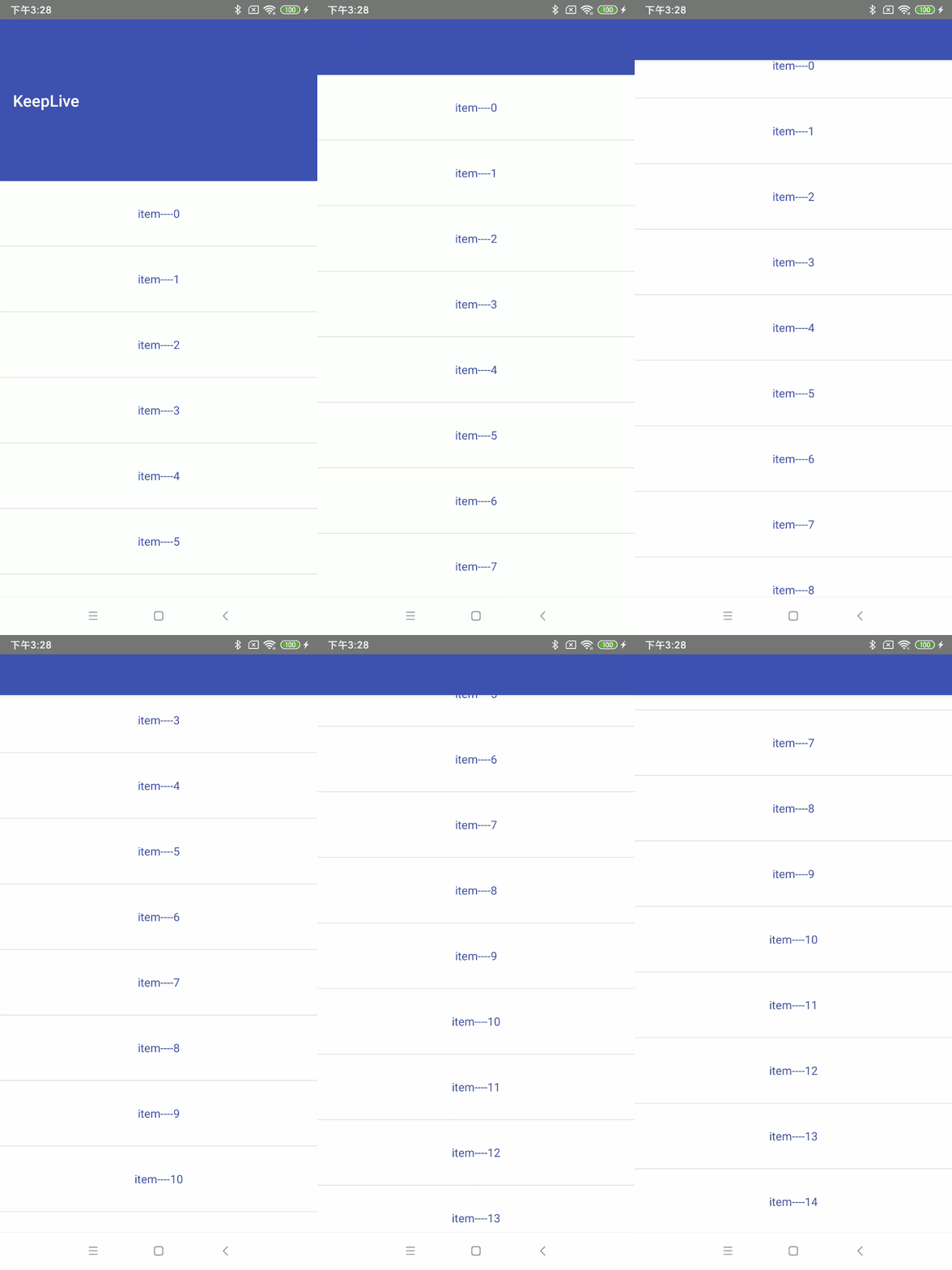
这里也涉及到最小高度。发生向上滚动事件时,子View向上滚动直至最小高度,然后Scrolling View开始滚动。也就是,子View不会完全退出屏幕。
布局文件:代码类型,只是改变属性值,这里就不赘述了
...................................

<android.support.v7.widget.Toolbar

            android:id="@+id/tb_toolbar"

            android:layout_width="match_parent"

            android:layout_height="200dp"

            android:minHeight="50dp"

            android:background="@color/colorPrimary"

            app:layout_scrollFlags="scroll|exitUntilCollapsed"

            app:title="@string/app_name" />

 ....................................
对应效果图:
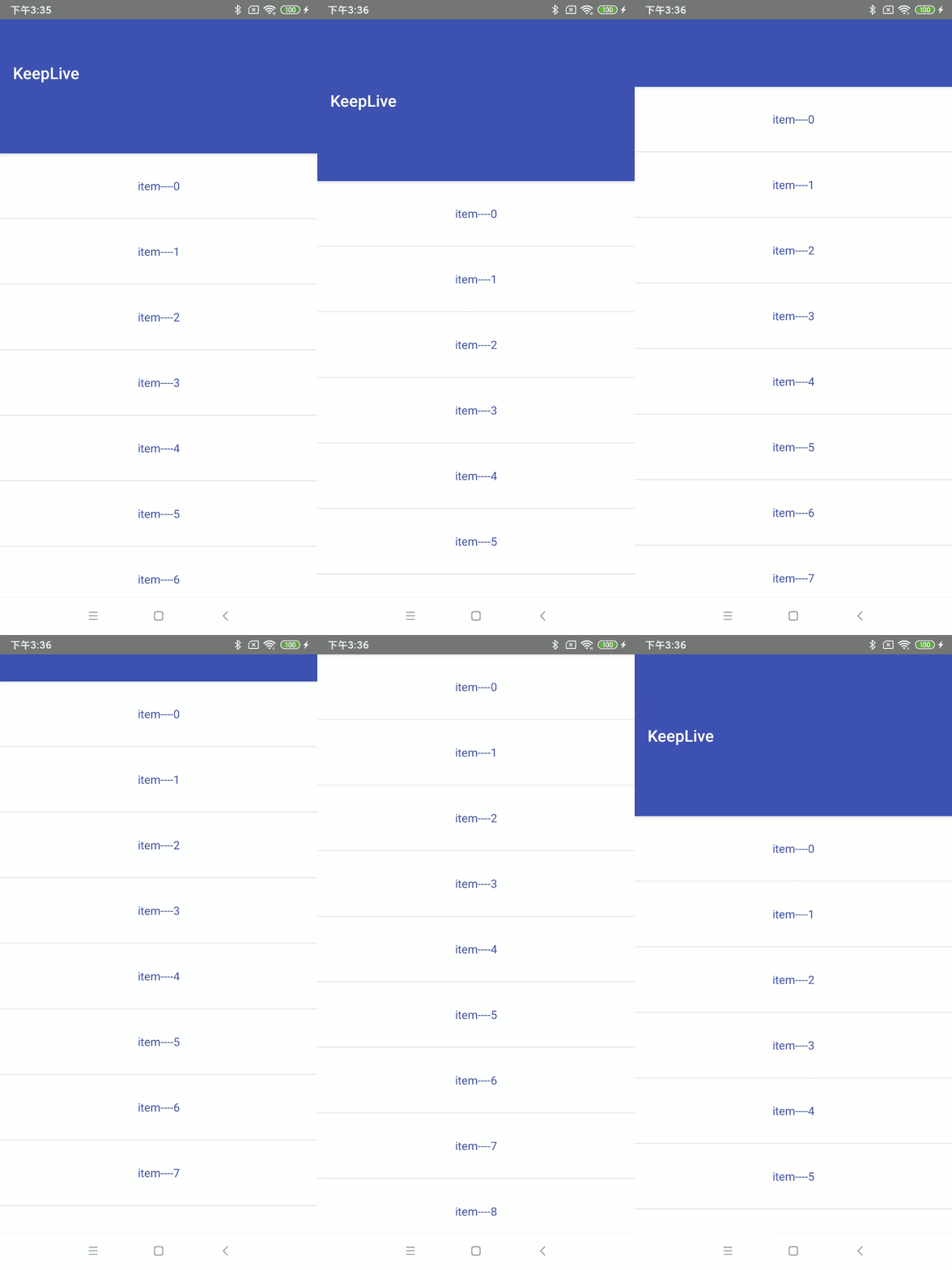
5、snap
子View滚动比例的吸附效果。也就是说子View不会存在局部显示的情况,滚动到子View的部分高度,当我们松开手指时,子View要么向上全部滚出屏幕,要么向下全部滚进屏幕。
布局文件:代码类型,只是改变属性值,这里就不赘述了
......................

 <android.support.v7.widget.Toolbar

            android:id="@+id/tb_toolbar"

            android:layout_width="match_parent"

            android:layout_height="200dp"

            android:background="@color/colorPrimary"

            app:layout_scrollFlags="scroll|snap"

            app:title="@string/app_name" />

......................
对应效果图:
6、snapMargins
snapMargins是必须配合snap一起使用的额外的flag。如果设置的话,这个View将会被snap到它的顶部外边距和它的底部外边距的位置,而不是这个View自身的上下边缘。
布局文件:
<?xml version="1.0" encoding="utf-8"?>

<android.support.design.widget.CoordinatorLayout xmlns:android="http://schemas.android.com/apk/res/android"

    xmlns:app="http://schemas.android.com/apk/res-auto"

    android:layout_width="match_parent"

    android:layout_height="match_parent"

    android:fitsSystemWindows="true">

    <android.support.design.widget.AppBarLayout

        android:id="@+id/appbar"

        android:layout_width="match_parent"

        android:layout_height="wrap_content"

        android:background="@color/colorPrimary"

        android:theme="@style/ThemeOverlay.AppCompat.Dark.ActionBar">

        <android.support.v7.widget.Toolbar

            android:id="@+id/tb_toolbar"

            android:layout_width="match_parent"

            android:layout_height="100dp"

            android:layout_marginStart="10dp"

            android:layout_marginTop="200dp"

            android:layout_marginEnd="10dp"

            android:layout_marginBottom="10dp"

            android:background="@color/colorAccent"

            app:layout_scrollFlags="scroll|snap|snapMargins"

            app:title="@string/app_name" />

    </android.support.design.widget.AppBarLayout>

    <android.support.v7.widget.RecyclerView

        android:id="@+id/recyclerView"

        android:layout_width="match_parent"

        android:layout_height="wrap_content"

        app:layout_behavior="@string/appbar_scrolling_view_behavior" />

</android.support.design.widget.CoordinatorLayout>
对应的效果图:
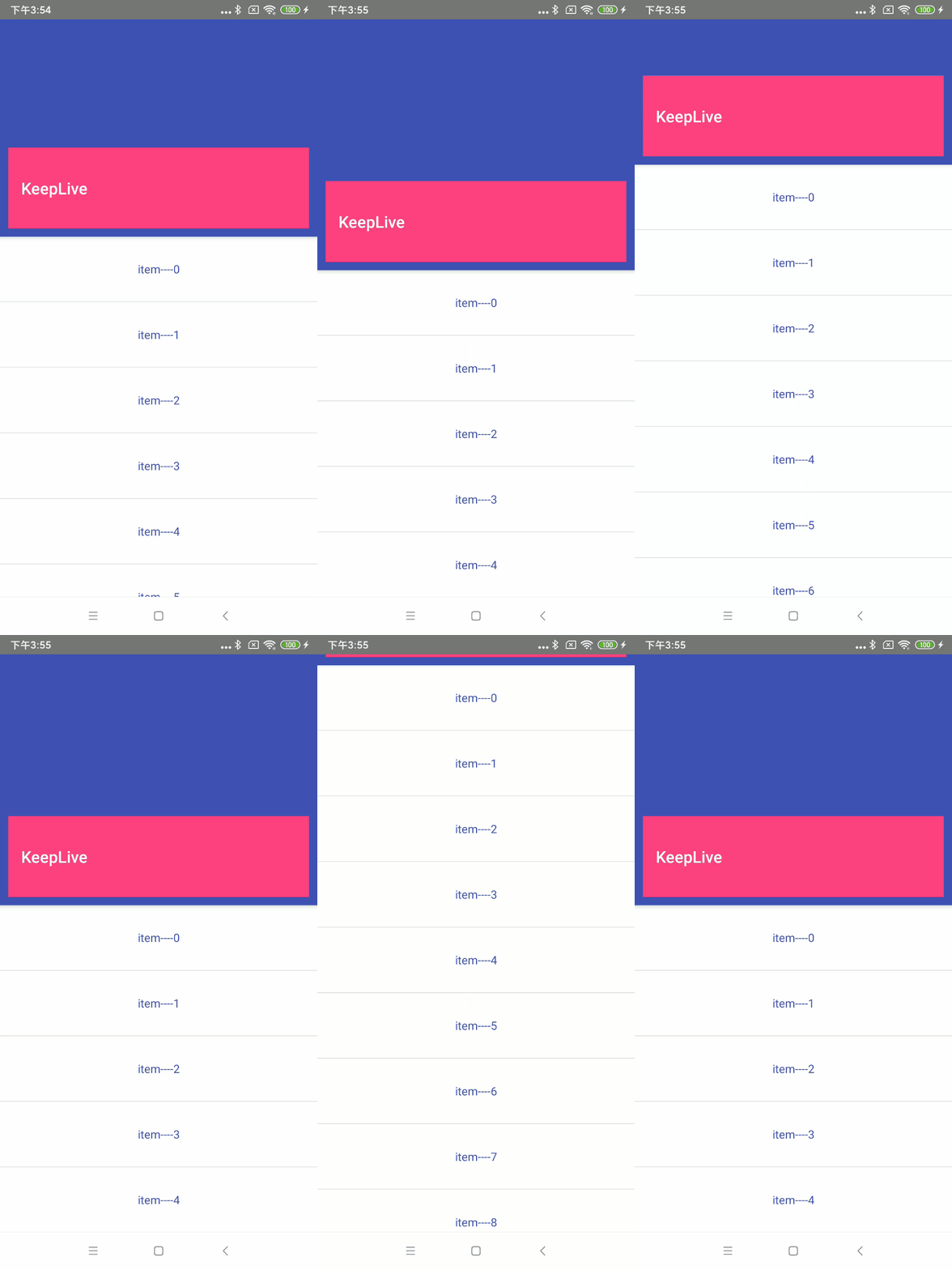
可以看到Margin生效了,滑动必须超过Toolbar的高度以及上下Margin就会继续滑动,否则就恢复。
上面的内容就介绍完了,代码基本都在文章里,就不放demo了。
到这里就结束啦!
Android | 玩转AppBarLayout,设置scrollFlags滑动属性详解的更多相关文章
- Android textAppearance的属性设置及TextView属性详解
textAppearance的属性设置 android:textAppearance="?android:attr/textAppearanceSmall" android:tex ...
- android中布局文件中 layout_weight 的属性详解
在不同的情况下,layout_weight属性作用是不同的.主要有两种属性: 1.当布局中的控件的尺寸(宽和高)都有指定时,它所表示的该控件在父容器中的比重,及它在父容器中所占的比例,数值越大,比重越 ...
- Android AVD创建及设置中各参数详解
设置AVD时有些参数比较模糊,特地找了篇文章,大家参考下! 本文根据如下的模拟器安装做一些解释: Name:自定义虚拟的名称,不能有空格或者其他非法字符,否则不能创建,即Creat AVD不能高亮点击 ...
- Android中的windowSoftInputMode属性详解
这篇文章主要介绍了Android中的windowSoftInputMode属性详解,本文对windowSoftInputMode的9个属性做了详细总结,需要的朋友可以参考下 在前面的一篇文章中 ...
- android:exported 属性详解
属性详解 标签: android 2015-06-11 17:47 27940人阅读 评论(7) 收藏 举报 分类: Android(95) 项目点滴(25) 昨天在用360扫描应用漏洞时,扫描结果, ...
- Android组件---四大布局的属性详解
[声明] 欢迎转载,但请保留文章原始出处→_→ 文章来源:http://www.cnblogs.com/smyhvae/p/4372222.html Android常见布局有下面几种: LinearL ...
- Android TextView和EditText属性详解
TextView属性详解: autoLink设置 是否当文本为URL链接/email/电话号码/map时,文本显示为可点击的链接.可选值(none/web /email/phone/map/all) ...
- Android笔记-2-TextView的属性详解
[Android 基础]TextView的属性详解 android:autoLink :设置是否当文本为URL链接/email/电话号码/map时,文本显示为可点击的链接.可选值(none/web / ...
- Android开发–Intent-filter属性详解
Android开发–Intent-filter属性详解 2011年05月09日 ⁄ Andriod ⁄ 暂无评论 ⁄ 被围观 1,396 views+ 如果一个 Intent 请求在一片数据上执行一个 ...
随机推荐
- C++ part2
为什么析构函数必须是虚函数?为什么C++默认的析构函数不是虚函数? references: nowcoder 将可能会被继承的父类的析构函数设置为虚函数,可以保证当我们new一个子类,然后使用基类指针 ...
- ysoserial Commons Collections2反序列化研究
Apache Commons Collections2反序列化研究 环境准备 JDK 1.7 Commons Collections 4.0 javassit 前置知识 PriorityQueue() ...
- GraphQL All In One
GraphQL All In One refs https://github.com/hasura/learn-graphql xgqfrms 2012-2020 www.cnblogs.com 发布 ...
- 扫码登录 & 实现原理
扫码登录 & 实现原理 二维码扫描登录是什么原理? https://time.geekbang.org/dailylesson/detail/100044032 xgqfrms 2012-20 ...
- classnames & React & taro
classnames & React & taro classnames https://www.npmjs.com/package/classnames demo https://g ...
- fetch & form-data & upload & image file
fetch & form-data & upload & image file no need multipart/form-data https://blog.xinshan ...
- Flutter NotificationListener 监听列表的滚动
import 'package:flutter/material.dart'; import 'package:flutter_imagenetwork/flutter_imagenetwork.da ...
- 02.Fancy Indexing
import numpy as np x = np.arange(16) index = [3,5,8] x[index] array([3, 5, 8]) X = x.reshape(4,-1) X ...
- the import java.util cannot be resolve
重新配置一下build path 的jre,如果不行的话就重新设置jre(在add library中installed JREs)
- Element-UI使用相关问题
1.如何修改el-dialog的样式? 要修改dialog的样式不能直接在<style scoped>中修改,这样修改后不会生效.做法是把scoped去掉,然后在dialog标签上自定义一 ...