
Android | 玩转AppBarLayout,设置scrollFlags滑动属性详解
CoordinatorLayout与AppBarLayout的配合使用,在之前的文章中我们也经常使用,主要是专门用来打造各种炫酷的效果。
有童鞋看了之前的文章反馈对AppBarLayout中的scrollFlags属性的设置不是很明白,这篇文章我们具体来讲讲这个属性的用法效果。
我们先简单了解一下AppBarLayout:
AppBarLayout继承自LinearLayout,布局方向为垂直方向。所以你可以把它当成垂直布局的LinearLayout来使用。AppBarLayout是在LinearLayou上加了一些材料设计的概念,它可以让你定制当某个可滚动View的滚动手势发生变化时,其内部的子View实现何种动作。
这里说得其内部的子View实现任何动作,就是可以通过scrollFlags属性进行设置达到想要的效果。
那么app:layout_scrollFlags可以设置哪些动作呢?
下面我们通过XML布局文件代码和对应的效果图进行解析:
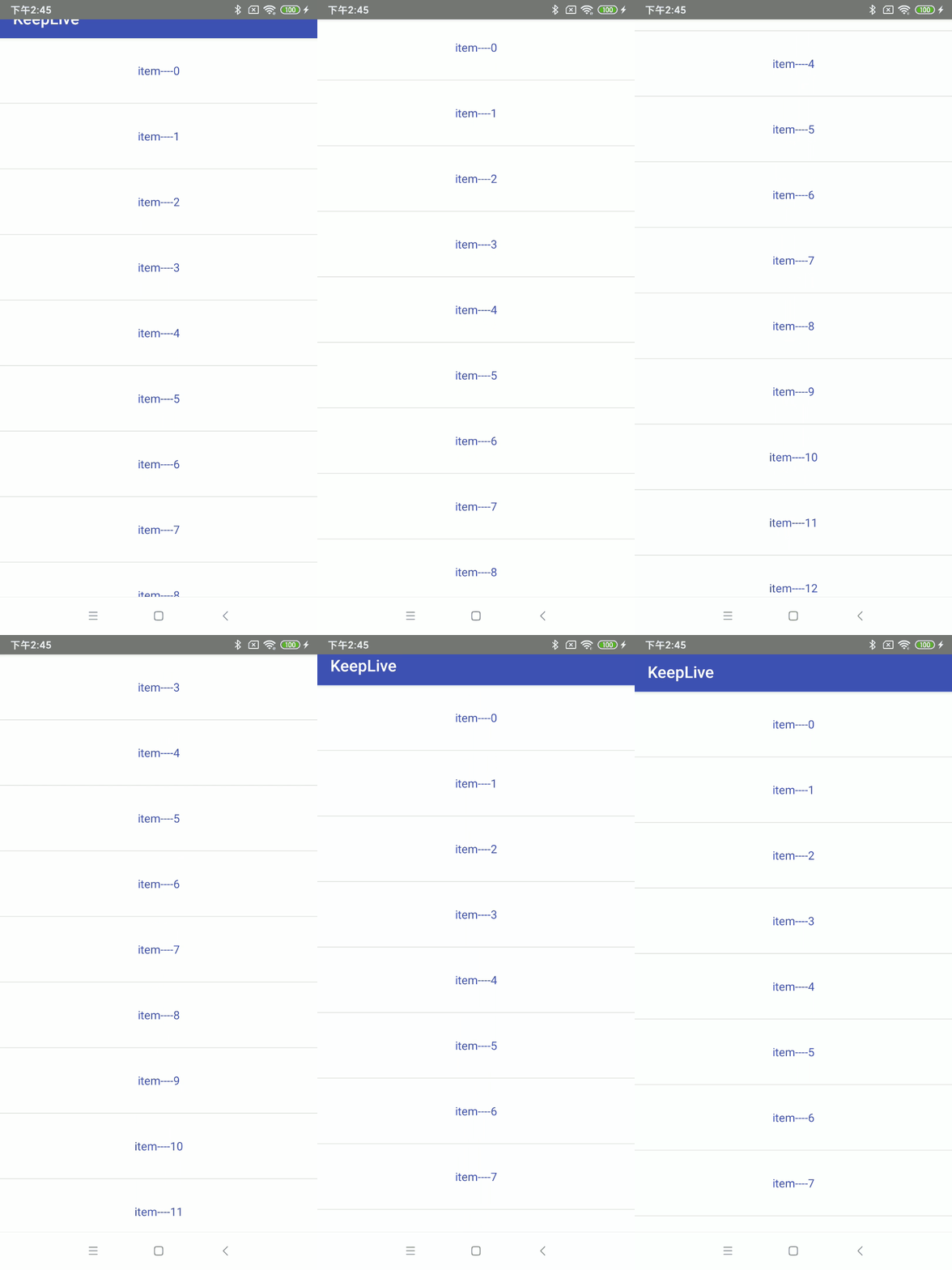
1、scroll
子View会跟随滚动事件一起发生移动而滚出或滚进屏幕。注意两点:第一点,如果使用了其他值,必定要使用这个值才能起作用;第二点:如果在这个子View前面的任何其他子View没有设置这个值,那么这个子View的设置将失去作用。
布局文件:
<android.support.design.widget.CoordinatorLayout xmlns:android="http://schemas.android.com/apk/res/android"

    xmlns:app="http://schemas.android.com/apk/res-auto"

    android:layout_width="match_parent"

    android:layout_height="match_parent"

    android:fitsSystemWindows="true">

    <android.support.design.widget.AppBarLayout

        android:id="@+id/appbar"

        android:layout_width="match_parent"

        android:layout_height="wrap_content"

        android:theme="@style/ThemeOverlay.AppCompat.Dark.ActionBar">

        <android.support.v7.widget.Toolbar

            android:id="@+id/tb_toolbar"

            android:layout_width="match_parent"

            android:layout_height="50dp"

            android:background="@color/colorPrimary"

            app:layout_scrollFlags="scroll"

            app:title="@string/app_name" />

    </android.support.design.widget.AppBarLayout>

    <android.support.v7.widget.RecyclerView

        android:id="@+id/recyclerView"

        android:layout_width="match_parent"

        android:layout_height="wrap_content"

        app:layout_behavior="@string/appbar_scrolling_view_behavior" />

</android.support.design.widget.CoordinatorLayout>
对应效果图:
2、enterAlways
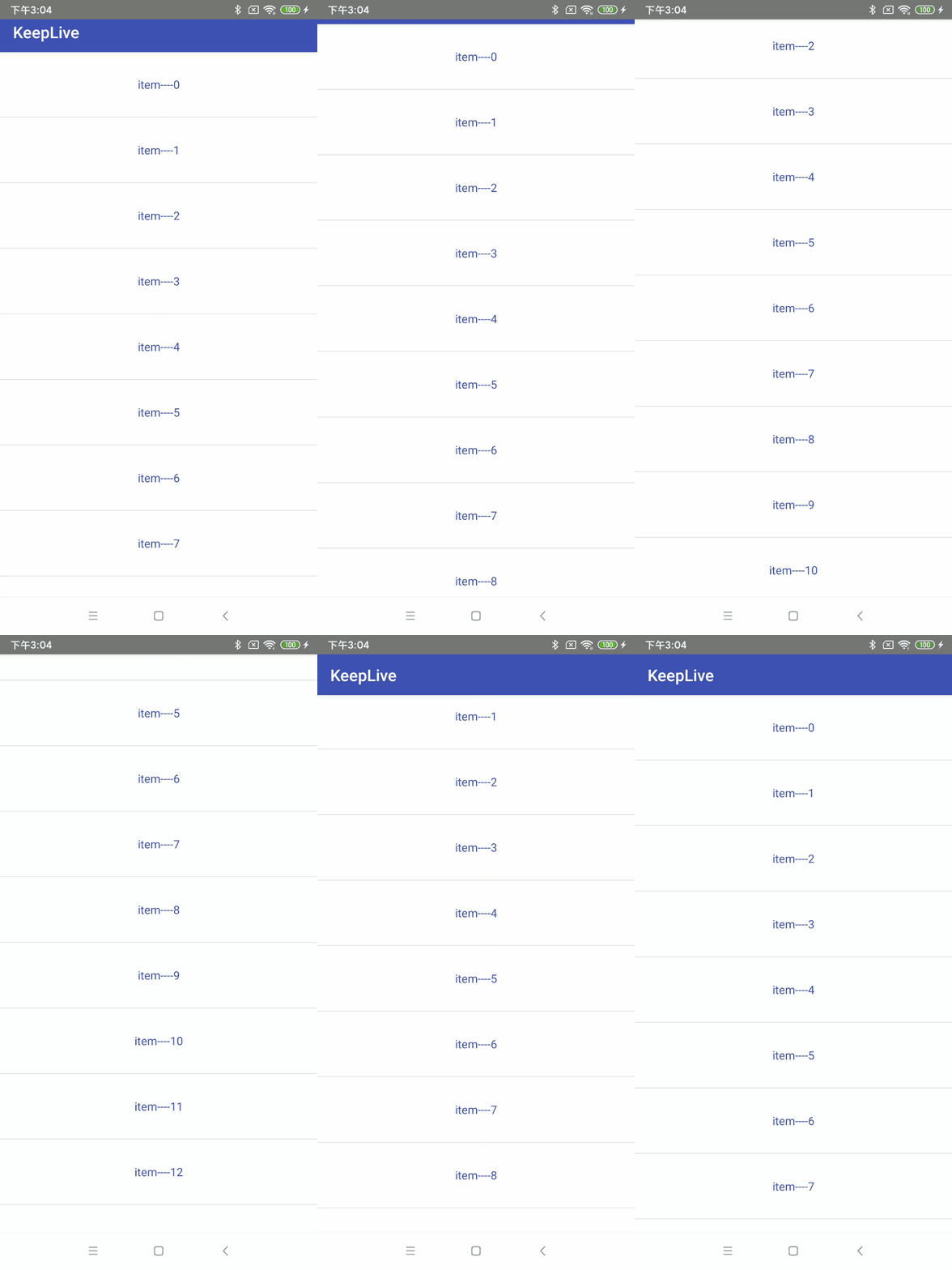
和scroll相比较,其实就是向下滚动时优先级问题,scroll首先滑动的是列表,列表的数据全部滚动完毕,才开始toolbar滑动。而scroll | enterAlways首先滑动的是toolbar ,然后再去滑动其他的view。只是优先级先后的问题。
布局文件:代码类型,只是改变属性值,这里就不赘述了
......................

 <android.support.v7.widget.Toolbar

            android:id="@+id/tb_toolbar"

            android:layout_width="match_parent"

            android:layout_height="50dp"

            android:background="@color/colorPrimary"

            app:layout_scrollFlags="scroll|enterAlways"

            app:title="@string/app_name" />

 ......................
对应效果图:
3、enterAlwaysCollapsed
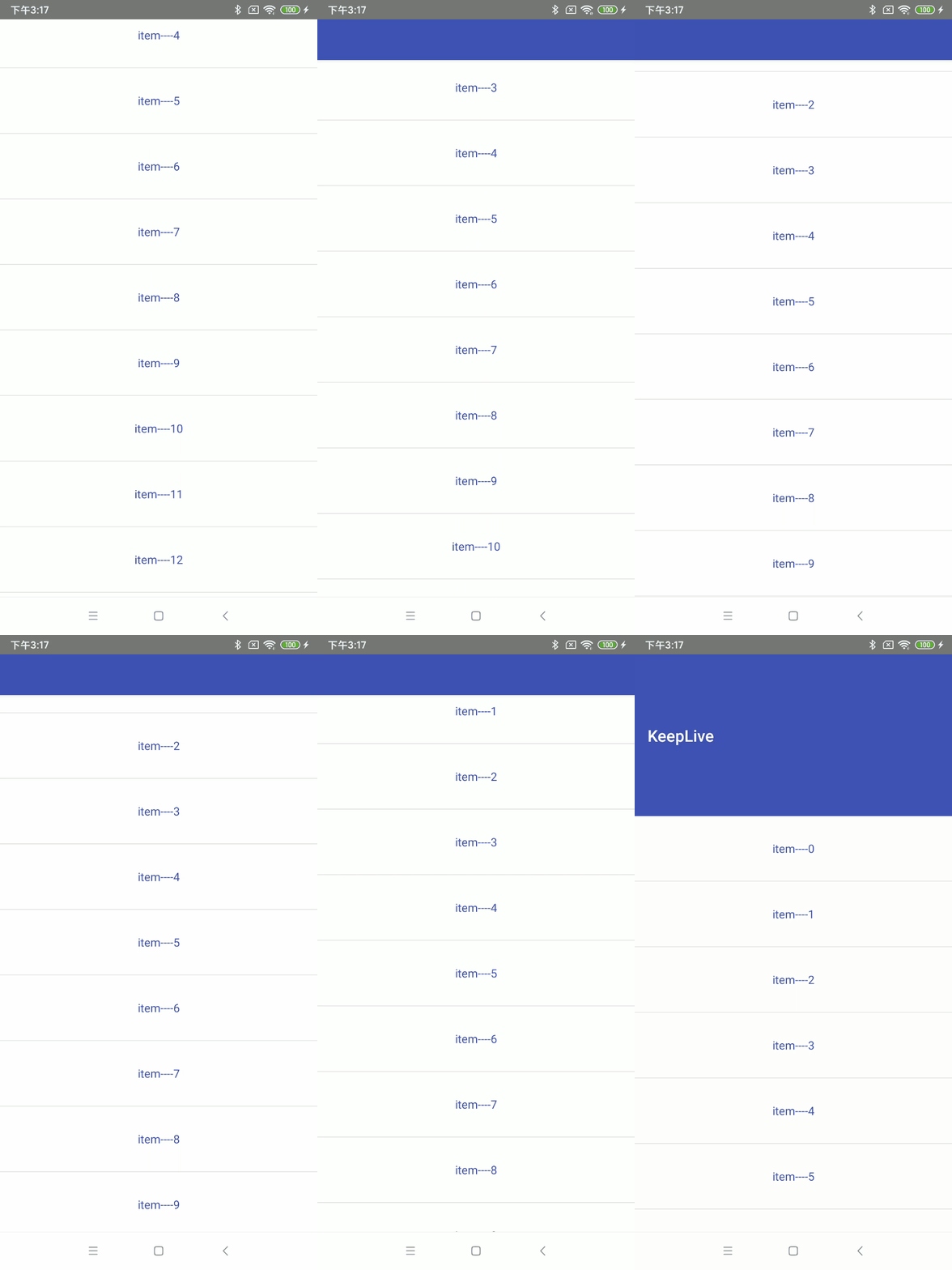
enterAlwaysCollapsed是enterAlways的附加标志,这里涉及到子View的高度和最小高度,向下滚动时,子View先向下滚动最小高度值,然后Scrolling View开始滚动,到达边界时,子View再向下滚动,直至显示完全。
布局文件:代码类型,只是改变属性值,这里就不赘述了
............................

 <android.support.v7.widget.Toolbar

            android:id="@+id/tb_toolbar"

            android:layout_width="match_parent"

            android:layout_height="200dp"

            android:minHeight="50dp"

            android:background="@color/colorPrimary"

            app:layout_scrollFlags="scroll|enterAlways|enterAlwaysCollapsed"

            app:title="@string/app_name" />

.............................
对应效果图:
4、exitUntilCollapsed
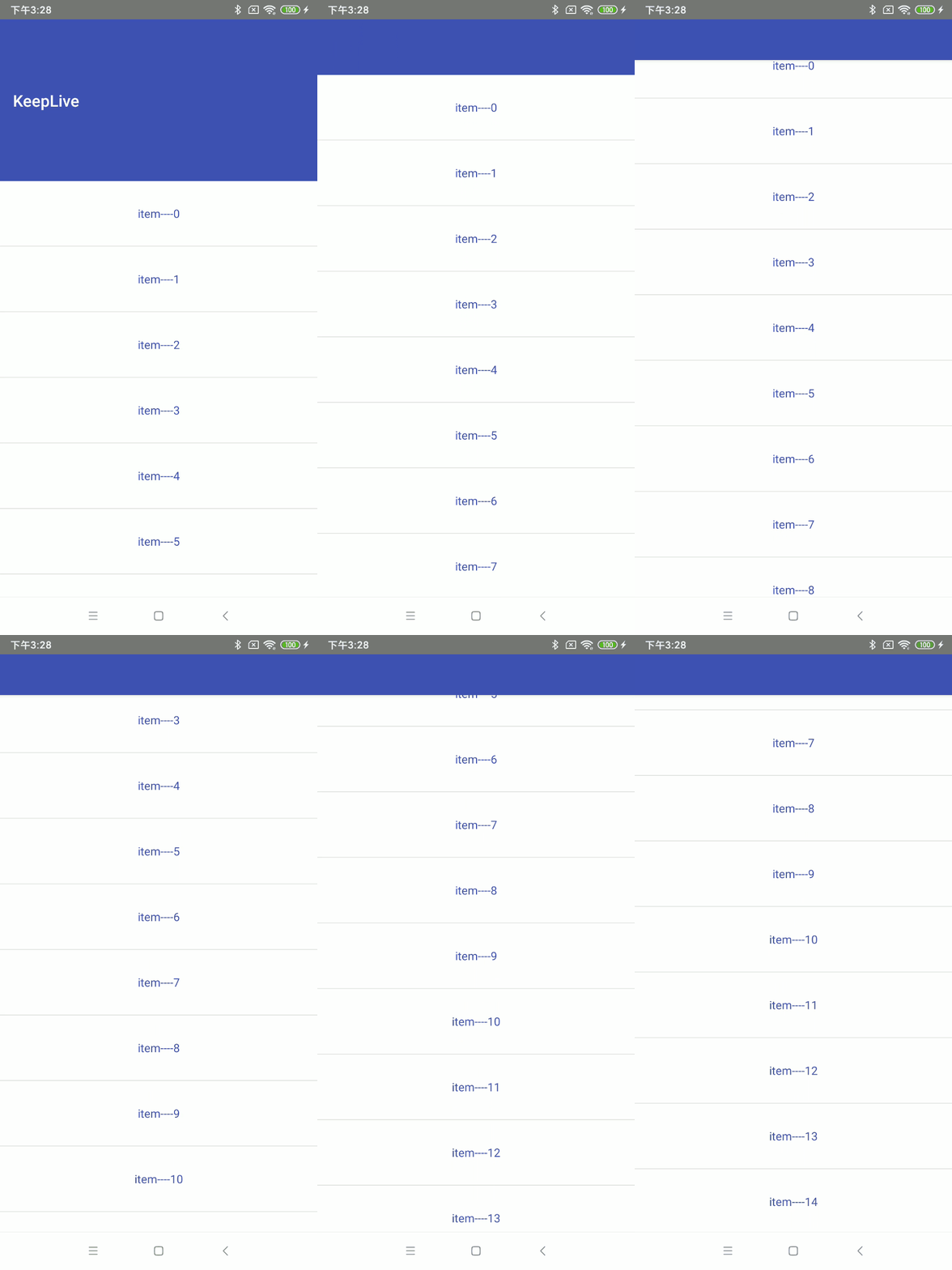
这里也涉及到最小高度。发生向上滚动事件时,子View向上滚动直至最小高度,然后Scrolling View开始滚动。也就是,子View不会完全退出屏幕。
布局文件:代码类型,只是改变属性值,这里就不赘述了
...................................

<android.support.v7.widget.Toolbar

            android:id="@+id/tb_toolbar"

            android:layout_width="match_parent"

            android:layout_height="200dp"

            android:minHeight="50dp"

            android:background="@color/colorPrimary"

            app:layout_scrollFlags="scroll|exitUntilCollapsed"

            app:title="@string/app_name" />

 ....................................
对应效果图:
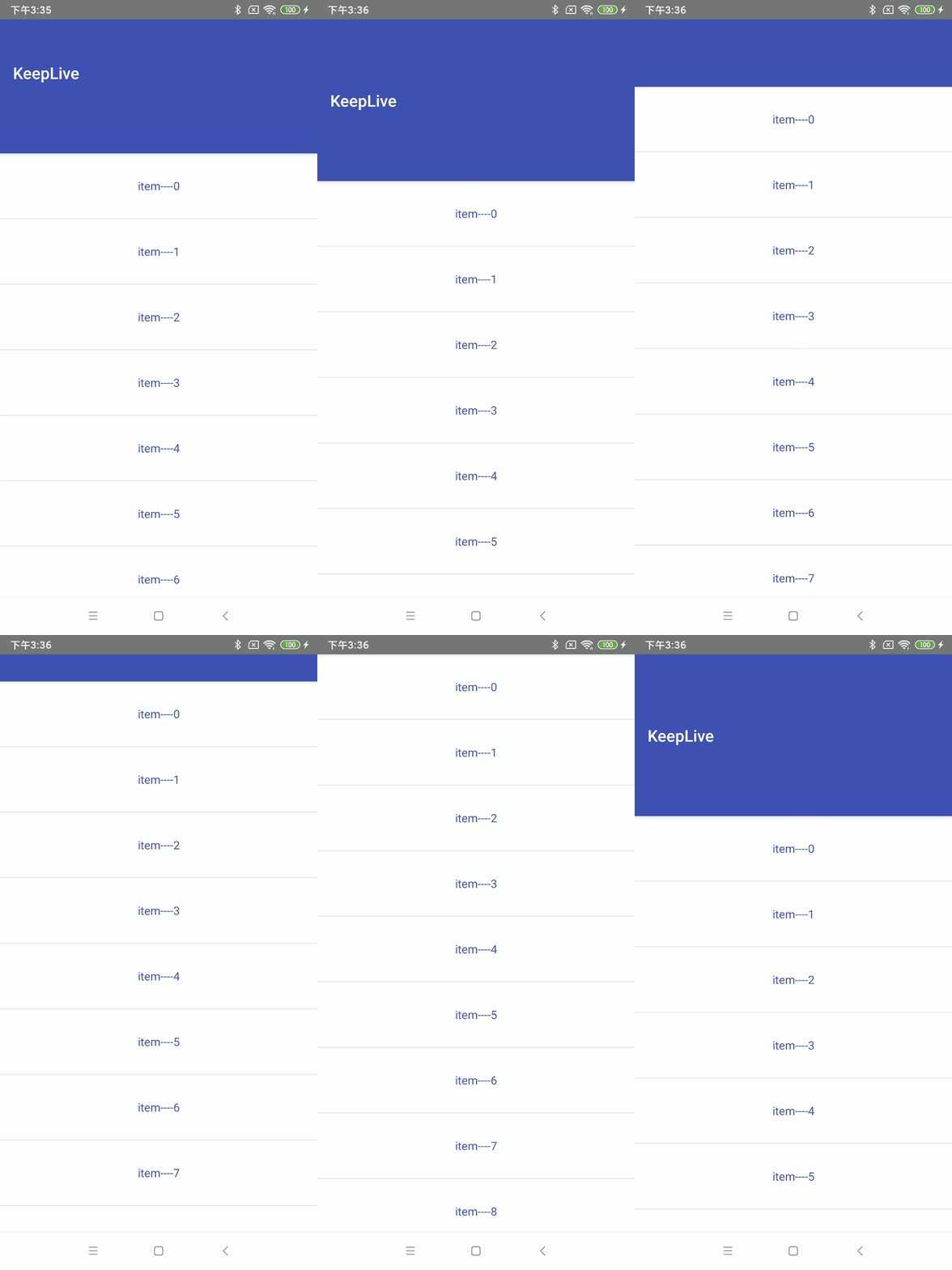
5、snap
子View滚动比例的吸附效果。也就是说子View不会存在局部显示的情况,滚动到子View的部分高度,当我们松开手指时,子View要么向上全部滚出屏幕,要么向下全部滚进屏幕。
布局文件:代码类型,只是改变属性值,这里就不赘述了
......................

 <android.support.v7.widget.Toolbar

            android:id="@+id/tb_toolbar"

            android:layout_width="match_parent"

            android:layout_height="200dp"

            android:background="@color/colorPrimary"

            app:layout_scrollFlags="scroll|snap"

            app:title="@string/app_name" />

......................
对应效果图:
6、snapMargins
snapMargins是必须配合snap一起使用的额外的flag。如果设置的话,这个View将会被snap到它的顶部外边距和它的底部外边距的位置,而不是这个View自身的上下边缘。
布局文件:
<?xml version="1.0" encoding="utf-8"?>

<android.support.design.widget.CoordinatorLayout xmlns:android="http://schemas.android.com/apk/res/android"

    xmlns:app="http://schemas.android.com/apk/res-auto"

    android:layout_width="match_parent"

    android:layout_height="match_parent"

    android:fitsSystemWindows="true">

    <android.support.design.widget.AppBarLayout

        android:id="@+id/appbar"

        android:layout_width="match_parent"

        android:layout_height="wrap_content"

        android:background="@color/colorPrimary"

        android:theme="@style/ThemeOverlay.AppCompat.Dark.ActionBar">

        <android.support.v7.widget.Toolbar

            android:id="@+id/tb_toolbar"

            android:layout_width="match_parent"

            android:layout_height="100dp"

            android:layout_marginStart="10dp"

            android:layout_marginTop="200dp"

            android:layout_marginEnd="10dp"

            android:layout_marginBottom="10dp"

            android:background="@color/colorAccent"

            app:layout_scrollFlags="scroll|snap|snapMargins"

            app:title="@string/app_name" />

    </android.support.design.widget.AppBarLayout>

    <android.support.v7.widget.RecyclerView

        android:id="@+id/recyclerView"

        android:layout_width="match_parent"

        android:layout_height="wrap_content"

        app:layout_behavior="@string/appbar_scrolling_view_behavior" />

</android.support.design.widget.CoordinatorLayout>
对应的效果图:
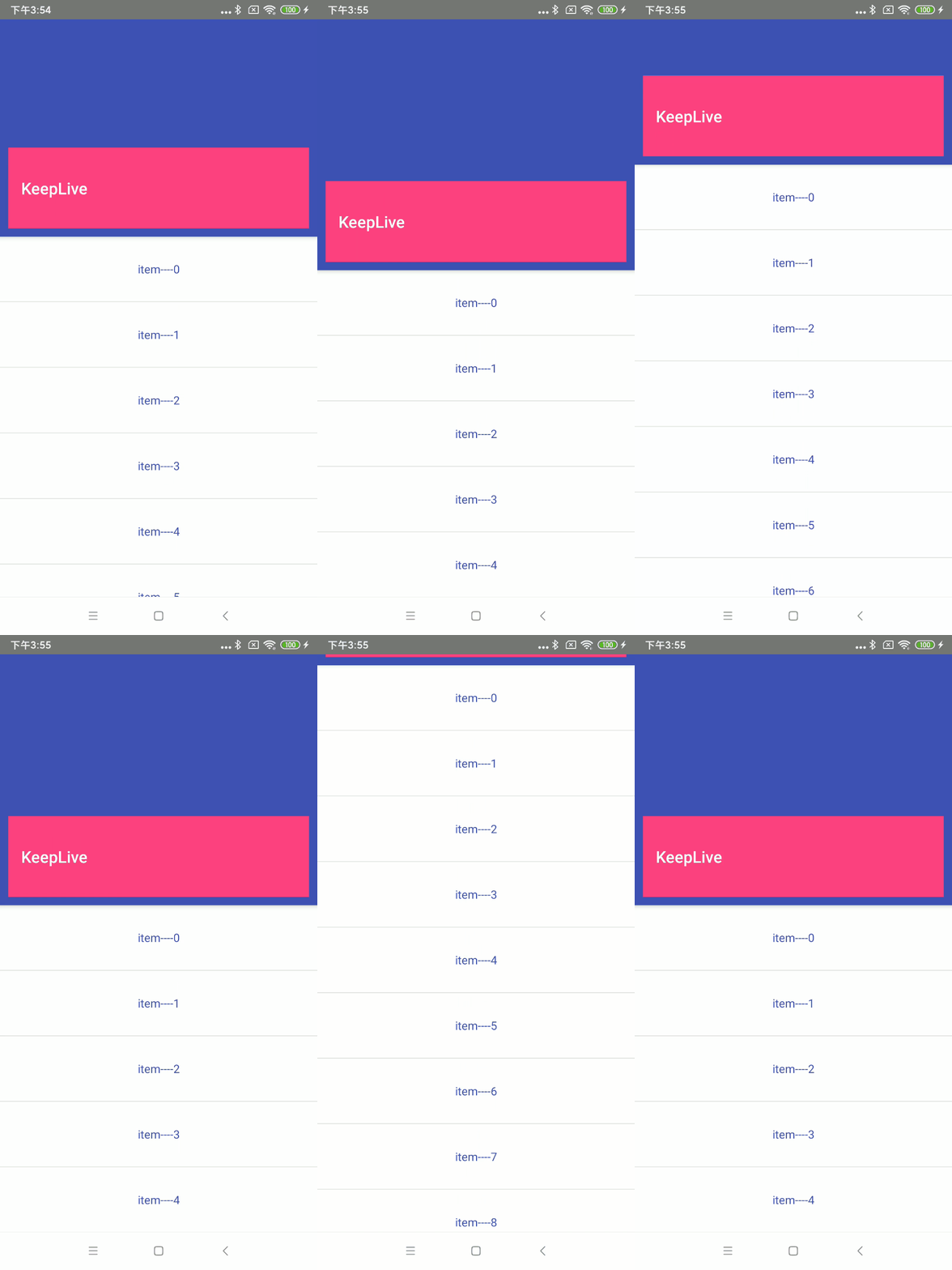
可以看到Margin生效了,滑动必须超过Toolbar的高度以及上下Margin就会继续滑动,否则就恢复。
上面的内容就介绍完了,代码基本都在文章里,就不放demo了。
到这里就结束啦!
Android | 玩转AppBarLayout,设置scrollFlags滑动属性详解的更多相关文章
- Android textAppearance的属性设置及TextView属性详解
textAppearance的属性设置 android:textAppearance="?android:attr/textAppearanceSmall" android:tex ...
- android中布局文件中 layout_weight 的属性详解
在不同的情况下,layout_weight属性作用是不同的.主要有两种属性: 1.当布局中的控件的尺寸(宽和高)都有指定时,它所表示的该控件在父容器中的比重,及它在父容器中所占的比例,数值越大,比重越 ...
- Android AVD创建及设置中各参数详解
设置AVD时有些参数比较模糊,特地找了篇文章,大家参考下! 本文根据如下的模拟器安装做一些解释: Name:自定义虚拟的名称,不能有空格或者其他非法字符,否则不能创建,即Creat AVD不能高亮点击 ...
- Android中的windowSoftInputMode属性详解
这篇文章主要介绍了Android中的windowSoftInputMode属性详解,本文对windowSoftInputMode的9个属性做了详细总结,需要的朋友可以参考下 在前面的一篇文章中 ...
- android:exported 属性详解
属性详解 标签: android 2015-06-11 17:47 27940人阅读 评论(7) 收藏 举报 分类: Android(95) 项目点滴(25) 昨天在用360扫描应用漏洞时,扫描结果, ...
- Android组件---四大布局的属性详解
[声明] 欢迎转载,但请保留文章原始出处→_→ 文章来源:http://www.cnblogs.com/smyhvae/p/4372222.html Android常见布局有下面几种: LinearL ...
- Android TextView和EditText属性详解
TextView属性详解: autoLink设置 是否当文本为URL链接/email/电话号码/map时,文本显示为可点击的链接.可选值(none/web /email/phone/map/all) ...
- Android笔记-2-TextView的属性详解
[Android 基础]TextView的属性详解 android:autoLink :设置是否当文本为URL链接/email/电话号码/map时,文本显示为可点击的链接.可选值(none/web / ...
- Android开发–Intent-filter属性详解
Android开发–Intent-filter属性详解 2011年05月09日 ⁄ Andriod ⁄ 暂无评论 ⁄ 被围观 1,396 views+ 如果一个 Intent 请求在一片数据上执行一个 ...
随机推荐
- 进程控制——fork-and-exec、system、wait
forc-and-exec流程 父进程与子进程之间的关系十分复杂,最大的复杂点在于进程间相互调用.Linux下这一流程称为fork-and-exec.父进程通过fork的方式产生一个一模一样的子进程, ...
- CS144学习(2)TCP协议实现
Lab1-4 分别是完成一个流重组器,TCP接收端,TCP发送端,TCP连接四个部分,将四个部分组合在一起就是一个完整的TCP端了.之后经过包装就可以进行TCP的接收和发送了. 代码全部在github ...
- 使用MCSManager搭建Minecraft服务器
目录 一.准备工作 1.MCSManager Windows环境下安装 Linux安装 2.Minecraft服务端 3.Java 二.配置 1.登录面板 2.上传服务端 3.服务端的配置 三.开启服 ...
- SVG background watermark
SVG background watermark SVG 背景水印 <svg xmlns="http://www.w3.org/2000/svg" width="2 ...
- HTML5 + JS 网站追踪技术:帆布指纹识别 Canvas FingerPrinting Universally Unique Identifier,简称UUID
1 1 1 HTML5 + JS 网站追踪技术:帆布指纹识别 Canvas FingerPrinting 1 一般情况下,网站或者广告联盟都会非常想要一种技术方式可以在网络上精确定位到每一个个体,这 ...
- js console.log color all in one
js console.log color all in one console.log color Chrome console.log 语法 / grammar %c, %s, css style ...
- vscode & typescript & optional-chaining bug
vscode & typescript & optional-chaining bug https://www.cnblogs.com/xgqfrms/p/11745541.html ...
- go语言第一天(变量与基本类型)
第一个go程序: //导入主函数的包package main//fmt format 包含格式化输入输出import "fmt"//注释 注释不参与程序编译 可以帮助可以程序//行 ...
- 疯狂的String
本文转载自疯狂的String 导语 在java中字符串是我们比较常用的一个类型,字符串是不可变的,类被声明为final , 存储字符的char[] value数据也被声明为final ,我们对Stri ...
- JDK源码阅读-Reference
本文转载自JDK源码阅读-Reference 导语 Java最初只有普通的强引用,只有对象存在引用,则对象就不会被回收,即使内存不足,也是如此,JVM会爆出OOME,也不会去回收存在引用的对象. 如果 ...