
css3实现循环执行动画,且动画每次都有延迟
一、最终效果

需求:gift图片的小动画每隔2s执行一次。
需求就一句话,我们看一下实现过程。
二、实现过程
1、网页结构
<!DOCTYPE html>

<html lang="en">

<head>

    <meta charset="UTF-8">

    <title>Document</title>

    <style>

    a {

        display: inline-block;

        background-color: #cc2222;

        text-decoration: none;

        color: #fff;

        font-size: 14px;

        padding: 10px 12px;

        width: 100px;

        position: relative;

    }

    .ico {

        position: absolute;

        width: 14px;

        height: 16px;

        background: url(images/ico.png) no-repeat center;

        background-size: 100%;

        position: absolute;

        top: 4px;

        right: 27px;

    }

    </style>

</head>

<body>

    <nav>

        <a href="javascript:;" class="box">

                            一元夺宝

                            <div class="ico"></div>

                        </a>

    </nav>

</body>

</html>

2、原始动画
原始动画效果为:鼠标hover上去出现动画。
动画样式如下:
/*动画*/

    .ico:hover{

    -webkit-animation: Tada 1s both;

    -moz-animation: Tada 1s both;

    -ms-animation: Tada 1s both;

    animation: Tada 1s both

}

/*浏览器兼容性部分略过*/

@keyframes Tada {

    0% {

        transform: scale(1);

        transform: scale(1)

    }

    10%,20% {

        transform: scale(0.9) rotate(-3deg);

        transform: scale(0.9) rotate(-3deg)

    }

    30%,50%,70%,90% {

        transform: scale(1.1) rotate(3deg);

        transform: scale(1.1) rotate(3deg)

    }

    40%,60%,80% {

        transform: scale(1.1) rotate(-3deg);

        transform: scale(1.1) rotate(-3deg)

    }

    100% {

        transform: scale(1) rotate(0);

        transform: scale(1) rotate(0)

    }

}
效果:鼠标hover上去gift图片会动一动。

3、实现变化后的需求
需求变动,要求不再是hover上去展示动画,而是每隔2s展示一次动画。
思路:不需要hover上去出现动画,就把hover去掉,每隔2s显示一次动画,很容易想到延迟2s,然后动画一直执行。
此时相关样式变成:
.ico{

-webkit-animation: Tada 1s  2s both infinite;

-moz-animation: Tada 1s 2s both infinite;

-ms-animation: Tada 1s 2s both infinite;

animation: Tada 1s 2s both infinite;

}
但是显示的效果是:页面加载第一次出现动画会延迟2s,后面的动画将不再有延迟。如下,这是不符合需求的。
为了看出效果,下图为延迟6s的效果。

此时换种思路,不要延迟执行动画,而是动画的效果本身就是前2s元素不动,后1s是元素动,然后一直循环执行。 这样在视觉上就会看起来是延迟2s执行1s动画。
计算一下,原来的百分比节点变成了多少。
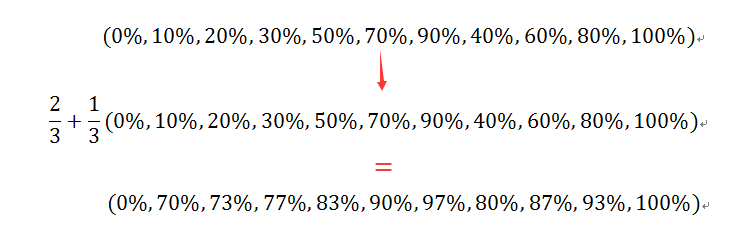
将动画总时长变成3s,用计算出的百分比替换原来的百分比,代码如下:
.ico{

    -webkit-animation: Tada 3s both infinite;

    -moz-animation: Tada 3s both infinite;

    -ms-animation: Tada 3s both infinite;

    animation: Tada 3s both infinite;

}

@keyframes Tada {

    0% {

        transform: scale(1);

        transform: scale(1)

    }

    70%,73%{

        transform: scale(0.9) rotate(-3deg);

        transform: scale(0.9) rotate(-3deg)

    }

    77%,83%,90%,97%  {

        transform: scale(1.1) rotate(3deg);

        transform: scale(1.1) rotate(3deg)

    }

    80%,87%,93%{

        transform: scale(1.1) rotate(-3deg);

        transform: scale(1.1) rotate(-3deg)

    }

    100% {

        transform: scale(1) rotate(0);

        transform: scale(1) rotate(0)

    }

}
效果就是我们期望的了。

完整代码如下:
<!DOCTYPE html>

<html lang="en">

<head>

    <meta charset="UTF-8">

    <title>demo of starof</title>

    <style>

    a {

        display: inline-block;

        background-color: #cc2222;

        text-decoration: none;

        color: #fff;

        font-size: 14px;

        padding: 10px 12px;

        width: 100px;

        position: relative;

    }

    .ico {

        position: absolute;

        width: 14px;

        height: 16px;

        background: url(images/ico.png) no-repeat center;

        background-size: 100%;

        position: absolute;

        top: 4px;

        right: 27px;

    }

    /*动画*/

    .ico{

    -webkit-animation: Tada 3s both infinite;

    -moz-animation: Tada 3s both infinite;

    -ms-animation: Tada 3s both infinite;

    animation: Tada 3s both infinite;

}

@-webkit-keyframes Tada {

    0% {

        -webkit-transform: scale(1);

        transform: scale(1)

    }

    70%,73% {

        -webkit-transform: scale(0.9) rotate(-3deg);

        transform: scale(0.9) rotate(-3deg)

    }

    77%,83%,90%,97% {

        -webkit-transform: scale(1.1) rotate(3deg);

        transform: scale(1.1) rotate(3deg)

    }

    80%,87%,93% {

        -webkit-transform: scale(1.1) rotate(-3deg);

        transform: scale(1.1) rotate(-3deg)

    }

    100% {

        -webkit-transform: scale(1) rotate(0);

        transform: scale(1) rotate(0)

    }

}

@-moz-keyframes Tada {

    0% {

        -moz-transform: scale(1);

        transform: scale(1)

    }

    70%,73% {

        -moz-transform: scale(0.9) rotate(-3deg);

        transform: scale(0.9) rotate(-3deg)

    }

    77%,83%,90%,97% {

        -moz-transform: scale(1.1) rotate(3deg);

        transform: scale(1.1) rotate(3deg)

    }

    80%,87%,93%{

        -moz-transform: scale(1.1) rotate(-3deg);

        transform: scale(1.1) rotate(-3deg)

    }

    100% {

        -moz-transform: scale(1) rotate(0);

        transform: scale(1) rotate(0)

    }

}

@-ms-keyframes Tada {

    0% {

        -ms-transform: scale(1);

        transform: scale(1)

    }

    70%,73% {

        -ms-transform: scale(0.9) rotate(-3deg);

        transform: scale(0.9) rotate(-3deg)

    }

    77%,83%,90%,97% {

        -ms-transform: scale(1.1) rotate(3deg);

        transform: scale(1.1) rotate(3deg)

    }

    80%,87%,93% {

        -ms-transform: scale(1.1) rotate(-3deg);

        transform: scale(1.1) rotate(-3deg)

    }

    100% {

        -ms-transform: scale(1) rotate(0);

        transform: scale(1) rotate(0)

    }

}

@keyframes Tada {

    0% {

        transform: scale(1);

        transform: scale(1)

    }

    70%,73%{

        transform: scale(0.9) rotate(-3deg);

        transform: scale(0.9) rotate(-3deg)

    }

    77%,83%,90%,97%  {

        transform: scale(1.1) rotate(3deg);

        transform: scale(1.1) rotate(3deg)

    }

    80%,87%,93%{

        transform: scale(1.1) rotate(-3deg);

        transform: scale(1.1) rotate(-3deg)

    }

    100% {

        transform: scale(1) rotate(0);

        transform: scale(1) rotate(0)

    }

}

    </style>

</head>

<body>

    <nav>

        <a href="javascript:;" class="box">

                            一元夺宝

                            <div class="ico"></div>

        </a>

    </nav>

</body>

</html>
本文只是介绍一种思路,关于动画各个参数详情可参考:
本文作者starof,因知识本身在变化,作者也在不断学习成长,文章内容也不定时更新,为避免误导读者,方便追根溯源,请诸位转载注明出处:http://www.cnblogs.com/starof/p/5443445.html有问题欢迎与我讨论,共同进步。
css3实现循环执行动画,且动画每次都有延迟的更多相关文章
- CSS3与页面布局学习总结(六)——CSS3新特性(阴影、动画、渐变、变形、伪元素等)
CSS3在CSS2.1的基础上新增加了许多属性,这里选择了较常用的一些功能与大家分享,帮助文档中有很详细的描述,可以在本文的示例中获得帮助文档. 一.阴影 1.1.文字阴影 text-shadow&l ...
- 详解用CSS3制作圆形滚动进度条动画效果
主 题 今天手把手教大家用CSS3制作圆形滚动进度条动画,想不会都难!那么,到底是什么东东呢?先不急,之前我分享了一个css实现进度条效果的博客<CSS实现进度条和订单进度条>,但是呢, ...
- CSS3与页面布局学习笔记(六)——CSS3新特性(阴影、动画、渐变、变形( transform)、透明、伪元素等)
一.阴影 1.1.文字阴影 text-shadow<length>①: 第1个长度值用来设置对象的阴影水平偏移值.可以为负值 <length>②: 第2个长度值用来设置对象的阴 ...
- Magic CSS3 – 创建各种神奇的交互动画效果
Magic CSS3 Animations 动画是一个独特的 CSS3 动画特效包,你可以自由地使用您的 Web 项目中.只需简单的在页面上引入 CSS 样式: magic.css 或者压缩版本 ma ...
- CSS3 skew倾斜、rotate旋转动画
css3出现之前,我们实现一个对象的一组连续动画需要通过JavaScript或Jquery编写,脚本代码较为复杂: 若需要实现倾斜.旋转之类的动画难度将更高(我还没试过用JavaScript或Jque ...
- CSS3新特性(阴影、动画、渐变、变形、伪元素等)
CSS3与页面布局学习总结(六)--CSS3新特性(阴影.动画.渐变.变形.伪元素等) 目录 一.阴影 1.1.文字阴影 1.2.盒子阴影 二.背景 2.1.背景图像尺寸 2.2.背景图像显示的原 ...
- CSS3新特性(阴影、动画、渐变、变形、伪元素等) CSS3与页面布局学习总结——CSS3新特性(阴影、动画、渐变、变形、伪元素等)
目录 一.阴影 1.1.文字阴影 1.2.盒子阴影 二.背景 2.1.背景图像尺寸 2.2.背景图像显示的原点 三.伪元素 3.1.before 3.2.after 3.3.清除浮动 四.圆角与边 ...
- CSS3新特性(阴影、动画、渐变)
一.阴影 1.1文字阴影: text-shadow<length>①: 第1个长度值用来设置对象的阴影水平偏移值.可以为负值 <length>②: 第2个长度值用来设置对象的阴 ...
- 显示层封装及实现与优化(无动画+css3动画+js动画)
showhide.html <!DOCTYPE html> <html lang="en"> <head> <meta charset=& ...
随机推荐
- 【Win10开发】自定义标题栏
UWP 现在已经可以自定义标题栏了,毕竟看灰色时间长了也会厌烦,开发者们还是希望能够将自己的UI做的更加漂亮,更加与众不同.那么废话不多说,我们开始吧! 首先要了解ApplicationViewTit ...
- CSS3橙色的星球绕轨道公转动画
效果:http://hovertree.com/texiao/css3/24/ 效果图: 代码如下: <!DOCTYPE html> <html lang="zh" ...
- Suggestion(搜索建议)产品和技术
今天来简单聊聊Suggestion产品 什么是Suggestion服务? 一图胜千言: 当你想要搜索某个长词语或者一句话输入部分时,Suggestion服务预测你极大可能的候选项,并罗列出来,供你选择 ...
- C语言: 预处理
1. 字符映射 键盘有多种标准规格,例如常用的IBM 104键盘标准,然而不是所有键盘都能打出像#这样的符号,因此C语言的预处理引入了字符映射机制.如果程序员要求,预处理会按照约定对源代码中的字符进行 ...
- 【工匠大道】Git的使用总结
初衷是想将一些常用的代码整理在博客园上,但是考虑到博客园上的代码量多,需要折叠,折叠后就不能直接修改,于是想到了 大家都常用的 gitHub来进行代码的管理. 其实之前我是用过 Osa的git的,但是 ...
- 8、ASP.NET MVC入门到精通——View(视图)
本系列目录:ASP.NET MVC4入门到精通系列目录汇总 View视图职责是向用户提供界面.负责根据提供的模型数据,生成准备提供给用户的格式界面. 支持多种视图引擎(Razor和ASPX视图引擎是官 ...
- 使用Enyim.Caching访问阿里云的OCS
阿里云的开放式分布式缓存(OCS)简化了缓存的运维管理,使用起来很方便,官方推荐的.NET访问客户端类库为 Enyim.Caching,下面对此做一个封装. 首先引用最新版本 Enyim.Cachin ...
- [翻译]用 Puppet 搭建易管理的服务器基础架构(3)
我通过伯乐在线翻译了一个Puppet简明教程,一共分为四部分,这是第三部分. 本文由 伯乐在线 - Wing 翻译,黄利民 校稿.未经许可,禁止转载!英文出处:Manuel Kiessling.欢迎加 ...
- C#图片处理常见方法性能比较
C#图片处理常见方法性能比较 来自:http://www.cnblogs.com/sndnnlfhvk/archive/2012/02/27/2370643.html 在.NET编程中,由于GDI ...
- asp.netDataTable导出excel方法(1)
先来写一段代码,这段代码也是我在网上找的,但是他那个原先有点问题,我对他那个进行了修改,现在这个代码是我修改改过的,应该没有问题的. public int StreamExport(System.Da ...