
elasticsearch迁移工具--elasticdump的使用
这篇文章主要讨论使用Elasticdump工具做数据的备份和type删除。
Elasticsearch的备份,不像MYSQL的myslqdump那么方便,它需要一个插件进行数据的导出和导入进行备份和恢复操作,也就是插件:Elasticdump
1、Elasticdump的安装:
[root@master mnt]# npm install elasticdump

2、使用
[root@master bin]# pwd

/mnt/elasticsearch-head-master/node_modules/elasticdump/bin
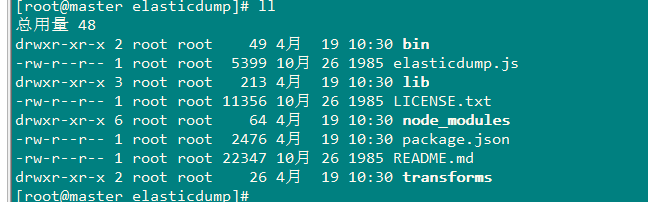
[root@master bin]# ./elasticdump --help

elasticdump: Import and export tools for elasticsearch

version: 4.7.0

Usage: elasticdump --input SOURCE --output DESTINATION [OPTIONS]

--input

                    Source location (required)

--input-index

                    Source index and type

                    (default: all, example: index/type)

--output

                    Destination location (required)

--output-index

                    Destination index and type

                    (default: all, example: index/type)

--limit

                    How many objects to move in batch per operation

                    limit is approximate for file streams

                    (default: 100)

--size

                    How many objects to retrieve

                    (default: -1 -> no limit)

--debug

                    Display the elasticsearch commands being used

                    (default: false)

--quiet

                    Suppress all messages except for errors

                    (default: false)

--type

                    What are we exporting?

                    (default: data, options: [data, settings, analyzer, mapping, alias])

--delete

                    Delete documents one-by-one from the input as they are

                    moved.  Will not delete the source index

                    (default: false)

--headers

                    Add custom headers to Elastisearch requests (helpful when

                    your Elasticsearch instance sits behind a proxy)

                    (default: '{"User-Agent": "elasticdump"}')

--params

                    Add custom parameters to Elastisearch requests uri. Helpful when you for example

                    want to use elasticsearch preference

                    (default: null)

--searchBody

                    Preform a partial extract based on search results

                    (when ES is the input, default values are

                      if ES > 5

                        `'{"query": { "match_all": {} }, "stored_fields": ["*"], "_source": true }'`

                      else

                        `'{"query": { "match_all": {} }, "fields": ["*"], "_source": true }'`

--sourceOnly

                    Output only the json contained within the document _source

                    Normal: {"_index":"","_type":"","_id":"", "_source":{SOURCE}}

                    sourceOnly: {SOURCE}

                    (default: false)

--ignore-errors

                    Will continue the read/write loop on write error

                    (default: false)

--scrollTime

                    Time the nodes will hold the requested search in order.

                    (default: 10m)

--maxSockets

                    How many simultaneous HTTP requests can we process make?

                    (default:

                      5 [node <= v0.10.x] /

                      Infinity [node >= v0.11.x] )

--timeout

                    Integer containing the number of milliseconds to wait for

                    a request to respond before aborting the request. Passed

                    directly to the request library. Mostly used when you don't

                    care too much if you lose some data when importing

                    but rather have speed.

--offset

                    Integer containing the number of rows you wish to skip

                    ahead from the input transport.  When importing a large

                    index, things can go wrong, be it connectivity, crashes,

                    someone forgetting to `screen`, etc.  This allows you

                    to start the dump again from the last known line written

                    (as logged by the `offset` in the output).  Please be

                    advised that since no sorting is specified when the

                    dump is initially created, there's no real way to

                    guarantee that the skipped rows have already been

                    written/parsed.  This is more of an option for when

                    you want to get most data as possible in the index

                    without concern for losing some rows in the process,

                    similar to the `timeout` option.

                    (default: 0)

--noRefresh

                    Disable input index refresh.

                    Positive:

                      1. Much increase index speed

                      2. Much less hardware requirements

                    Negative:

                      1. Recently added data may not be indexed

                    Recommended to use with big data indexing,

                    where speed and system health in a higher priority

                    than recently added data.

--inputTransport

                    Provide a custom js file to use as the input transport

--outputTransport

                    Provide a custom js file to use as the output transport

--toLog

                    When using a custom outputTransport, should log lines

                    be appended to the output stream?

                    (default: true, except for `$`)

--awsChain

                    Use [standard](https://aws.amazon.com/blogs/security/a-new-and-standardized-way-to-manage-credentials-in-the-aws-sdks/) location and ordering for resolving credentials including environment variables, config files, EC2 and ECS metadata locations

                    _Recommended option for use with AWS_

--awsAccessKeyId

--awsSecretAccessKey

                    When using Amazon Elasticsearch Service protected by

                    AWS Identity and Access Management (IAM), provide

                    your Access Key ID and Secret Access Key

--awsIniFileProfile

                    Alternative to --awsAccessKeyId and --awsSecretAccessKey,

                    loads credentials from a specified profile in aws ini file.

                    For greater flexibility, consider using --awsChain

                    and setting AWS_PROFILE and AWS_CONFIG_FILE

                    environment variables to override defaults if needed

--transform

                    A javascript, which will be called to modify documents

                    before writing it to destination. global variable 'doc'

                    is available.

                    Example script for computing a new field 'f2' as doubled

                    value of field 'f1':

                        doc._source["f2"] = doc._source.f1 * 2;

--httpAuthFile

                    When using http auth provide credentials in ini file in form

                    `user=<username>

                    password=<password>`

--support-big-int

                    Support big integer numbers

--retryAttempts

                    Integer indicating the number of times a request should be automatically re-attempted before failing

                    when a connection fails with one of the following errors `ECONNRESET`, `ENOTFOUND`, `ESOCKETTIMEDOUT`,

                    ETIMEDOUT`, `ECONNREFUSED`, `EHOSTUNREACH`, `EPIPE`, `EAI_AGAIN`

                    (default: 0)

--retryDelay

                    Integer indicating the back-off/break period between retry attempts (milliseconds)

                    (default : 5000)

--parseExtraFields

                    Comma-separated list of meta-fields to be parsed

--fileSize

                    supports file splitting.  This value must be a string supported by the **bytes** module.

                    The following abbreviations must be used to signify size in terms of units

                    b for bytes

                    kb for kilobytes

                    mb for megabytes

                    gb for gigabytes

                    tb for terabytes

                    e.g. 10mb / 1gb / 1tb

                    Partitioning helps to alleviate overflow/out of memory exceptions by efficiently segmenting files

                    into smaller chunks that then be merged if needs be.

--s3AccessKeyId

                    AWS access key ID

--s3SecretAccessKey

                    AWS secret access key

--s3Region

                    AWS region

--s3Bucket

                    Name of the bucket to which the data will be uploaded

--s3RecordKey

                    Object key (filename) for the data to be uploaded

--s3Compress

                    gzip data before sending to s3

--tlsAuth

                    Enable TLS X509 client authentication

--cert, --input-cert, --output-cert

                    Client certificate file. Use --cert if source and destination are identical.

                    Otherwise, use the one prefixed with --input or --output as needed.

--key, --input-key, --output-key

                    Private key file. Use --key if source and destination are identical.

                    Otherwise, use the one prefixed with --input or --output as needed.

--pass, --input-pass, --output-pass

                    Pass phrase for the private key. Use --pass if source and destination are identical.

                    Otherwise, use the one prefixed with --input or --output as needed.

--ca, --input-ca, --output-ca

                    CA certificate. Use --ca if source and destination are identical.

                    Otherwise, use the one prefixed with --input or --output as needed.

--inputSocksProxy, --outputSocksProxy

                    Socks5 host address

--inputSocksPort, --outputSocksPort

                    Socks5 host port

--help

                    This page

Examples:

# Copy an index from production to staging with mappings:

elasticdump \

  --input=http://production.es.com:9200/my_index \

  --output=http://staging.es.com:9200/my_index \

  --type=mapping

elasticdump \

  --input=http://production.es.com:9200/my_index \

  --output=http://staging.es.com:9200/my_index \

  --type=data

# Backup index data to a file:

elasticdump \

  --input=http://production.es.com:9200/my_index \

  --output=/data/my_index_mapping.json \

  --type=mapping

elasticdump \

  --input=http://production.es.com:9200/my_index \

  --output=/data/my_index.json \

  --type=data

# Backup and index to a gzip using stdout:

elasticdump \

  --input=http://production.es.com:9200/my_index \

  --output=$ \

  | gzip > /data/my_index.json.gz

# Backup the results of a query to a file

elasticdump \

  --input=http://production.es.com:9200/my_index \

  --output=query.json \

  --searchBody '{"query":{"term":{"username": "admin"}}}'

------------------------------------------------------------------------------

Learn more @ https://github.com/taskrabbit/elasticsearch-dump
3、elasticsearchdump的使用
'#拷贝analyzer如分词

elasticdump \

  --input=http://production.es.com:9200/my_index \

  --output=http://staging.es.com:9200/my_index \

  --type=analyzer

'#拷贝映射

elasticdump \

  --input=http://production.es.com:9200/my_index \

  --output=http://staging.es.com:9200/my_index \

  --type=mapping

'#拷贝数据

elasticdump \

  --input=http://production.es.com:9200/my_index \

  --output=http://staging.es.com:9200/my_index \

  --type=data
'#拷贝所有索引
elasticdump
--input=http://production.es.com:9200/
--output=http://staging.es.com:9200/
--all=true
# 备份到标准输出,且进行压缩(这里有一个需要注意的地方,我查询索引信息有6.4G,用下面的方式备份后得到一个789M的压缩文件,这个压缩文件解压后有19G):

elasticdump \

  --input=http://production.es.com:9200/my_index \

  --output=$ \

  | gzip > /data/my_index.json.gz

# 把一个查询结果备份到文件中

elasticdump \

  --input=http://production.es.com:9200/my_index \

  --output=query.json \

  --searchBody '{"query":{"term":{"username": "admin"}}}'
3、实例操作
1. 将es集群中的某个company的数据导出到文件中。
[root@master bin]# ./elasticdump --input http://192.168.200.100:9200/company --output /mnt/company.json

Fri, 19 Apr 2019 03:39:20 GMT | starting dump

Fri, 19 Apr 2019 03:39:20 GMT | got 2 objects from source elasticsearch (offset: 0)

Fri, 19 Apr 2019 03:39:20 GMT | sent 2 objects to destination file, wrote 2

Fri, 19 Apr 2019 03:39:20 GMT | got 0 objects from source elasticsearch (offset: 2)

Fri, 19 Apr 2019 03:39:20 GMT | Total Writes: 2

Fri, 19 Apr 2019 03:39:20 GMT | dump complete

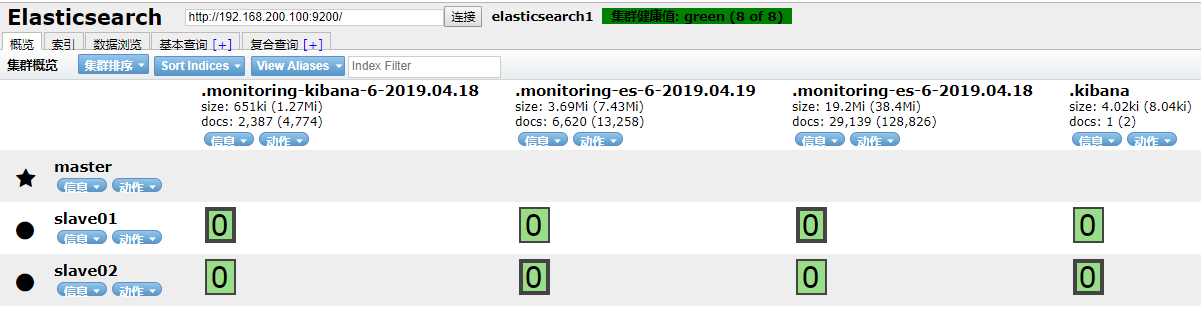
2、删除该index下的data
[root@master mnt]# curl -XDELETE '192.168.200.100:9200/company'
查看删除情况:
3、恢复:
[root@master bin]# ./elasticdump elasticdump --input /mnt/company.json --output "http://192.168.200.100:9200/company"

Fri, 19 Apr 2019 03:46:56 GMT | starting dump

Fri, 19 Apr 2019 03:46:56 GMT | got 2 objects from source file (offset: 0)

Fri, 19 Apr 2019 03:46:57 GMT | sent 2 objects to destination elasticsearch, wrote 2

Fri, 19 Apr 2019 03:46:57 GMT | got 0 objects from source file (offset: 2)

Fri, 19 Apr 2019 03:46:57 GMT | Total Writes: 2

Fri, 19 Apr 2019 03:46:57 GMT | dump complete


elasticsearch迁移工具--elasticdump的使用的更多相关文章
- Elasticsearch数据迁移工具elasticdump工具
1. 工具安装 wget https://nodejs.org/dist/v8.11.2/node-v8.11.2-linux-x64.tar.xz tar xf node-v8.11.2-linux ...
- Elasticsearch的数据导出和导入操作(elasticdump工具),以及删除指定type的数据(delete-by-query插件)
Elasticseach目前作为查询搜索平台,的确非常实用方便.我们今天在这里要讨论的是如何做数据备份和type删除.我的ES的版本是2.4.1. ES的备份,可不像MySQL的mysqldump这么 ...
- 实际使用Elasticdump工具对Elasticsearch集群进行数据备份和数据还原
文/朱季谦 目录 一.Elasticdump工具介绍 二.Elasticdump工具安装 三.Elasticdump工具使用 最近在开发当中做了一些涉及到Elasticsearch映射结构及数据导出导 ...
- elasticsearch数据转移,elasticdump的安装使用
模拟: 将本地的my_index的products的一条document转移到http://192.168.111.130的一个es服务器上. (一)安装elasticdump 先安装node.js, ...
- elasticsearch将数据导出json文件【使用elasticdump】
1.前提准备 需要使用npm安装,还未安装的朋友可以阅读另一篇我的博客<安装使用npm>,windows环境. 2.安装es-dump 打开终端窗口PowerShell或者cmd. 输入命 ...
- 学习用Node.js和Elasticsearch构建搜索引擎(7):零停机时间更新索引配置或迁移索引
上一篇说到如果一个索引的mapping设置过了,想要修改type或analyzer,通常的做法是新建一个索引,重新设置mapping,再把数据同步过来. 那么如何实现零停机时间更新索引配置或迁移索引? ...
- elasticsearch自动按天创建索引脚本
elasticsearch保存在一个索引中数据量太大无法查询,现在需要将索引按照天来建,查询的时候关联查询即可 有时候es集群创建了很多索引,删不掉,如果是测试环境或者初始化es集群(清空所有数据), ...
- Elasticsearch snapshot 备份的使用方法 【备忘】
常见的数据库都会提供备份的机制,以解决在数据库无法使用的情况下,可以开启新的实例,然后通过备份来恢复数据减少损失.虽然 Elasticsearch 有良好的容灾性,但由于以下原因,其依然需要备份机制. ...
- 严选 | Elasticsearch史上最全最常用工具清单【转】
1.题记 工欲善其事必先利其器,ELK Stack的学习和实战更是如此,特将工作中用到的“高效”工具分享给大家. 希望能借助“工具”提高开发.运维效率! 2.工具分类概览 2.1 基础类工具 1.He ...
随机推荐
- 转:Cookie详解
没怎么坐过客户端相关的工作,所以写爬虫的时候,很多概念都很模糊,学习起来很困难.现在想攻坚一下,所以找了一下cookies相关的内容. HTTP cookies,通常又称作"cookies& ...
- 深入分析 Java Lock 同步锁
前言 Java 的锁实现,有 Synchronized 和 Lock.上一篇文章深入分析了 Synchronized 的实现原理:由Java 15废弃偏向锁,谈谈Java Synchronized 的 ...
- 百度前端技术学院-基础-day20-21
第二十到第二十一天:让你和页面对话 task1 控制元素的显示及隐藏 实现以下功能: 当用户选择了 School 的单选框时,显示 School 的下拉选项,隐藏 Company 的下拉选项 当用户选 ...
- linux下/etc/profile /etc/bashrc /root/.bashrc /root/.bash_profile这四个配置文件的加载顺序
目录 一.关于linux配置文件 二.验证四个配置文件的加载顺序 三.结论 一.关于linux配置文件 1.linux下主要有四个配置文件:/etc/profile ./etc/bashrc ./ro ...
- 跨站点请求伪造 - SpringBoot配置CSRF过滤器
1. 跨站点请求伪造 风险:可能会窃取或操纵客户会话和 cookie,它们可能用于模仿合法用户,从而使黑客能够以该用户身份查看或变更用户记录以及执行事务. 原因:应用程序使用的认证方法不充分. ...
- Spring Boot之搞定mongoTemplate
最近使用MongoDB+Spring Boot的项目,发现相较于MyBatis来说,Spring Boot对于MongoDB进行操作变化更多,所以总结一下使用mongoTemplate库的知识点,以备 ...
- 虚拟局域网Vlan配置实战
VLAN 的基本概念 Access 类型的接口 Trunk 类型的接口 接口类型小结 以太网交换机的二层接口类型 Access口接收帧 Access口发送帧 Trunk口接收帧 Trunk口发送帧 H ...
- 一文说通C#中的异步迭代器
今天来写写C#中的异步迭代器 - 机制.概念和一些好用的特性 迭代器的概念 迭代器的概念在C#中出现的比较早,很多人可能已经比较熟悉了. 通常迭代器会用在一些特定的场景中. 举个例子:有一个for ...
- 【Electron Playground 系列】文件下载篇
作者:long.woo 文件下载是我们开发中比较常见的业务需求,比如:导出 excel. web 应用文件下载存在一些局限性,通常是让后端将响应的头信息改成 Content-Disposition: ...
- 关于MySQL索引知识与小妙招 — get get get
一.索引基本知识 1.1 索引的优点 大大减少了服务器需要扫描的数据量,加快数据库的检索速度 帮助服务器避免排序和临时表 将随机io变成顺序io 1.2 索引的用处 速查找匹配WHERE子句的行 从c ...