
使用PostMan测试WebService接口
使用PostMan测试WebService接口
参考资料:
通过XML请求WebServer https://blog.csdn.net/qq_33933408/article/details/53149435
WebService发布与访问并通过Postman测试WebService接口 https://blog.csdn.net/up123456789/article/details/79474446
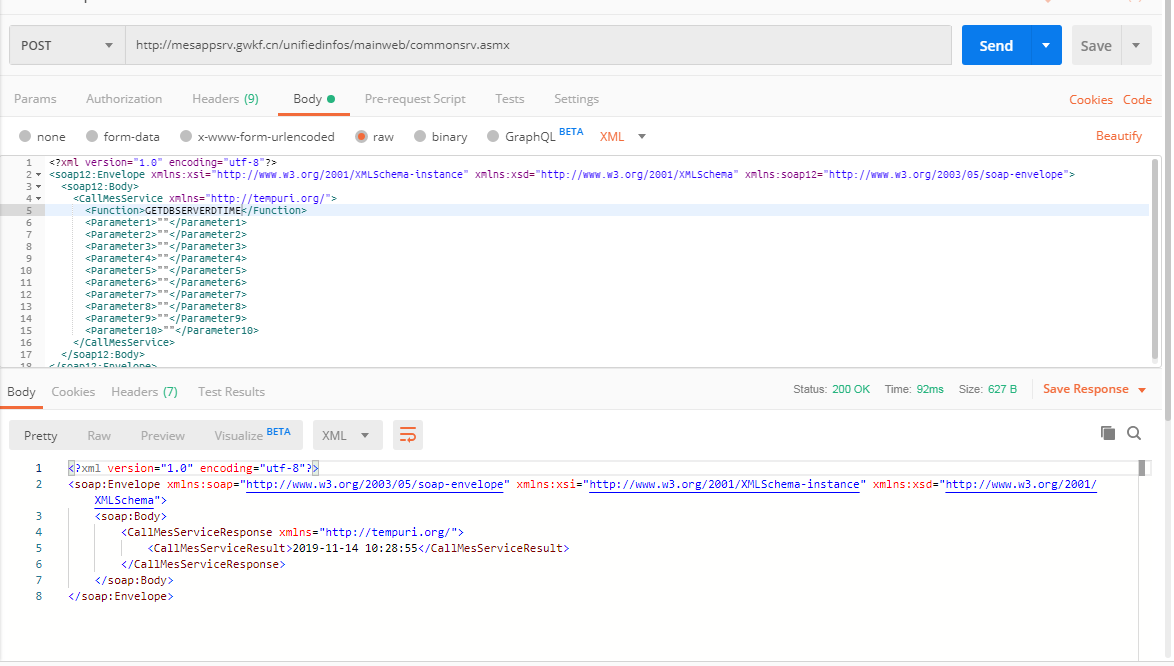
一、操作步骤
1、设置URL
2、设置请求模式:Post
3、设置Header:添加 Content-Type ,值为 text/xml;charset=utf-8
4、设置Body:勾选raw
5、输入Body内容:(详见 二)
二、请求WebService时的Body结构
<?xml version="1.0" encoding="utf-8"?>
<soap:Envelope xmlns:xsi="http://www.w3.org/2001/XMLSchema-instance" xmlns:xsd="http://www.w3.org/2001/XMLSchema" xmlns:soap="http://schemas.xmlsoap.org/soap/envelope/">
<soap:Body>
<getWeather xmlns="http://WebXml.com.cn/">
<theCityCode>string</theCityCode>
<theUserID>string</theUserID>
</getWeather>
</soap:Body>
</soap:Envelope>
详细说明:
(1) getWeather是方法名。
(2)theCityCode、theUserID是方法参数。
三、WebService响应时的Body结构
<?xml version="1.0" encoding="utf-8"?>
<soap:Envelope xmlns:xsi="http://www.w3.org/2001/XMLSchema-instance" xmlns:xsd="http://www.w3.org/2001/XMLSchema" xmlns:soap="http://schemas.xmlsoap.org/soap/envelope/">
<soap:Body>
<getWeatherResponse xmlns="http://WebXml.com.cn/">
<getWeatherResult>
<string>string</string>
<string>string</string>
</getWeatherResult>
</getWeatherResponse>
</soap:Body>
</soap:Envelope>
详细说明:
(1)getWeatherResult是方法的返回值。

使用PostMan测试WebService接口的更多相关文章
- 使用PostMan测试WebService接口教程
一.操作步骤 1.设置URL 2.设置请求模式:Post 3.设置Header:添加 Content-Type ,值为 text/xml;charset=utf-8 4.设置Body:勾选raw 5. ...
- postman测试webservice接口
- 【SoapUI、Postman、WebServiceStudio、Jmeter】接口测试工具结合测试webservice接口(发送XML格式参数)
目录: SoapUI测试webservice接口,发送XML格式参数 Postman测试webservice接口,发送XML格式参数 WebServiceStudio.exe测试webservice接 ...
- 关于python测试webservice接口的视频分享
现在大公司非常流行用python做产品的测试框架,还有对于一些快速原型产品的开发也好,很好地支持OO编程,代码易读.Python的更新挺快的,尤其是第三方库. 对于测试人员,代码基础薄弱,用pytho ...
- Python之测试webservice接口
前段时间学习了Python操作http接口,觉得挺容易的.最近项目组也有接触webservice接口,心里想想是否Python也可以操作这类接口.于是利用伟大的度娘,花了6个小时研究出来了,所以迫不及 ...
- python实现建立soap通信(调用及测试webservice接口)
实现代码如下: #调用及测试webservice接口 import requests class SoapConnect: def get_soap(self,url,data): r = reque ...
- 『动善时』JMeter基础 — 50、使用JMeter测试WebService接口
目录 1.什么是WebService 2.WebService和SOAP的关系 3.什么是WSDL 4.测试WebService接口前的准备 (1)如何判断是WebService接口 (2)如何获取W ...
- 『动善时』JMeter基础 — 51、使用JMeter测试WebService接口
目录 1.什么是WebService 2.WebService和SOAP的关系 3.什么是WSDL 4.测试WebService接口前的准备 (1)如何判断是WebService接口 (2)如何获取W ...
- Postman如何测试Webservice接口?
一般情况下使用soapui工具测试ws接口,那么能不能使用postman测试呢?当然可以,往下看. 1. 首先请求类型为post 填写上ws地址 ,url地址后不追加?wsdl 2. 设置请求头 he ...
随机推荐
- Java&Selenium根据实参启动相应浏览器
Java&Selenium根据实参启动相应浏览器 /** * 定义函数initBrowser * @param browser:字符串参数chrome/ie/xx * @return 并返回驱 ...
- Python+request 获取响应(elapsed)和响应时间(timeout)《七》
requests发请求时,接口的响应时间,也是我们需要关注的一个点,如果响应时间太长,也是不合理的.如果服务端没及时响应,也不能一直等着,可以设置一个timeout超时的时间 具体的实现如下: 超时( ...
- Python中的猴子补丁
monkey patch指的是在运行时动态替换,一般是在startup的时候.用过gevent就会知道,会在最开头的地方gevent.monkey.patch_all();把标准库中的thread/s ...
- node.js之文件读写模块,配合递归函数遍历文件夹和其中的文件
fs.stat会返回文件夹会文件的属性 var fs = require('fs'); var wenwa = function (pathname,callback) { fs.stat(pathn ...
- android studio调试报错:java.lang.RuntimeException: Unable to start activity ComponentInfo
报错信息: java.lang.RuntimeException: Unable to start activity ComponentInfo{com.example.pro_u_loc/com.e ...
- [Google Guava] 4-函数式编程
原文链接 译文链接 译者:沈义扬,校对:丁一 注意事项 截至JDK7,Java中也只能通过笨拙冗长的匿名类来达到近似函数式编程的效果.预计JDK8中会有所改变,但Guava现在就想给JDK5以上用户提 ...
- 3、获取Class对象的三种方式
3.获取Class对象的三种方式 要想对字节码文件进行解刨,必须要有字节码文件对象 Object类中的getClass方法 通过对象静态属性 .class来获取对应的Class对象 只要通过给定类的字 ...
- 边学边体验django--表格
在模板的末尾,我们增加一个rlt记号,为表格处理结果预留位置. 表格后面还有一个{% csrf_token %}的标签.csrf全称是Cross Site Request Forgery.这是Djan ...
- PHP mysqli_commit() 函数
关闭自动提交,做一些查询,然后提交查询: <?php // 假定数据库用户名:root,密码:123456,数据库:RUNOOB $con=mysqli_connect("localh ...
- 004——转载C#禁止改变窗体大小
原文链接:http://www.cnblogs.com/shaozhuyong/p/5545005.html 1.先把MaximizeBox和MinimumBox设置为false,这时你发现最大最小化 ...