
GraphQL实战篇(一)
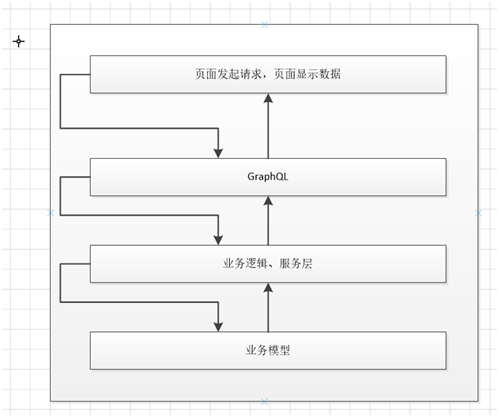
看过基础篇的都知道,GraphQL创建Schema有两种方式,Schema First和Graph Type,前者使用GraphQL Schema Language类似于EF的DB First;后者和EF 的Code First相似。使用GraphQL请求流程大致如下图所示,今天我就用Graph Type通过控制台程序简单的介绍下大致使用过程:
1、安装GraphQL包
GraphQL包提供了GraphQL.Types命名空间,GraphQL的使用离不开GraphQL.Types。
2、自定义数据模型
     /// <summary>

     /// 自定义客户类

     /// </summary>

     [Table("t_customer")]

     public partial class CustomerEntity

     {

         public CustomerEntity()

         {

         }

         /// <summary>

         /// 主键GuID

         /// </summary>

         public string Guid { get; set; }

         /// <summary>

         /// 中文性

         /// </summary>

         [Required, Column("code_cn", TypeName = Constants.NVarChar255)]

         public string Code_CN { get; set; }

         /// <summary>

         /// 中文名

         /// </summary>

         [Required, Column("name_cn", TypeName = Constants.NVarChar255)]

         public string Name_CN { get; set; }

         /// <summary>

         /// 英文性

         /// </summary>

         [Required, Column("code_en", TypeName = Constants.NVarChar255)]

         public string Code_EN { get; set; }

         /// <summary>

         /// 英文名

         /// </summary>

         [Required, Column("name_en", TypeName = Constants.NVarChar255)]

         public string Name_EN { get; set; }

         //中文姓,中文名,英文姓,英文名,性别,生日,默认出票方式,国籍,电子邮箱,工作单位,备注

         /// <summary>

         /// 性别

         /// </summary>

         [Required, Column("sex", TypeName = Constants.NVarChar255)]

         public string Sex { get; set; }

         /// <summary>

         /// 生日

         /// </summary>

         [Required, Column("birthday", TypeName = Constants.NVarChar255)]

         public string BirthDay { get; set; }

         /// <summary>

         /// 出票方式

         /// </summary>

         [Required, Column("drawerway", TypeName = Constants.NVarChar255)]

         public string DrawerWay { get; set; }

         /// <summary>

         /// 国籍

         /// </summary>

         [Required, Column("country", TypeName = Constants.NVarChar255)]

         public string Country { get; set; }

         /// <summary>

         /// 电子邮箱

         /// </summary>

         [Required, Column("email", TypeName = Constants.NVarChar255)]

         public string EMail { get; set; }

         /// <summary>

         /// 工作单位

         /// </summary>

         [Required, Column("workunit", TypeName = Constants.NVarChar255)]

         public string WorkUnit { get; set; }

         /// <summary>

         /// 备注

         /// </summary>

         [Required, Column("remark", TypeName = Constants.Text)]

         public string Remark { get; set; }

     }
CustomerEntity
3、GraphQL的数据模型
定义GraphQL的数据模型该模型继承自ObjectGraphType,对自定义数据模型CustomerEntity的属性进行相应映射。
     /// <summary>

     /// GraphQL的数据模型:继承自ObjectGraphType,并传递范型CustomerEntity

     /// </summary>

     public class CustomerEntityType : ObjectGraphType<CustomerEntity>

     {

         //在构造函数中,对属性作影射

         public CustomerEntityType()

         {

             Name = "customers";

             Field(x => x.Guid);

             Field(x=>x.BirthDay);

             Field(x => x.Code_CN);

             Field(x => x.Code_EN);

             Field(x => x.Country);

             Field(x => x.DrawerWay);

             Field(x => x.EMail);

             Field(x => x.Name_CN);

             Field(x => x.Name_EN);

             Field(x => x.Remark);

             Field(x => x.Sex);

             Field(x => x.WorkUnit);

             Field<ListGraphType<CustomerEntityType>>("Customers");

         }

     }
CustomerEntityType
4、定义操作模型
在这里我在啰嗦一遍GraphQL的操作包括 Query(Select), Mutation (Create,Update,Delete),Subscription (订阅),在这里我把所有请求查询的字段映射到了CustomerRepository的调用上。
     public class CustomerRepository : ICustomerRepository

     {

         //public List<CustomerEntity> CustomersList { get; set; }

         public IEnumerable<CustomerEntity> GetAll()

         {

             var jack = new CustomerEntity

             {

                 Guid = Guid.NewGuid().ToString(),

                 Code_CN = "张",

                 Name_CN = "三",

                 Code_EN = "Jack",

                 Name_EN = "Jack-Jie",

                 Sex = "男"

             };

             var lx = new CustomerEntity

             {

                 Guid = Guid.NewGuid().ToString(),

                 Code_CN = "李",

                 Name_CN = "五",

                 Code_EN = "lx",

                 Name_EN = "lx-Jie",

                 Sex = "男"

             };

             var wz = new CustomerEntity

             {

                 Guid = Guid.NewGuid().ToString(),

                 Code_CN = "王",

                 Name_CN = "三",

                 Code_EN = "wz",

                 Name_EN = "Wz-Jie",

                 Sex = "女"

             };

             var query = new List<CustomerEntity> { jack, lx, wz };

             return query;

         }

         public CustomerEntity GetByID(string guid)

         {

             return GetAll().FirstOrDefault(x=>x.Guid == guid);

         }

     }
CustomerRepository
查询操作:
     /// <summary>

     /// GraphQL查询

     /// </summary>

     public class QueryAction : ObjectGraphType

     {

         IEnumerable<CustomerEntity> customers = null;

         ICustomerRepository repository = new CustomerRepository();

         public QueryAction()

         {

             Field<ListGraphType<CustomerEntityType>>(//在构造函数中定义查询操作

                 name: "customers", //注意这个名字,后边查询的时候需要对应

                 arguments: new QueryArguments //定义查询参数

                 {

                      new QueryArgument<StringGraphType>

                     {

                         Name = "Guid",

                         Description = "The Guid for the CustomerEntity"

                     },

                     new QueryArgument<StringGraphType>

                     {

                         Name = "BirthDay",

                         Description = "The BirthDay for the CustomerEntity"

                     },

                     new QueryArgument<StringGraphType>

                     {

                         Name = "Code_CN",

                         Description = "The Code_CN for the CustomerEntity"

                     },

                     new QueryArgument<StringGraphType>

                     {

                         Name = "Code_EN",

                         Description = "The Code_EN for CustomerEntity"

                     },

                     new QueryArgument<StringGraphType>

                     {

                         Name = "Country",

                         Description = "The Country for CustomerEntity"

                     },

                     new QueryArgument<StringGraphType>

                     {

                         Name = "DrawerWay",

                         Description = "The DrawerWay for CustomerEntity"

                     },

                     new QueryArgument<StringGraphType>

                     {

                         Name = "EMail",

                         Description = "The EMail for CustomerEntity"

                     },

                     new QueryArgument<StringGraphType>

                     {

                         Name = "Name_CN",

                         Description = "The Name_CN for CustomerEntity"

                     },

                     new QueryArgument<StringGraphType>

                     {

                         Name = "Name_EN",

                         Description = "The Name_EN for CustomerEntity"

                     },

                     new QueryArgument<StringGraphType>

                     {

                         Name = "Remark",

                         Description = "The Remark for CustomerEntity"

                     },

                     new QueryArgument<StringGraphType>

                     {

                         Name = "Sex",

                         Description = "The Sex for CustomerEntity"

                     },

                     new QueryArgument<StringGraphType>

                     {

                         Name = "WorkUnit",

                         Description = "The WorkUnit for CustomerEntity"

                     }

                 },

                 resolve: context =>// 定义查询操作的执行

                 {

                     var customerContext = context.UserContext;// 获取上下文,可在此作用户验证操作

                     customers = repository.GetAll();

                     var Guid = context.GetArgument<string>("Guid");

                     customers = customers.Where(u => Guid == null || u.BirthDay == Guid);

                     var BirthDay = context.GetArgument<string>("BirthDay");

                     customers = customers.Where(u => BirthDay == null || u.BirthDay == BirthDay);

                     var Code_CN = context.GetArgument<string>("Code_CN");

                     customers = customers.Where(u => Code_CN == null || u.Code_CN == Code_CN);

                     var Code_EN = context.GetArgument<string>("Code_EN");

                     customers = customers.Where(u => Code_EN == null || u.Code_EN == Code_EN);

                     var Country = context.GetArgument<string>("Country");

                     customers = customers.Where(u => Country == null || u.Country == Country);

                     var DrawerWay = context.GetArgument<string>("DrawerWay");

                     customers = customers.Where(u => DrawerWay == null || u.DrawerWay == DrawerWay);

                     var EMail = context.GetArgument<string>("EMail");

                     customers = customers.Where(u => EMail == null || u.EMail == EMail);

                     var Name_CN = context.GetArgument<string>("Name_CN");

                     customers = customers.Where(u => Name_CN == null || u.Name_CN == Name_CN);

                     var Name_EN = context.GetArgument<string>("Name_EN");

                     customers = customers.Where(u => Name_EN == null || u.Name_EN == Name_EN);

                     var Remark = context.GetArgument<string>("Remark");

                     customers = customers.Where(u => Remark == null || u.Remark == Remark);

                     var Sex = context.GetArgument<string>("Sex");

                     customers = customers.Where(u => Sex == null || u.Sex == Sex);

                     var WorkUnit = context.GetArgument<string>("WorkUnit");

                     customers = customers.Where(u => WorkUnit == null || u.WorkUnit == WorkUnit);

                     return customers;

                 });

             Field<CustomerEntityType>(

                name: "AddCustomer", //注意这个名字,后边查询的时候需要对应

                arguments: new QueryArguments //定义查询参数

                {

                     new QueryArgument<StringGraphType>

                     {

                         Name = "Guid",

                         Description = "The Guid for the CustomerEntity"

                     },

                     new QueryArgument<StringGraphType>

                     {

                         Name = "BirthDay",

                         Description = "The BirthDay for the CustomerEntity"

                     },

                     new QueryArgument<StringGraphType>

                     {

                         Name = "Code_CN",

                         Description = "The Code_CN for the CustomerEntity"

                     },

                     new QueryArgument<StringGraphType>

                     {

                         Name = "Code_EN",

                         Description = "The Code_EN for CustomerEntity"

                     },

                     new QueryArgument<StringGraphType>

                     {

                         Name = "Country",

                         Description = "The Country for CustomerEntity"

                     },

                     new QueryArgument<StringGraphType>

                     {

                         Name = "DrawerWay",

                         Description = "The DrawerWay for CustomerEntity"

                     },

                     new QueryArgument<StringGraphType>

                     {

                         Name = "EMail",

                         Description = "The EMail for CustomerEntity"

                     },

                     new QueryArgument<StringGraphType>

                     {

                         Name = "Name_CN",

                         Description = "The Name_CN for CustomerEntity"

                     },

                     new QueryArgument<StringGraphType>

                     {

                         Name = "Name_EN",

                         Description = "The Name_EN for CustomerEntity"

                     },

                     new QueryArgument<StringGraphType>

                     {

                         Name = "Remark",

                         Description = "The Remark for CustomerEntity"

                     },

                     new QueryArgument<StringGraphType>

                     {

                         Name = "Sex",

                         Description = "The Sex for CustomerEntity"

                     },

                     new QueryArgument<StringGraphType>

                     {

                         Name = "WorkUnit",

                         Description = "The WorkUnit for CustomerEntity"

                     }

                },

                resolve: context =>// 定义查询操作的执行

                 {

                     string guid = context.GetArgument<string>("Guid");

                     return repository.GetByID(guid);

                 });

         }

     }
QueryAction
更新操作:
     /// <summary>

     /// GraphQL修改更新

     /// </summary>

     public class MutationAction : ObjectGraphType

     {

         private ICustomerRepository _repository = new CustomerRepository();

         IEnumerable<CustomerEntity> customers = null;

         public MutationAction()

         {

             Field<StringGraphType>(

                "run",

                arguments: new QueryArguments(new QueryArgument<CustomerEntityType> { Name = "customer" }),

                resolve: ctx => ctx.GetArgument<CustomerEntity>("customer").Guid);

         }

     }
MutationAction
5、定义GraphSchema模型
GraphSchema是GraphQL重中之重,它是所有操作的枢纽。
   public class GraphSchema : Schema

     {

         public GraphSchema()

         {

             Query = new QueryAction();

             Mutation = new MutationAction();

         }

     }
GraphSchema
6、测试调用
测试一下查询操作,关键代码如下:
    public async void QueryCustomers(string Code_CN, string Code_EN)

         {

             var queryStr = @"{customers(Code_CN:" + Code_CN + ",Code_EN:" + "\"" + Code_EN + "\"" + "){Code_CN Code_EN Name_CN Name_EN}}";

             var result = await execute.ExecuteAction(new GraphQLQuery { Query = queryStr, CustomerEntityContext = "Add Customer" });

             var data = result.Data;

             Assert.IsNull(result.Errors?.Count);

         }
QueryCustomersTest
这里你可以修改你的查询参数,无须修改API接口便可以达到目的。
修改更新接口的操作主要代码如下:
         public async void CreateCustomer(string Code_CN, string Code_EN)

         {

             var queryStr = @"{query: mutation ($customer: UserInput!){AddCustomer($customer:$customer){Code_CN Code_EN Name_CN Name_EN}},variables:{customer:{Code_CN: " + Code_CN + @",Code_EN:" + Code_EN + @"}}}";

             var query = new GraphQLQuery

             {

                 Query = "mutation ($customer: UserInput!){AddCustomer(customer:$customer){Code_CN Code_EN Name_CN Name_EN}}",

                 Variables = JObject.Parse("{customer:{\"Code_CN\": \"" + Code_CN + "\",\"Code_EN\":" + Code_EN + "}}")

             };

             var result = await execute.ExecuteAction(query);

             Assert.IsNull(result.Errors.Count);

         }
MutationActionTest
好了,以上就是我得初步总结和实践,后续会继续跟踪,欢迎纠错!!!
GraphQL实战篇(一)的更多相关文章
- 二、Redis基本操作——String(实战篇)
小喵万万没想到,上一篇博客,居然已经被阅读600次了!!!让小喵感觉压力颇大.万一有写错的地方,岂不是会误导很多筒子们.所以,恳请大家,如果看到小喵的博客有什么不对的地方,请尽快指正!谢谢! 小喵的唠 ...
- AngularJS in Action读书笔记6(实战篇)——bug hunting
这一系列文章感觉写的不好,思维跨度很大,原本是由于与<Angularjs in action>有种相见恨晚而激发要写点读后感之类的文章,但是在翻译或是阐述的时候还是会心有余而力不足,零零总 ...
- ROS2.9.27架设网吧软路由实战篇之端口映射与回流
转载:http://blog.csdn.net/zm2714/article/details/7924280 上一篇:ROS2.9.27架设网吧软路由实战篇之连通网络,主要讲述了网吧架设软路由ROS2 ...
- 2天驾驭DIV+CSS (实战篇)(转)
这是去年看到的一片文章,感觉在我的学习中,有不少的影响.于是把它分享给想很快了解css的兄弟们.本文是实战篇. 基础篇[知识一] “DIV+CSS” 的叫法是不准确的[知识二] “DIV+CSS” ...
- javamail模拟邮箱功能发送电子邮件-基础实战篇(javamail API电子邮件实例)
引言: JavaMail 是一种可选的.能用于读取.编写和发送电子消息的包 JavaMail jar包下载地址:http://java.sun.com/products/javamail/downlo ...
- javamail模拟邮箱功能发送电子邮件-中级实战篇【新增附件发送方法】(javamail API电子邮件实例)
引言: JavaMail jar包下载地址:http://java.sun.com/products/javamail/downloads/index.html 此篇是紧随上篇文章而封装出来的,阅读本 ...
- javamail模拟邮箱功能--邮件删除-中级实战篇【邮件标记方法】(javamail API电子邮件实例)
前言: JavaMail jar包下载地址:http://java.sun.com/products/javamail/downloads/index.html 本章可能是讲解javamail的最后一 ...
- Systemd 入门教程:实战篇
Systemd 入门教程:实战篇 上一篇文章,介绍了 Systemd 的主要命令,这篇文章主要介绍如何使用 Systemd 来管理我们的服务,以及各项的含义: 一.开机启动 对于那些支持 System ...
- 工作经常使用的SQL整理,实战篇(二)
原文:工作经常使用的SQL整理,实战篇(二) 工作经常使用的SQL整理,实战篇,地址一览: 工作经常使用的SQL整理,实战篇(一) 工作经常使用的SQL整理,实战篇(二) 工作经常使用的SQL整理,实 ...
随机推荐
- uboot的仓库在哪里?
答: https://gitlab.denx.de/u-boot/u-boot# 1. 获取源码 git clone git@gitlab.denx.de:u-boot/u-boot.git Or g ...
- MySQL中表的复制以及大型数据表的备份教程
MySQL中表的复制以及大型数据表的备份教程 这篇文章主要介绍了MySQL中表的复制以及大型数据表的备份教程,其中大表备份是采用添加触发器增量备份的方法,需要的朋友可以参考下 表复制 mysq ...
- 002-创建型-01-工厂方法模式(Factory Method)
一.概述 定义一个创建对象的接口,但让实现这个接口的类来决定实例化那个类,工厂方法让类的实例化推迟到子类中进行. 工厂方法模式(FACTORY METHOD)同样属于一种常用的对象创建型设计模式,又称 ...
- QSplitter的使用案例
#include <QApplication> #include <QSplitter> #include <QTextEdit> #include <QTe ...
- LeetCode_167. Two Sum II - Input array is sorted
167. Two Sum II - Input array is sorted Easy Given an array of integers that is already sorted in as ...
- 使用PHP实现命令模式(转)
<?php /** * 命令模式 2010-08-21 sz * @author phppan.p#gmail.com http://www.phppan.com * 哥学社成员(http:// ...
- iOS面试经历(个人)
1.OC的runtime运行机制1> runtime,运行时机制,它是一套C语言库2> 实际上我们编写的所有OC代码,最终都是转成了runtime库的东西,比如类转成了runtime库里面 ...
- rabbitMQ tipic 模式
RabbitMQ消息队列(八)-通过Topic主题模式分发消息(.Net Core版) 前两章我们讲了RabbitMQ的direct模式和fanout模式,本章介绍topic主题模式的应用.如果对di ...
- 【c# 学习笔记】为什么要使用委托
上一章中我们可能会很疑惑,为什么需要委托?为什么不直接在MyMethod方法里直接调用Add方法,反而要实例化一个委托对象来完成调用呢?这岂不是自找麻烦吗? 当然,c#引入委托并不是自找麻烦.委托是c ...
- jvm minor gc 为什么比 full gc 快很多
1.minor gc 也需要STW,只不过正常情况下 minor gc STW时间非常短,所以很多人误以为没有STW. 这里的正常情况是,Eden 区产生的新对象大部分被回收了,不需要拷贝. 2.M ...