
Ajax调用WebService接口样例
在做手机端h5的应用时,通过Ajax调用http接口时没啥问题的;但有些老的接口是用WebService实现的,也来不及改成http的方式,这时通过Ajax调用会有些麻烦,在此记录具体实现过程。本文使用在线的简体字和繁体字互转WebService来演示,WebService地址为http://www.webxml.com.cn/WebServices/TraditionalSimplifiedWebService.asmx。
1、使用SoapUI生成Soap消息
这里使用简体转繁体的方法toTraditionalChinese来生成Soap信息;该WebService支持Soap1.1、Soap1.2,下面生成的是Soap1.1的信息,Soap1.2一样的生成。
查看XML:

查看Raw:
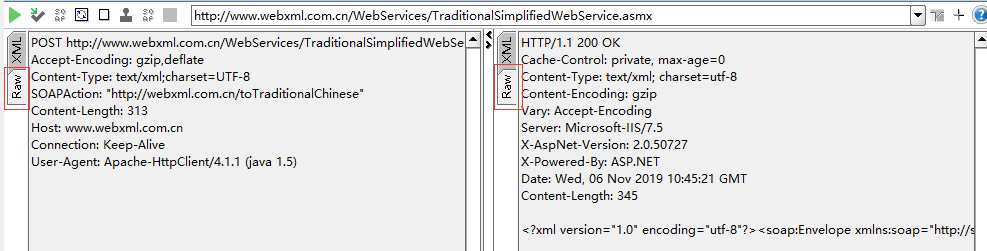
使用SoapUI可以很方便的测试WebService,不熟悉的同志可以了解下。
2、使用Jquery Ajax调用WebService
Soap1.1
function soapTest() {

    let data = '<soapenv:Envelope xmlns:soapenv="http://schemas.xmlsoap.org/soap/envelope/" xmlns:web="http://webxml.com.cn/">'

                + '<soapenv:Header/>'

                + '<soapenv:Body>'

                + '<web:toTraditionalChinese>'

                + '<web:sText>小学</web:sText>'

                + '</web:toTraditionalChinese>'

                + '</soapenv:Body>'

                + '</soapenv:Envelope>';

    $.ajax({
     headers: {SOAPAction: 'http://webxml.com.cn/toTraditionalChinese'},

        contentType: 'text/xml;charset="UTF-8"',

        dataType: 'xml',

        type: 'post',

        url: 'http://www.webxml.com.cn/WebServices/TraditionalSimplifiedWebService.asmx?wsdl',

        data: data,

        success: function(data) {

            let ss = $(data).find("toTraditionalChineseResult").first().text();//对应find方法中的值,不同的WebService可能会不同,需根据实际情况来填写

            alert(ss);

        }

    });

}
headers、contentType、data都是从SoapUI生成的信息里提取的。
Soap1.2
function soapTest12() {

    let data = '<soap:Envelope xmlns:soap="http://www.w3.org/2003/05/soap-envelope" xmlns:web="http://webxml.com.cn/">'

                + '<soap:Header/>'

                + '<soap:Body>'

                + '<web:toTraditionalChinese>'

                + '<web:sText>大学</web:sText>'

                + '</web:toTraditionalChinese>'

                + '</soap:Body>'

                + '</soap:Envelope>';

    $.ajax({

        contentType: 'application/soap+xml;charset=UTF-8;action="http://webxml.com.cn/toTraditionalChinese"',

        dataType: 'xml',

        type: 'post',

        url: 'http://www.webxml.com.cn/WebServices/TraditionalSimplifiedWebService.asmx?wsdl',

        data: data,

        success:function(data) {

            let ss = $(data).find("toTraditionalChineseResult").first().text();

            alert(ss);

        }

    });

}
contentType、data也都是从SoapUI生成的信息里提取的。
注:使用ie11可以正常调用,chrome会有跨域限制。
3、no SOAPAction header错误处理
用Ajax调用某些WebService的时候会报no SOAPAction header错误,缺少SOAPAction请求头(targetNamespace+operation),增加即可。
$.ajax({

    headers: {SOAPAction: 'http://webxml.com.cn/toTraditionalChinese'}

    contentType: 'text/xml;charset="UTF-8"',

    dataType: 'xml',

    type: 'post',

    url: 'http://www.webxml.com.cn/WebServices/TraditionalSimplifiedWebService.asmx?wsdl',

    data: data,

    success: function(data) {

        let ss = $(data).find("toTraditionalChineseResult").first().text();//对应find方法中的值,不同的WebService可能会不同,需根据实际情况来填写

        alert(ss);

    }

});
Ajax调用WebService接口样例的更多相关文章
- js调用Webservice接口案例
第一步:新建Webservice接口 主文件方法 using System;using System.Collections.Generic;using System.Web;using System ...
- Java调用webservice接口方法
java调用webservice接口 webservice的 发布一般都是使用WSDL(web service descriptive langu ...
- 使用soapui调用webservice接口
soapui是专门模拟调用webservice接口的工具,下面介绍下怎么使用: 1.下载soapui并安装: 2.以免费天气获取接口为例:http://www.webservicex.net/glob ...
- thinkjs学习-this.assign传递数据和ajax调用后台接口
在页面加载时,就需要显示在页面上的数据,可以在后台使用this.assign赋值,在前台通过ejs等模板获取:用户点击按钮,或者触发某些事件和后台进行交互时,就需要用到ajax调用后台接口.本文通过一 ...
- Ajax 调用webservice 解决跨域请求和发布到服务器后本地调用成功外网失败的问题
webservice 代码 /// <summary> /// MESService 的摘要说明 /// </summary> [WebService(Namespac ...
- ASP.NET实现二维码 ASP.Net上传文件 SQL基础语法 C# 动态创建数据库三(MySQL) Net Core 实现谷歌翻译ApI 免费版 C#发布和调试WebService ajax调用WebService实现数据库操作 C# 实体类转json数据过滤掉字段为null的字段
ASP.NET实现二维码 using System;using System.Collections.Generic;using System.Drawing;using System.Linq;us ...
- ThinkPHP使用soapclient调用webservice接口
1,开启 php.ini 这2个服务 12 extension=php_openssl.dllextension=php_soap.dll 以公共天气预报webservice为例,采用thinkPHP ...
- 调用webservice接口,报错:(十六进制值0x01)是无效的字符
#事故现场 调用webservice接口,报错:(十六进制值0x01)是无效的字符. 如图: 意思是webservice返回的信息中包含无效的字符,无法解析成xml: #分析 使用postman向we ...
- php中创建和调用webservice接口示例
php中创建和调用webservice接口示例 这篇文章主要介绍了php中创建和调用webservice接口示例,包括webservice基本知识.webservice服务端例子.webservi ...
随机推荐
- PostgreSQL 登录时在命令行中输入密码
有时候需要设置定时任务直接执行 sql 语句,但是 postgresql 默认需要人工输入密码,以下命令可以直接在命令行中直接填入密码 PGPASSWORD=pass1234 psql -U MyUs ...
- flutter 数据存储 SP和sqlite
添加插件: shared_preferences: ^0.4.2 path_provider: ^1.2.0 sqflite: ^0.12.0 import 'dart:async'; import ...
- Xadmin权限管理
需求分析: 1.判断用户是否登陆,未登陆就不能进入其他页面2.为用户分配不同的权限,用户的操作只能在权限范围之内3.将用户可操作的权限显示在页面山,点击能进入该页面操作 模型表的建立 1.对每个用户建 ...
- 安装docker报错:https://download.docker.com/linux/centos/7/i386/stable/repodata/repomd.xml: [Errno 14] PYCURL ERROR 22 - "The requested URL returned error: 404 Not Found"
如题,执行docker安装命令报错: [root@centos ~]# yum install docker-ce Loaded plugins: fastestmirror, security Se ...
- Shenzhen Wanze Technology Co., Ltd.隐私协议
本隐私权政策详细说明了Shenzhen Wanze Technology Co., Ltd.团队(“我们”或“我们的”)通过我们的应用程序和网站收集的信息,以及我们将如何使用这些信息. 1.我们不会通 ...
- Python第一阶段02
1.模块: import sys print(sys.path) # 打印环境变量 print(sys.argv) # 打印当前文件绝对路径 # print(sys.argv[]) import os ...
- k8s中正确删除一个pod
1.先删除pod 2.再删除对应的deployment 否则只是删除pod是不管用的,还会看到pod,因为deployment.yaml文件中定义了副本数量 实例如下: 删除pod [root@tes ...
- jenkins编译时文件存放的位置
1.首先随便打包编译一下 2.查看编译执行的目录 [root@bogon ~]# ls /root/.jenkins/workspace/pipline-test/ CHANGE_LOGS.html ...
- idea里面lombok要如何设置后才会生效
16:31 Lombok Requires Annotation Processing Annotation processing seems to be disabled for the proje ...
- 文件描述符FD的含义/文件句柄
使用sudo lsof -nP -iTCP -sTCP:LISTEN查看占用端口的程序;因为 lsof 需要访问核心内存和各种文件,所以必须以 root 用户的身份运行它才能够充分地发挥其功能 概念 ...