
Windows 在 git bash下使用 conda 命令
1. 安装git
安装连接:http://git-scm.com/download/linux (LINUX)
https://git-scm.com/downloads (Windows)
2. 安装后配置环境变量
我的电脑右键 -> 属性 -> 左边栏高级系统设置 -> 环境变量 -> 系统变量
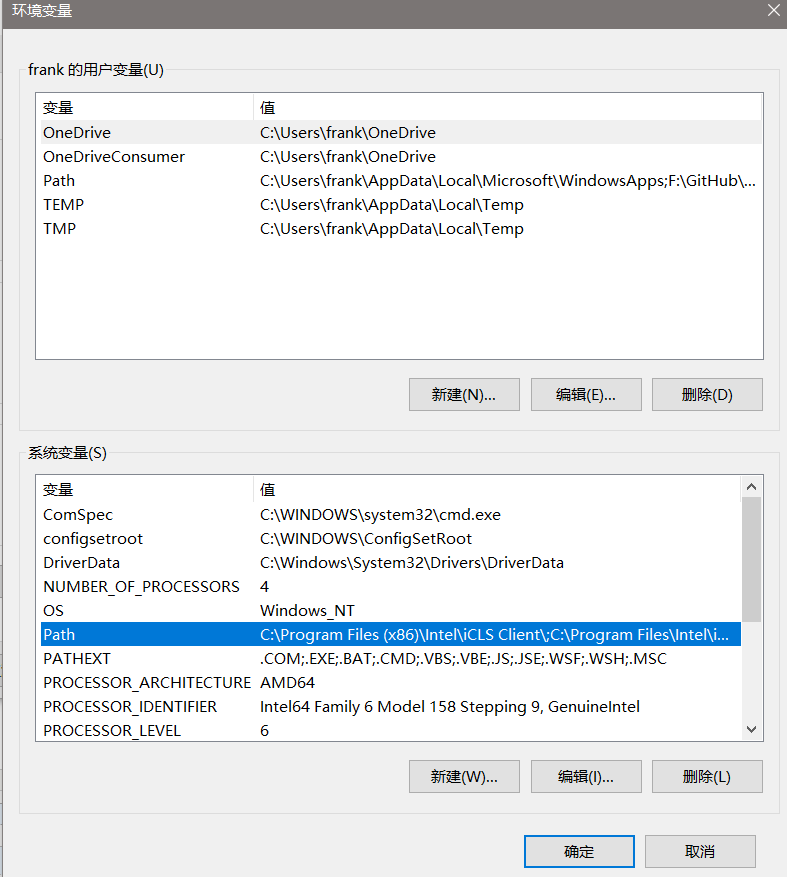
Path 内新建:
1. Python 安装路径 (可以是Anaconda 虚拟环境的python路径)
2. Anaconda 安装地址
3. Anaconda Script 目录
4. Anaconda\Library\bin 目录
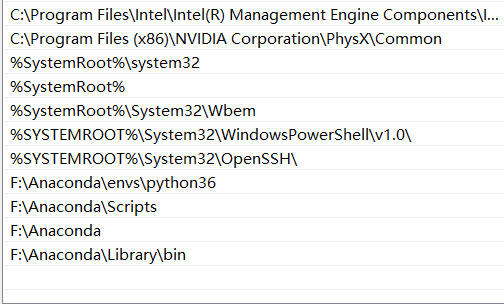
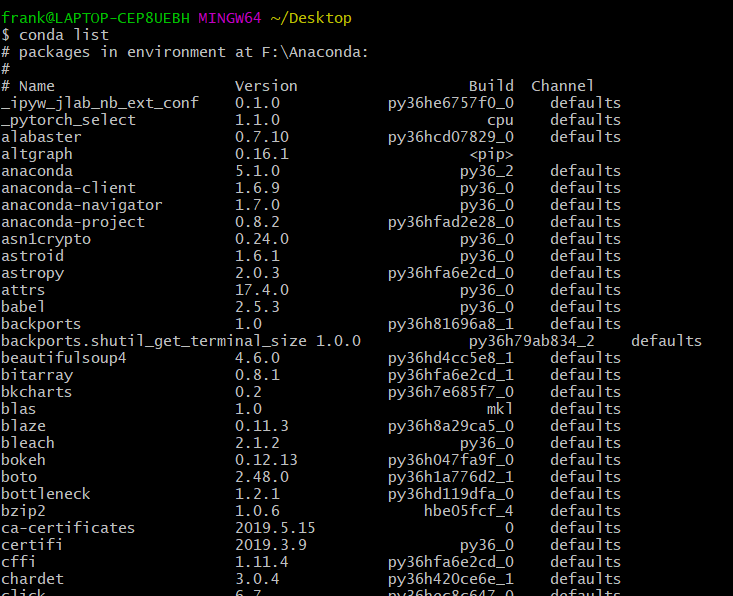
3. 安装完成
conda list 命令不报错
Windows 在 git bash下使用 conda 命令的更多相关文章
- 解决 Windows 环境 Git Bash 无法识别 Composer 命令的问题
思路 模拟 Linux,复制一个 composer 文件到 Git Bash 的 /usr 的子目录,并赋予执行权限. 解决 首先,请确定你的 composer.phar 文件路径.我的是: /d/w ...
- git for windows 2.1版本git bash下git log乱码修复
git bash,输入以下命令git config --global i18n.logoutputencoding utf-8git config quotepath false关闭git bash, ...
- windows使用git bash 无法交互键盘上下键移动选择选项的解决方法
目录 遇到的问题 解决方案 1. 直接通过数字键来选择 2. 使用 winpty 来启动命令 3. 将 git bash 换成 cmd 4. 使用vscode中是bash 遇到的问题 windows使 ...
- Git bash下中文乱码问题
Git bash下中文乱码--解决方案 解决办法1: 在git bash下,右键 出现下图,选择options: 选择"Text" 将Character set设置为 UTF-8 ...
- Windows 10 & git & bash
Windows 10 & git & bash If you are on Windows, we recommend downloading Git for Windows and ...
- git bash 下操作文件及文件夹命令
1, cd : change directory的简写,改变目录的意思,就是切换到哪个目录下, 如 cd e:\fff 切换 E 盘下面的fff 目录. 当我们用cd 进入文件夹时,我们可以使用 通 ...
- Git 使用问题 - win7 git bash下git pull失败
win7 旗舰版,从github上pull代码时,git bash命令出现错误 Administrator@rust-PC /g/rust_proj/cardslib (master) $ git - ...
- Git Bash下实现复制粘贴等快速编辑功能
在windows下使用Git Bash会经常用到选中.复制.粘贴等功能,但是一般用的方法会很复杂,笔者经过查阅一些资料,特整理一些常见编辑功能的实现方法. (1)默认方法: 单击左上角的logo ic ...
- git bash 常用操作文件命令行
1, cd : change directory的简写,改变目录的意思,就是切换到哪个目录下, 如 cd e:\fff 切换 E 盘下面的fff 目录. 当我们用cd 进入文件夹时,我们可以使用 通配 ...
随机推荐
- 迅速生成项目-react-scripts
推荐指数:
- 静态站点生成器-html-markdown-jekyll
推荐指数:
- K8S - 容器编排工具Kubernetes简介
1 - Kubernetes Kubernetes(简称K8s,用8代替8个字符"ubernete")是Google开源的一个容器编排引擎. 目前最为广泛且流行的容器编排调度系统, ...
- Python3-ibm_db模块-数据库操作之DB2
官方文档 https://www.ibm.com/support/knowledgecenter/SSEPGG_9.5.0/kc_gen/developing-gen1.html 模块安装 Windo ...
- 知识点-Spark小节
Spark处理字符串日期的max和min的方式Spark处理数据存储到Hive的方式Spark处理新增列的方式map和udf.functionsSpark处理行转列pivot的使用Python 3.5 ...
- Vue零碎总结
1.Vue指令里的bind钩子是生成了vnode,但是将它插入/更新到浏览器dom树之前的操作,因此对于一些需要插入dom树后执行的操作它是不支持的,如el.focus()方法,这些要放在insert ...
- Linux 脚本语言入门
0.脚本编写初步介绍 (1)脚本第一行以 #!/bin/sh 开始,也可以用 #!/bin/bash 开始,但是第一行必须以这种方式开始. (2)脚本名需要以.sh结尾 (3)#开头的句子表示注释 ( ...
- python第三天---列表的魔法
# list 列表 # 中括号括起来,逗号分隔每个元素, # 列表中可以是数字字符串.列表等都可以放进去 list1 = [123, "book", "手动", ...
- 20191125:Python中的上下文管理机制with
20191125:with上下文管理 with是一个上下文管理器,用于执行代码块所需要的运行的时候的上下文入口和出口.上下文管理器的典型用法包括保存和还原各种全局状态,锁定和解锁资源,关闭打开的文件等 ...
- BBS项目架构
数据库设计 用户表(用的是auth_user那张表,通过自定义表继承AbstractUser) phone 电话 avatar 头像 create_time 创建时间#外键 blog 一对一个人站点表 ...