
14 Windows编程——SetWindowLong
使用默认窗口处理函数,源码
 #include<Windows.h>

 #include<Windowsx.h>

 LRESULT CALLBACK WindProc(HWND hwnd, UINT message, WPARAM wParam, LPARAM lParam);

 LRESULT CALLBACK MyProc(HWND hwnd, UINT message, WPARAM wParam, LPARAM lParam);

 int WinMain(HINSTANCE hInst, HINSTANCE tmp, LPSTR szCmd, int nShow)

 {

     WNDCLASS WndClass;

     TCHAR* ClassName = TEXT("MyClass");

     HWND hwnd;

     MSG msg;

     HBRUSH hBrush = CreateSolidBrush(RGB(, , ));

     WndClass.cbClsExtra = ;

     WndClass.cbWndExtra = ;

     WndClass.hbrBackground = hBrush;

     WndClass.hCursor = LoadCursor(NULL, IDC_ARROW);

     WndClass.hIcon = LoadIcon(NULL, IDI_APPLICATION);

     WndClass.hInstance = hInst;

     WndClass.lpfnWndProc = WindProc;

     WndClass.lpszClassName = ClassName;

     WndClass.lpszMenuName = NULL;

     WndClass.style = CS_VREDRAW | CS_HREDRAW;

     if (!RegisterClass(&WndClass))

     {

         MessageBox(NULL, TEXT("Gegister Class Fail!!"), TEXT("error"), MB_OK);

         return ;

     }

     //CreateWindow返回之前,会发送WM_CREATE消息

     hwnd = CreateWindow(ClassName, TEXT("Hello"), WS_OVERLAPPEDWINDOW, CW_USEDEFAULT, CW_USEDEFAULT, , , NULL, NULL, hInst, NULL);

     if (hwnd == NULL)

     {

         MessageBox(NULL, TEXT("Create Window Fail!!"), TEXT("error"), MB_OK);

         return ;

     }

     ShowWindow(hwnd, nShow);

     UpdateWindow(hwnd);

     while (GetMessage(&msg, NULL, , ))

     {

         TranslateMessage(&msg);

         DispatchMessage(&msg);

     }

     return ;

 }

 LRESULT CALLBACK WindProc(HWND hwnd, UINT message, WPARAM wParam, LPARAM lParam)

 {

     PAINTSTRUCT pt;

     static int cx, cy;

     HDC hdc;

     HBRUSH hBrush = CreateSolidBrush(RGB(, , ));

     switch (message)

     {

     case WM_CREATE:

         //SetWindowLong(hwnd, GWL_WNDPROC, (LONG)MyProc);

         return ;

     case WM_SIZE:

         cx = LOWORD(lParam);

         cy = HIWORD(lParam);

         return ;

     case WM_PAINT:

         hdc = BeginPaint(hwnd, &pt);

         HBRUSH hBrush = CreateSolidBrush(RGB(,,));

         SelectObject(hdc, hBrush);

         Rectangle(hdc, , , cx/, cy/);

         DeleteObject(hBrush);

         EndPaint(hwnd, &pt);

         return ;

     case WM_DESTROY:

         PostQuitMessage();

         return ;

     default:

         break;

     }

     return DefWindowProc(hwnd, message, wParam, lParam);

 }

 LRESULT CALLBACK MyProc(HWND hwnd, UINT message, WPARAM wParam, LPARAM lParam)

 {

     PAINTSTRUCT ps;

     HDC hdc;

     static int cx, cy;

     switch (message)

     {

     case WM_SIZE:

         cx = LOWORD(lParam);

         cy = HIWORD(lParam);

         return ;

     case WM_PAINT:

         hdc = BeginPaint(hwnd, &ps);

         EndPaint(hwnd, &ps);

         return ;

     default:

         break;

     }

     return DefWindowProc(hwnd, message, wParam, lParam);

 }
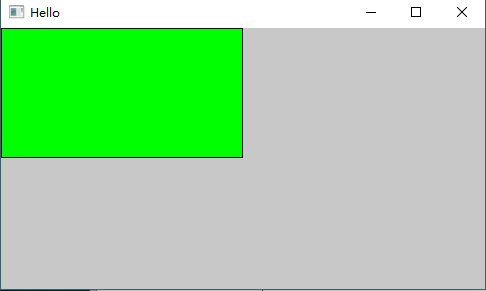
运行结果(只能使用Alt+F4关闭):
使用SetWindowLong替换窗户口处理函数,源码
 #include<Windows.h>

 #include<Windowsx.h>

 LRESULT CALLBACK WindProc(HWND hwnd, UINT message, WPARAM wParam, LPARAM lParam);

 LRESULT CALLBACK MyProc(HWND hwnd, UINT message, WPARAM wParam, LPARAM lParam);

 int WinMain(HINSTANCE hInst, HINSTANCE tmp, LPSTR szCmd, int nShow)

 {

     WNDCLASS WndClass;

     TCHAR* ClassName = TEXT("MyClass");

     HWND hwnd;

     MSG msg;

     HBRUSH hBrush = CreateSolidBrush(RGB(, , ));

     WndClass.cbClsExtra = ;

     WndClass.cbWndExtra = ;

     WndClass.hbrBackground = hBrush;

     WndClass.hCursor = LoadCursor(NULL, IDC_ARROW);

     WndClass.hIcon = LoadIcon(NULL, IDI_APPLICATION);

     WndClass.hInstance = hInst;

     WndClass.lpfnWndProc = WindProc;

     WndClass.lpszClassName = ClassName;

     WndClass.lpszMenuName = NULL;

     WndClass.style = CS_VREDRAW | CS_HREDRAW;

     if (!RegisterClass(&WndClass))

     {

         MessageBox(NULL, TEXT("Gegister Class Fail!!"), TEXT("error"), MB_OK);

         return ;

     }

     //CreateWindow返回之前,会发送WM_CREATE消息

     hwnd = CreateWindow(ClassName, TEXT("Hello"), WS_OVERLAPPEDWINDOW, CW_USEDEFAULT, CW_USEDEFAULT, , , NULL, NULL, hInst, NULL);

     if (hwnd == NULL)

     {

         MessageBox(NULL, TEXT("Create Window Fail!!"), TEXT("error"), MB_OK);

         return ;

     }

     ShowWindow(hwnd, nShow);

     UpdateWindow(hwnd);

     while (GetMessage(&msg, NULL, , ))

     {

         TranslateMessage(&msg);

         DispatchMessage(&msg);

     }

     return ;

 }

 LRESULT CALLBACK WindProc(HWND hwnd, UINT message, WPARAM wParam, LPARAM lParam)

 {

     PAINTSTRUCT pt;

     static int cx, cy;

     HDC hdc;

     HBRUSH hBrush = CreateSolidBrush(RGB(, , ));

     switch (message)

     {

     case WM_CREATE:

         SetWindowLong(hwnd, GWL_WNDPROC, (LONG)MyProc);

         return ;

     case WM_SIZE:

         cx = LOWORD(lParam);

         cy = HIWORD(lParam);

         return ;

     case WM_PAINT:

         hdc = BeginPaint(hwnd, &pt);

         HBRUSH hBrush = CreateSolidBrush(RGB(,,));

         SelectObject(hdc, hBrush);

         Rectangle(hdc, , , cx/, cy/);

         DeleteObject(hBrush);

         EndPaint(hwnd, &pt);

         return ;

     case WM_DESTROY:

         PostQuitMessage();

         return ;

     default:

         break;

     }

     return DefWindowProc(hwnd, message, wParam, lParam);

 }

 LRESULT CALLBACK MyProc(HWND hwnd, UINT message, WPARAM wParam, LPARAM lParam)

 {

     PAINTSTRUCT ps;

     HDC hdc;

     static int cx, cy;

     switch (message)

     {

     case WM_SIZE:

         cx = LOWORD(lParam);

         cy = HIWORD(lParam);

         return ;

     case WM_PAINT:

         hdc = BeginPaint(hwnd, &ps);

         HBRUSH hBrush = CreateSolidBrush(RGB(, , ));

         SelectObject(hdc, hBrush);

         Rectangle(hdc, cx / , cy / , cx, cy);

         DeleteObject(hBrush);

         EndPaint(hwnd, &ps);

         return ;

     default:

         break;

     }

     return DefWindowProc(hwnd, message, wParam, lParam);

 }
运行结果:

使用SetWindowLong接管原来窗口处理函数后,把WM_PAINT消息先在MyProc处理一次 ,然后交给原来的窗口处理函数再处理一次。但是发现并没有绘制出原来窗口处理函数绘制的图形
 #include<Windows.h>

 #include<Windowsx.h>

 LRESULT CALLBACK WindProc(HWND hwnd, UINT message, WPARAM wParam, LPARAM lParam);

 LRESULT CALLBACK MyProc(HWND hwnd, UINT message, WPARAM wParam, LPARAM lParam);

 int WinMain(HINSTANCE hInst, HINSTANCE tmp, LPSTR szCmd, int nShow)

 {

     WNDCLASS WndClass;

     TCHAR* ClassName = TEXT("MyClass");

     HWND hwnd;

     MSG msg;

     HBRUSH hBrush = CreateSolidBrush(RGB(, , ));

     WndClass.cbClsExtra = ;

     WndClass.cbWndExtra = ;

     WndClass.hbrBackground = hBrush;

     WndClass.hCursor = LoadCursor(NULL, IDC_ARROW);

     WndClass.hIcon = LoadIcon(NULL, IDI_APPLICATION);

     WndClass.hInstance = hInst;

     WndClass.lpfnWndProc = WindProc;

     WndClass.lpszClassName = ClassName;

     WndClass.lpszMenuName = NULL;

     WndClass.style = CS_VREDRAW | CS_HREDRAW;

     if (!RegisterClass(&WndClass))

     {

         MessageBox(NULL, TEXT("Gegister Class Fail!!"), TEXT("error"), MB_OK);

         return ;

     }

     //CreateWindow返回之前,会发送WM_CREATE消息

     hwnd = CreateWindow(ClassName, TEXT("Hello"), WS_OVERLAPPEDWINDOW, CW_USEDEFAULT, CW_USEDEFAULT, , , NULL, NULL, hInst, NULL);

     if (hwnd == NULL)

     {

         MessageBox(NULL, TEXT("Create Window Fail!!"), TEXT("error"), MB_OK);

         return ;

     }

     ShowWindow(hwnd, nShow);

     UpdateWindow(hwnd);

     while (GetMessage(&msg, NULL, , ))

     {

         TranslateMessage(&msg);

         DispatchMessage(&msg);

     }

     return ;

 }

 LRESULT CALLBACK WindProc(HWND hwnd, UINT message, WPARAM wParam, LPARAM lParam)

 {

     PAINTSTRUCT pt;

     static int cx, cy;

     HDC hdc;

     HBRUSH hBrush = CreateSolidBrush(RGB(, , ));

     switch (message)

     {

     case WM_CREATE:

         SetWindowLong(hwnd, GWL_WNDPROC, (LONG)MyProc);

         return ;

     case WM_SIZE:

         cx = LOWORD(lParam);

         cy = HIWORD(lParam);

         return ;

     case WM_PAINT:

         hdc = BeginPaint(hwnd, &pt);

         HBRUSH hBrush = CreateSolidBrush(RGB(,,));

         SelectObject(hdc, hBrush);

         Rectangle(hdc, , , cx/, cy/);

         DeleteObject(hBrush);

         EndPaint(hwnd, &pt);

         return ;

     case WM_DESTROY:

         PostQuitMessage();

         return ;

     default:

         break;

     }

     return DefWindowProc(hwnd, message, wParam, lParam);

 }

 LRESULT CALLBACK MyProc(HWND hwnd, UINT message, WPARAM wParam, LPARAM lParam)

 {

     PAINTSTRUCT ps;

     HDC hdc;

     static int cx, cy;

     switch (message)

     {

     case WM_SIZE:

         cx = LOWORD(lParam);

         cy = HIWORD(lParam);

         return ;

     case WM_PAINT:

         hdc = BeginPaint(hwnd, &ps);

         HBRUSH hBrush = CreateSolidBrush(RGB(, , ));

         SelectObject(hdc, hBrush);

         Rectangle(hdc, cx / , cy / , cx, cy);

         DeleteObject(hBrush);

         EndPaint(hwnd, &ps);

         //return 0;

         break;

     default:

         break;

     }

     return WindProc(hwnd, message, wParam, lParam);

 }
经调试,发现WindProc函数中WM_PAINT消息,cx=0,cy=0。绘制了,只不过绘制的矩形坐标时( 0 0 0 0),修改如下
方式① 源码
 #include<Windows.h>

 #include<Windowsx.h>

 LRESULT CALLBACK WindProc(HWND hwnd, UINT message, WPARAM wParam, LPARAM lParam);

 LRESULT CALLBACK MyProc(HWND hwnd, UINT message, WPARAM wParam, LPARAM lParam);

 int WinMain(HINSTANCE hInst, HINSTANCE tmp, LPSTR szCmd, int nShow)

 {

     WNDCLASS WndClass;

     TCHAR* ClassName = TEXT("MyClass");

     HWND hwnd;

     MSG msg;

     HBRUSH hBrush = CreateSolidBrush(RGB(, , ));

     WndClass.cbClsExtra = ;

     WndClass.cbWndExtra = ;

     WndClass.hbrBackground = hBrush;

     WndClass.hCursor = LoadCursor(NULL, IDC_ARROW);

     WndClass.hIcon = LoadIcon(NULL, IDI_APPLICATION);

     WndClass.hInstance = hInst;

     WndClass.lpfnWndProc = WindProc;

     WndClass.lpszClassName = ClassName;

     WndClass.lpszMenuName = NULL;

     WndClass.style = CS_VREDRAW | CS_HREDRAW;

     if (!RegisterClass(&WndClass))

     {

         MessageBox(NULL, TEXT("Gegister Class Fail!!"), TEXT("error"), MB_OK);

         return ;

     }

     //CreateWindow返回之前,会发送WM_CREATE消息

     hwnd = CreateWindow(ClassName, TEXT("Hello"), WS_OVERLAPPEDWINDOW, CW_USEDEFAULT, CW_USEDEFAULT, , , NULL, NULL, hInst, NULL);

     if (hwnd == NULL)

     {

         MessageBox(NULL, TEXT("Create Window Fail!!"), TEXT("error"), MB_OK);

         return ;

     }

     ShowWindow(hwnd, nShow);

     UpdateWindow(hwnd);

     while (GetMessage(&msg, NULL, , ))

     {

         TranslateMessage(&msg);

         DispatchMessage(&msg);

     }

     return ;

 }

 LRESULT CALLBACK WindProc(HWND hwnd, UINT message, WPARAM wParam, LPARAM lParam)

 {

     PAINTSTRUCT pt;

     static int cx, cy;

     HDC hdc;

     HBRUSH hBrush = CreateSolidBrush(RGB(, , ));

     switch (message)

     {

     case WM_CREATE:

         SetWindowLong(hwnd, GWL_WNDPROC, (LONG)MyProc);

         return ;

     case WM_SIZE:

         cx = LOWORD(lParam);

         cy = HIWORD(lParam);

         return ;

     case WM_PAINT:

         InvalidateRect(hwnd, NULL, FALSE);

         hdc = BeginPaint(hwnd, &pt);

         HBRUSH hBrush = CreateSolidBrush(RGB(, , ));

         SelectObject(hdc, hBrush);

         Rectangle(hdc, , , cx / , cy / );

         DeleteObject(hBrush);

         EndPaint(hwnd, &pt);

         return ;

     case WM_DESTROY:

         PostQuitMessage();

         return ;

     default:

         break;

     }

     return DefWindowProc(hwnd, message, wParam, lParam);

 }

 LRESULT CALLBACK MyProc(HWND hwnd, UINT message, WPARAM wParam, LPARAM lParam)

 {

     PAINTSTRUCT ps;

     HDC hdc;

     static int cx, cy;

     switch (message)

     {

     case WM_SIZE:

         cx = LOWORD(lParam);

         cy = HIWORD(lParam);

         break;

     case WM_PAINT:

         hdc = BeginPaint(hwnd, &ps);

         HBRUSH hBrush = CreateSolidBrush(RGB(, , ));

         SelectObject(hdc, hBrush);

         Rectangle(hdc, cx / , cy / , cx, cy);

         DeleteObject(hBrush);

         EndPaint(hwnd, &ps);

         break;

     default:

         break;

     }

     return WindProc(hwnd, message, wParam, lParam);

 }
方式② 源码
 #include<Windows.h>

 #include<Windowsx.h>

 LRESULT CALLBACK WindProc(HWND hwnd, UINT message, WPARAM wParam, LPARAM lParam);

 LRESULT CALLBACK MyProc(HWND hwnd, UINT message, WPARAM wParam, LPARAM lParam);

 int WinMain(HINSTANCE hInst, HINSTANCE tmp, LPSTR szCmd, int nShow)

 {

     WNDCLASS WndClass;

     TCHAR* ClassName = TEXT("MyClass");

     HWND hwnd;

     MSG msg;

     HBRUSH hBrush = CreateSolidBrush(RGB(, , ));

     WndClass.cbClsExtra = ;

     WndClass.cbWndExtra = ;

     WndClass.hbrBackground = hBrush;

     WndClass.hCursor = LoadCursor(NULL, IDC_ARROW);

     WndClass.hIcon = LoadIcon(NULL, IDI_APPLICATION);

     WndClass.hInstance = hInst;

     WndClass.lpfnWndProc = WindProc;

     WndClass.lpszClassName = ClassName;

     WndClass.lpszMenuName = NULL;

     WndClass.style = CS_VREDRAW | CS_HREDRAW;

     if (!RegisterClass(&WndClass))

     {

         MessageBox(NULL, TEXT("Gegister Class Fail!!"), TEXT("error"), MB_OK);

         return ;

     }

     //CreateWindow返回之前,会发送WM_CREATE消息

     hwnd = CreateWindow(ClassName, TEXT("Hello"), WS_OVERLAPPEDWINDOW, CW_USEDEFAULT, CW_USEDEFAULT, , , NULL, NULL, hInst, NULL);

     if (hwnd == NULL)

     {

         MessageBox(NULL, TEXT("Create Window Fail!!"), TEXT("error"), MB_OK);

         return ;

     }

     ShowWindow(hwnd, nShow);

     UpdateWindow(hwnd);

     while (GetMessage(&msg, NULL, , ))

     {

         TranslateMessage(&msg);

         DispatchMessage(&msg);

     }

     return ;

 }

 LRESULT CALLBACK WindProc(HWND hwnd, UINT message, WPARAM wParam, LPARAM lParam)

 {

     PAINTSTRUCT pt;

     static int cx, cy;

     HDC hdc;

     RECT rect;

     HBRUSH hBrush = CreateSolidBrush(RGB(, , ));

     switch (message)

     {

     case WM_CREATE:

         SetWindowLong(hwnd, GWL_WNDPROC, (LONG)MyProc);

         return ;

     case WM_SIZE:

         cx = LOWORD(lParam);

         cy = HIWORD(lParam);

         return ;

     case WM_PAINT:

         rect.left = ;

         rect.bottom = cy / ;

         rect.right = cx / ;

         rect.top = ;

         InvalidateRect(hwnd, &rect, TRUE);

         hdc = BeginPaint(hwnd, &pt);

         HBRUSH hBrush = CreateSolidBrush(RGB(,,));

         SelectObject(hdc, hBrush);

         Rectangle(hdc, , , cx/, cy/);

         DeleteObject(hBrush);

         EndPaint(hwnd, &pt);

         return ;

     case WM_DESTROY:

         PostQuitMessage();

         return ;

     default:

         break;

     }

     return DefWindowProc(hwnd, message, wParam, lParam);

 }

 LRESULT CALLBACK MyProc(HWND hwnd, UINT message, WPARAM wParam, LPARAM lParam)

 {

     PAINTSTRUCT ps;

     HDC hdc;

     static int cx, cy;

     switch (message)

     {

     case WM_SIZE:

         cx = LOWORD(lParam);

         cy = HIWORD(lParam);

         break;

     case WM_PAINT:

         hdc = BeginPaint(hwnd, &ps);

         HBRUSH hBrush = CreateSolidBrush(RGB(, , ));

         SelectObject(hdc, hBrush);

         Rectangle(hdc, cx / , cy / , cx, cy);

         DeleteObject(hBrush);

         EndPaint(hwnd, &ps);

         break;

     default:

         break;

     }

     return WindProc(hwnd, message, wParam, lParam);

 }
运行结果:

借助SetWindowLong创建白板窗口
源码
 #include<Windows.h>

 #include<Windowsx.h>

 LRESULT CALLBACK WindProc(HWND hwnd, UINT message, WPARAM wParam, LPARAM lParam);

 LRESULT CALLBACK MyProc(HWND hwnd, UINT message, WPARAM wParam, LPARAM lParam);

 int WinMain(HINSTANCE hInst, HINSTANCE tmp, LPSTR szCmd, int nShow)

 {

     WNDCLASS WndClass;

     TCHAR* ClassName = TEXT("MyClass");

     HWND hwnd;

     MSG msg;

     HBRUSH hBrush = CreateSolidBrush(RGB(, , ));

     WndClass.cbClsExtra = ;

     WndClass.cbWndExtra = ;

     WndClass.hbrBackground = hBrush;

     WndClass.hCursor = LoadCursor(NULL, IDC_ARROW);

     WndClass.hIcon = LoadIcon(NULL, IDI_APPLICATION);

     WndClass.hInstance = hInst;

     WndClass.lpfnWndProc = WindProc;

     WndClass.lpszClassName = ClassName;

     WndClass.lpszMenuName = NULL;

     WndClass.style = CS_VREDRAW | CS_HREDRAW;

     if (!RegisterClass(&WndClass))

     {

         MessageBox(NULL, TEXT("Gegister Class Fail!!"), TEXT("error"), MB_OK);

         return ;

     }

     //CreateWindow返回之前,会发送WM_CREATE消息

     hwnd = CreateWindow(ClassName, TEXT("Hello"), WS_OVERLAPPEDWINDOW, CW_USEDEFAULT, CW_USEDEFAULT, , , NULL, NULL, hInst, NULL);

     if (hwnd == NULL)

     {

         MessageBox(NULL, TEXT("Create Window Fail!!"), TEXT("error"), MB_OK);

         return ;

     }

     ShowWindow(hwnd, nShow);

     UpdateWindow(hwnd);

     while (GetMessage(&msg, NULL, , ))

     {

         TranslateMessage(&msg);

         DispatchMessage(&msg);

     }

     return ;

 }

 LRESULT CALLBACK WindProc(HWND hwnd, UINT message, WPARAM wParam, LPARAM lParam)

 {

     PAINTSTRUCT pt;

     static int cx, cy;

     HDC hdc;

     RECT rect;

     HBRUSH hBrush = CreateSolidBrush(RGB(, , ));

     switch (message)

     {

     case WM_CREATE:

         SetWindowLong(hwnd, GWL_STYLE, (LONG)WS_POPUP);

         return ;

     case WM_SIZE:

         cx = LOWORD(lParam);

         cy = HIWORD(lParam);

         return ;

     case WM_PAINT:

         rect.left = ;

         rect.bottom = cy / ;

         rect.right = cx / ;

         rect.top = ;

         InvalidateRect(hwnd, &rect, TRUE);

         hdc = BeginPaint(hwnd, &pt);

         HBRUSH hBrush = CreateSolidBrush(RGB(,,));

         SelectObject(hdc, hBrush);

         Rectangle(hdc, , , cx/, cy/);

         DeleteObject(hBrush);

         EndPaint(hwnd, &pt);

         return ;

     case WM_DESTROY:

         PostQuitMessage();

         return ;

     default:

         break;

     }

     return DefWindowProc(hwnd, message, wParam, lParam);

 }

 LRESULT CALLBACK MyProc(HWND hwnd, UINT message, WPARAM wParam, LPARAM lParam)

 {

     PAINTSTRUCT ps;

     HDC hdc;

     static int cx, cy;

     switch (message)

     {

     case WM_SIZE:

         cx = LOWORD(lParam);

         cy = HIWORD(lParam);

         break;

     case WM_PAINT:

         hdc = BeginPaint(hwnd, &ps);

         HBRUSH hBrush = CreateSolidBrush(RGB(, , ));

         SelectObject(hdc, hBrush);

         Rectangle(hdc, cx / , cy / , cx, cy);

         DeleteObject(hBrush);

         EndPaint(hwnd, &ps);

         break;

     default:

         break;

     }

     return WindProc(hwnd, message, wParam, lParam);

 }
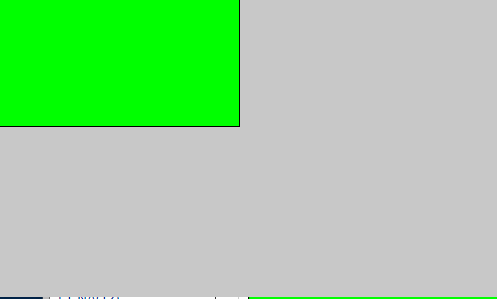
运行结果
14 Windows编程——SetWindowLong的更多相关文章
- 【Windows编程】系列第十一篇:多文档界面框架
前面我们所举的例子中都是单文档界面框架,也就是说这个窗口里面的客户区就是一个文档界面,可以编写程序在里面输入或者绘制文本和图形输出,但是不能有出现多个文档的情况.比如下面的UltraEdit就是一个典 ...
- windows 编程—— 宽字符集 与 Unicode
目录: 从ASCII码 到 Unicode Windows 编程中的 "字符” 定义 (如何在windows下进行通用编码) 常用的通用函数,定义 (本文为学习<Programming ...
- windows编程 进程的创建销毁和分析
Windows程序设计:进程 进程是一个具有一定独立功能的程序关于某个数据集合的一次运行活动,在Windows编程环境下,主要由两大元素组成: • 一个是操作系统用来管理进程的内核对象.操作系统使用内 ...
- MoreWindows 微软认证专家博客目录(白话算法,C++ STL,windows编程)
为了方便大家查找和学习,现将本人博客中所有博客文章列出目录. (http://blog.csdn.net/morewindows) 一. 白话经典算法 目前有17篇,分为七大排序和经典面试题 ...
- Windows编程 Windows程序的生与死(中)
<pre style=""><pre class="cpp" name="code">1 #include < ...
- Windows编程 Windows程序的生与死(上)
引子 “Windows 程序分为‘程序代码’和‘UI(User Interface)资源’两大部份,两部份最后以RC编译器(资源编译器)整合为一个完整的EXE 文件.所谓UI 资源是指功能菜单.对话框 ...
- 资源在windows编程中的应用----菜单
资源在Windows编程中的应用 资源 加速键.位图.光标.对话框.菜单.字符串.工具条 1.菜单的创建 菜单由以下组成部分: (1)窗口主菜单条 (2)下拉式菜单框 (3)菜单项热键标识 (4)菜单 ...
- 【Windows编程】系列第六篇:创建Toolbar与Statusbar
上一篇我们学习了解了如何使用Windows GDI画图,该应用程序都是光光的静态窗口,我们使用Windows应用程序,但凡稍微复杂一点的程序都会有工具栏和状态栏,工具栏主要用于一些快捷功能按钮.比如典 ...
- 【Windows编程】系列第十篇:文本插入符
大家知道,在使用微软的编程环境创建工程时会让你选择是控制台模式还是Windows应用程序.如果选择控制台的console模式,就会在运行时出现一个黑洞洞的字符模式窗口,里面就有等待输入一闪一闪的插入符 ...
随机推荐
- jquery img src赋值
不用Jquery时:document.getElementById("imageId").src = "xxxx.jpg"; 用Jquery时:$(" ...
- Java基础教程:多线程基础——线程池
Java基础教程:多线程基础——线程池 线程池 在正常负载的情况瞎,通过为每一个请求创建一个新的线程来提供服务,从而实现更高的响应性. new Thread(runnable).start() 在生产 ...
- SpringBoot学习笔记:单元测试
SpringBoot学习笔记:单元测试 单元测试 单元测试(英语:Unit Testing)又称为模块测试,是针对程序模块(软件设计的最小单位)来进行正确性检验的测试工作.程序单元是应用的最小可测试部 ...
- Python爬取网址中多个页面的信息
通过上一篇博客了解到爬取数据的操作,但对于存在多个页面的网址来说,使用上一篇博客中的代码爬取下来的资料并不完整.接下来就是讲解该如何爬取之后的页面信息. 一.审查元素 鼠标移至页码处右键,选择检查元素 ...
- MaskRCNN 奔跑自己的数据
import os import sys import random import math import re import time import numpy as np import cv2 i ...
- LeetCode 414. 第三大的数(Third Maximum Number) 3
414. 第三大的数 414. Third Maximum Number 题目描述 给定一个非空数组,返回此数组中第三大的数.如果不存在,则返回数组中最大的数.要求算法时间复杂度必须是 O(n). 每 ...
- Python28之文件1
因为懂你,所以永恒 一.文件处理的重要性: 程序处理的数据都是在提取到内存,然后由CPU进行处理,而当断电或系统异常关机时,程序所处理的结果在内存中不会被保存.像永久的保存处理结果,对于windows ...
- C++Primer 5th Chap10 Generic Algorithms(未完)
大多数算法定义在头文件algorithm中,在头文件numeric中定义了数值泛型算法. 以find算法为例:在容器的两个迭代器指定的范围内遍历,查找特定值. auto result= cout< ...
- 机器学习之Bagging与随机森林笔记
集成学习通过将多个学习器进行结合,常可获得比单一学习器显著优越的泛化性能.这对“弱学习器”尤为明显,因此集成学习的很多理论研究都是针对弱学习器进行的,而基学习器有时也被直接称为弱学习器.虽然从理论上来 ...
- Qt更新组件出现(“要继续此操作,至少需要一个有效且已启用的储存库”)
Qt更新组件出现(“要继续此操作,至少需要一个有效且已启用的储存库”) 目的: 当时在安装Qt时,有些组件暂时没用着,然后过一段时间后,需要用到某些该组件时,不用删掉重新再安装. 操作: Wind ...