
【Spring Cloud】 总结
一.Spring Cloud简介
简单来说,Spring Cloud 就是致力于分布式系统、微服务等的一套在目前非常火热的框架。但它的本身也是一系列框架的有序集合(由多个模块组成)。
相比较于Dubbo还是有很多不同之处的:例如Dubbo是基于RPC的服务框架,而Spring Cloud是基于RESTful API的服务框架。Dubbo是基于二进制的传输,而Spring Cloud是http协议传输等等。
二.Spring Cloud的Eureka组件
1.Eureka的作用
Eureka和zookeeper类似,能起到一个服务注册中心的作用
2.使用Eureka
在Spring Boot主类中添加@EnableEurekaServer注解即可开启Eureka(注意,需要引入相关的依赖,依赖如下)
 <dependency>

  <groupId>org.springframework.cloud</groupId>

  <artifactId>spring-cloud-starter-netflix-eureka-server</artifactId>

</dependency>
3.Eureka配置
在application.properties中配置如下
spring.application.name=spring-cloud-eureka

server.port=8060

eureka.instance.hostname=localhost

#配置服务中心  应将下列属性设为false

eureka.client.registerWithEureka=false

eureka.client.fetchRegistry=false

#访问路径

eureka.client.serviceUrl.defaultZone=http://localhost:8060/eureka/
4.测试服务中心
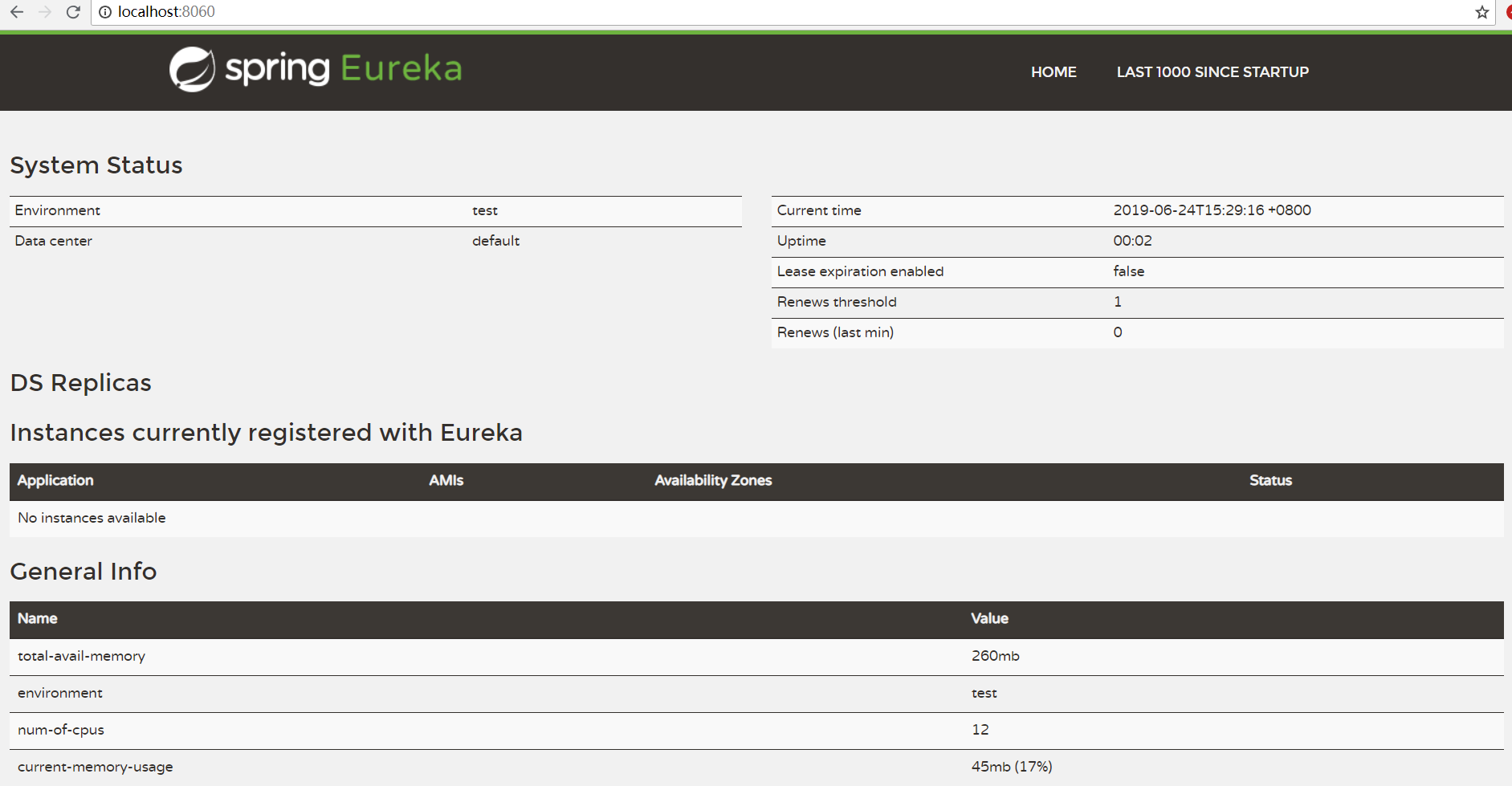
启动Spring Boot项目,访问端口后可以看到如下界面
5.服务提供者
在项目下新建一个Spring Boot项目的Module,并在主类中添加@EnableEurekaClient注解
在配置文件中添加如下配置
spring.application.name=spring-cloud-provider

server.port=8061

eureka.client.serviceUrl.defaultZone=http://localhost:8060/eureka/
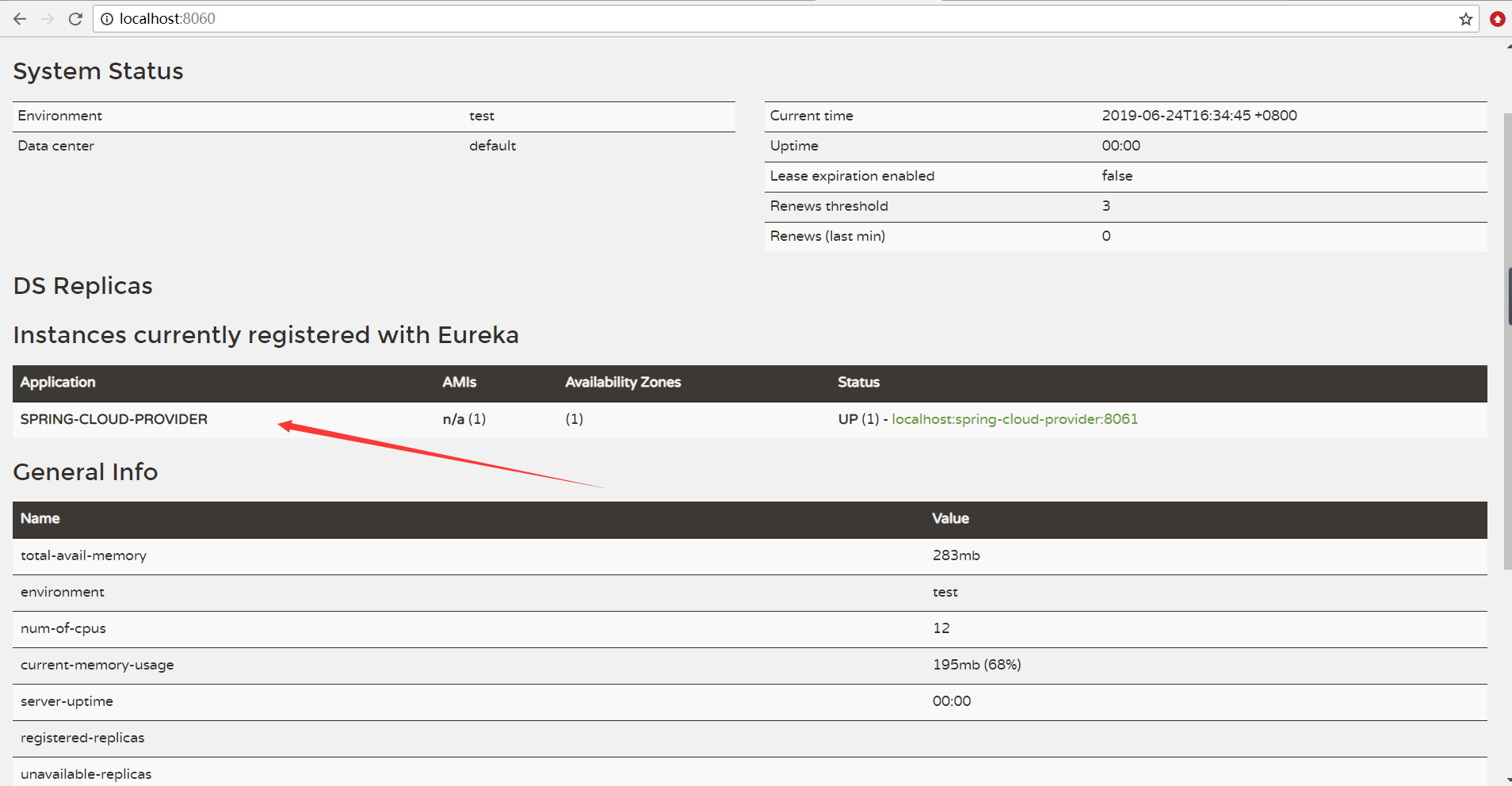
启动项目后发现服务中心多了一个服务提供者,如下图所示
6.服务消费者
Spring Cloud创建服务消费者有两种方式,分别是使用Ribbon和使用Feign
1.Ribbon的方式创建服务消费者
(1)首先引入相关的依赖
<dependency>

  <groupId>org.springframework.cloud</groupId>

  <artifactId>spring-cloud-starter-netflix-ribbon</artifactId>

</dependency>
(2)在主类中添加@EnableDiscoveryClient注解
(3)最后在配置文件中配置如下
spring.application.name=spring-cloud-consumer

server.port=8063

eureka.client.serviceUrl.defaultZone=http://localhost:8060/eureka/
(4)服务消费者调用服务提供者中的方法
创建RestTemplate对象,并调用该对象的getForObject方法,例如下列代码
service层
@Service

public class MyService {

    @Autowired

    private RestTemplate restTemplate;

    public String getPort(){

        //调用服务提供方的方法

        return restTemplate.getForObject("http://spring-cloud-provider:getPort",String.class);

    }

}
controller层
@RestController

public class MyController {

    @Autowired

    private MyService myService;

    @RequestMapping("/getPort")

    public String getPort(){

        return myService.getPort();

    }

}
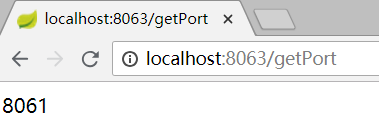
测试结果如下
如果需要配置负载均衡策略,可以在服务消费者中添加一个配置类,再开启一个其他端口的服务提供者即可
@Configuration

public class MyConfig {

    @Bean

    @LoadBalanced

    public RestTemplate restTemplate(){

        return new RestTemplate();

    }

}
2.Feign的方式创建服务消费者
(1)首先引入相关的依赖
<dependency>

  <groupId>org.springframework.cloud</groupId>

  <artifactId>spring-cloud-starter-openfeign</artifactId>

</dependency>
(2)然后在主类中添加 @EnableFeignClients 和 @EnableDiscoveryClient 注解,配置文件与Ribbon的方式类似
(3)服务消费者调用服务提供者中的方法
在service层中的代码如下
@FeignClient(value = "spring-cloud-provider")

public interface MyService {

    @RequestMapping(value = "getPort" , method = RequestMethod.GET)

    public String getPort();

}
在controller层中的代码如下
@RestController

public class MyController {

    @Autowired

    private MyService myService;

    @RequestMapping(value = "getPort" , method = RequestMethod.GET)

    public String getPort(){

        return myService.getPort();

    }

}
由于Feign的方式本身包含有了Ribbon,也实现了负载均衡,面向接口编程,写起来思路更清晰方便,实际开发中应用更广
三.Spring Cloud 熔断器
1.Ribbon的方式下添加熔断器
(1)导入相关的依赖
<dependency>

  <groupId>org.springframework.cloud</groupId>

  <artifactId>spring-cloud-starter-netflix-hystrix</artifactId>

</dependency>
(2)在主类中添加 @EnableHystrix 注解开启熔断器
(3)修改service层中的方法,在方法上添加 @HystrixCommand 注解,例如
    @HystrixCommand(fallbackMethod = "getError")//如果getPort方法执行失败,会直接熔断该方法并执行getError方法(避免浏览器一直去加载)

    public String getPort(){

        //调用服务提供方的方法

        return restTemplate.getForObject("http://spring-cloud-provider:getPort",String.class);

    }

    public String getError(){

        return String.format("获取失败");

    }
2.Feign的方式下添加熔断器
(1)Feign自带熔断器,但默认是关闭的,可以在application.properties中开启
feign.hystrix.enabled=true
(2)在service层的接口中添加熔断回调方法(在上面的代码的基础上,在@FeignClient 中添加熔断回调如下,如果出现熔断,则执行接口的实现类中的方法)
@FeignClient(value = "spring-cloud-provider",fallback = MyServiceImpl.class)//如果下面的方法执行失败,会熔断并去执行MyServiceImpl中的方法
(3)创建接口实现类,例如
@Component

public class MyServiceImpl implements MyService {

    @Override

    public String getPort() {

        return String.format("获取失败");

    }

}
3熔断监控
如果需要监控熔断信息,可以做如下步骤
(1)导入相关依赖
<dependency>

  <groupId>org.springframework.cloud</groupId>

  <artifactId>spring-cloud-starter-netflix-hystrix-dashboard</artifactId>

</dependency>
(2)在主类中添加注解 @EnableHystrixDashboard 开启熔断监控,启动项目,并访问/hystrix,页面如下

(3)添加配置类
@Configuration

public class MyConfig {

    @Bean

    public ServletRegistrationBean getServlet(){

        HystrixMetricsStreamServlet streamServlet = new HystrixMetricsStreamServlet();

        ServletRegistrationBean registrationBean = new ServletRegistrationBean(streamServlet);

        registrationBean.setLoadOnStartup(1);

        registrationBean.addUrlMappings("/myhystrix");

        registrationBean.setName("HystrixMetricsStreamServlet");

        return registrationBean;

    }

}
(4)在页面中输入路径即(ip+端口号+配置类中的addUrlMappings)可查看熔断信息,例如下图

四.Spring Cloud 网关服务
1.开启Zuul网关服务步骤如下
(1)引入相关依赖
<dependency>

  <groupId>org.springframework.cloud</groupId>

  <artifactId>spring-cloud-starter-netflix-zuul</artifactId>

</dependency>
(2)在主类中添加 @EnableEurekaClient 和 @EnableZuulProxy 注解开启相应的服务
(3)在配置文件中配置如下
spring.application.name=spring-cloud-zuul

server.port=8065

eureka.client.serviceUrl.defaultZone=http://localhost:8060/eureka/

#指定网关路径,并设置其映射路径

zuul.routes.api-a.path=/api/ribbon/**

zuul.routes.api-a.serviceId=spring-cloud-consumer-ribbon

zuul.routes.api-b.path=/api/feign/**

zuul.routes.api-b.serviceId=spring-cloud-consumer-feign
(4)启动项目,可以通过网关来访问项目,例如下图

2.网关路由失败回调
编写一个回调实体类,并实现 FallbackProvider 接口即可,详细可以参考官方api文档
3.zuul过滤功能
编写一个过滤器,并实现ZuulFilter接口即可
五.Spring Cloud 配置中心
1.服务端配置
(1)导入相关依赖并在主类中开启@EnableEurekaClient 和 @EnableConfigServer注解
(2)在配置文件中配置如下(以github作为配置文件存放中心)
spring.application.name=spring-cloud-config

spring.cloud.config.label=master

#gitHub仓库地址

spring.cloud.config.server.git.uri=git@github.com:RetimeFor/spring-cloud-config-test.git

#存放配置文件的文件夹(相对以上仓库地址)

spring.cloud.config.server.git.search-paths=spring-cloud-config/others

spring.cloud.config.server.username=gitHub账号

spring.cloud.config.server.password=gitHub密码

#端口号配置为8888(不要在这里修改)

server.port=8888

eureka.client.serviceUrl.defaultZone=http://localhost:8060/eureka/
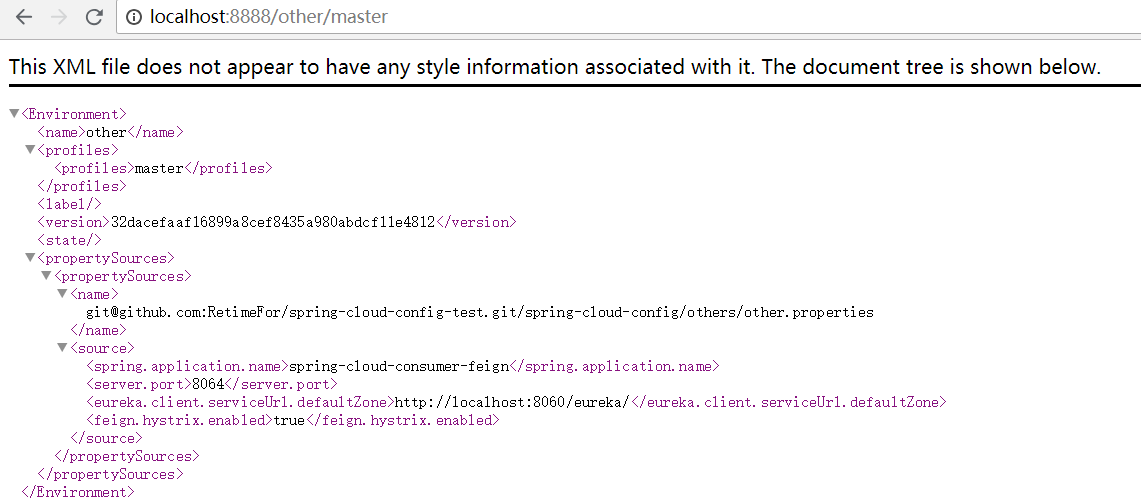
(3)测试结果如下(端口后直接跟 /文件的名字/master)
2.客户端配置
以Feign的服务端为例,只需要将配置文件中的内容用如下代码替换即可
spring.cloud.config.uri=http://localhost:8888

spring.cloud.config.name=other

spring.cloud.config.label=master
【Spring Cloud】 总结的更多相关文章
- spring/spring boot/spring cloud开发总结
背景 针对RPC远程调用,都在使用dubbo.dubbox等,我们也是如此.由于社区暂停维护.应对未来发展,我们准备尝试新技术(或许这时候也不算什么新技术了吧),选择使用了spring ...
- 转 Netflix OSS、Spring Cloud还是Kubernetes? 都要吧!
Netflix OSS.Spring Cloud还是Kubernetes? 都要吧! http://www.infoq.com/cn/articles/netflix-oss-spring-cloud ...
- spring cloud 学习研究- spring-cloud-microservice-example
spring cloud + docker 微服务架构 http://www.open-open.com/lib/view/open1437363835818.html 实例项目 https://gi ...
- Spring Cloud集成相关优质项目推荐
Spring Cloud Config 配置管理工具包,让你可以把配置放到远程服务器,集中化管理集群配置,目前支持本地存储.Git以及Subversion. Spring Cloud Bus 事件.消 ...
- spring boot分布式技术,spring cloud,负载均衡,配置管理器
spring boot分布式的实现,使用spring cloud技术. 下边是我理解的spring cloud的核心技术: 1.配置服务器 2.注册发现服务器eureka(spring boot默认使 ...
- Spring Cloud 配置服务
Spring Cloud 配置服务 1. 配置服务简介 产生背景: 传统开发中,我们通常是将系统的业务无关配置(数据库,缓存服务器)在properties中配置,在这个文件中不会经常改变,但随着系统规 ...
- Microservices Reference Architecture - with Spring Boot, Spring Cloud and Netflix OSS--转
原文地址:https://www.linkedin.com/pulse/microservices-reference-architecture-spring-boot-cloud-anil-alle ...
- 综合使用spring cloud技术实现微服务应用
在之前的章节,我们已经实现了配置服务器.注册服务器.微服务服务端,实现了服务注册与发现.这一章将实现微服务的客户端,以及联调.实现整个spring cloud框架核心应用. 本文属于<7天学会s ...
- Spring cloud实现服务注册及发现
服务注册与发现对于微服务系统来说非常重要.有了服务发现与注册,你就不需要整天改服务调用的配置文件了,你只需要使用服务的标识符,就可以访问到服务. 本文属于<7天学会spring cloud系列& ...
- 使用spring cloud实现分布式配置管理
<7天学会spring cloud系列>之创建配置管理服务器及实现分布式配置管理应用. 本文涉及到的项目: 开源项目:http://git.oschina.net/zhou666/spri ...
随机推荐
- C# 打包安装部署 属性中找不到 查找目标或打开文件位置
用第三方工具OrcaMis (一个可以修改msi文件的工具)来实现的 最后我又试了几次,以为是再程序打包的时候设置有问题,结果都没有找到原因,没有办法只有需求网络资源,网络上有朋友说VS创建的快捷方式 ...
- mybatisplus
1.selectById 根据主键查询一个对象,如果没有查到,则返回null: GxySchoolDto isExist = gxySchoolMapper.selectById(schoolEnti ...
- HDFS文件目录操作代码
分布式文件系统HDFS中对文件/目录的相关操作代码,整理了一下,大概包括以下部分: 文件夹的新建.删除.重命名 文件夹中子文件和目录的统计 文件的新建及显示文件内容 文件在local和remote间的 ...
- vm overcommit参数
overcommit参数需要根据不同服务来进行调整,使内存得到充分利用的同时保证系统的稳定性.比如redis服务器建议把vm.overcommit_memory设置为1. 1.vm.overcommi ...
- QT下过多点的曲线绘制
绘制过多点的曲线意义重大.但通过试验,QT的PainterPath不是很如意.当多段曲线围成一个区域时,PainterPath内并不包含该区域的所有面积,只包含曲线和其弦构成的面积. 为了解决这一问题 ...
- 2019Java常见面试上
一.开场白简单的介绍一下自己的工作经历与职责,在校或者工作中主要的工作内容,主要负责的内容:(你的信息一清二白的写在简历上,能答出来的最好写在上面,模棱两可不是很清楚的最好不要写,否则会被问的很尴尬) ...
- jQuery代码书写规范
1. 对于同一个对象不超过三个操作的,可以直接写成一行 $("li").show().unbind("click"); 2. 对于同一个对象的较多操作,建议每行 ...
- 如何禁止谷歌浏览器隐藏url的www前缀
若要将Chrome浏览器的设置恢复为隐藏HTTP.HTTPS以及WWW前缀,则只需再次进入此页面: chrome://flags/#omnibox-ui-hide-steady-state-url-s ...
- Linux三剑客之sed深度实践讲解(上)
sed sed 是Stream Editor(流编辑器)缩写,是操 作过滤和转换文本内容的强大工具.常用功能有增删改查,过滤,取行. 2.增删改查 2.1 增 a 追加文本到指定行后 i 插入文本到指 ...
- Java中简单测试FastDFS的文件上传
pom.xml文件内容如下: <dependencies> <!-- fastdfs --> <dependency> <groupId>org.cso ...