
Tkinter 之RadioButton单选框标签
一、参数说明
| 语法 | 作用 |
|---|---|
| Radiobutton(root,text='xxxx') | 单选框文本显示内容 |
| Radiobutton(root,variable=color) | 单选框索引变量,通过变量的值确定哪个单选框被选中 |
| Radiobutton(root,variable=color,value='red') | 单选框选中时设定变量的值 |
| Radiobutton(root,variable=color,value='red',command=函数) | 单选框选中时执行的命令(函数) |
| Radiobutton(root,indicatoron=False) | 设置单选框类型(默认为True) |
二、代码示例
import tkinter as tk

window = tk.Tk()

def main():

    global window

    # 设置主窗体大小

    winWidth = 600

    winHeight = 400

    # 获取屏幕分辨率

    screenWidth = window.winfo_screenwidth()

    screenHeight = window.winfo_screenheight()

    # 计算主窗口在屏幕上的坐标

    x = int((screenWidth - winWidth)/ 2)

    y = int((screenHeight - winHeight) / 2)

    # 设置主窗口标题

    window.title("RadioButton参数说明")

    # 设置主窗口大小

    window.geometry("%sx%s+%s+%s" % (winWidth, winHeight, x, y))

    # 设置窗口宽高固定

    window.resizable(0,0)

    # 设置窗口图标

    window.iconbitmap("./image/icon.ico")

    """radiobutton参数.

        Valid resource names: activebackground, activeforeground, anchor,

        background, bd, bg, bitmap, borderwidth, command, cursor,

        disabledforeground, fg, font, foreground, height,

        highlightbackground, highlightcolor, highlightthickness, image,

        indicatoron, justify, padx, pady, relief, selectcolor, selectimage,

        state, takefocus, text, textvariable, underline, value, variable,

        width, wraplength."""

    # 设置默认选中

    v=tk.IntVar()

    v.set(2)

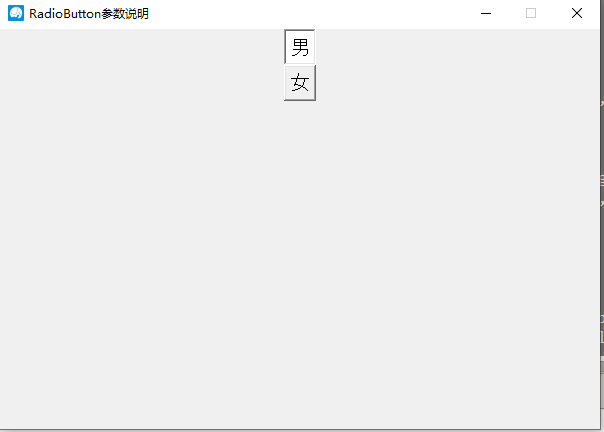
    tk.Radiobutton(window, text="男", font=("Arial", 16), value=2, variable=v, indicatoron=False ).pack()

    tk.Radiobutton(window, text="女", font=("Arial", 16),value=1, variable=v, indicatoron=False ).pack()

    window.mainloop()

def click():

    print("click")

if __name__ == '__main__':

    main()
三、效果图
Tkinter 之RadioButton单选框标签的更多相关文章
- tkinter中Radiobutton单选框控件(七)
Radiobutton控件 由于本次内容中好多知识都是之前重复解释过的,本次就不做解释了.不太清楚的内容请参考tkinter1-6节中的内容 import tkinter wuya = tkinter ...
- RadioGroup和RadioButton(单选框)
1.布局文件 <LinearLayout xmlns:android="http://schemas.android.com/apk/res/android" xmlns:t ...
- tkiner中Radiobutton单选框控件(七)
Radiobutton控件 由于本次内容中好多知识都是之前重复解释过的,本次就不做解释了.不太清楚的内容请参考tkinter1-6节中的内容 import tkinter wuya = tkinter ...
- Qt Quick 常用元素:RadioButton(单选框),CheckBox(复选框) 与 GroupBox(分组框)
先介绍一下 ExclusiveGroup. ExclusiveGroup (互斥分组)本身是不可见元素,用于将若干个可选择元素组合在一起, 供用户选择其中的一个选项.你可以在 ExclusiveGro ...
- Tkinter 之Text文本框标签
一.参数说明 语法 作用 t=tk.Text()t.insert(END,'插入的文本信息') INSERT:光标的插入点CURRENT:鼠标的当前位置所对应的字符位置END:这个Textbuffer ...
- TagHelper+Layui封装组件之Radio单选框
TagHelper+Layui封装组件之Radio单选框 标签名称:cl-radio 标签属性: asp-for:绑定的字段,必须指定 asp-items:绑定单选项 类型为:IEnumerable& ...
- Tkinter单选框及滚动条
界面:左侧是单选框,右侧是信息显示框,下方是按扭 功能:点击开始爬取按扭,则会自动执行函数,显示在文本框中 indicatoron = 0 改变单选框按扭样式 效果图一: 效果图二: 效果图三: 示例 ...
- 可分组的选择框控件(MVVM下)(Toggle样式 仿造单选框RadioButton,复选框CheckBox功能)
原地址: http://www.cnblogs.com/yk250/p/5660340.html 效果图如下:支持分组的单选框,复选框样式和MVVM下功能的实现.这是项目中一个快捷键功能的扩展. 1, ...
- WPF中单选框RadioButton
单选框RadioButton的基本使用: <StackPanel Margin="10"> <Label FontWeight="Bold"& ...
随机推荐
- springboot_4 spring boot 使用servlet,filter,listener和interceptor
上一篇我们学习了 spring boot 利用Controller响应数据与响应页面. 一般的Web开发使用 Controller 基本上可以完成大部分需求,但是有的时候我们还是会用到 Servlet ...
- shell 实战 -- 基于一个服务启动,关闭,状态检查的脚本
功能说明: check:检查服务状态,在开启,关闭,状态检查时都会用到这个函数,所以封装起来放到最前面 start:开启服务 stop:关闭服务 fstop:强制关闭 status:检查服务状态 ru ...
- FI-TCODE收集
主数据:FS00 编辑总帐科目FS01 创建主记录FS02 更改主记录FS03 显示主记录FS04 总帐科目更改(集中地 ...
- java网络编程--httpurlconnection
HttpURLConnection是基于HTTP协议的,其底层通过socket通信实现.如果不设置超时(timeout),在网络异常的情况下,可能会导致程序僵死而不继续往下执行.可以通过以下两个语句来 ...
- 利用EasyUI 数据网格(DataGrid)的loader属性实现后端分页
该属性在easyui官方文档中并没有详细阐述,通过简单的资料查询和摸索,实现了easyUI数据网格的后端分页功能. 在官网文档中这样阐述loader属性: 定义如何从远程服务器加载数据.返回false ...
- Zabbix MySQL percona 模板部署
Zabbix MySQL percona服务端执行以下操作https://www.zabbix.com/download?zabbix=4.0&os_distribution=centos&a ...
- Python_字符串相关操作
1.字符串切片操作: str1='hello word' startIndex=0 #开始索引位置 endIndex=5 #结束索引位置+1 step=2 #步长 print(str1[startIn ...
- window kvm 虚拟机的创建
1:开始安装win7 (1) 上传iso文件到/data/iso文件夹中 说明:如果不存在的话, 输入 mkdir -p /data/iso (2) 开始安装 virt-install --name= ...
- JDBC_通过DriverManager获得数据库连接
package day_18; import org.junit.Test; import java.io.InputStream; import java.sql.*; import java.sq ...
- P1313 计算系数[二项式定理]
题目描述 给定一个多项式\((by+ax)^k\),请求出多项式展开后\(x^n \times y^m\)项的系数. 解析 一道水题,二项式定理搞定.注意递推组合数时对其取模. 参考代码 #inclu ...