
Tkinter 之RadioButton单选框标签
一、参数说明
| 语法 | 作用 |
|---|---|
| Radiobutton(root,text='xxxx') | 单选框文本显示内容 |
| Radiobutton(root,variable=color) | 单选框索引变量,通过变量的值确定哪个单选框被选中 |
| Radiobutton(root,variable=color,value='red') | 单选框选中时设定变量的值 |
| Radiobutton(root,variable=color,value='red',command=函数) | 单选框选中时执行的命令(函数) |
| Radiobutton(root,indicatoron=False) | 设置单选框类型(默认为True) |
二、代码示例
import tkinter as tk

window = tk.Tk()

def main():

    global window

    # 设置主窗体大小

    winWidth = 600

    winHeight = 400

    # 获取屏幕分辨率

    screenWidth = window.winfo_screenwidth()

    screenHeight = window.winfo_screenheight()

    # 计算主窗口在屏幕上的坐标

    x = int((screenWidth - winWidth)/ 2)

    y = int((screenHeight - winHeight) / 2)

    # 设置主窗口标题

    window.title("RadioButton参数说明")

    # 设置主窗口大小

    window.geometry("%sx%s+%s+%s" % (winWidth, winHeight, x, y))

    # 设置窗口宽高固定

    window.resizable(0,0)

    # 设置窗口图标

    window.iconbitmap("./image/icon.ico")

    """radiobutton参数.

        Valid resource names: activebackground, activeforeground, anchor,

        background, bd, bg, bitmap, borderwidth, command, cursor,

        disabledforeground, fg, font, foreground, height,

        highlightbackground, highlightcolor, highlightthickness, image,

        indicatoron, justify, padx, pady, relief, selectcolor, selectimage,

        state, takefocus, text, textvariable, underline, value, variable,

        width, wraplength."""

    # 设置默认选中

    v=tk.IntVar()

    v.set(2)

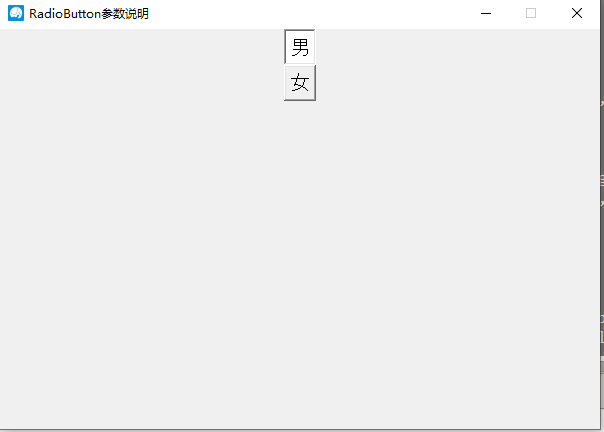
    tk.Radiobutton(window, text="男", font=("Arial", 16), value=2, variable=v, indicatoron=False ).pack()

    tk.Radiobutton(window, text="女", font=("Arial", 16),value=1, variable=v, indicatoron=False ).pack()

    window.mainloop()

def click():

    print("click")

if __name__ == '__main__':

    main()
三、效果图
Tkinter 之RadioButton单选框标签的更多相关文章
- tkinter中Radiobutton单选框控件(七)
Radiobutton控件 由于本次内容中好多知识都是之前重复解释过的,本次就不做解释了.不太清楚的内容请参考tkinter1-6节中的内容 import tkinter wuya = tkinter ...
- RadioGroup和RadioButton(单选框)
1.布局文件 <LinearLayout xmlns:android="http://schemas.android.com/apk/res/android" xmlns:t ...
- tkiner中Radiobutton单选框控件(七)
Radiobutton控件 由于本次内容中好多知识都是之前重复解释过的,本次就不做解释了.不太清楚的内容请参考tkinter1-6节中的内容 import tkinter wuya = tkinter ...
- Qt Quick 常用元素:RadioButton(单选框),CheckBox(复选框) 与 GroupBox(分组框)
先介绍一下 ExclusiveGroup. ExclusiveGroup (互斥分组)本身是不可见元素,用于将若干个可选择元素组合在一起, 供用户选择其中的一个选项.你可以在 ExclusiveGro ...
- Tkinter 之Text文本框标签
一.参数说明 语法 作用 t=tk.Text()t.insert(END,'插入的文本信息') INSERT:光标的插入点CURRENT:鼠标的当前位置所对应的字符位置END:这个Textbuffer ...
- TagHelper+Layui封装组件之Radio单选框
TagHelper+Layui封装组件之Radio单选框 标签名称:cl-radio 标签属性: asp-for:绑定的字段,必须指定 asp-items:绑定单选项 类型为:IEnumerable& ...
- Tkinter单选框及滚动条
界面:左侧是单选框,右侧是信息显示框,下方是按扭 功能:点击开始爬取按扭,则会自动执行函数,显示在文本框中 indicatoron = 0 改变单选框按扭样式 效果图一: 效果图二: 效果图三: 示例 ...
- 可分组的选择框控件(MVVM下)(Toggle样式 仿造单选框RadioButton,复选框CheckBox功能)
原地址: http://www.cnblogs.com/yk250/p/5660340.html 效果图如下:支持分组的单选框,复选框样式和MVVM下功能的实现.这是项目中一个快捷键功能的扩展. 1, ...
- WPF中单选框RadioButton
单选框RadioButton的基本使用: <StackPanel Margin="10"> <Label FontWeight="Bold"& ...
随机推荐
- source tree每次push都需要密码的解决方法
Windows首先可以考虑使用GitHub for Windows,它已经包含了该助手,或者可以下载对应系统的版本:Windows 7.Windows 8.Source 版本,然后解压缩文件并将里面的 ...
- 在oracle中存入date类型数据遇到的问题及其解决方法(利用java.sql.date和Timestamp)
转自:https://blog.csdn.net/ShadowerWArden/article/details/80652377 1. 使用JDBC操作Oracle数据库时,使用java.sql.Da ...
- Qt QPushButton 背景色
正常状态:黑底(背景色),白字(前景色),圆角,向外凸起 鼠标停留:背景和前景反色 鼠标按下:背景色变为淡蓝色,向内凹陷 ui->pushButton->setStyleSheet(&qu ...
- python识别文字tesseract
Ubuntu版本: .tesseract-ocr安装 sudo apt-get install tesseract-ocr .pytesseract安装 sudo pip install pytess ...
- 剑指offer-链表相关
剑指offer面试常考手撸算法题-链表篇 1. 从头到尾打印链表 class Solution { public: // 可以先压栈,再出栈到vector // 时间/空间:O(n) vector&l ...
- C++ 基础知识汇总 持续更新
摘录一些C++面试常考问题,写一些自己的理解,花了挺长时间的,作图是真的累,欢迎来摘果子. static关键字 用于声明静态对象: 静态函数只在本文件可见.(默认是extern的) 全局静态对象:全局 ...
- sql 四舍五入 保留两位小数
一.问题描述 数据库里的 float momey 类型,都会精确到多位小数.但有时候 我们不需要那么精确,例如,只精确到两位有效数字. 二.sqlserver解决方案: 1. 使用 Round() 函 ...
- Redis for C#
ServiceStack.Redis 初识Redis时接触到的.Net-Redis组件是 ServiceStack.Redis,其V3系列的最新版本是:ServiceStack.Redis.3.9.2 ...
- dstat 监控工具
dstat 监控工具 Linux 自带的监控工具.界面相当友好,可以替代其他的监控工具. 安装 yum install -y dstat 命令使用 dstat -h # 帮助 dstat -tpcdr ...
- HTML手写课程表,练基础
<html> <head> <title>表格table元素综合练习--课程表</title> </head> <body> & ...