
在ROS系统下,获取tango的RGBD信息和Pose信息
Tango强大在于它的其服务于环境感知的SDK,其核心是三大组件:
- Motion Tracking
运动跟踪,Tango通过自身的传感器感知自身的6自由度信息。这部分是三大组件的核心功能。具体上来讲,tango使用视觉+惯性器件,实现了VIO(visual-inertial odometry)算法,下面会进一步介绍。
- Depth Perception
深度感知,主要是通过Tango搭载的深度传感器的原始数据生成点云,服务于一些3D建模的应用。
- Area Learning
区域建模,可以认为是在motion tracking 基础上的一个增强。它可以将之前走过的路径记录下来,同时生成空间中的3D landmark,这些信息可以用于下一次开机之后的重定位。这个功能可以使用户可以在已经建模好的地图中定位自己,减小误差。
Motion tracking 是tango SDK的最核心。
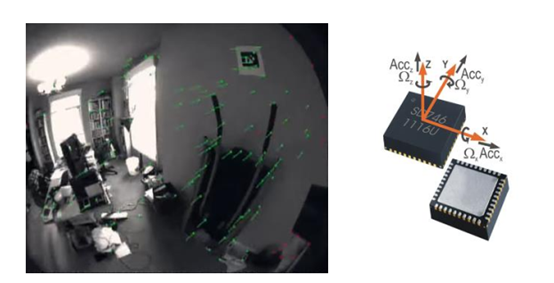
VIO融合对空间中视觉特征以及惯性测量的观测,来定位。上图中绿色的就是tango提取的特征点,VIO融合两种传感器信息,解决尺度漂移的同时也估计了IMU的bias。
其实如果tango作为精确传感器数据融合的一个工具,是kinect非常棒的替代品,在机器人SLAM领域可以有更多应用。最近我在做的一个工作就是将tango中的数据提取出来,通过tango VIO精确定位,实现对室内场景的更好定位。
1、安装 Tango ROS Streamer
Tango ROS Streamer是一款适用于探戈设备的Android应用程序和ROS节点。其主要目的是为ROS生态系统提供Tango传感器数据,以便在机器人上轻松使用Tango功能。

详细安装看介绍,一般来说联想国行坑爹的tango不会有这个APK,也不会让你上Google play上下载这个apk(多方证实,不要再浪费精力)。所以还是在网上找个老版本的APK下载下来使用。
只要你的14.04安装好了ROS,那么你就可以通过 配置文件 可视化从tango获取的数据
rosrun rviz rviz -d <path_to_rviz_config_file>
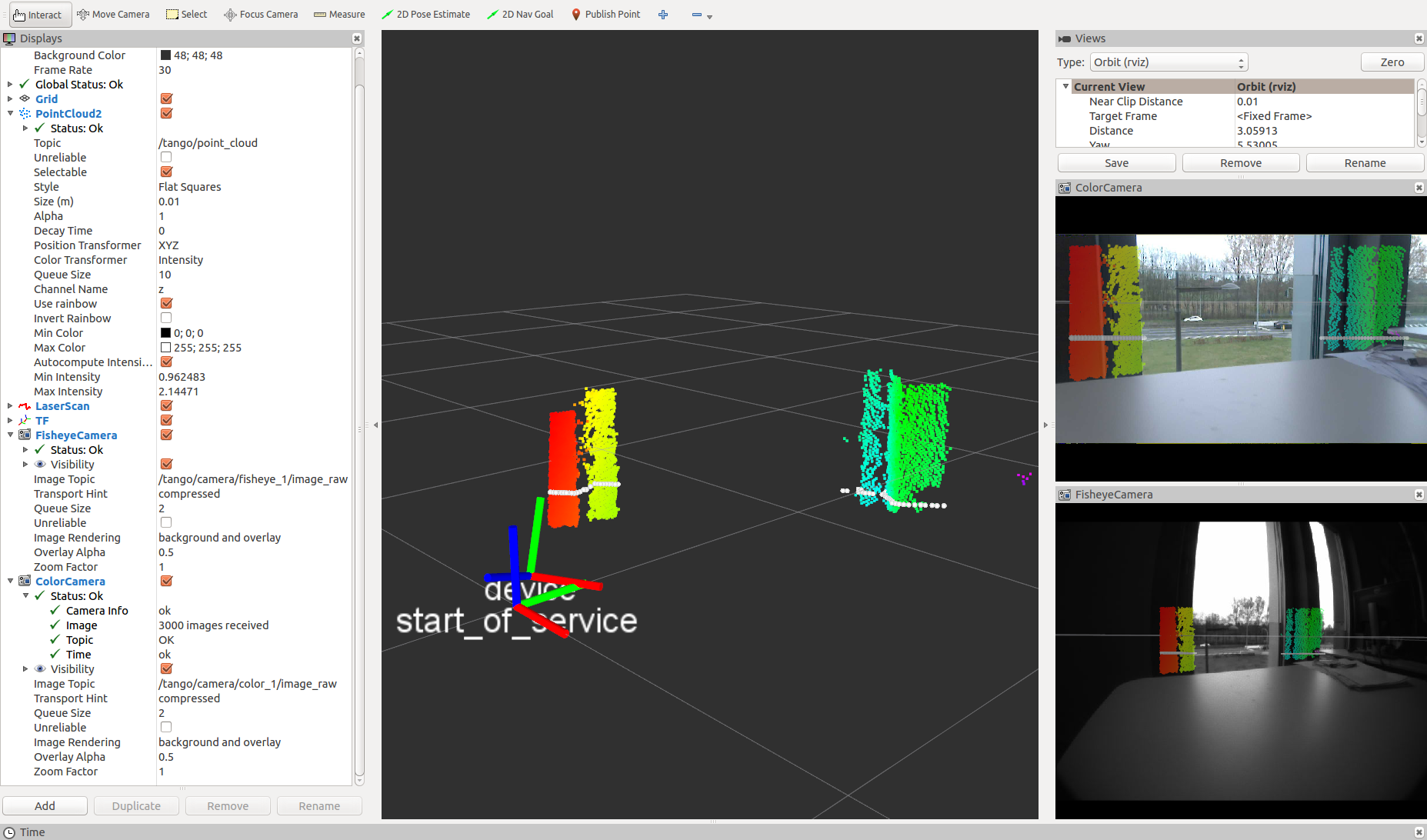
上面两步,我们已经能订阅tango的topic,获得tango的这些信息
android/imu (sensor_msgs/Imu)
IMU message from the Android sensors.
tango/camera/color_1/camera_info (sensor_msgs/CameraInfo)
Camera info of the Tango device color camera.
tango/camera/color_1/image_raw (sensor_msgs/Image)
Image of the Tango device color camera.
tango/camera/color_1/image_rect (sensor_msgs/Image)
Rectified image of the Tango device color camera.
tango/camera/fisheye_1/camera_info (sensor_msgs/CameraInfo)
Camera info of the Tango device fisheye camera. The fisheye camera data is not available on devices with API level > 23. This topic is therefore not advertised for these devices.
tango/camera/fisheye_1/image_raw (sensor_msgs/Image)
Image of the Tango device fisheye camera. The fisheye camera data is not available on devices with API level > 23. This topic is therefore not advertised for these devices.
tango/camera/fisheye_1/image_rect (sensor_msgs/Image)
Rectified image of the Tango device fisheye camera. The fisheye camera data is not available on devices with API level > 23. This topic is therefore not advertised for these devices.
tango/laser_scan (sensor_msgs/LaserScan)
Laser scan message created from the Tango point cloud, expressed in laser frame.
tango/point_cloud (sensor_msgs/PointCloud2)
Point cloud of the Tango device depth sensor, expressed in camera_depth frame.
然而我们无法获取深度图信息,我们只有上面的point cloud信息。
目前我发现最容易获取深度图信息的方法只有我找到了。
3、安装rtabmap_ros
rosrun rtabmap_ros pointcloud_to_depthimage cloud:=/tango/point_cloud camera_info:=/tango/camera/color_1/camera_info _fixed_frame_id:=start_of_service _decimation:=8 _fill_holes_size:=5
当然安装rtabmap_ros也有很多坑,分别通过stark overflow还有ros wiki基本能解决。比如opencv中有未定义函数啥的,这个我后面再整理。建议下载最新的rtabmao_ros源文件编译执行。
坑1:The general issue is with the "nonfree" parts of opencv,需要重新编译opencv,关闭opencl编译
cmake -D CMAKE_BUILD_TYPE=RELEASE -D WITH_OPENCL=OFF -D CMAKE_INSTALL_PREFIX=/usr/local .安装opencv TIP:
1、依赖包
[compiler] sudo apt-get install build-essential

[required] sudo apt-get install cmake git libgtk2.0-dev pkg-config libavcodec-dev libavformat-dev libswscale-dev

[optional] sudo apt-get install python-dev python-numpy libtbb2 libtbb-dev libjpeg-dev libpng-dev libtiff-dev libjasper-dev libdc1394-22-dev
2、编译安装
unzip opencv-2.4.13.zip

cd opencv-2.4.13/

cmake -D CMAKE_BUILD_TYPE=RELEASE -D WITH_OPENCL=OFF -D CMAKE_INSTALL_PREFIX=/usr/local .

make    # make -j4表示开4个线程来进行编译

make install
上面的命令执行后,就能在topic list里找到深度图的话题了。
在ROS系统下,获取tango的RGBD信息和Pose信息的更多相关文章
- win10 系统下获取系统版本号为6.2的问题(manifest如何写)
近期赶时髦升级了win10,用着挺爽.但是某天在测试一个bug时发现要对win10做特殊处理,于是直接调用了GetVersionEx,并取出版本号进行判断,但是发现得到的版本竟然是6.2.当时就被雷到 ...
- win10 系统下获取系统版本号为6.2的问题
近期赶时髦升级了win10,用着挺爽.但是某天在测试一个bug时发现要对win10做特殊处理,于是直接调用了GetVersionEx,并取出版本号进行判断,但是发现得到的版本竟然是6.2.当时就被雷到 ...
- 【cartogarpher_ros】一: ros系统下的快速安装
Cartographer是一个跨多个平台和传感器配置提供 2D 和 3D实时同步定位和映射 ( SLAM ) 的系统. 使用Cartographer有Ros集成环境和无Ros环境,对于新手快速入门,推 ...
- linux系统下获取IP,MAC,子网掩码,网关
获取IP和子网掩码 int getLocalInfo(char IP[],char Mask[]) { int fd; int interfaceNum = 0; struct ifreq buf[1 ...
- 怎样在windows下和linux下获取文件(如exe文件)的具体信息和属性
版权声明:本文为博主原创文章.未经博主同意不得转载. https://blog.csdn.net/xmt1139057136/article/details/25620685 程序猿都非常懒.你懂的! ...
- 使用dmidecode在Linux下获取硬件信息
dmidecode命令可以让你在Linux系统下获取有关硬件方面的信息.dmidecode的作用是将DMI数据库中的信息解码,以可读的文本方式显示.由于DMI信息可以人为修改,因此里面的信息不一定是系 ...
- Unix/Linux系统下获得时间戳函数
在Unix/Linux系统下,使用gettimeofday函数来获得当前系统的时间戳,精度可达到微秒(microsecond,即μs)级别. 通过结构体timeval来存放当前时间戳的信息: #ifn ...
- Linux系统下基本命令
<Linux系统下基本命令> Linux系统下基本命令: 要区分大小写 uname 显示版本信息(同win2K的 ver) dir 显示当前目录文件,ls -al 显示包括隐藏文件(同wi ...
- ROS下利用realsense采集RGBD图像合成点云
摘要:在ROS kinetic下,利用realsense D435深度相机采集校准的RGBD图片,合成点云,在rviz中查看点云,最后保存成pcd文件. 一. 各种bug 代码编译成功后,打开rviz ...
随机推荐
- leetcode解题报告(20):Rotate Array
描述 Rotate an array of n elements to the right by k steps. For example, with n = 7 and k = 3, the arr ...
- 【原创】go语言学习(五)函数详解1
目录 1.函数介绍 2.多返回值和可变参数 3.defer语句 4.内置函数介绍 1.函数介绍 1.1定义: 有输⼊入.有输出,⽤用来执⾏行行⼀一个指定任务的代码块. func functionnam ...
- hadoop(10)---hdfs配置文件详解
以下只是简单的对hdfs(hdfs.site.xml)配置文件做一个简单的说明. <configuration><property><!-- 为namenode集群定义一 ...
- 拼图游戏(8 puzzle)
如图所示,这是一个九宫格(这倒是让我想起了小时候老师在黑板上教导我们的如何通过一系列的拼凑,将横行,竖行,以及斜行都拼到和相等),格子中有一个格子是空的,另外八个格子分别有数字1--8,我们的任务是将 ...
- 记一次ArrayList产生的线上OOM问题
前言:本以为(OutOfMemoryError)OOM问题会离我们很远,但在一次生产上线灰度的过程中就出现了Java.Lang.OutOfMemoryError:Java heap space异常,通 ...
- arcgis python 开启编辑会话和编辑操作、在表中创建行、停止编辑操作以及提交编辑会话。
import arcpy import os fc = 'Database Connections/Portland.sde/portland.jgp.schools' workspace = os. ...
- Linux中工作目录切换命令
1.pwd命令用于显示当前的工作目录 2.cd命令用于切换工作路径,格式为:cd [目录名称] 参数 作用 - 切换到上一次的 目录,如:cd - ~ 切换到”家目录“,如:cd ~ ~usernam ...
- Code First 迁移----官方 应用程序启动时自动升级(MigrateDatabaseToLatestVersion 初始值设定项)
Code First 迁移 如果使用的是 Code First 工作流,推荐使用 Code First 迁移改进应用程序的数据库架构. 迁移提供一组允许以下操作的工具: 创建可用于 EF 模型的初始数 ...
- Java 中的JSON 字符串
类库选择 Java中并没有内置JSON的解析,因此使用JSON需要借助第三方类库. 下面是几个常用的 JSON 解析类库: Gson: 谷歌开发的 JSON 库,功能十分全面. FastJson: 阿 ...
- wmi 远程访问问题解决
WMI远程访问问题解决方法 WMI 全称为:Microsoft Windows Management Instrumentation (WMI) 按微软的介绍大致如下: WMI 是 Mic ...