
Failed to install the following Android SDK packages as some licences have not been accepted.
问题描述:
执行gradle tasks报错:
gradle tasks

> Configure project :app

Exception while marshalling /usr/local/android-home/android-sdk-linux/build-tools/28.0./package.xml. Probably the SDK is read-only

Exception while marshalling /usr/local/android-home/android-sdk-linux/build-tools/29.0./package.xml. Probably the SDK is read-only

Exception while marshalling /usr/local/android-home/android-sdk-linux/platform-tools/package.xml. Probably the SDK is read-only

Exception while marshalling /usr/local/android-home/android-sdk-linux/platforms/android-/package.xml. Probably the SDK is read-only

Exception while marshalling /usr/local/android-home/android-sdk-linux/platforms/android-/package.xml. Probably the SDK is read-only

Exception while marshalling /usr/local/android-home/android-sdk-linux/tools/package.xml. Probably the SDK is read-only

> Configure project :picture_library

Exception while marshalling /usr/local/android-home/android-sdk-linux/build-tools/28.0./package.xml. Probably the SDK is read-only

Exception while marshalling /usr/local/android-home/android-sdk-linux/build-tools/29.0./package.xml. Probably the SDK is read-only

Exception while marshalling /usr/local/android-home/android-sdk-linux/platform-tools/package.xml. Probably the SDK is read-only

Exception while marshalling /usr/local/android-home/android-sdk-linux/platforms/android-/package.xml. Probably the SDK is read-only

Exception while marshalling /usr/local/android-home/android-sdk-linux/platforms/android-/package.xml. Probably the SDK is read-only

Exception while marshalling /usr/local/android-home/android-sdk-linux/tools/package.xml. Probably the SDK is read-only

Checking the license for package Android SDK Build-Tools 28.0. in /usr/local/android-home/android-sdk-linux/licenses

Warning: License for package Android SDK Build-Tools 28.0. not accepted.

FAILURE: Build failed with an exception.

* What went wrong:

A problem occurred configuring project ':picture_library'.

> Failed to install the following Android SDK packages as some licences have not been accepted.

     build-tools;28.0. Android SDK Build-Tools 28.0.

  To build this project, accept the SDK license agreements and install the missing components using the Android Studio SDK Manager.

  Alternatively, to transfer the license agreements from one workstation to another, see http://d.android.com/r/studio-ui/export-licenses.html

  Using Android SDK: /usr/local/android-home/android-sdk-linux

* Try:

Run with --stacktrace option to get the stack trace. Run with --info or --debug option to get more log output. Run with --scan to get full insights.

* Get more help at https://help.gradle.org

BUILD FAILED in 1s
分析错误信息:
Failed to install the following Android SDK packages as some licences have not been accepted.

     build-tools;28.0. Android SDK Build-Tools 28.0.

  To build this project, accept the SDK license agreements and install the missing components using the Android Studio SDK Manager.
得到以下结论:
构建当前的项目缺少下面的android sdk
所以下载这个sdk即可:
build-tools;28.0. Android SDK Build-Tools 28.0.
解决办法:
使用android命令 列出sdk相关的列表,以便我们选择和自己项目匹配的SDK版本
android list sdk --all
输出如下所示:
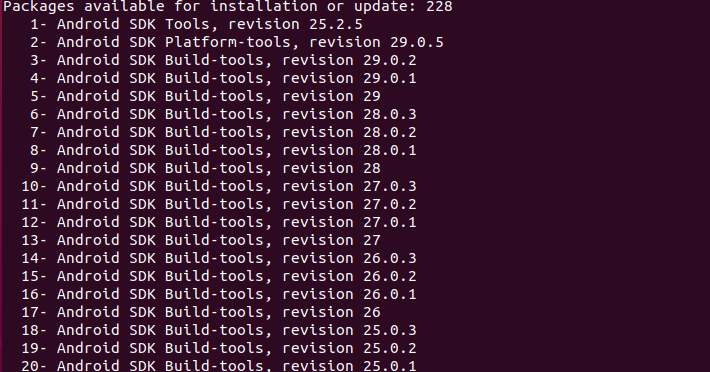
从上图可以看出,Android SDK Build-Tools 28.0.2对应的序号是7,使用android update命令安装:
android update sdk -u -a -t
安装完成:
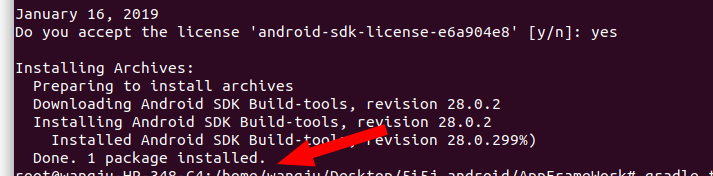
再次在app目录下,测试gradle clean命令,就执行成功了:

Failed to install the following Android SDK packages as some licences have not been accepted.的更多相关文章
- Failed to load C:\ProgramFilesTwo\Android\sdk\build-tools\27.0.3\lib\dx.jar
Eclipse遇到如下错误: Failed to load C:\ProgramFilesTwo\Android\sdk\build-tools\27.0.3\lib\dx.jar 原因: eclip ...
- [ubuntu]android SDK 与Gradle环境的安装与配置|搭建android基础开发/构建环境
系统环境: linux:ubuntu18 已配置jdk 环境变量 切换到root账户 sudo su 安装Android-sdk (0)准备工作 切换到/usr/local目录: /usr/local ...
- 解决Android Studio Fetching Android SDK component information失败问题【转】
本文转载自:http://blog.csdn.net/isesar/article/details/41908089 Android Studio 安装完成后,如果直接启动,Android Studi ...
- Android Studio 1.5启动出现“SDK Manager: failed to install”问题的解决
问题描述 Android Studio 1.5是当前最新Android手机应用开发平台,下载bundle版安装后,启动Studio后出现“SDK Manager: failed to install” ...
- Cannot find `aapt.exe`. Please install the Android SDK Build-tools package
Google has updated their SDK tools ("Android SDK Tools" Rev. 23) in a way that also requir ...
- Android开发 Failed to install *.apk on device 'emulator-5554': EOF
在运行android 程序时出现这样的错误: Failed to install homework.apk on device 'emulator-5554': EOF java.io.IOExcep ...
- [转载]关于android SDK安装Failed to fetch URL http://dl-ssl.google.com/android/repository/addons_list-1.xml出错
原文地址为:http://blog.csdn.net/springsky_/article/details/7442388 因为入行移动测试,所以很多测试环境的搭建.从中遇到了和这个GG同样的问题.怕 ...
- windows中android SDK manager安装更新sdk很慢,或者出现Done loading packages后不动甚至没有任何可用包
出现问题: 1.windows中android SDK manager安装更新sdk很慢,或者出现Done loading packages后不动甚至没有任何可用包 2.Failed to fetch ...
- Android SDK content Loader has encountered a problem.parseSdkContent failed
打开Eclipse,弹出Android SDK content Loader has encountered a problem.parseSdkContent failed,当点击detail按钮, ...
随机推荐
- python中的负数取模问题(一个大坑)
先来看一段代码 这是什么情况?为什么会出现这种结果.我们再来看看其它语言的执行结果 我们用golang.js.c分别算了一下,结果得到的结果都是一致的,但是python为啥不一样呢? 其实之所以这么做 ...
- bootstrap和JS实现下拉菜单
// bootstrap下拉菜单 <div class="btn-group"> <button id="button_text" type= ...
- 8.1.Zookeeper概念简介
1.分布式系统概述 理解1: 分布式系统:分布式系统是针对一个大系统而言,将一个大系统分成多个子系统,即多个工程系统. 我们先看下传统的系统模式: 传统的系统模式将多个功能模块全部在一个工程中写 ...
- 正则表达式 Regular expression为学习助跑
这是一个Regular expression的铁路图(至少我现在是这么称呼的)的图形化界面帮助检验和理解我们所写的Regular expression是否正确. 1.官网 :https://regex ...
- java8学习之Lambda表达式初步与函数式接口
对于Java8其实相比之前的的版本增加的内容是相当多的,其中有相当一大块的内容是关于Lambda表达式与Stream API,而这两部分是紧密结合而不能将其拆开来对待的,但是是可以单独使用的,所以从学 ...
- java线程基础巩固---Thread API综合实战之编写ThreadService实现暴力结束线程
上篇中在最后抛出一个问题,具体问题可以查看此篇[http://www.cnblogs.com/webor2006/p/7995229.html],这里不再概述,其实要实现这个需求可以用咱们之前学习的守 ...
- Vue错误集
1.Component template should contain exactly one root element. If you are using v-if on multiple elem ...
- 部署jenkins+git
Jenkins简介 Jenkins是一个开源软件项目,是基于Java开发的一种持续集成工具,用于监控持续重复的工作,旨在提供一个开放易用的软件平台,使软件的持续集成变成可能 安装并启动思路: 安装准备 ...
- 12-SSMS图形化工具中不允许保存修改的解决办法
1.报出的警告 2.解决办法 工具-->选项-->设计器--->表设计和数据库设计器-->阻止保存要求重新创建表的更改 的勾去掉就OK 了
- docker安装rocketmq
一.单机部署 1.拉取镜像:foxiswho/rocketmq:server cabel/rocketmq:broker styletang/rocketmq-console-ng 2.创建目录:d ...