
Failed to install the following Android SDK packages as some licences have not been accepted.
问题描述:
执行gradle tasks报错:
gradle tasks

> Configure project :app

Exception while marshalling /usr/local/android-home/android-sdk-linux/build-tools/28.0./package.xml. Probably the SDK is read-only

Exception while marshalling /usr/local/android-home/android-sdk-linux/build-tools/29.0./package.xml. Probably the SDK is read-only

Exception while marshalling /usr/local/android-home/android-sdk-linux/platform-tools/package.xml. Probably the SDK is read-only

Exception while marshalling /usr/local/android-home/android-sdk-linux/platforms/android-/package.xml. Probably the SDK is read-only

Exception while marshalling /usr/local/android-home/android-sdk-linux/platforms/android-/package.xml. Probably the SDK is read-only

Exception while marshalling /usr/local/android-home/android-sdk-linux/tools/package.xml. Probably the SDK is read-only

> Configure project :picture_library

Exception while marshalling /usr/local/android-home/android-sdk-linux/build-tools/28.0./package.xml. Probably the SDK is read-only

Exception while marshalling /usr/local/android-home/android-sdk-linux/build-tools/29.0./package.xml. Probably the SDK is read-only

Exception while marshalling /usr/local/android-home/android-sdk-linux/platform-tools/package.xml. Probably the SDK is read-only

Exception while marshalling /usr/local/android-home/android-sdk-linux/platforms/android-/package.xml. Probably the SDK is read-only

Exception while marshalling /usr/local/android-home/android-sdk-linux/platforms/android-/package.xml. Probably the SDK is read-only

Exception while marshalling /usr/local/android-home/android-sdk-linux/tools/package.xml. Probably the SDK is read-only

Checking the license for package Android SDK Build-Tools 28.0. in /usr/local/android-home/android-sdk-linux/licenses

Warning: License for package Android SDK Build-Tools 28.0. not accepted.

FAILURE: Build failed with an exception.

* What went wrong:

A problem occurred configuring project ':picture_library'.

> Failed to install the following Android SDK packages as some licences have not been accepted.

     build-tools;28.0. Android SDK Build-Tools 28.0.

  To build this project, accept the SDK license agreements and install the missing components using the Android Studio SDK Manager.

  Alternatively, to transfer the license agreements from one workstation to another, see http://d.android.com/r/studio-ui/export-licenses.html

  Using Android SDK: /usr/local/android-home/android-sdk-linux

* Try:

Run with --stacktrace option to get the stack trace. Run with --info or --debug option to get more log output. Run with --scan to get full insights.

* Get more help at https://help.gradle.org

BUILD FAILED in 1s
分析错误信息:
Failed to install the following Android SDK packages as some licences have not been accepted.

     build-tools;28.0. Android SDK Build-Tools 28.0.

  To build this project, accept the SDK license agreements and install the missing components using the Android Studio SDK Manager.
得到以下结论:
构建当前的项目缺少下面的android sdk
所以下载这个sdk即可:
build-tools;28.0. Android SDK Build-Tools 28.0.
解决办法:
使用android命令 列出sdk相关的列表,以便我们选择和自己项目匹配的SDK版本
android list sdk --all
输出如下所示:
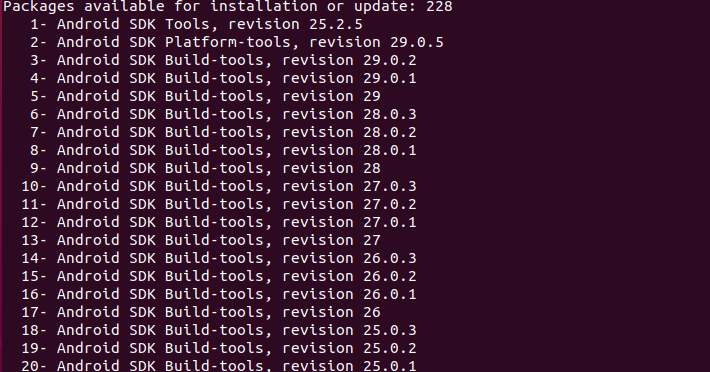
从上图可以看出,Android SDK Build-Tools 28.0.2对应的序号是7,使用android update命令安装:
android update sdk -u -a -t
安装完成:
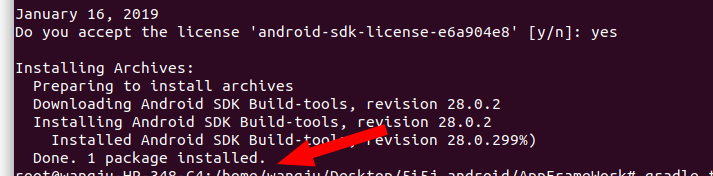
再次在app目录下,测试gradle clean命令,就执行成功了:

Failed to install the following Android SDK packages as some licences have not been accepted.的更多相关文章
- Failed to load C:\ProgramFilesTwo\Android\sdk\build-tools\27.0.3\lib\dx.jar
Eclipse遇到如下错误: Failed to load C:\ProgramFilesTwo\Android\sdk\build-tools\27.0.3\lib\dx.jar 原因: eclip ...
- [ubuntu]android SDK 与Gradle环境的安装与配置|搭建android基础开发/构建环境
系统环境: linux:ubuntu18 已配置jdk 环境变量 切换到root账户 sudo su 安装Android-sdk (0)准备工作 切换到/usr/local目录: /usr/local ...
- 解决Android Studio Fetching Android SDK component information失败问题【转】
本文转载自:http://blog.csdn.net/isesar/article/details/41908089 Android Studio 安装完成后,如果直接启动,Android Studi ...
- Android Studio 1.5启动出现“SDK Manager: failed to install”问题的解决
问题描述 Android Studio 1.5是当前最新Android手机应用开发平台,下载bundle版安装后,启动Studio后出现“SDK Manager: failed to install” ...
- Cannot find `aapt.exe`. Please install the Android SDK Build-tools package
Google has updated their SDK tools ("Android SDK Tools" Rev. 23) in a way that also requir ...
- Android开发 Failed to install *.apk on device 'emulator-5554': EOF
在运行android 程序时出现这样的错误: Failed to install homework.apk on device 'emulator-5554': EOF java.io.IOExcep ...
- [转载]关于android SDK安装Failed to fetch URL http://dl-ssl.google.com/android/repository/addons_list-1.xml出错
原文地址为:http://blog.csdn.net/springsky_/article/details/7442388 因为入行移动测试,所以很多测试环境的搭建.从中遇到了和这个GG同样的问题.怕 ...
- windows中android SDK manager安装更新sdk很慢,或者出现Done loading packages后不动甚至没有任何可用包
出现问题: 1.windows中android SDK manager安装更新sdk很慢,或者出现Done loading packages后不动甚至没有任何可用包 2.Failed to fetch ...
- Android SDK content Loader has encountered a problem.parseSdkContent failed
打开Eclipse,弹出Android SDK content Loader has encountered a problem.parseSdkContent failed,当点击detail按钮, ...
随机推荐
- 渗透测试平台Vulnreport介绍与使用
渗透测试平台Vulnreport介绍与使用 在这篇文章中,我们将跟大家讨论一些关于渗透测试方面的内容,并给大家介绍一款名叫Vulnreport的新型开源工具,而这款工具将能够让任何场景下的渗透测试 ...
- 使用TextView和Textedit
1.TextView res/layout 中设置布局文件 hint属性:提示输入信息text属性:与hint的区别---hint仅仅是提示:text是实际的内容讲布局xml文件引入到activit ...
- laravel的下载与安装
下载代码 https://github.com/laravel/laravel 在开发环境中配置好之后将根目录的 .env.example 文件改成 .env ,此文件是laravel的配置文件,将 ...
- Kaggle_泰坦尼克乘客存活预测
转载 逻辑回归应用之Kaggle泰坦尼克之灾 此转载只为保存!!! ————————————————版权声明:本文为CSDN博主「寒小阳」的原创文章,遵循 CC 4.0 BY-SA 版权协议,转载请附 ...
- 【PKUSC2018】最大前缀和
上午的国庆大阅兵有意思 Description https://loj.ac/problem/6433 Solution 看数据范围认解法 首先在每种情况出现概率相同的情况下, \(期望 \times ...
- 个人的web商城网站
项目介绍 1.作为前端的菜鸟,每每看到Github上有很多大神分享着自己的项目时,内心都是蠢蠢欲动,这次终于下定决心要给自己一段时间来完成属于自己的一份作品.2.于是在查找了大量资料,思考着技术选型, ...
- 小程序swiper组件的bindchange方法重复执行问题
这是官方文档的说法给出了swiper组件一直来回滑动的bug原因 以下是修正方法 <swiper autoplay="{{autoplay}}" interval=" ...
- web添加学生信息(首发web)
程序思路,先在JSP上画好页面,然后再创建一Servlet文件用于判断在网页上操作是否正确,还需要与数据库相连接,用DBUtile文件连接数据库,用Dao层来实现数据的增加,用Service来服务于D ...
- H5微信分享相关规范
微信分享 用户调用微信的分享功能,可以自定义分享的title和描述,以及小图标和链接.可以分享到群.好友.朋友圈.QQ.QQ空间等. 分享设计规范 分享标题:14字以内,建议使用朋友般亲切的口吻 分享 ...
- php+memcache实现的网站在线人数统计
<?php $mc = new Memcache (); // 连接memcache $mc->connect ( ); // 获取 在线用户 IP 和 在线时间数据 $online_me ...