
JavaWeb_(Hibernate框架)使用Hibernate开发用户注册功能
使用Hibernate开发用户注册功能:
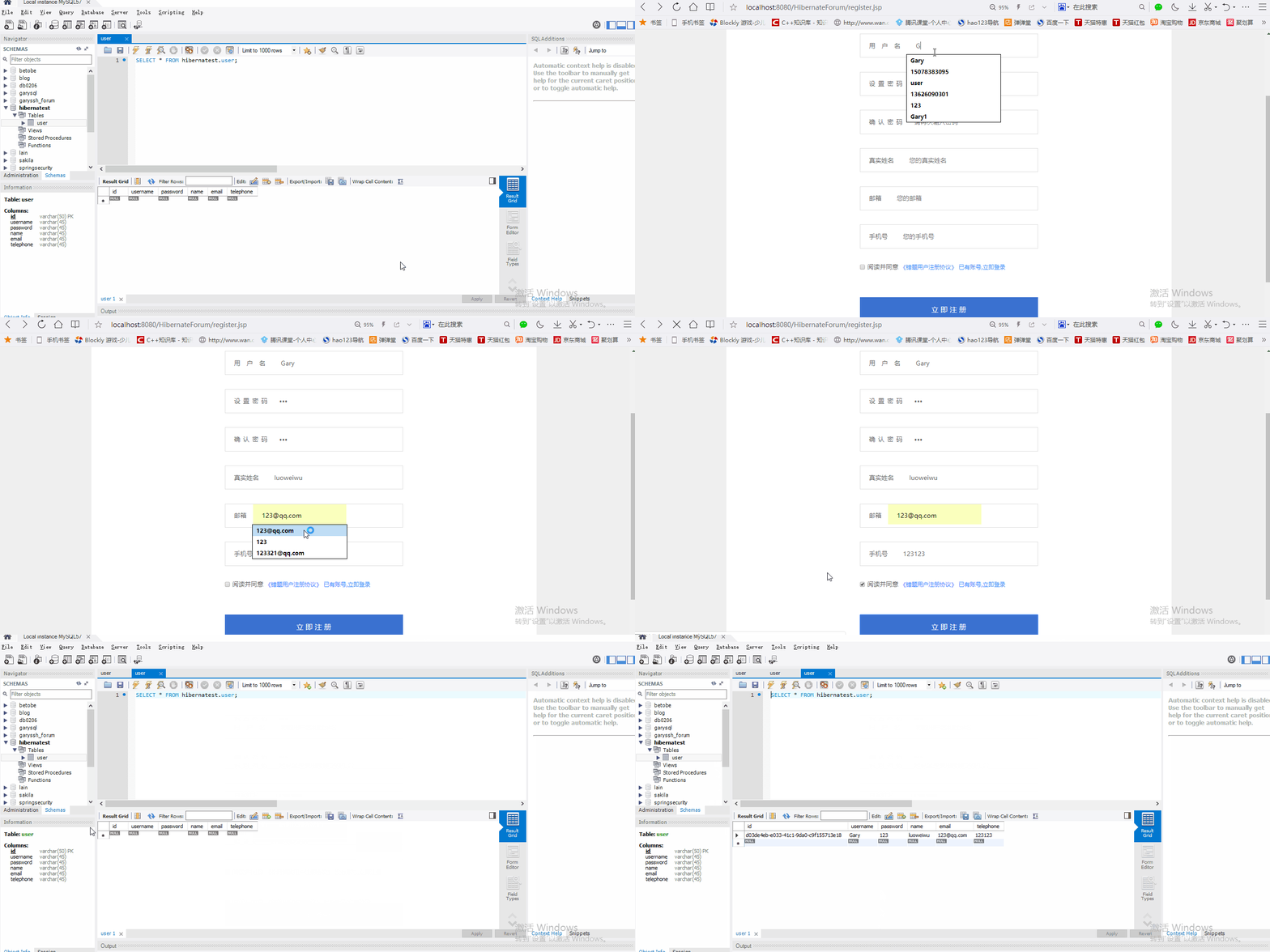
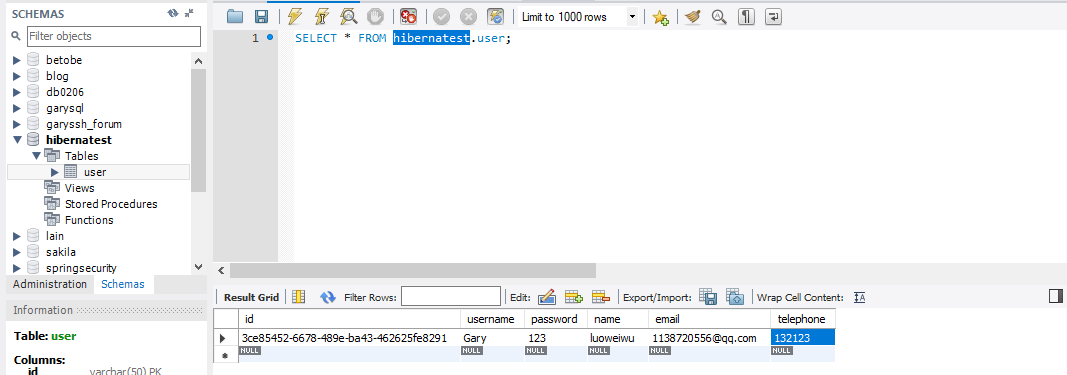
用户在register.jsp表单成功后,页面跳转到login.html,数据库中会存放用户注册的信息
<%@ page language="java" contentType="text/html; charset=UTF-8"
pageEncoding="UTF-8"%>
<!DOCTYPE html>
<html>
<head>
<meta charset="UTF-8">
<title></title>
<link rel="stylesheet" type="text/css" href="css/login.css" />
<link rel="stylesheet" href="css/head.css" />
<link rel="stylesheet" type="text/css" href="css/login.css" />
</head> <body>
<div class="dvhead">
<div class="dvlogo"><a href="index.html">你问我答</a></div>
<div class="dvsearch">10秒钟注册账号,找到你的同学</div>
<div class="dvreg">
已有账号,立即 <a href="login.html">登录</a>
</div>
</div>
<section class="sec">
<form action="${pageContext.request.contextPath }/UserAction_register" method="post">
<div class="register-box">
<label for="username" class="username_label">
用 户 名
<input maxlength="20" name="username" type="text"
placeholder="您的用户名和登录名" />
</label>
<div class="tips"> </div>
</div>
<div class="register-box">
<label for="username" class="other_label">
设 置 密 码
<input maxlength="20" type="password" name="password"
placeholder="建议至少使用两种字符组合" />
</label>
<div class="tips"> </div>
</div>
<div class="register-box">
<label for="username" class="other_label">
确 认 密 码
<input maxlength="20" type="password" placeholder="请再次输入密码" />
</label>
<div class="tips"> </div>
</div>
<div class="register-box">
<label for="username" class="username_label">
真实姓名
<input maxlength="20" name="name" type="text"
placeholder="您的真实姓名" />
</label>
<div class="tips">
</div>
</div> <div class="register-box">
<label for="username" class="username_label">
邮箱
<input maxlength="20" name="email" type="text"
placeholder="您的邮箱" />
</label>
<div class="tips">
</div>
</div>
<div class="register-box">
<label for="username" class="username_label">
手机号
<input maxlength="20" name="telephone" type="text"
placeholder="您的手机号" />
</label>
<div class="tips">
</div>
</div> <div class="arguement">
<input type="checkbox" id="xieyi" />
阅读并同意
<a href="javascript:void(0)">《错题用户注册协议》</a>
<a href="login.html">已有账号,立即登录</a>
<div class="tips">
</div>
</div>
<div class="submit_btn">
<button type="submit" id="submit_btn">
立 即 注 册
</button>
</div>
</form>
</section>
<script src="js/index.js" type="text/javascript" charset="utf-8"></script>
</body>
</html>
register.jsp
<?xml version="1.0" encoding="UTF-8"?>

<web-app xmlns:xsi="http://www.w3.org/2001/XMLSchema-instance" xmlns="http://xmlns.jcp.org/xml/ns/javaee" xsi:schemaLocation="http://xmlns.jcp.org/xml/ns/javaee http://xmlns.jcp.org/xml/ns/javaee/web-app_3_1.xsd" id="WebApp_ID" version="3.1">

  <display-name>HibernateForum</display-name>

  <welcome-file-list>

    <welcome-file>index.html</welcome-file>

    <welcome-file>index.htm</welcome-file>

    <welcome-file>index.jsp</welcome-file>

    <welcome-file>default.html</welcome-file>

    <welcome-file>default.htm</welcome-file>

    <welcome-file>default.jsp</welcome-file>

  </welcome-file-list>

  <filter>

      <filter-name>struts</filter-name>

      <filter-class>org.apache.struts2.dispatcher.filter.StrutsPrepareAndExecuteFilter</filter-class>

  </filter>

  <filter-mapping>

      <filter-name>struts</filter-name>

      <url-pattern>/*</url-pattern>

  </filter-mapping>

</web-app>
web.xml
<?xml version="1.0" encoding="UTF-8"?>

<!DOCTYPE hibernate-configuration PUBLIC

    "-//Hibernate/Hibernate Configuration DTD 3.0//EN"

    "http://www.hibernate.org/dtd/hibernate-configuration-3.0.dtd">

<hibernate-configuration>

    <!-- 负责初始化hibernate -->

    <session-factory>

        <!-- 连接数据库驱动 -->

        <property name="hibernate.connection.driver_class">com.mysql.jdbc.Driver</property>

        <!-- 数据库地址 -->

        <property name="hibernate.connection.url">jdbc:mysql:///hibernatest</property>

        <!-- 数据库用户名 -->

        <property name="hibernate.connection.username">root</property>

        <!-- 数据库密码 -->

        <property name="hibernate.connection.password">123456</property>

        <!-- 配置数据库的方言 -->

        <property name="hibernate.dialect">org.hibernate.dialect.MySQLDialect</property>

        <mapping resource= "com/Gary/domain/User.hbm.xml"/>

    </session-factory>

</hibernate-configuration>
hibernate.xml
<?xml version="1.0" encoding="UTF-8"?>

<!DOCTYPE struts PUBLIC

    "-//Apache Software Foundation//DTD Struts Configuration 2.5//EN"

    "http://struts.apache.org/dtds/struts-2.5.dtd">

<struts>

    <constant name="struts.devMode" value="true" />

    <constant name="struts.enable.DynamicMethodInvocation" value="true" />

    <package name="hibernate" namespace="/" extends="struts-default">

        <global-allowed-methods>regex:.*</global-allowed-methods>

        <action name="UserAction_*" class="com.Gary.web.UserAction" method="{1}">

            <result name="toLogin" type="redirect">/login.html</result>

        </action>

    </package>

</struts>
struts.xml
package com.Gary.dao;

import org.hibernate.Session;

import org.hibernate.SessionFactory;

import org.hibernate.Transaction;

import org.hibernate.cfg.Configuration;

import com.Gary.domain.User;

public class UserDao {

    public void addUser(User user) {

        //使用Hibernate

        //得到配置信息

        Configuration config = new Configuration().configure();

        //创建sessionFactiory对象

        SessionFactory sessionFactory = config.buildSessionFactory();

        //获取session

        Session session = sessionFactory.openSession();

        //打开事务

        Transaction transaction = session.beginTransaction();

        //存储User对象

        session.save(user);

        //提交事务

        transaction.commit();

        //关闭资源

        session.close();

    }

}
UserDao.java
package com.Gary.domain;

public class User {

    private String id;

    private String username;

    private String password;

    private String name;

    private String email;

    private String telephone;

    public String getId() {

        return id;

    }

    public void setId(String id) {

        this.id = id;

    }

    public String getUsername() {

        return username;

    }

    public void setUsername(String username) {

        this.username = username;

    }

    public String getPassword() {

        return password;

    }

    public void setPassword(String password) {

        this.password = password;

    }

    public String getName() {

        return name;

    }

    public void setName(String name) {

        this.name = name;

    }

    public String getEmail() {

        return email;

    }

    public void setEmail(String email) {

        this.email = email;

    }

    public String getTelephone() {

        return telephone;

    }

    public void setTelephone(String telephone) {

        this.telephone = telephone;

    }

}
User.java
<?xml version="1.0" encoding="UTF-8"?>

<!DOCTYPE hibernate-mapping PUBLIC

    "-//Hibernate/Hibernate Mapping DTD 3.0//EN"

    "http://www.hibernate.org/dtd/hibernate-mapping-3.0.dtd">

<hibernate-mapping>

   <class name="com.Gary.domain.User" table="user">

   <!-- id元素

               name:实体中的属性

               colum(可选):数据库的列名

               type(可选):    填写列(属性)的类型.hibernate会自动检测实体的属性类型.

                        每个类型有三种填法: java类型|hibernate类型|数据库类型

            length(可选):配置数据库中列的长度.

                         默认值:使用数据库类型的最大长度

    -->

           <id name="id" column="id">

               <!-- 主键生成策略(手动生成) (最后讲)  5种

                   identity:主键自增

                   sequence:oracle中主键生成的策略

                   native:identity+sequence (hibernate会根据连接的数据库自动选择(identity,sequence))

                   uuid:产生随机字符串作为主键,主键必须为String

                   assigned:我们要手动去指定

                -->

                <generator class="assigned"></generator>

           </id>

           <!--

               property:除了id之外的普通属性

               name:实体中的属性

               colum(可选):数据库的列名

               type(可选):    填写列(属性)的类型.hibernate会自动检测实体的属性类型.

                        每个类型有三种填法: java类型|hibernate类型|数据库类型

            length(可选):配置数据库中列的长度.

                         默认值:使用数据库类型的最大长度

            not-null(可选):配置该属性(列)是否不能为空. 默认值:false

            -->

           <property name="username" column="username"></property>

           <property name="password" column="password"></property>

           <property name="name" column="name"></property>

           <property name="email" column="email"></property>

           <property name="telephone" column="telephone"></property>

   </class>

</hibernate-mapping>
User.hbm.xml
package com.Gary.service;

import com.Gary.dao.UserDao;

import com.Gary.domain.User;

public class UserService {

    public void addUser(User user) {

        UserDao userDao = new UserDao();

        userDao.addUser(user);

    }

}
UserService.java
package com.Gary.web;

import java.util.UUID;

import com.Gary.domain.User;

import com.Gary.service.UserService;

import com.opensymphony.xwork2.ActionSupport;

import com.opensymphony.xwork2.ModelDriven;

public class UserAction extends ActionSupport implements ModelDriven<User>{

    public User user = new User();

    public String register() throws Exception {

        user.setId(UUID.randomUUID().toString());

        UserService userService = new UserService();

        System.out.println(user);

        userService.addUser(user);

        return "toLogin";

    }

    @Override

    public User getModel() {

        // TODO Auto-generated method stub

        return user;

    }

}
UserAction.java
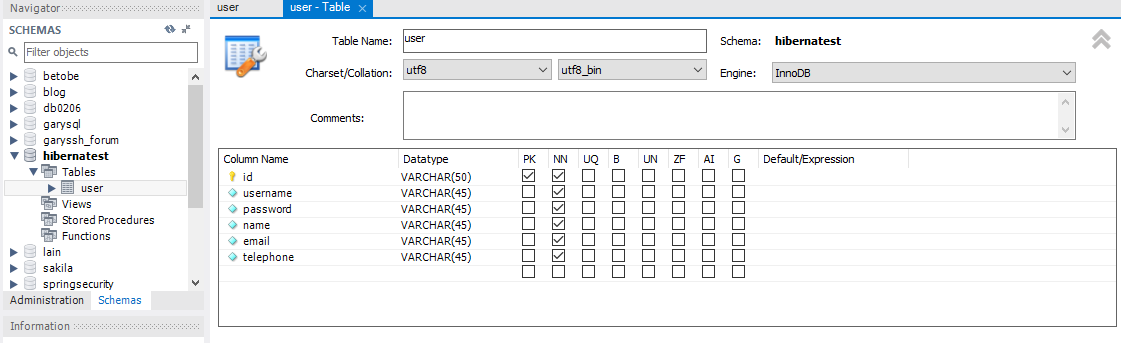
数据库表hibernatest.user
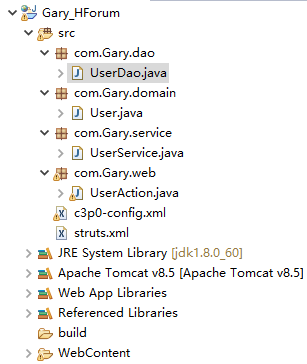
【项目结构】
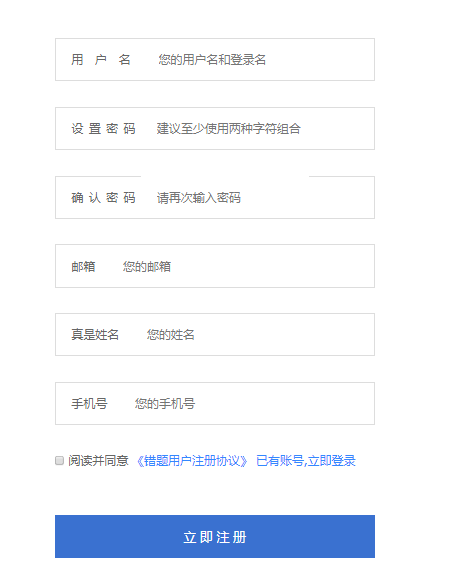
注册表单页面register.jsp
<form action="${pageContext.request.contextPath }/UserAction_register" method="post">

            <div class="register-box">

                <label for="username" class="username_label">

                    用 户 名

                    <input maxlength="20" name="username" type="text"

                        placeholder="您的用户名和登录名" />

                </label>

                <div class="tips">

                </div>

            </div>

            <div class="register-box">

                <label for="username" class="other_label">

                    设 置 密 码

                    <input maxlength="20" type="password" name="password"

                        placeholder="建议至少使用两种字符组合" />

                </label>

                <div class="tips">

                </div>

            </div>

            <div class="register-box">

                <label for="username" class="other_label">

                    确 认 密 码

                    <input maxlength="20" type="password" placeholder="请再次输入密码" />

                </label>

                <div class="tips">

                </div>

            </div>

            <div class="register-box">

                <label for="username" class="username_label">

                    真实姓名

                    <input maxlength="20" name="name" type="text"

                        placeholder="您的真实姓名" />

                </label>

                <div class="tips">

                </div>

            </div>

            <div class="register-box">

                <label for="username" class="username_label">

                    邮箱

                    <input maxlength="20" name="email" type="text"

                        placeholder="您的邮箱" />

                </label>

                <div class="tips">

                </div>

            </div>

            <div class="register-box">

                <label for="username" class="username_label">

                    手机号

                    <input maxlength="20" name="telephone" type="text"

                        placeholder="您的手机号" />

                </label>

                <div class="tips">

                </div>

            </div>

            <div class="arguement">

                <input type="checkbox" id="xieyi" />

                阅读并同意

                <a href="javascript:void(0)">《错题用户注册协议》</a>

                <a href="login.html">已有账号,立即登录</a>

                <div class="tips">

                </div>

            </div>

            <div class="submit_btn">

                <button type="submit" id="submit_btn">

                    立 即 注 册

                </button>

            </div>

        </form>
用户实体层
    private String id;

    private String username;

    private String password;

    private String name;

    private String email;

    private String telephone;
用户提交表单,发送请求UserAction_register到Web层userService.java
public String register() throws Exception {

        user.setId(UUID.randomUUID().toString());

        UserService userService = new UserService();

        System.out.println(user);

        userService.addUser(user);

        return "toLogin";

    }
在domain层中的User.hbm.xml配置传传入数据库Hibernate的事务
<hibernate-mapping>

   <class name="com.Gary.domain.User" table="user">

   <!-- id元素

               name:实体中的属性

               colum(可选):数据库的列名

               type(可选):    填写列(属性)的类型.hibernate会自动检测实体的属性类型.

                        每个类型有三种填法: java类型|hibernate类型|数据库类型

            length(可选):配置数据库中列的长度.

                         默认值:使用数据库类型的最大长度

    -->

           <id name="id" column="id">

               <!-- 主键生成策略(手动生成) (最后讲)  5种

                   identity:主键自增

                   sequence:oracle中主键生成的策略

                   native:identity+sequence (hibernate会根据连接的数据库自动选择(identity,sequence))

                   uuid:产生随机字符串作为主键,主键必须为String

                   assigned:我们要手动去指定

                -->

                <generator class="assigned"></generator>

           </id>

           <!--

               property:除了id之外的普通属性

               name:实体中的属性

               colum(可选):数据库的列名

               type(可选):    填写列(属性)的类型.hibernate会自动检测实体的属性类型.

                        每个类型有三种填法: java类型|hibernate类型|数据库类型

            length(可选):配置数据库中列的长度.

                         默认值:使用数据库类型的最大长度

            not-null(可选):配置该属性(列)是否不能为空. 默认值:false

            -->

           <property name="username" column="username"></property>

           <property name="password" column="password"></property>

           <property name="name" column="name"></property>

           <property name="email" column="email"></property>

           <property name="telephone" column="telephone"></property>

   </class>

</hibernate-mapping>
Dao层UserDao.java向数据库传入用户信息
public void addUser(User user) {

        //使用Hibernate

        //得到配置信息

        Configuration config = new Configuration().configure();

        //创建sessionFactiory对象

        SessionFactory sessionFactory = config.buildSessionFactory();

        //获取session

        Session session = sessionFactory.openSession();

        //打开事务

        Transaction transaction = session.beginTransaction();

        //存储User对象

        session.save(user);

        //提交事务

        transaction.commit();

        //关闭资源

        session.close();

    }
JavaWeb_(Hibernate框架)使用Hibernate开发用户注册功能的更多相关文章
- JavaWeb_(Hibernate框架)使用c3p0与Dbutils开发用户注册功能
使用c3p0与Dbutils开发用户注册功能: 用户在register.jsp表单成功后,页面跳转到login.html,数据库中会存放用户注册的信息 <%@ page language=&qu ...
- ORM进阶:Hibernate框架搭建及开发
本节将開始.使用hibernate搭建持久层.当然在决定用不用之前,还请斟酌一下是否使用.了解一下Hibernate的优缺点. Hibernate优劣对照 Hibernate是一个持久的ORM框架.首 ...
- hibernate框架(1)---Hibernate增删改查
Hibernate增删改查 1.首先我们要知道什么是Hibernate Hibernate是一个轻量级的ORMapping对象.主要用来实现Java和数据库表之间的映射,除此之外还提供数据查询和数据获 ...
- hibernate框架(2)---Hibernate的核心API
Hibernate的核心API 一般我们通过hibernate进行操作的时候,都会遵循下面的流程,那么接下来我对每一个步骤进行讲解: 1 public void testInsert() { 2 // ...
- JavaWeb_(Hibernate框架)Hibernate与c3p0与Dbutils的区别
JavaWeb_(Hibernate框架)使用Hibernate开发用户注册功能 传送门 JavaWeb_(Hibernate框架)使用c3p0与Dbutils开发用户注册功能 传送门 Hiberna ...
- Annotation(二)——Hibernate中注解的开发
在利用注解开发数据库持久层以前,需要学习一个规范JPA(Java Persistence API),这也是SUN公司提出的数据库的持久化规范.就类似于JDBC,Servlet,JSP等规范一样.而Hi ...
- Struts2+Hibernate框架探险
写这篇文章的目的 了解 JavaWeb 开发的人都知道SSH和SSM框架,前段时间开始接触 JavaWeb 开发,看了几个教学视频后就想上手构建一个小型 Web项目,可在跟着视频敲代码当中,使用 St ...
- Hibernate框架笔记01_环境搭建_API_CRUD
目录 1. Hibernate框架的概述 1.1 什么是框架 1.2 经典三层架构 1.3 Hibernate框架 2 Hibernate入门 2.1 下载Hibernate的开发包 2.2 创建项目 ...
- Hibernate中注解的开发
转自:https://blog.csdn.net/liujiahan629629/article/details/22335563 在利用注解开发数据库持久层以前,需要学习一个规范JPA(JavaPe ...
随机推荐
- 树莓派SD卡安装系统后扩容——实测简单高效
接上一篇博客安装了树莓派64位的系统,如果需要安装桌面等其他操作会面临文件系统分区空间紧张的局面,扩容方法如下: 在ubuntu上安装 gparted工具可以对SD卡重新分区 $sudo apt-ge ...
- 搭建自己的框架WedeNet(一)
框架用到的技术: EF.UnitOfWork+Repository.Ninject.log4net.WCF.MVC.T4.windows服务.AOP前端技术:Bootstrap.layer.jQuer ...
- 实现代码重启android app.
var Form1: TForm1; implementation uses System.DateUtils, Androidapi.JNI.GraphicsContentViewText, FMX ...
- php--常见算法1
<?php //递归输出123321 function digui($num){ echo $num; if($num<3){ digui($num+1); } echo $num; } ...
- deep_learning_Function_tf.equal(tf.argmax(y, 1),tf.argmax(y_, 1))用法
[Tensorflow] tf.equal(tf.argmax(y, 1),tf.argmax(y_, 1))用法 作用:输出正确的预测结果利用tf.argmax()按行求出真实值y_.预测值y最大值 ...
- Django的Auth模块
1 Auth模块是什么 Auth模块是Django自带的用户认证模块: 我们在开发一个网站的时候,无可避免的需要设计实现网站的用户系统.此时我们需要实现包括用户注册.用户登录.用户认证.注销.修改密码 ...
- ad 拼板
随着整个电子产业的不断发展,电子行业的很多产品都已经有完善的上下游配套企业.从一个成熟产品的方案设计,外观设计,加工制造,装配测试,包装,批发商渠道等等,这样的一条产业链在特定的环境就这样自然地生成. ...
- jdk提供的线程协调API suspend/resume wait/notify park/unpark
线程通信(如 线程执行先后顺序,获取某个线程执行的结果等)有多种方式: 文件共享 线程1 --写入--> 文件 < --读取-- 线程2 网络共享 变量共享 线程1 --写入--> ...
- java8学习之Predicate深入剖析与函数式编程本质
上次[http://www.cnblogs.com/webor2006/p/8214596.html]对Predicate函数接口进行了初步的学习,其中提到了在未来要学习的Stream中得到了大量的应 ...
- 如何保存ActionMailbox inbound HTML email和关于ActionText与ActiveStorage的附加
gi代码: https://github.com/gorails-screencasts/action-mailbox-action-text/commit/3aeedc09441696c9489ed ...