
运行时用AnimatorOverrideController动态加载动画片段
https://blog.csdn.net/tlrainty/article/details/54602786
项目中经常会遇到这种情况:很多模型动画的AnimatorController是一模一样的(比如人类男,人类女),但是由于在AnimatorController中需要为每个State指定具体的Motion(比如人类女的Run和Attack要分别指定Human_Female_Run和Human_Female_Attack,如图1),我们并不能简单地在编辑器中给它们指定同一个AnimatorControllor,否则如果人类男用了人类女的AnimatorController我们就会发现人类男走起路来也一扭一扭的了=_=|||(原因是决定骨骼动画的Avatar信息存储在这个Motion所指定的AnimationClip中)
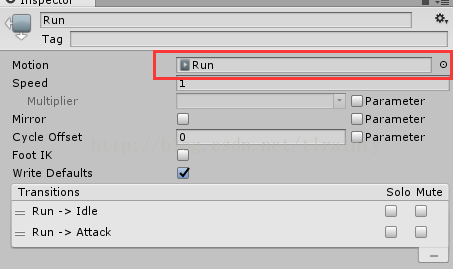
图1
要解决这个问题就要用到Unity的AnimatorOverrideController了,先贴个API手册: https://docs.unity3d.com/ScriptReference/AnimatorOverrideController.html
代码如下:
- private readonly string PrePath = "Prefabs/AnimationClips/";
- private readonly string[] ActionList = {"Run", "Attack"};
- private Animator m_animator = GetComponent<Animator>();
- <span style="white-space:pre;"> </span>[HideInInspector]
- public string m_modelName;
- //...
- if (m_animator != null)
- {
- AnimatorOverrideController overrideController = new AnimatorOverrideController();
- overrideController.runtimeAnimatorController = m_animator.runtimeAnimatorController;
- foreach (var actionName in ActionList)
- overrideController[actionName] = Resources.Load(PrePath + m_modelName + "_" + actionName) as AnimationClip;
- m_animator.runtimeAnimatorController = overrideController;
- }
这里主要需要注意的是
1. Resources.Load()的是以"模型名_动作名"格式命名的.anim文件,比如模型名是"Human_Female",动作名是"Run",那动画文件就是"Human_Femal_Run.anim".
2. overrideController中保存的是当前animator中所有用到的动画片段. overrideController[actionName] 的actionName是动画片段的名字,而不是State名字,即图1红框中的部分.我们并不对State进行任何操作,包括Motion中指定的动画片段的名字也不改变.因此创建AnimatorController的时候,需要先随便给每个State的Motion指定一个名字为actionName的动画,保证overrideController[actionName]存在,然后我们再用自己的AnimationClip去替换它.拿刚才的人类男和人类女举例来说,就是需要先给Run这个State指定一个名字为Run的动画,Attack这个State也要指定一个名字为Attack的动画.这里随便用谁的动画都可以,因为我们这里只是为了"让Dictionary中存在这个Key",以便后面我们用上述代码来替换.另外有一点要注意的是
- overrideController[actionName] = Resources.Load(PrePath + m_modelName + "_" + actionName) as AnimationClip;
这句会把所有State中的同名动画片段都替换掉.
3.这里把每个动作单独作为一个anim保存而不是统一存在一个FBX中读取的原因是Unity现在还不能在运行时创建Animation(图2是16年2月Unity论坛的官方回复,后面我也没有找到新消息说支持了).
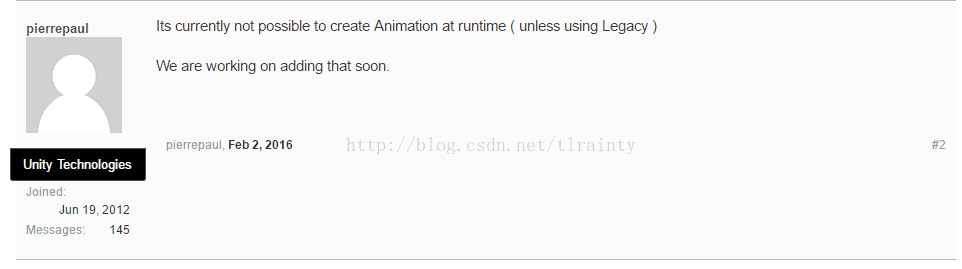
图2
4. 这种方法保存出来的带animator的prefab的动画在编辑器中看会是错的,因为此时还没有加载正确的animator controller,想看正确的动画需要看最原始的FBX文件
P.S.从FBX中提取单一anim的方法:当把FBX截取出Clips之后
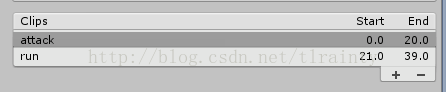
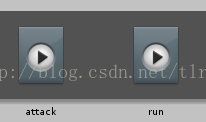
在Project视图中点开FBX后面的白三角就会出现这些动画片段,单击想要提取的anim然后按ctrl+D(即Duplicate)就会在同一文件夹下生成相应的anim文件
本文中所用Unity版本为5.4.1f1
using UnityEngine;

/// <summary>

/// 代码示例

/// </summary>

public class SetupAnimatorOverrideController : MonoBehaviour

{

    public AnimationClip m_clip;

    private void Update()

    {

        if (Input.GetKeyDown(KeyCode.W))

        {

            Debug.Log("切换");

            OverrideAnimationClip("suit03_Boy_idle", m_clip);

            AddAnimEvent(m_clip);

        }

    }

    public RuntimeAnimatorController GetEffectiveController(Animator animator)

    {

        RuntimeAnimatorController controller = animator.runtimeAnimatorController;

        AnimatorOverrideController overrideController = controller as AnimatorOverrideController;

        while (overrideController != null)

        {

            controller = overrideController.runtimeAnimatorController;

            overrideController = controller as AnimatorOverrideController;

        }

        return controller;

    }

    /// <summary>

    /// 动态替换clip

    /// </summary>

    /// <param name="name"></param>

    /// <param name="clip"></param>

    public void OverrideAnimationClip(string name, AnimationClip clip)

    {

        Animator animator = GetComponent<Animator>();

        AnimatorOverrideController overrideController = new AnimatorOverrideController();

        overrideController.runtimeAnimatorController = GetEffectiveController(animator);

        overrideController[name] = clip;

        animator.runtimeAnimatorController = overrideController;

    }

    /// <summary>

    /// 动态添加动态事件

    /// </summary>

    /// <param name="clip"></param>

    public void AddAnimEvent(AnimationClip clip)

    {

        AnimationEvent aEvent1 = new AnimationEvent();

        aEvent1.time = clip.length;

        aEvent1.functionName = "OnOpenComplete";

        clip.AddEvent(aEvent1);

    }

    public void OnOpenComplete()

    {

        Debug.Log("呵呵");

    }

}
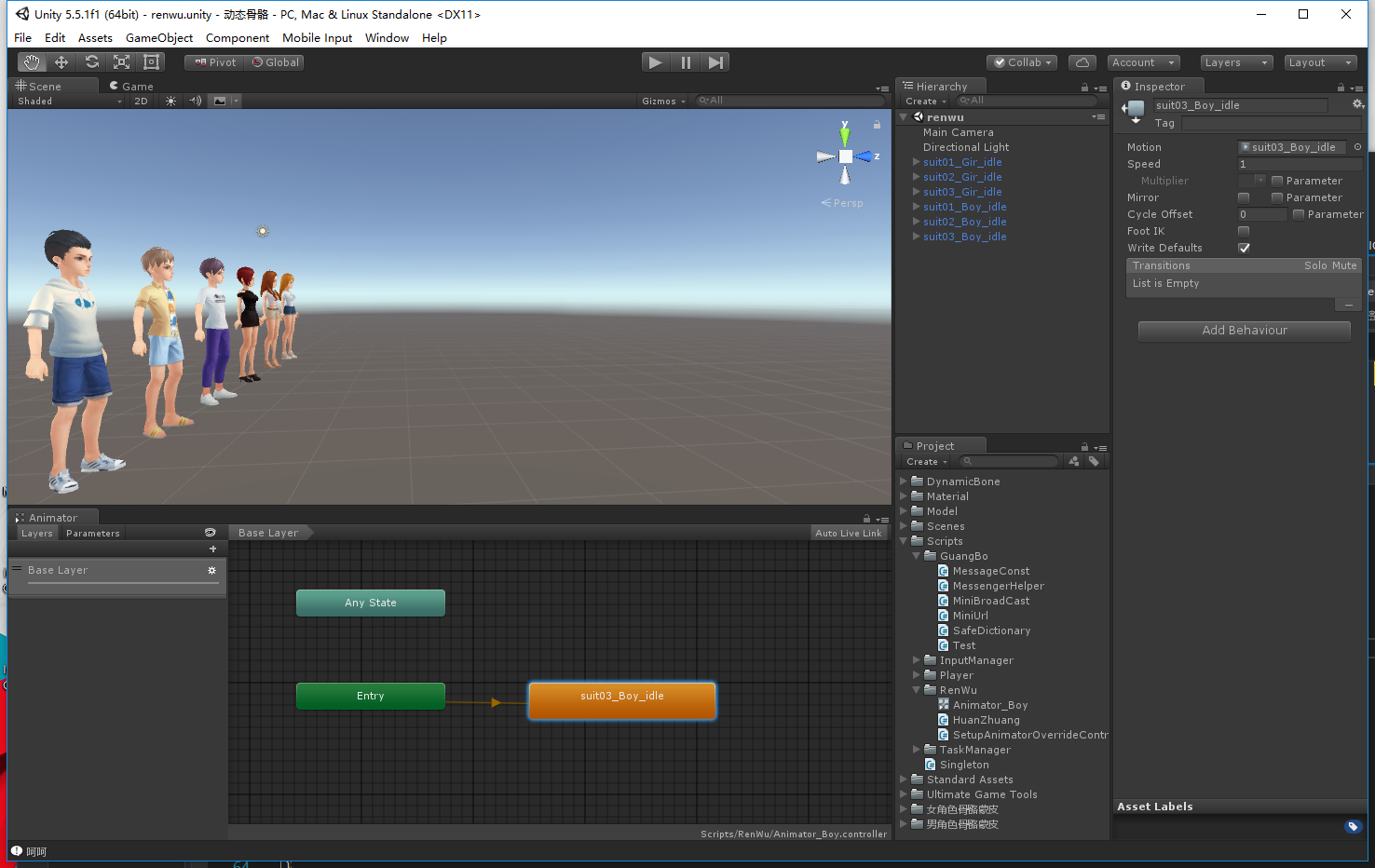
=================================2018年5月24日20:10:14=======================================
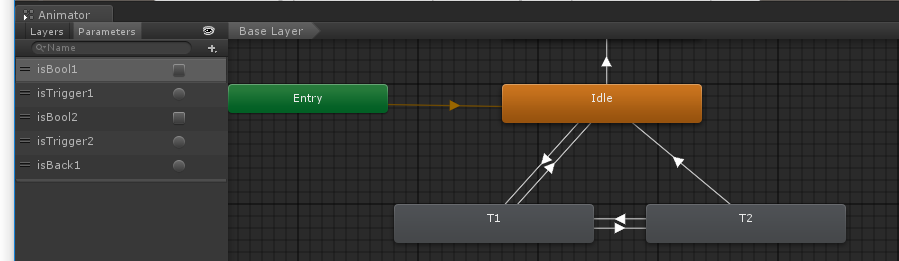
/// 老版动画系统一些功能有所缺少(例如,不支持位移动画,会闪回)
/// 新版动画唯一坑爹的就是缺少动态去添加clip,只能把原有的clip替换成新的clip
/// 那么要想支持具有大量动画的游戏,有2种办法
/// 1.animator里面添加足够多的clip,以便于到时候随意替换,因为animator.Play("xx") 可以直接播放动画,不需要通过触发器
/// 2.构建一种三角形的万能架构(用于去支持流星的动态连招),直接动态变换clip
运行时用AnimatorOverrideController动态加载动画片段的更多相关文章
- Canvas——使用定时器模拟动态加载动画!
<!DOCTYPE html> <html> <head lang="en"> <meta charset="UTF-8&quo ...
- 【Vue】动态加载Html片段
在编写Vue页面的时候,会碰到这么一个需求.由于页面组件比较多,不可能一次性将所有的页面都打包,只能按需获取相应的页面进行显示. 比如有一个App页面,需要异步获取html片段通过v-html指令加载 ...
- Ajaxload动态加载动画生成工具的实现(ajaxload的本地移植)
前言 前段时间看到一个国外的网站,在线生成ajax loading动画.觉得很实用,于是动起了移植到自己网站的念头(一直以来的习惯,看到好的工具总想着移植到本地好好研究).根据以往移植的经验最终把 这 ...
- jQuery动态加载动画spin.js
在线演示 本地下载
- WPF当属性值改变时利用PropertyChanged事件来加载动画
在我们的程序中,有时我们需要当绑定到UI界面上的属性值发生变化从而引起数据更新的时候能够加载一些动画,从而使数据更新的效果更佳绚丽,在我们的程序中尽量将动画作为一种资源放在xaml中,而不是在后台中通 ...
- svg的animate动画动态加载删除遇到删除animate后再次加载的animate动画没有效果问题
svg上有多个圆圈,当选中特定圆圈后给其加上animate动画效果,并把其他圆圈的animate效果去除. 第一次选择一个点实现动画效果完全达到效果,因为是第一次所以不需要把其他圆圈的animate子 ...
- unity动态加载(翻译) .
AssetBundles are files which you can export from Unity to contain assets of your choice. These files ...
- Unity3D AssetBundles 动态加载游戏资源
AssetBundles are files which you can export from Unity to contain assets of your choice. These files ...
- [AngularJS] 使用AngularCSS动态加载CSS
[AngularJS] 使用AngularCSS动态加载CSS 前言 使用AngularAMD动态加载Controller 使用AngularAMD动态加载Service 上列两篇文章里,介绍了如何如 ...
随机推荐
- Java实现四则运算---任路乾,乐滔
1.GitHub地址:https://github.com/3116004700/ruanjiangongcheng 2.项目需求: 生成的题目中计算过程不能产生负数(完成) 生成的题目中如果存在形如 ...
- 如何让X5发现你的手机
1. 手机开启 USB 调试.不用 ROOT.2. 装驱动.(问题就在这里) 首先要装对驱动,如果你的驱动叫 MyHTC,请立即删除. 找个 手机助手.例如 百度 腾讯 360 等等.反正不论你是谁的 ...
- java 添加到数据库的数据没有时分秒
检查hibernate实体类的映射文件日期类型把date 改为 java.util.Date
- Python【filter、map、reduce】
filter和map和reduce map(function,iterable...) -> list 映射,对列表中的每个值操作 返回操作后的数值组成列表 # 给列表值+1 l = [1,2, ...
- MySQL MGR实现分析 - 成员管理与故障恢复实现
此文已由作者温正湖授权网易云社区发布. 欢迎访问网易云社区,了解更多网易技术产品运营经验. MySQL Group Replication(MGR)框架让MySQL具备了自动主从切换和故障恢复能力,举 ...
- nginx location 与 rewrite详解 (转)
点我
- RDLC报表的相关技巧二(主从报表)
为了广泛支持客户端,系统框架运行在.Net Framework 4.0之上,Report viewer的版本也限制在11.0.3366.16. 使用NUGET安装Microsoft.ReportVie ...
- UITableView定制左滑效果
UITableViewRowAction类 object defines a single action to present when the user swipes horizontally in ...
- [译文]casperjs的API-colorizer模块
colorizer模块包含了一个Colorizer类,它能够生成一个标准化的颜色字符串: var colorizer = require('colorizer').create('Colorizer' ...
- SQL总结----存储过程
概念 存储过程(Stored Procedure):已预编译为一个可执行过程的一个或多个SQL语句. 创建存储过程语法 CREATE proc | procedure procedure_name [ ...