
iOS:触摸控件UITouch、事件类UIEvent
UITouch:触摸控件类 UIEvent:事件类
❤️❤️❤️UITouch的介绍❤️❤️❤️
typedef NS_ENUM(NSInteger, UITouchPhase) {
UITouchPhaseBegan, // 开始触摸
UITouchPhaseMoved, // 触摸移动
UITouchPhaseStationary, // 触摸没有移动
UITouchPhaseEnded, //触摸结束
UITouchPhaseCancelled, //取消触摸
};
@interface UITouch : NSObject
二、属性:
//时间戳记录了触摸事件产生或变化时的时间,单位是秒
@property(nonatomic,readonly) NSTimeInterval timestamp;
//当前触摸事件在一个周期中所处的状态
@property(nonatomic,readonly) UITouchPhase phase;
//表示短时间内点按屏幕的次数
@property(nonatomic,readonly) NSUInteger tapCount;
//触摸的主半径
@property(nonatomic,readonly) CGFloat majorRadius;
//触摸的主半径的公差
@property(nonatomic,readonly) CGFloat majorRadiusTolerance;
//触摸产生时所处的窗口。由于窗口可能发生变化,当前所在的窗口不一定是最开始的窗口
@property(nonatomic,readonly,retain) UIWindow *window;
//触摸产生时所处的视图。由于视图可能发生变化,当前视图也不一定时最初的视图
@property(nonatomic,readonly,retain) UIView *view;
//触摸手势数组
@property(nonatomic,readonly,copy) NSArray *gestureRecognizers;
三、方法:
//返回当前触摸点的位置
- (CGPoint)locationInView:(UIView *)view;
//返回上一个触摸点的位置
- (CGPoint)previousLocationInView:(UIView *)view;
@end
四、由于触摸点被放在了NSSet,所以通过NSSet集合的一个属性和方法可以获取触摸点:
//获取全部的触摸点
@property (readonly, copy) NSArray *allObjects;
//获取当前触摸点
- (id)anyObject;
===============================================================
❤️❤️❤️UIEvent的介绍❤️❤️❤️
//输入事件类型枚举
typedef NS_ENUM(NSInteger, UIEventType) {
UIEventTypeTouches, //触摸事件
UIEventTypeMotion, //运动事件
UIEventTypeRemoteControl, //远程控制事件
};
//输入事件不同类型的一些具体事件枚举
typedef NS_ENUM(NSInteger, UIEventSubtype) {
UIEventSubtypeNone = 0,
UIEventSubtypeMotionShake = 1
UIEventSubtypeRemoteControlPlay = 100,
UIEventSubtypeRemoteControlPause = 101,
UIEventSubtypeRemoteControlStop = 102,
UIEventSubtypeRemoteControlTogglePlayPause = 103,
UIEventSubtypeRemoteControlNextTrack = 104,
UIEventSubtypeRemoteControlPreviousTrack = 105,
UIEventSubtypeRemoteControlBeginSeekingBackward = 106,
UIEventSubtypeRemoteControlEndSeekingBackward = 107,
UIEventSubtypeRemoteControlBeginSeekingForward = 108,
UIEventSubtypeRemoteControlEndSeekingForward = 109;
};
//类
@interface UIEvent : NSObject
//属性
@property(nonatomic,readonly) UIEventType type ; //事件类型
@property(nonatomic,readonly) UIEventSubtype subtype ; //同一事件类型的具体事件
@property(nonatomic,readonly) NSTimeInterval timestamp; //事件触发时间间隔
//方法
※所有触摸点
- (NSSet *)allTouches;
※窗体上的触摸点
- (NSSet *)touchesForWindow:(UIWindow *)window;
※视图上的触摸点
- (NSSet *)touchesForView:(UIView *)view;
※手势触摸点
- (NSSet *)touchesForGestureRecognizer:(UIGestureRecognizer *)gesture;
@end
五、举例如下:演示触摸事件(都是用鼠标代替手指在模拟器上进行测试)
实例一:打印触摸输出
1.设置用户交互和触摸点
//支持用户交互,能够处理触摸事件

self.view.userInteractionEnabled = YES;

//支持多点触摸

self.view.multipleTouchEnabled = YES;
2.实现UIResponser中触摸的4个事件
触摸开始
-(void)touchesBegan:(NSSet *)touches withEvent:(UIEvent *)event

{

    NSLog(@"触摸开始");

    //取出一个touch对象

    UITouch *touch = [touches anyObject];

    //取出当前点

    CGPoint location = [touch locationInView:self.view];

    //取出上一点

    CGPoint previousLocation = [touch previousLocationInView:self.view];

    NSLog(@"%@,%@",NSStringFromCGPoint(location),NSStringFromCGPoint(previousLocation));

    //遍历每一个touch对象

    [touches enumerateObjectsUsingBlock:^(UITouch *touch, BOOL *stop) {

    }];

}
触摸移动
-(void)touchesMoved:(NSSet *)touches withEvent:(UIEvent *)event

{

    NSLog(@"触摸移动");

}
触摸结束
-(void)touchesEnded:(NSSet *)touches withEvent:(UIEvent *)event

{

    NSLog(@"触摸结束");

}
触摸取消(该事件在模拟器不好演示)
-(void)touchesCancelled:(NSSet *)touches withEvent:(UIEvent *)event

{

    NSLog(@"触摸取消");

}
演示结果如下:
1.在屏幕上开始触摸和结束触摸时:
-- ::24.875 -touch[:] 触摸开始

-- ::24.875 -touch[:] {219.5, },{219.5, }

-- ::24.983 -touch[:] 触摸结束
2.在屏幕上触摸移动时:
-- ::00.388 -touch[:] 触摸移动

-- ::00.413 -touch[:] 触摸移动

-- ::00.430 -touch[:] 触摸移动
实例二:触摸时,视图变色(每触摸一次,颜色就交替改变)
<1>布局故事板,在视图中在拖一个试图UIView控件,设置合适大小和背景颜色
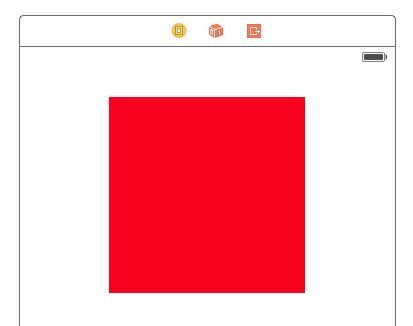
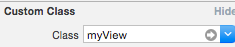
<2>自定义一个试图类,将控件与该类关联


<3>在自定义类myView.m中实现触摸开始事件
//开始触摸

-(void)touchesBegan:(NSSet *)touches withEvent:(UIEvent *)event

{

    if ([self.backgroundColor isEqual:[UIColor redColor]])

    {

        self.backgroundColor = [UIColor purpleColor];

    }

    else

    {

        self.backgroundColor = [UIColor redColor];

    }

}
<4>演示结果如下
开始颜色:红色 触摸一次:变为紫色 再触摸一次:又变为红色



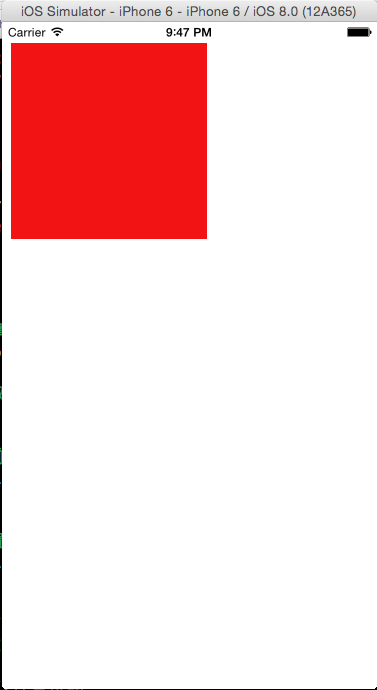
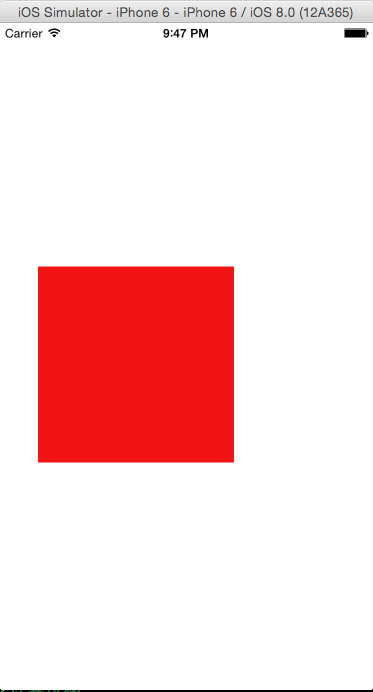
实例三:触摸移动时,移动红色试图位置
<1>布局故事板,在视图中在拖一个试图UIView控件,设置合适大小和背景颜色
<2>自定义一个试图类,将控件与该类关联,同时将视图IBOutLet到视图控制器类中

<3> 在控制器类ViewController.m中实现触摸移动事件
//添加移动事件

-(void)touchesMoved:(NSSet *)touches withEvent:(UIEvent *)event

{

    //获取触摸对象touch

    UITouch *touch = [touches anyObject];

    //当前触摸点

    CGPoint location = [touch locationInView:self.view];

    //设置触摸点只有在myView中,才可以移动myView视图

    CGPoint point = [touch locationInView:self.myView];

    if ([self.myView pointInside:point withEvent:event])

    {

        //上一个触摸点

        CGPoint previousLocation = [touch previousLocationInView:self.view];

        //计算位移

        CGFloat xOffset = location.x - previousLocation.x;

        CGFloat yOffset = location.y - previousLocation.y;

        //设置视图新的位置

        CGPoint center = self.myView.center;

        self.myView.center = CGPointMake(center.x+xOffset, center.y+yOffset);

    }

}
<4>演示结果如下:触摸红色视图位置拖拽移动即可


iOS:触摸控件UITouch、事件类UIEvent的更多相关文章
- iOS控件之UIResponder类
iOS控件之UIResponder类 在iOS中UIResponder类是专门用来响应用户的操作处理各种事件的,我们知道UIApplication.UIView.UIViewController这几个 ...
- Android 使用代码主动去调用控件的点击事件(模拟人手去触摸控件)
使用代码主动去调用控件的点击事件(模拟人手去触摸控件) //View 可以是LinearLayout,Button,TextView View.performClick();
- C# 有关控件、自定义类事件中的委托链的获取、移除操作
直接来代码吧,这样干脆直接,也不耽误我午休了.一切尽在源码中. public class ControlEventTool { /// <summary> /// 移除控件的某类事件, 如 ...
- iOS常见控件的基本使用
UI相关类继承关系 UIView 常见属性和方法 UIView属性 UIView方法 UIControl 常用控件 UIImageView 图片显示控件android ImageView UISlid ...
- 背水一战 Windows 10 (29) - 控件(文本类): RichTextBlock, RichTextBlockOverflow, RichEditBox
[源码下载] 背水一战 Windows 10 (29) - 控件(文本类): RichTextBlock, RichTextBlockOverflow, RichEditBox 作者:webabcd ...
- 控件(文本类): RichTextBlock, RichTextBlockOverflow, RichEditBox
介绍背水一战 Windows 10 之 控件(文本类) RichTextBlock RichTextBlockOverflow RichEditBox 示例1.RichTextBlock 的示例Con ...
- IOS—UITextFiled控件详解
IOS—UITextFiled控件详解 //初始化textfield并设置位置及大小 UITextField *text = [[UITextField alloc]initWithFrame:CGR ...
- 重新想象 Windows 8.1 Store Apps (77) - 控件增强: 文本类控件的增强, 部分控件增加了 Header 属性和 HeaderTemplate 属性, 部分控件增加了 PlaceholderText 属性
[源码下载] 重新想象 Windows 8.1 Store Apps (77) - 控件增强: 文本类控件的增强, 部分控件增加了 Header 属性和 HeaderTemplate 属性, 部分控件 ...
- [iOS基础控件 - 5.5] 代理设计模式 (基于”APP列表"练习)
A.概述 在"[iOS基础控件 - 4.4] APP列表 进一步封装,初见MVC模式”上进一步改进,给“下载”按钮加上效果.功能 1.按钮点击后,显示为“已下载”,并且不 ...
随机推荐
- linux命令(20):rm命令
1. 强行删除文件,系统不再确认:rm –f test.log 2. 删除任何.log文件:rm *.log 3. 将test子目录及子目录中所有档案删除:rm –r test 4. 将 test子 ...
- [PAT] 1143 Lowest Common Ancestor(30 分)
1143 Lowest Common Ancestor(30 分)The lowest common ancestor (LCA) of two nodes U and V in a tree is ...
- 五十七 POP3收取邮件
SMTP用于发送邮件,如果要收取邮件呢? 收取邮件就是编写一个MUA作为客户端,从MDA把邮件获取到用户的电脑或者手机上.收取邮件最常用的协议是POP协议,目前版本号是3,俗称POP3. Python ...
- lazarus安装
https://sourceforge.net/projects/lazarus/files/Lazarus%20Linux%20amd64%20DEB/Lazarus%201.6.4/ 下载这三个文 ...
- 在 Ubuntu 系统安装 Redi
在 Ubuntu 系统安装 Redi 可以使用以下命令: $sudo apt-get update $sudo apt-get install redis-server 启动 Redis $ redi ...
- 如何访问mvc 默认的错误页
在ActionResult 中: public ActionResult Error() { return View("~/Views/Shared/Error.cshtml"); ...
- ZOJ 3781 Paint the Grid Reloaded
枚举,$BFS$,连通块缩点. 可以枚举一开始染哪个位置,然后逐层往外染色,看最多需要多少操作次数,也就是算最短距离.连通块缩点之后可以保证是一个黑白相间的图,且每条边的费用均为$1$,$BFS$即可 ...
- 洛谷P1801 黑匣子
题目传送门 分析:这题和另外一个题目中位数非常相似,有兴趣可以先看看,比这一题简单.首先暴力模拟还是别想了,估计30%的数据都有点悬.正解应该是用二叉堆.但是如果用一个堆当然不方便,所以建两个堆,一个 ...
- vue中keep-alive
vue2.0提供了一个keep-alive组件用来缓存组件,避免多次加载相应的组件,减少性能消耗 1.基本用法,缓存整个页面或组件 <keep-alive> <component&g ...
- Java集合之ArrayList与LinkList
注:示例基于JDK1.8版本 参考资料:Java知音公众号 本文超长,也是搬运的干货,希望小伙伴耐心看完. Collection集合体系 List.Set.Map是集合体系的三个接口. 其中List和 ...