
iPhone图片拉伸:resizableImageWithCapInsets
1 [[UIImage imageNamed:@"button_textured_30"] resizableImageWithCapInsets:UIEdgeInsetsMake(0, 5, 0, 5)];
其中Insets这个参数的格式是(top,left,bottom,right),从上、左、下、右分别在图片上画了一道线,这样就给一个图片加了一个框。
只有在框里面的部分才会被拉伸,而框外面的部分则不会改变。
4个参数是上边界,左边界,下边界,右边界距离,也可以为负值。
其中Insets这个参数的格式是(top,left,bottom,right),从上、左、下、右分别在图片上画了一道线,这样就给一个图片加了一个框。只有在框里面的部分才会被拉伸,而框外面的部分则不会改变。比如(20,5,10,5),意思是下图矩形里面的部分可以被拉伸,而其余部分不变。

据说stretchableImageWithLeftCapWidth:topCapHeight这个函数也能够实现,但是在iOS5里面建议不要使用这个函数。效果如下图: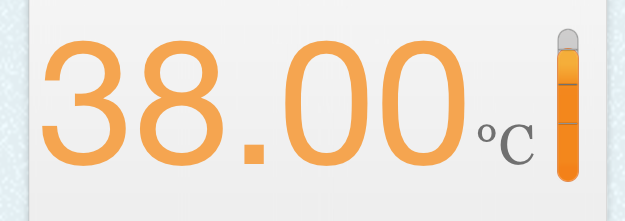
当修改了数据之后,变成这样:
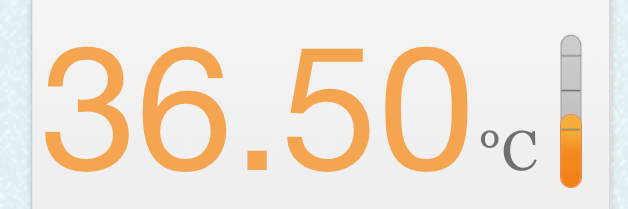
下面来看如何实现。
温度计共由三张图组成:
背景图ThermometerBackground.png:

刻度图ThermometerCalibration:

里面的溶液Calibration:

首先将背景图加入superview中,再将刻度图和溶液图加入背景图中:(为简化起见,一些不必要的代码已经省略)
- //将背景图加入superview
- UIImageView *thermometerBackground = [[UIImageView alloc] initWithFrame:THERMOMETER_FRAME];
- [thermometerBackground setImage:[UIImage imageNamed:@"ThermometerBackground.png"]];
- [self.view addSubview:self.thermometerBackground];
- //将溶液图加入背景图
- UIImageView *thermometer = [[UIImageView alloc]init];
- [self.thermometerBackground addSubview:self.thermometer];
- //将刻度图加入背景图
- UIImageView *thermometerCalibration = [[UIImageView alloc] initWithImage:[UIImage imageNamed:@"ThermometerCalibration.png"]];
- [self.thermometerCalibration setFrame:CGRectMake(0, 10, thermometerBackground.frame.size.width, thermometerCalibration.image.size.height*thermometerBackground.frame.size.width/thermometerCalibration.frame.size.width)];
- [self.thermometerBackground addSubview:thermometerCalibration];
然后,根据度数生成对应高度的image;
- UIImage* image = [UIImage imageNamed:@"Thermometer.png"];
- UIEdgeInsets insets = UIEdgeInsetsMake(20, 0, 25, 0);
- image = [image resizableImageWithCapInsets:insets];
- int top = 10.00+(38.00-temperature)*20.00;
- [self.thermometer setFrame:CGRectMake(0, top, self.thermometerBackground.frame.size.width, self.thermometerBackground.frame.size.height-top)];
- [self.thermometer setImage:image];
在这里,top这个变量就代表了根据度数计算出的溶液的高度。
这样,当改变温度temperature的大小时,只要在viewWillAppear里调用这段代码,就能够动态生成温度计图片了。
iPhone图片拉伸:resizableImageWithCapInsets的更多相关文章
- iOS 图片拉伸 resizableImageWithCapInsets
UIImage *image = [[UIImage imageNamed:@"test.png"] resizableImageWithCapInsets:UIEdgeInse ...
- 使用图片拉伸resizableImageWithCapInsets
在仿写QQ会话的时候背景蓝色图片是拉伸而来,但是有些地方是受保护的不能拉伸 所以定义了下面的工具类中的一个方法,专门拉伸图片 UIImageResizingModeStretch:拉伸模式,通过拉伸U ...
- ios UIImage图片拉伸 resizableImageWithCapInsets:
常见的按钮添加和背景设置如下: UIButton *button = [[UIButton alloc] initWithFrame:CGRectMake(80, 130, 160, 44)];[bu ...
- iOS图片拉伸技巧
纵观移动市场,一款移动app,要想长期在移动市场立足,最起码要包含以下几个要素:实用的功能.极强的用户体验.华丽简洁的外观.华丽外观的背后,少不了美工的辛苦设计,但如果开发人员不懂得怎么合理展示这些设 ...
- 【原】iOS学习之图片拉伸处理(类似qq的气泡)
原理是拉伸里面的内容,将边保护起来 方法1: ①[image resizableImageWithCapInsets:UIEdgeInsetsMake(, , , )]; ②[image resiza ...
- iOS开发——UI基础-按钮内边距,图片拉伸
一.内边距 UIButton有三个属性,分别可以设置按钮以及内部子控件的内边距 1.contentEdgeInsets 如果是设置contentEdgeInsets, 会把UIImageView和UI ...
- (转)iOS图片拉伸技巧
( 原文博客地址: http://blog.csdn.net/q199109106q/article/details/8615661) 纵观移动市场,一款移动app,要想长期在移动市场立足,最起码要 ...
- IOS中图片拉伸技巧与方法总结(转载)
以下内容转载自:http://my.oschina.net/u/2340880/blog/403996 IOS中图片拉伸技巧与方法总结 一.了解几个图像拉伸的函数和方法 1.直接拉伸法 简单暴力,却是 ...
- iOS杂谈-图片拉伸的实现
如上图是一个按钮的背景图,在Android上,很多图片资源都是类似这样子的,但是由于按钮的高度及宽度与图片的世纪尺寸不同,所以需要采用9patch来实现拉伸处理, 可参考:http://www.cnb ...
随机推荐
- Sybase:数据库检索的日期格式
Sybase:数据库检索的日期格式 示例代码: --1,字符转日期 ' as date ),'yyyy/mm/dd'); ---结果:2018/03/09 --2,一年内第几天 ' as date ) ...
- [BZOJ1823]满汉全席
Description 满汉全席是中国最丰盛的宴客菜肴,有许多种不同的材料透过满族或是汉族的料理方式,呈现在數量繁多的菜色之中.由于菜色众多而繁杂,只有极少數博学多闻技艺高超的厨师能够做出满汉全席,而 ...
- [BZOJ2342]双倍回文
对每个大中心暴力找小中心即可. 代码: #include<iostream> #include<cstdio> #include<cstring> #define ...
- 简单的aop实现日志打印(切入点表达式)
Spring中可以使用注解或XML文件配置的方式实现AOP. 1.导入jar包 com.springsource.net.sf.cglib -2.2.0.jar com.springsource.or ...
- JavaScript常用知识点整理——思维导图
如图 思维导图图片链接 http://www.edrawsoft.cn/viewer/public/s/b8327462051289 有道云笔记图片链接 http://note.youdao.com/ ...
- SQL中比较好的For xml 用法实例
--包裹单号 入库时间 交易号 商品分类 商品名称 实付款SELECT a.DeliveryCode AS '包裹单号',a.DomesticWarehouseInTime AS '入库时间',a.T ...
- Dubbo定义及其作用
Dubbo定义 Dubbo是一个分布式服务框架,致力于提供高性能和透明化的RPC远程服务调用方案,以及SOA服务治理方案.简单的说,dubbo就是个服务框架,如果没有分布式的需求,其实是不需要用的,只 ...
- Solr工具类
import java.util.List; import org.springframework.beans.factory.annotation.Autowired; import org.spr ...
- angularJS中directive父子组件的数据交互
angularJS中directive父子组件的数据交互 1. 使用共享 scope 的时候,可以直接从父 scope 中共享属性.使用隔离 scope 的时候,无法从父 scope 中共享属性.在 ...
- 【scala】构造器
和Java或C++一样,Scala可以有任意多的构造器. 不过Scala类有一个构造器比其他所有构造器都更为重要,它就是主构造器. 除了主构造器之外,类还可以有任意多的辅助构造器. 主构造器 在Sca ...