
RHEL7删除yum命令后如何恢复
楼主也是不小心删除了rhel7上的yum命令,后来通过安装centos7的yum命令解决
1.首先下载yum相关的rpm包
http://mirrors.163.com/centos/7/os/x86_64/Packages/
python-iniparse-0.4-9.el7.noarch.rpm
yum-metadata-parser-1.1.4-10.el7.x86_64.rpm
yum-plugin-fastestmirror-1.1.31-42.el7.noarch.rpm
yum-3.4.3-154.el7.centos.noarch.rpm
2.下载完成之后用rpm命令进行安装
这里安装的时候需要注意,一定要加 --force --nodeps不然会报错安装不上
rpm -ivh --force --nodeps python-iniparse-0.4-9.el7.noarch.rpm
rpm -ivh --force --nodeps yum-metadata-parser-1.1.4-10.el7.x86_64.rpm
rpm -ivh --force --nodeps yum-plugin-fastestmirror-1.1.31-42.el7.noarch.rpm
rpm -ivh --force --nodeps yum-3.4.3-154.el7.centos.noarch.rpm
基本安装到这里yum就可以用了,但如果你下载的是旧版本的yum,有可能报错
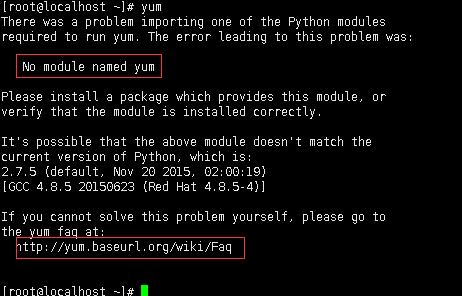
一般RHEL因为没有注册是没有办法使用yum的,解决这个问题的办法是把/etc/yum.repos.d/下的文件全部删除,然后更换成CentOS的源即可
rm -rf /etc/yum.repos.d/*
vim centos.repo
# CentOS-Base.repo
#
# The mirror system uses the connecting IP address of the client and the
# update status of each mirror to pick mirrors that are updated to and
# geographically close to the client. You should use this for CentOS updates
# unless you are manually picking other mirrors.
#
# If the mirrorlist= does not work for you, as a fall back you can try the
# remarked out baseurl= line instead.
#
#
[base]
name=CentOS-$releasever - Base
mirrorlist=http://mirrorlist.centos.org/?release=$releasever&arch=$basearch&repo=os&infra=$infra
#baseurl=http://mirror.centos.org/centos/$releasever/os/$basearch/
gpgcheck=1
gpgkey=file:///etc/pki/rpm-gpg/RPM-GPG-KEY-CentOS-7
#released updates
[updates]
name=CentOS-$releasever - Updates
mirrorlist=http://mirrorlist.centos.org/?release=$releasever&arch=$basearch&repo=updates&infra=$infra
#baseurl=http://mirror.centos.org/centos/$releasever/updates/$basearch/
gpgcheck=1
gpgkey=file:///etc/pki/rpm-gpg/RPM-GPG-KEY-CentOS-7
#additional packages that may be useful
[extras]
name=CentOS-$releasever - Extras
mirrorlist=http://mirrorlist.centos.org/?release=$releasever&arch=$basearch&repo=extras&infra=$infra
#baseurl=http://mirror.centos.org/centos/$releasever/extras/$basearch/
gpgcheck=1
gpgkey=file:///etc/pki/rpm-gpg/RPM-GPG-KEY-CentOS-7
#additional packages that extend functionality of existing packages
[centosplus]
name=CentOS-$releasever - Plus
mirrorlist=http://mirrorlist.centos.org/?release=$releasever&arch=$basearch&repo=centosplus&infra=$infra
#baseurl=http://mirror.centos.org/centos/$releasever/centosplus/$basearch/
gpgcheck=1
enabled=0
gpgkey=file:///etc/pki/rpm-gpg/RPM-GPG-KEY-CentOS-7
yum clean all&yum makecache
然后就可以用yum安装软件了
如果还不行,那就把系统的yum工具删了,然后用公网安装CentOS的yum工具,rpm+URL(上面有具体步骤)
RHEL7删除yum命令后如何恢复的更多相关文章
- centos7.0下删除yum和python之后恢复的办法
centos 7如果卸载了yum和python之后恢复的办法(该方法已经测试). 下载 地址 http://mirrors.163.com/centos/7/os/x86_64/Packages/ 下 ...
- 解决yum命令后出现libldap-2.4.so.2: cannot open shared object file
问题: [root@lgh ~]# yum There was a problem importing one of the Python modules required to run yum. T ...
- CentOS 使用yum命令安装Java SDK(openjdk)
CentOS 6.X 和 5.X 自带有OpenJDK runtime environment (openjdk).它是一个在linux上实现开源的java 平台.CentOS yum 命令 安装 ...
- CentOS7 使用yum命令安装Java SDK(openjdk)
CentOS 6.X 和 7.X 自带有OpenJDK runtime environment (openjdk).它是一个在linux上实现开源的java 平台. 安装方式: 1.输入以下命令,以 ...
- CentOS7使用yum命令安装Java1.8
CentOS7使用yum命令安装Java1.8 首先更新已安装的包:#yum update查看系统当前的java版本:#java -version==================== CentOS ...
- dataguard主库删除归档日志后从库恢复的方法
------------------方法1在主库上使用备份的进行恢复丢失的归档日志-------------------------1.发现主库备份后删除了归档,但是这些归档从库还没应用,也没有传到从 ...
- 将SD卡的音频设置为手机铃声后删除,手机铃声没有恢复到默认的问题
1. Android7.0,将存储卡中MP3设置为铃声,删除该MP3后,settings中的铃声没有变化,来电铃声也没有变化. 原因:android7.0的新特性 google 默认如此设计,在选择铃 ...
- CentOS6 系统下升级python后yum命令使用时报错
CentOS6 系统下升级python后yum命令使用时报错,如下: [root@xxxxxxx]#yumFile"/usr/bin/yum",line30exceptKeyboa ...
- windows 10 删除库后自动恢复的解决方法
目录 什么是windows 库? 手动删除不行吗? 如何正确的"删除"? title: windows 10 删除库后自动恢复的解决方法 date: 2019-06-09 15:4 ...
随机推荐
- bzoj [POI2007]旅游景点atr 状态压缩+Dij
[POI2007]旅游景点atr Time Limit: 30 Sec Memory Limit: 357 MBSubmit: 2258 Solved: 595[Submit][Status][D ...
- bzoj 4724 [POI2017]Podzielno 二分+模拟
[POI2017]Podzielno Time Limit: 10 Sec Memory Limit: 128 MBSubmit: 364 Solved: 160[Submit][Status][ ...
- C# 把类实例保存到文件里(类的序列化和反序列化)
有时候我们希望把类的实例保存下来,以便以后的时候用.一个直观的方法就是StreamWriter把类写成一行,用\t分隔开每个属性,然后用StreamReader读出来. 但是这样太麻烦,代码行数较多, ...
- Elasticsearch6.0 IKAnalysis分词使用
Elasticsearch 内置的分词器对中文不友好,会把中文分成单个字来进行全文检索,不能达到想要的结果,在全文检索及新词发展如此快的互联网时代,IK可以进行友好的分词及自定义分词. IK Anal ...
- 【CC2530入门教程-01】CC2530微控制器开发入门基础
[引言] 本系列教程就有关CC2530单片机应用入门基础的实训案例进行分析,主要包括以下6部分的内容:[1]CC2530微控制器开发入门基础.[2]通用I/O端口的输入和输出.[3]外部中断初步应用. ...
- 【转】linux下杀死进程
经过搜集和整理相关的Linux操作系统杀死进程的材料,在这里给大家推荐本篇文章,希望大家看后会有不少收获. 1. kill 作用:根据进程号杀死进程 用法: kill [信号代码] 进程ID 举例: ...
- python 正则表达式口诀
正则其实也势利,削尖头来把钱揣: (指开始符号^和结尾符号$) 特殊符号认不了,弄个倒杠来引路: (指\. \*等特殊符号) 倒杠后面跟小w, 数字字母来表示: (\w跟数字字母;\d跟数字) ...
- Metlnfo cms后台getshell漏洞复现
整体思路 挖掘伪全局变量 然后找可控参数进行利用#伪全局变量:可理解为全局变量,例部分CMS为了全局过滤SQL注入或者XSS之类的漏洞就会将GET.POST.COOKIE等请求借入全局然后直接过滤.这 ...
- static class 和 non static class 的区别
static class non static class 1.用static修饰的是内部类,此时这个 内部类变为静态内部类:对测试有用: 2.内部静态类不需要有指向外部类的引用: 3.静态类只能访问 ...
- 需要重刷整個 image 的時機 - 1
最近遇到一個問題, gpio 讀出來的值與預期不同, 詳細描述如下: 首先手機 download 了一個完整的 daily build image , 接下來 不斷地修改 kernel 部分 code ...