
Jenkins和Docker以及Kubernetes结合考虑
今天搞了一下Jenkins和Docker的结合,我在想几个问题:
- 构建是经常的,构建最大的目标还是生成一个包或者应用
- 发布应用也是频繁的,发布本质上是把这个包放到可运行的环境中便于测试
- 如果每次构建我们都需要去Build一个环境,包括配置连接池等和应用相关的资源的话,那就太消耗时间和CPU了
- 在日常项目中更多的变动应该还是在代码上,因此考虑的就是把针对某个项目的环境发布成一个images,然后基于这个images进行应用代码的发布。
基于这种考虑就没必要每次构建通过Jenkins基于Dockfile去build image,而应该尽量采用事先构建的images模板。
把Jenkins作为kubernetes pod来用今天也尝试了一下,无奈虚拟环境性能不行放弃,我个人感觉放在kubernetes集群外运行就可以了,没必要放进去作为Pod来统一管理。
Kubernetes还是专门作为一个应用运行环境,而不是发布构建持续集成的环境比较好点 :)
基于上次的maven project,改造了一下把应用部署到kubernetes环境中的WebLogic Pod。当然只能做功能测试,如果性能测试的话,我还要考虑考虑。
项目的脚本部分改动
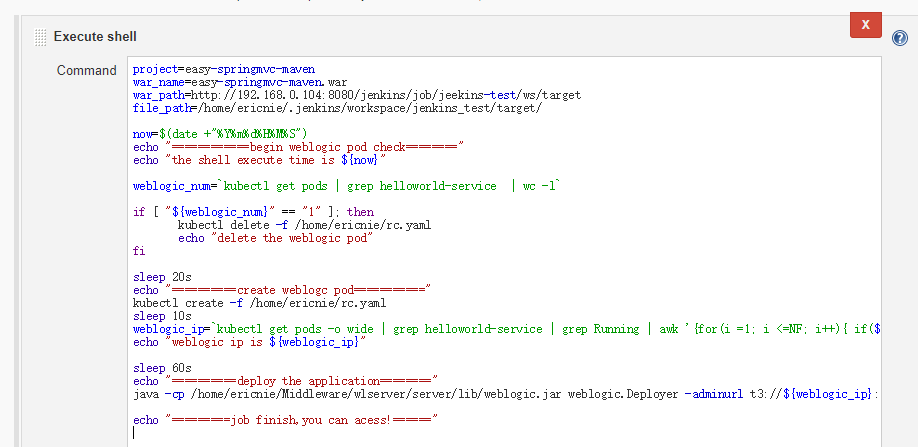
project=easy-springmvc-maven

war_name=easy-springmvc-maven.war

war_path=http://192.168.0.104:8080/jenkins/job/jeekins-test/ws/target

file_path=/home/ericnie/.jenkins/workspace/jenkins_test/target/

now=$(date +"%Y%m%d%H%M%S")

echo "============begin weblogic pod check========"

echo "the shell execute time is ${now}"

weblogic_num=`kubectl get pods | grep helloworld-service  | wc -l`

if [ "${weblogic_num}" == "" ]; then

       kubectl delete -f /home/ericnie/rc.yaml

       echo "delete the weblogic pod"

fi

sleep 20s

echo "==========create weblogc pod==========="

kubectl create -f /home/ericnie/rc.yaml

sleep 10s

weblogic_ip=`kubectl get pods -o wide | grep helloworld-service | grep Running | awk '{for(i =1; i <=NF; i++){ if($i~/[0-9]\.[0-9]/) print $i}}'`

echo "weblogic ip is ${weblogic_ip}"

sleep 60s

echo "==========deploy the application========"

java -cp /home/ericnie/Middleware/wlserver/server/lib/weblogic.jar weblogic.Deployer -adminurl t3://${weblogic_ip}:7001 -user weblogic -password welcome1  -name ${war_name} -targets AdminServer -deploy -upload -source ${file_path}/${war_name}

echo "=========job finish,you can acess!======"
jenkins console输出
[jenkins_test] $ /bin/sh -xe /tmp/jenkins7532164656453389066.sh

+ project=easy-springmvc-maven

+ war_name=easy-springmvc-maven.war

+ war_path=http://192.168.0.104:8080/jenkins/job/jeekins-test/ws/target

+ file_path=/home/ericnie/.jenkins/workspace/jenkins_test/target/

++ date +%Y%m%d%H%M%S

+ now=

+ echo '============begin weblogic pod check========'

============begin weblogic pod check========

+ echo 'the shell execute time is 20171031153657'

the shell execute time is

++ kubectl get pods

++ grep helloworld-service

++ wc -l

+ weblogic_num=

+ '['  ==  ']'

+ kubectl delete -f /home/ericnie/rc.yaml

replicationcontroller "helloworld-service" deleted

service "helloworldsvc" deleted

+ echo 'delete the weblogic pod'

delete the weblogic pod

+ sleep 20s

+ echo '==========create weblogc pod==========='

==========create weblogc pod===========

+ kubectl create -f /home/ericnie/rc.yaml

replicationcontroller "helloworld-service" created

service "helloworldsvc" created

+ sleep 10s

++ kubectl get pods -o wide

++ grep helloworld-service

++ grep Running

++ awk '{for(i =1; i <=NF; i++){ if($i~/[0-9]\.[0-9]/) print $i}}'

+ weblogic_ip=10.0.35.3

+ echo 'weblogic ip is 10.0.35.3'

weblogic ip is 10.0.35.3

+ sleep 60s

+ echo '==========deploy the application========'

==========deploy the application========

+ java -cp /home/ericnie/Middleware/wlserver/server/lib/weblogic.jar weblogic.Deployer -adminurl t3://10.0.35.3:7001 -user weblogic -password welcome1 -name easy-springmvc-maven.war -targets AdminServer -deploy -upload -source /home/ericnie/.jenkins/workspace/jenkins_test/target//easy-springmvc-maven.war

weblogic.Deployer invoked with options:  -adminurl t3://10.0.35.3:7001 -user weblogic -name easy-springmvc-maven.war -targets AdminServer -deploy -upload -source /home/ericnie/.jenkins/workspace/jenkins_test/target//easy-springmvc-maven.war

<Oct ,  :: PM CST> <Info> <J2EE Deployment SPI> <BEA-> <Initiating deploy operation for application, easy-springmvc-maven.war [archive: /home/ericnie/.jenkins/workspace/jenkins_test/target/easy-springmvc-maven.war], to AdminServer .>

Task  initiated: [Deployer:]deploy application easy-springmvc-maven.war on AdminServer.

Task  completed: [Deployer:]deploy application easy-springmvc-maven.war on AdminServer.

Target state: deploy completed on Server AdminServer

+ echo '=========job finish,you can acess!======'

=========job finish,you can acess!======

Finished: SUCCESS
欢迎提出意见探讨。
Jenkins和Docker以及Kubernetes结合考虑的更多相关文章
- Jenkins+GitLab+Docker+SpringCloud+Kubernetes实现可持续自动化微服务
现有混合云平台的场景下,即有线下和线上的环境,又有测试与正式的场景,而且结合了Docker,导致打包内容有所区分,且服务的发布流程复杂起来,手工打包需要在编译阶段就要根据环境到处更改配置,因此纯手工发 ...
- jenkins构建docker镜像上传到harbor并发布到kubernetes
很早之前写过一篇jenkins集成docker的文章,使用的是CloudBees Docker Build and Publish plugin插件.这篇文章是直接使用shell脚本做的,主要是这次有 ...
- Jenkins 与Docker/Kubernetes的自动化CI流水(笔记)
一.CI/CD 持续集成(continuous Integration,CI):代码合并.构建.部署.测试都在一起.不断执行这个过程,并对结果反馈. 持续部署(Continuous Deploymen ...
- Kubernetes笔记(三):Gitlab+Jenkins Pipeline+Docker+k8s+Helm自动化部署实践(干货分享!)
通过前面两篇文章,我们已经有了一个"嗷嗷待哺"的K8s集群环境,也对相关的概念与组件有了一个基本了解(前期对概念有个印象即可,因为只有实践了才能对其有深入理解,所谓"纸上 ...
- Jenkins与Docker相关的Plugin使用
原文地址:http://blog.csdn.net/ztsinghua/article/details/52128140 Jenkins与Docker相关的Plugin 在Jenkins Plugin ...
- Jenkins+Git+Docker+K8s部署
准备工作 Jenkins已安装 Docker和K8s部署运行成功 代码管理工具使用Git 最近公司项目使用Jenkins+Git+Docker+K8s进行持续化构建部署,这里笔者整理了一下构建部署的相 ...
- Docker vs. Kubernetes vs. Apache Mesos: Why What You Think You Know is Probably Wrong
Docker vs. Kubernetes vs. Apache Mesos: Why What You Think You Know is Probably Wrong - Mesosphere h ...
- 【k8s实战一】Jenkins 部署应用到 Kubernetes
[k8s实战一]Jenkins 部署应用到 Kubernetes 01 本文主旨 目标是演示整个Jenkins从源码构建镜像到部署镜像到Kubernetes集群过程. 为了简化流程与容易重现文中效果, ...
- jenkins和docker 使用docker作为slave
使用docker作为jenkins slave. 文章来自:http://www.ciandcd.com文中的代码来自可以从github下载: https://github.com/ciandcd 参 ...
随机推荐
- hdu 1547(BFS)
Bubble Shooter Time Limit: 2000/1000 MS (Java/Others) Memory Limit: 65536/32768 K (Java/Others)To ...
- office2007/2010/2013输入公式的正确方式
博客中的文章均为 meelo 原创,请务必以链接形式注明本文地址 理工科的学生,写报告.写论文那面需要输入公式,过去大家常用的公式编辑器是mathtype,虽然功能强大,但输入极为不方便,输入个指数. ...
- 关于在C#中对函数重载理解
函数重载是个什么概念,才接触的这个概念的时候我也是完全昏了,还在自己看看了书后就理解了.那什么是函数重载呢?我个人理解的是在同一个作用域下有多个同名的函数,但是他们的形参的类型是不同的,或者参数个数是 ...
- 六十三 、异步IO
在IO编程一节中,我们已经知道,CPU的速度远远快于磁盘.网络等IO.在一个线程中,CPU执行代码的速度极快,然而,一旦遇到IO操作,如读写文件.发送网络数据时,就需要等待IO操作完成,才能继续进行下 ...
- 阿里云Maven仓库配置,Maven镜像配置
Jenkins通过maven对java代码打包编译时,速度太慢,所以修改为阿里的Maven仓库 修改如下: [root@7mini-node2 conf]# vim /software/apache- ...
- Java基础:类加载机制
之前的<java基础:内存模型>当中,我们大体了解了在java当中,不同类型的信息,都存放于java当中哪个部位当中,那么有了对于堆.栈.方法区.的基本理解以后,今天我们来好好剖析一下,j ...
- Aras Innovator 11 sp2 firefox客户端设置
在上一篇文章<Aras Innovator 11 sp2 安装>后,服务器算是安装好了,还需要在使用的客户端进行设置才可以正常使用Aras Innovator 该篇为firefox设置,还 ...
- win7家庭版如何获得管理员权限?
1.首先,打开你的命令提示符,输入cmd.有一点非常重要,如图所示,我们必须“以管理员的方式打开”.只有以管理员身份打开,那么接下来要敲打的命令才会成功. 2. 打开命令提示符后,在输入框输入net ...
- Bzoj4016/洛谷P2993 [FJOI2014] 最短路径树问题(最短路径问题+长链剖分/点分治)
题面 Bzoj 洛谷 题解 首先把最短路径树建出来(用\(Dijkstra\),没试过\(SPFA\)\(\leftarrow\)它死了),然后问题就变成了一个关于深度的问题,可以用长链剖分做,所以我 ...
- 34、Flask实战第34天:修改邮箱
修改邮箱页面布局 新建cms/cms_resetemail.html {% extends 'cms/cms_base.html' %} {% block title %}修改邮箱-CMS管理系统{% ...