
POJ 1663:Number Steps
| Time Limit: 1000MS | Memory Limit: 10000K | |
| Total Submissions: 13664 | Accepted: 7378 |
Description
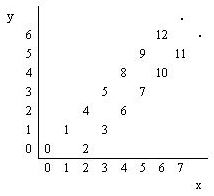
You are to write a program that reads the coordinates of a point (x, y), and writes the number (if any) that has been written at that point. (x, y) coordinates in the input are in the range 0...5000.
Input
Output
Sample Input
3

4 2

6 6

3 4
Sample Output
6

12

No Number
洪水题,找规律。
代码:
#include <iostream>

#include <algorithm>

#include <cmath>

#include <vector>

#include <string>

#include <cstring>

#pragma warning(disable:4996)

using namespace std;

int main()

{

	//freopen("i.txt","r",stdin);

	//freopen("o.txt","w",stdout);

	int Test,x,y;

	cin>>Test;

	while(Test--)

	{

		cin>>x>>y;

		if((x==y||x-2==y)&&x>=0&&y>=0)

		{

			if(x==y)

			{

			    if(x%2)

				{

					cout<<x*2-1<<endl;

				}

				else

				{

					cout<<x*2<<endl;

				}

			}

			else

			{

				if(x%2)

				{

					cout<<x*2-3<<endl;

				}

				else

				{

					cout<<x*2-2<<endl;

				}

			}

		}

		else

		{

			cout<<"No Number"<<endl;

		}

	}

	return 0;

}
版权声明:本文为博主原创文章,未经博主允许不得转载。
POJ 1663:Number Steps的更多相关文章
- POJ 1019:Number Sequence 二分查找
Number Sequence Time Limit: 1000MS Memory Limit: 10000K Total Submissions: 36013 Accepted: 10409 ...
- 九度OJ 1136:Number Steps(步数) (基础题)
时间限制:1 秒 内存限制:32 兆 特殊判题:否 提交:691 解决:412 题目描述: Starting from point (0,0) on a plane, we have written ...
- POJ 1663:Number Steps
Number Steps Time Limit: 1000MS Memory Limit: 10000K Total Submissions: 13758 Accepted: 7430 Des ...
- poj 2104 K-th Number 主席树+超级详细解释
poj 2104 K-th Number 主席树+超级详细解释 传送门:K-th Number 题目大意:给出一段数列,让你求[L,R]区间内第几大的数字! 在这里先介绍一下主席树! 如果想了解什么是 ...
- POJ 3252:Round Numbers
POJ 3252:Round Numbers Time Limit: 2000MS Memory Limit: 65536K Total Submissions: 10099 Accepted: 36 ...
- 原生JS:Number对象详解
Number对象 本文参考MDN做的详细整理,方便大家参考MDN JavaScript 的 Number 对象是经过封装的能让你处理数字值的对象.Number 对象由 Number() 构造器创建. ...
- HDU-1391 Number Steps
http://acm.hdu.edu.cn/showproblem.php?pid=1391 Number Steps Time Limit: 2000/1000 MS (Java/Others) ...
- Number Steps
Number Steps Time Limit: 2000/1000 MS (Java/Others) Memory Limit: 65536/32768 K (Java/Others)Tota ...
- JavaScript:Number 对象
ylbtech-JavaScript:Number 对象 1. Number 对象返回顶部 Number 对象 Number 对象是原始数值的包装对象. 创建 Number 对象的语法: var my ...
随机推荐
- C++面试常见问题——10派生类的构造与析构
派生类的构造与析构 派生类的构造 派生时构造函数与析构函数不会被继承,需要重新定义派生类的构造函数与析构函数.派生类对象包含了基类对象的值,创建派生类时首先会调用基类的构造函数,若派生类中含有其它类对 ...
- Python在运行中发生错误怎么正确处理方法,案例详解!
在程序运行的过程中,如果发生了错误,可以事先约定返回一个错误代码,这样,就可以知道是否有错,以及出错的原因.在操作系统提供的调用中,返回错误码非常常见.比如打开文件的函数open(),成功时返回文件描 ...
- 6.安装telnet服务
yum list telnet* 列出telnet相关的安装包 yum install telnet-server 安装telnet服务 yum install telnet.* 安装telnet客户 ...
- C++用sqlite3_open连接打开指定数据库的小问题
一开始我也纳闷,我以为是我数据库没弄好,但是当我仔细检查,才发现 原来我少了分号 写少了分号,可能会导致 database 和 table 找不到... 所以用的时候需要注意... 代 ...
- 修正png
这是修正+取MD5的方法 function MD5FileTextPng(filename: AnsiString): AnsiString; var buf: ..MAX_PATH - ] of C ...
- H5页面单点登录跳回首页 http url参数转义
在往首页跳的时候因为是单点登录进来的,url后面会带有参数,然后存入会话,所以我要拿到原本存入会话的参数放入url后面 但是返回的时候页面报错了 http://localhost:18086/h5ap ...
- Linux学习-预习第五六七章节关于用户权限管理以及磁盘文件系统
- P1044 火星数字
P1044 火星数字 转跳点:
- POJ 1061:青蛙的约会
青蛙的约会 Time Limit: 1000MS Memory Limit: 10000K Total Submissions: 95878 Accepted: 17878 Descripti ...
- 6 —— node —— 响应一个完整的页面
const http = require('http'); const fs = require('fs'); const server = http.createServer(); server ...