
Spark教程——(2)编写spark-submit测试Demo
创建Maven项目:
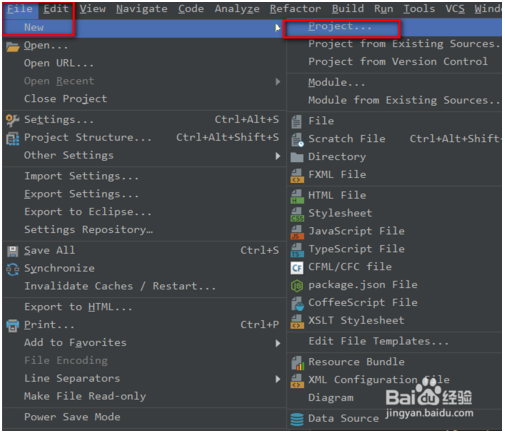
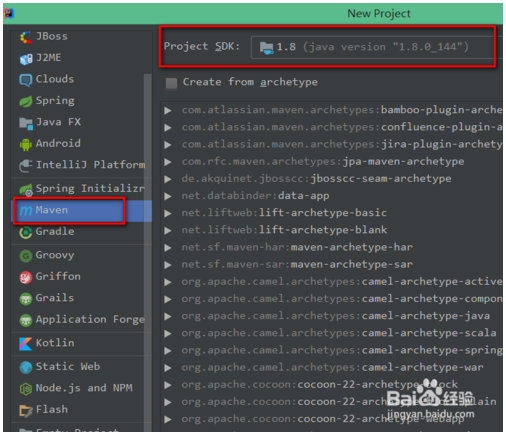
填写Maven的pom文件如下:
<?xml version="1.0" encoding="UTF-8"?>
<project xmlns="http://maven.apache.org/POM/4.0.0"
         xmlns:xsi="http://www.w3.org/2001/XMLSchema-instance"
         xsi:schemaLocation="http://maven.apache.org/POM/4.0.0 http://maven.apache.org/xsd/maven-4.0.0.xsd">
    <modelVersion>4.0.0</modelVersion>

    <groupId>org.world.chenfei</groupId>
    <artifactId>JavaSparkPi</artifactId>
    <version>1.0-SNAPSHOT</version>

    <properties>
        <maven.compiler.source>1.8</maven.compiler.source>
        <maven.compiler.target>1.8</maven.compiler.target>
        <encoding>UTF-8</encoding>
        <spark.version>2.1.0</spark.version>
    </properties>

    <dependencies>
        <dependency>
            <groupId>org.apache.spark</groupId>
            <artifactId>spark-core_2.10</artifactId>
            <version>${spark.version}</version>
        </dependency>

    </dependencies>

    <build>
        <plugins>
            <plugin>
                <groupId>org.apache.maven.plugins</groupId>
                <artifactId>maven-compiler-plugin</artifactId>
                <configuration>
                    <source>1.8</source>
                    <target>1.8</target>
                </configuration>
            </plugin>

            <plugin>
                <groupId>org.apache.maven.plugins</groupId>
                <artifactId>maven-shade-plugin</artifactId>
                <version>2.4.3</version>
                <executions>
                    <execution>
                        <phase>package</phase>
                        <goals>
                            <goal>shade</goal>
                        </goals>
                        <configuration>
                            <filters>
                                <filter>
                                    <artifact>*:*</artifact>
                                    <excludes>
                                        <exclude>META-INF/*.SF</exclude>
                                        <exclude>META-INF/*.DSA</exclude>
                                        <exclude>META-INF/*.RSA</exclude>
                                    </excludes>
                                </filter>
                            </filters>
                            <transformers>
                                <transformer implementation="org.apache.maven.plugins.shade.resource.ManifestResourceTransformer">
                                    <mainClass>org.world.chenfei.JavaSparkPi</mainClass>
                                </transformer>
                            </transformers>
                        </configuration>
                    </execution>
                </executions>
            </plugin>
        </plugins>
    </build>

</project>
编写一个蒙特卡罗求PI的代码:
package org.world.chenfei;

import java.util.ArrayList;
import java.util.List;

import org.apache.spark.SparkConf;
import org.apache.spark.api.java.JavaRDD;
import org.apache.spark.api.java.JavaSparkContext;
import org.apache.spark.api.java.function.Function;
import org.apache.spark.api.java.function.Function2;

public class JavaSparkPi {
    public static void main(String[] args) throws Exception {
        SparkConf sparkConf = new SparkConf().setAppName("JavaSparkPi")/*.setMaster("local[2]")*/;
        JavaSparkContext jsc = new JavaSparkContext(sparkConf);

        int slices = (args.length == 1) ? Integer.parseInt(args[0]) : 2;
        int n = 100000 * slices;
        List<Integer> l = new ArrayList<Integer>(n);
        for (int i = 0; i < n; i++) {
            l.add(i);
        }

        JavaRDD<Integer> dataSet = jsc.parallelize(l, slices);

        int count = dataSet.map(new Function<Integer, Integer>() {
            @Override
            public Integer call(Integer integer) {
                double x = Math.random() * 2 - 1;
                double y = Math.random() * 2 - 1;
                return (x * x + y * y ) ? 1 : 0;
            }
        }).reduce(new Function2<Integer, Integer, Integer>() {
            @Override
            public Integer call(Integer integer, Integer integer2) {
                return integer + integer2;
            }
        });

        System.out.println("Pi is roughly " + 4.0 * count / n);

        jsc.stop();
    }
}
将本项目打包为Jar文件:
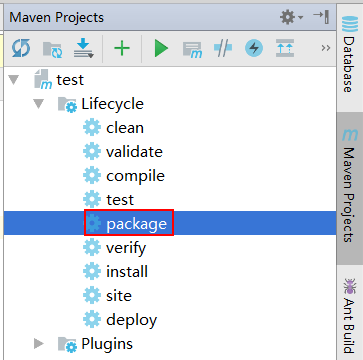
此时在target目录下,就会生成这个项目的Jar包
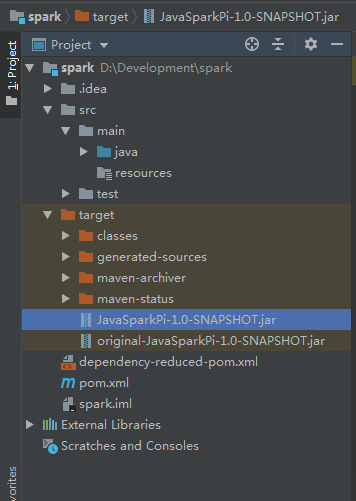
尝试将该jar包在本地执行:
C:\Users\Administrator\Desktop\swap>java -jar JavaSparkPi-1.0-SNAPSHOT.jar
执行失败,并返回如下信息:
C:\Users\Administrator\Desktop\swap>java -jar JavaSparkPi-1.0-SNAPSHOT.jar
Using Spark's default log4j profile: org/apache/spark/log4j-defaults.properties
19/04/28 16:24:30 INFO SparkContext: Running Spark version 2.1.0
19/04/28 16:24:30 WARN SparkContext: Support for Scala 2.10 is deprecated as of
Spark 2.1.0
19/04/28 16:24:30 WARN NativeCodeLoader: Unable to load native-hadoop library fo
r your platform... using builtin-java classes where applicable
19/04/28 16:24:30 ERROR SparkContext: Error initializing SparkContext.
org.apache.spark.SparkException: A master URL must be set in your configuration
        at org.apache.spark.SparkContext.<init>(SparkContext.scala:379)
        at org.apache.spark.api.java.JavaSparkContext.<init>(JavaSparkContext.sc
ala:58)
        at org.world.chenfei.JavaSparkPi.main(JavaSparkPi.java:15)
19/04/28 16:24:30 INFO SparkContext: Successfully stopped SparkContext
Exception in thread "main" org.apache.spark.SparkException: A master URL must be
 set in your configuration
        at org.apache.spark.SparkContext.<init>(SparkContext.scala:379)
        at org.apache.spark.api.java.JavaSparkContext.<init>(JavaSparkContext.sc
ala:58)
        at org.world.chenfei.JavaSparkPi.main(JavaSparkPi.java:15)
将Jar包上传到服务器上,并执行以下命令:
spark-submit --class org.world.chenfei.JavaSparkPi --executor-memory 500m --total-executor-cores /home/cf/JavaSparkPi-1.0-SNAPSHOT.jar
执行成功,并返回如下信息:
[root@node1 ~]# spark-submit --class org.world.chenfei.JavaSparkPi --executor-memory 500m --total-executor-cores  /home/cf/JavaSparkPi-1.0-SNAPSHOT.jar
SLF4J: Class path contains multiple SLF4J bindings.
SLF4J: Found binding -.cdh5./jars/slf4j-log4j12-.jar!/org/slf4j/impl/StaticLoggerBinder.class]
SLF4J: Found binding -.cdh5./jars/avro-tools--cdh5.14.2.jar!/org/slf4j/impl/StaticLoggerBinder.class]
……
// :: INFO util.Utils: Successfully started service .
// :: INFO spark.SparkEnv: Registering MapOutputTracker
// :: INFO spark.SparkEnv: Registering BlockManagerMaster
// :: INFO storage.DiskBlockManager: Created local directory at /tmp/blockmgr-97788ddb-d5eb-48ce-aa9b-e030102dd06c
……
// :: INFO util.Utils: Fetching spark://10.200.101.131:41504/jars/JavaSparkPi-1.0-SNAPSHOT.jar to /tmp/spark-e96463c3-1979-4247-957c-b381f65ddc88/userFiles-666197fa-738d-41e1-a670-a758af1ef9e1/fetchFileTemp2787870198743975902.tmp
// :: INFO executor.Executor: Adding --957c-b381f65ddc88/userFiles-666197fa-738d-41e1-a670-a758af1ef9e1/JavaSparkPi-1.0-SNAPSHOT.jar to class loader
// :: INFO executor.Executor: Finished task ).  bytes result sent to driver
// :: INFO executor.Executor: Finished task ).  bytes result sent to driver
// :: INFO scheduler.TaskSetManager: Finished task )  ms on localhost (executor driver) (/)
// :: INFO scheduler.TaskSetManager: Finished task )  ms on localhost (executor driver) (/)
// :: INFO scheduler.TaskSchedulerImpl: Removed TaskSet 0.0, whose tasks have all completed, from pool
// :: INFO scheduler.DAGScheduler: ResultStage  (reduce at JavaSparkPi.java:) finished in 0.682 s
// :: INFO scheduler.DAGScheduler: Job  finished: reduce at JavaSparkPi.java:, took 1.102582 s
……
Pi is roughly 3.14016
……
// :: INFO ui.SparkUI: Stopped Spark web UI at http://10.200.101.131:4040
// :: INFO spark.MapOutputTrackerMasterEndpoint: MapOutputTrackerMasterEndpoint stopped!
// :: INFO storage.MemoryStore: MemoryStore cleared
// :: INFO storage.BlockManager: BlockManager stopped
// :: INFO storage.BlockManagerMaster: BlockManagerMaster stopped
// :: INFO scheduler.OutputCommitCoordinator$OutputCommitCoordinatorEndpoint: OutputCommitCoordinator stopped!
// :: INFO remote.RemoteActorRefProvider$RemotingTerminator: Shutting down remote daemon.
// :: INFO spark.SparkContext: Successfully stopped SparkContext
// :: INFO remote.RemoteActorRefProvider$RemotingTerminator: Remote daemon shut down; proceeding with flushing remote transports.
// :: INFO util.ShutdownHookManager: Shutdown hook called
// :: INFO util.ShutdownHookManager: Deleting directory /tmp/spark-e96463c3---957c-b381f65ddc88
计算结果为:
Pi is roughly 3.14016
Spark教程——(2)编写spark-submit测试Demo的更多相关文章
- Spark&Hadoop:scala编写spark任务jar包,运行无法识别main函数,怎么办?
昨晚和同事一起看一个scala写的程序,程序都写完了,且在idea上debug运行是ok的.但我们不能调试的方式部署在客户机器上,于是打包吧.打包时,我们是采用把外部引入的五个包(spark-asse ...
- Spark教程——(3)编写spark-shell测试Demo
创建一个文件aa.txt,随便写点内容: hello world! aa aa d d dg g 登录HDFS文件系统: [root@node1 ~]# su hdfs 在HDFS文件系统中创建文件目 ...
- 在IDEA中编写Spark的WordCount程序
1:spark shell仅在测试和验证我们的程序时使用的较多,在生产环境中,通常会在IDE中编制程序,然后打成jar包,然后提交到集群,最常用的是创建一个Maven项目,利用Maven来管理jar包 ...
- 小白学习Spark系列二:spark应用打包傻瓜式教程(IntelliJ+maven 和 pycharm+jar)
在做spark项目时,我们常常面临如何在本地将其打包,上传至装有spark服务器上运行的问题.下面是我在项目中尝试的两种方案,也踩了不少坑,两者相比,方案一比较简单,本博客提供的jar包适用于spar ...
- [大数据从入门到放弃系列教程]第一个spark分析程序
[大数据从入门到放弃系列教程]第一个spark分析程序 原文链接:http://www.cnblogs.com/blog5277/p/8580007.html 原文作者:博客园--曲高终和寡 **** ...
- 使用Scala编写Spark程序求基站下移动用户停留时长TopN
使用Scala编写Spark程序求基站下移动用户停留时长TopN 1. 需求:根据手机基站日志计算停留时长的TopN 我们的手机之所以能够实现移动通信,是因为在全国各地有许许多多的基站,只要手机一开机 ...
- spark教程(12)-生态与原理
spark 是目前非常流行的大数据计算框架. spark 生态 Spark core:包含 spark 的基本功能,定义了 RDD 的 API,其他 spark 库都基于 RDD 和 spark co ...
- Spark教程——(11)Spark程序local模式执行、cluster模式执行以及Oozie/Hue执行的设置方式
本地执行Spark SQL程序: package com.fc //import common.util.{phoenixConnectMode, timeUtil} import org.apach ...
- 使用IDEA开发及测试Spark的环境搭建及简单测试
一.安装JDK(具体安装省略) 二.安装Scala(具体安装省略) 三.安装IDEA 1.打开后会看到如下,然后点击OK
- 使用Eclipse开发及测试Spark的环境搭建及简单测试
一.下载专门开发的Scala的Eclipse 1.下载地址:http://scala-ide.org/download/sdk.html,或链接:http://pan.baidu.com/s/1hre ...
随机推荐
- 【STM32H7教程】第57章 STM32H7硬件JPEG编解码基础知识和HAL库API
完整教程下载地址:http://www.armbbs.cn/forum.php?mod=viewthread&tid=86980 第57章 STM32H7硬件JPEG编解码基础知识 ...
- 跨域-JSONP
jsonp跨域 - 前端适配,后台配合 说明:前后台同时改造 cnpm i jsonp --save-dev 在App.vue里 import jsonp from 'jsonp' let url = ...
- ES6:let 与 const
在ES6中,let 用来定义变量,const 用来定义常量 事实上var可以看成是js语言设计上的错误,但是不能移除,因为需要向后兼容 于是提出了一个新的关键字let,可以将let看成更完美的var ...
- Bugku-CTF社工篇之王晓明的日记
- 【代码学习】PYTHON中的静态方法和类方法
一.类方法 是类对象所拥有的方法,需要用修饰器@classmethod来标识其为类方法,对于类方法,第一个参数必须是类对象,一般以cls作为第一个参数(当然可以用其他名称的变量作为其第一个参数,但是大 ...
- PyQt5打印机
1.打印机操作(打印默认文本里面的内容)from PyQt5 import QtGui,QtWidgets,QtPrintSupportfrom PyQt5.QtWidgets import *imp ...
- Spring Boot 学习方法论-如何正确的入门 Spring Boot
想要入门 Spring Boot,那么什么样的教程是符合初学者学习的(没有太多的Java基础但有一些程序基础或者软件编程知识). 这恰好能够勾出很多问题,比如是文章图文教程适合还是视频教程适合零基础初 ...
- 吴裕雄--天生自然TensorFlow2教程:激活函数及其梯度
import tensorflow as tf a = tf.linspace(-10., 10., 10) a with tf.GradientTape() as tape: tape.watch( ...
- Cisco AP-AP重置操作
Resetting to Default Settings Using the MODE Button/spanFollow these steps to reset the access point ...
- Java IO流详解(四)——字符流Reader和Writer
前面一章介绍了字节流的使用,提到了字节流在处理utf-8编码的中文可能会出现乱码的情况(其他编码的中文同样会出现乱码),所以Java针对这一情况提供了字符流. 但是字符流只能处理字符,不能用来处理 . ...