
从pip+requirements.txt+virtualenv管理依赖到使用pipenv管理依赖-修改布署方式
背景:
已经使用pip+requirements.txt+virtualenv管理了项目一段时间,为了不要每次都 导出依赖(本地),安装依赖(服务器)
现在要使用pipenv来管理项目的依赖关系
思路:
主要是在本地项目中生成pipfile文件,并将其提到git,然后在服务器clone下包含pipfile的文件,并通过pipenv 生成新的依赖环境
2端的操作基本相同,都是先使用pip安装pipenv,然后再使用pipenv初始化虚拟环境。
这里不用担心,如果你的项目中已经使用requirements.txt管理依赖了,在使用pipevn初始化环境的时候,会直接根据requirements.txt生成pipfile,而无须一个依赖一个依赖的重新安装。
【客户端操作】
step1:使用命令pip install pipenv安装pipenv
pip install pipenv
step2:cd到项目根目录,使用命令pipenv install初始化环境
pipenv install
如果项目中有requirements.txt文件,pipenv 会根据requirements.txt生成pipfile,而不用我们再重新逐个安装依赖。很方便
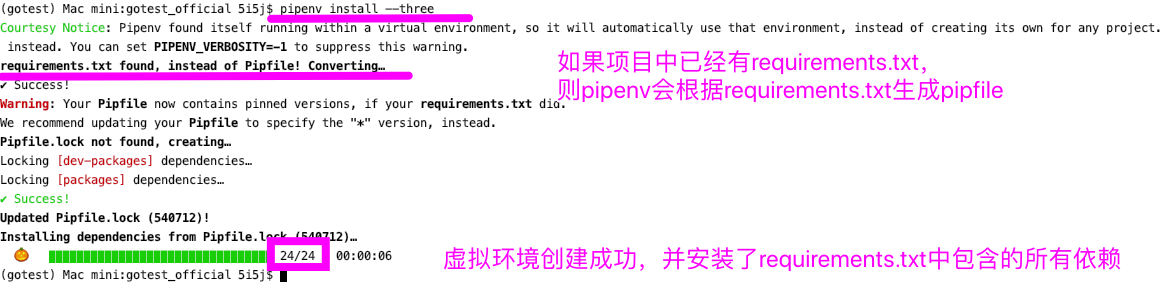
使用pipenv shell命令可以显示的激活虚拟环境,并显示虚拟环境的安装目录,pipenv创建的虚拟环境名称形式为:“当前项目目录名”+一串随机字符,
比如:gotest_official-FJrPcT2s
(gotest) Mac mini:gotest_official 5i5j$ pipenv shell

Launching subshell in virtual environment…

 . /Users/5i5j/.local/share/virtualenvs/gotest_official-FJrPcT2s/bin/activate

(gotest) Mac mini:gotest_official 5i5j$  . /Users/5i5j/.local/share/virtualenvs/gotest_official-FJrPcT2s/bin/activate
step3:如果使用pycharm编辑项目,这时候需要更换项目的虚拟环境

step4:测试新的虚拟环境是否正常使用
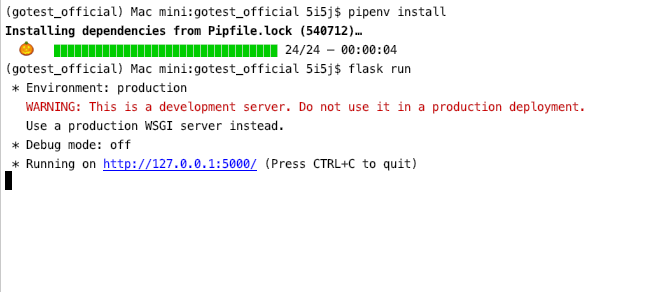
使用flask run 命令启动项目,如果能启动成功,则说明虚拟环境迁移成功
【服务器端-CentOS7】
环境 python2 与 python3.6环境并存,原来安装依赖是通过 pip3 install xxx的方式
step1:安装pipenv
首先使用pip安装pipenv,如果在linux或macOS系统中使用sudo以全局安装
pip3 install pipenv
可以看到pipenv的安装目录 ,证明安装成功了
pipenv in /usr/local/python3/lib/python3.6/site-packages (2018.11.26)
但是使用命令检查pipenv是否已经安装,却报错:pipenv 未找到命令
pipenv --version
报错信息:
[root@67 ~]# pipenv

bash: pipenv: 未找到命令...
解决办法:
执行下面命令,为 Pipenv 可执行文件设置软链接,之后可以通过 pipenv 命令来使用 Pipenv
[root@67 ~]# ln -s /usr/local/python3/bin/pipenv /usr/bin/pipenv

[root@67 ~]# pipenv --version

pipenv, version 2018.11.26
由此可见/usr/bin/下的命令都是全局可以使用的。
step2:创建虚拟环境
git 克隆已经上传了pipfile的项目 goTest至服务器
cd到项目目录,然后使用pipenv install命令为当前项目创建虚拟环境
这里使用jenkins自动布署,所以目录是 ~/.jenkins/workspace/goTest
[root@67 ~]# cd ~/.jenkins/workspace/goTest

[root@67 goTest]# ls

app  log  Pipfile  Pipfile.lock  __pycache__  README.md  wsgi.py
使用命令pipenv install 初始化pipenv虚拟环境:
pipenv install
报错: python3.7 was not found on your system:
[root@67 goTest]# pipenv install

Warning: Python 3.7 was not found on your system…

You can specify specific versions of Python with:

  $ pipenv --python path/to/python
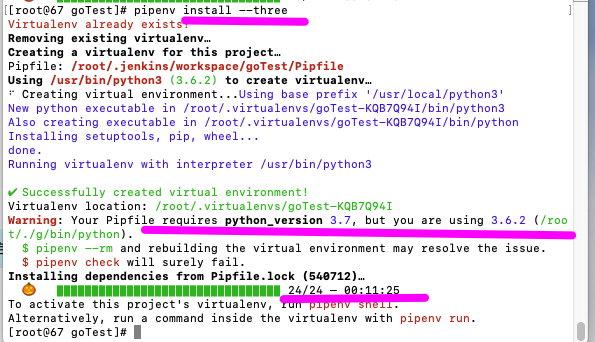
这是因为 :Pipfile中指定的python version是3.7,但服务器的python是3.6.2版本
Your Pipfile requires python_version 3.7, but you are using 3.6.2 (/root/./g/bin/python).
解决办法:
使用命令:pipenv install --three 指定pipenv创建python3的虚拟环境
pipenv install --three

Creating a virtualenv for this project…

Pipfile: /root/.jenkins/workspace/goTest/Pipfile

Using /usr/bin/python3 (3.6.2) to create virtualenv…

⠼ Creating virtual environment...
python3虚拟环境初始化成功
查看服务器中所有的虚拟环境,可以看到pipenv 已经成功为goTest项目创建了1个虚拟环境
[root@67 goTest]# lsvirtualenv

automationVenv

==============

flaskApi

========

goTest-KQB7Q94I #pipenv创建的虚拟环境

===============

rlcVenv

=======
stetp3:测试
使用命令 pipenv shell 激活当前虚拟环境
[root@67 goTest]# pipenv shell

Warning: Your Pipfile requires python_version 3.7, but you are using 3.6.2 (/root/./g/bin/python).

  $ pipenv --rm and rebuilding the virtual environment may resolve the issue.

  $ pipenv check will surely fail.

Launching subshell in virtual environment…

 . /root/.virtualenvs/goTest-KQB7Q94I/bin/activate

[root@67 goTest]#  . /root/.virtualenvs/goTest-KQB7Q94I/bin/activate
使用flask run命令运行项目,项目运行成功,说明更换依赖环境成功了
(goTest) [root@67 goTest]# flask run

 * Environment: production

   WARNING: This is a development server. Do not use it in a production deployment.

   Use a production WSGI server instead.

 * Debug mode: off

 * Running on http://127.0.0.1:5000/ (Press CTRL+C to quit)
【pipenv其它命令】
使用命令pipenv --venv 可以查看虚拟环境所在目录
pipenv --venv
使用exit命令退出当前虚拟环境
(goTest) [root@67 workspace]# exit

exit

[root@67 goTest]#
删除旧的依赖环境
rmvirtualenv <原来的虚拟环境名称>
ps,使用rmvirtualenv命令的前堤是,已经安装了virtualenvwrapper
题外话,即使使用了pipenv,virtualenvwrapper也是管理虚拟环境非常棒的工具,它可以很方便查看 删除虚拟环境
【很重要!】
【修改布署方式】
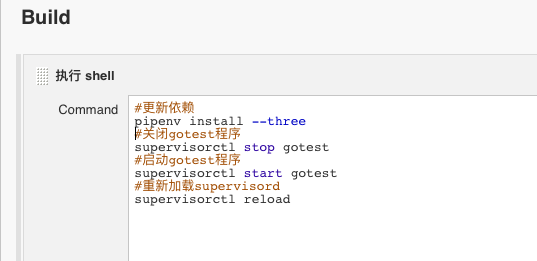
step1:修改jenkins执行shell,通过pipenv install --three更新依赖
jenkins重新布署后,访问接口报错:
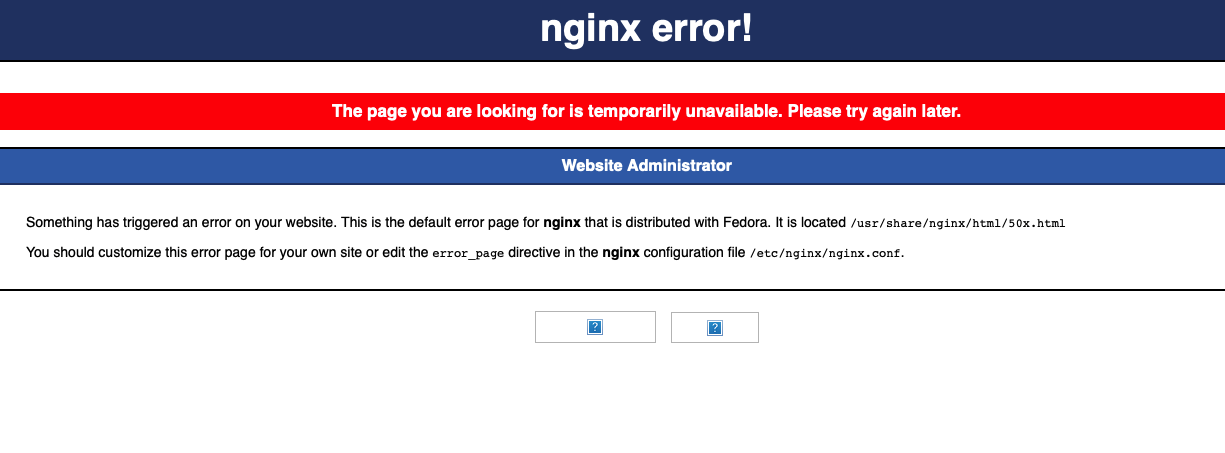
问题分析及解决办法:
1.这是因为之前的布署方式是通过nginx+gunicorn+supervisord
2.而supervisord又通过1个配置文件启动gunicron,这样才能成功建立gunicorn和nginx之间地址的映射
3.现在gunicron所在的环境目录变了,所以我们也需要修改supervisord启动gunicorn的目录地址
step2:修改supervisord配置文件gunicorn启动目录
# supervisor的程序名字

[program:gotest] #program_name 该名称可以随意设置

# supervisor执行的命令

command=/root/.virtualenvs/goTest-KQB7Q94I/bin/gunicorn -w 4 -b 127.0.0.1:5000 wsgi:app #修改gunicorn命令的启动目录
step3:重新加载 supervisorctl配置
[root@67 etc]# supervisorctl reload

Restarted supervisord
step4:测试再次请求接口,正常返回响应信息,说明环境迁移成功
参考文档:

pipenv 安装pipfile的依赖包
CentOS 下使用 Pipenv + Gunicorn + Supervisor 部署 Flask 程序
【Centos7】 中使用Supervisor守护进程
从pip+requirements.txt+virtualenv管理依赖到使用pipenv管理依赖-修改布署方式的更多相关文章
- pip requirements.txt
生成文件 pip freeze > requirements.txt 依赖库会导到于requirements.txt 比如: image.png 从requirements.txt安装依赖库 ...
- Djanog|requirements.txt生成
Django | requirement.txt 生成 pip django 1 pip 通常我们熟悉使用的都是 pip, 这个工具确实方便项目管理依赖包.当想把当前项目依赖的包的名称和版本导入指 ...
- python 项目自动生成requirements.txt文件
主要使用目的: 任何应用程序通常需要设置安装所需并依赖一组类库来满足工作要求.通过requirements.txt可以一次性安装程序所需要和依赖的包. 为工程生成requirements.txt的两种 ...
- Python项目生成requirements.txt的多种方式
我相信任何软件程序都会有依赖的类库,尤其现在开源如此的火爆,因为一个项目可能会有无很多的依赖的包 这个时候难道我们都要一个一个的去找到安装吗?即使你找到了依赖的包 但是呢模块的版本又有很多难道你都要装 ...
- Python中如何生成requirements.txt文件
Python项目中一般都包含一个名为 requirements.txt 文件,用来记录当前项目所有的依赖包和版本号,在一个新环境下通过该文件可以更方便的构建项目所需要的运行环境. 生成requirem ...
- bae使用nodejs遇到的问题---‘Fix depends failed. Please check requirements.txt.’
今天尝试了百度开放云里面的nodejs云引擎,部署没有任何问题,修改文件后发现了发布不了,去查看发布设置发现了问题: Fix depends failed. Please check requirem ...
- Docker build 安装报错, Could not open requirments file: [Errno 2] No such file or directory:'requirements.txt'
docker安装教程 https://docs.docker.com/get-started/part2/#build-the-app 相关帖子 https://stackoverflow.com/q ...
- Python开发还在用virtualenv?不如了解下pipenv...#华为云·寻找黑马程序员#
又见 Kenneth Reitz 之前公众号写了一篇文章爬虫新宠requests_html 带你甄别2019虚假大学,其中主要是为了介绍模块**requests_html,这个模块的作者还开发了req ...
- python包管理(distutils、easy_install、pip、setup.py/requirements.txt、wheel)
distutils.distutils2 distutils是 python 标准库的一部分,2000年发布.使用它能够进行 python 模块的 安装 和 发布. distutils2 被设计为 d ...
随机推荐
- 003-centos7:rsyslog简单配置客户端和服务器端
实现把一个主机作为客户端,把日志发送到指定的服务器端: [服务器端] 开放tcp端口,udp端口: vim /etc/rsyslog.conf: # Provides UDP syslog recep ...
- Spring笔记之配置数据源
任何DAO访问数据库,最开始都需要配置数据源,数据源中定义了访问数据库的常用配置.有了数据源才能创建数据模板,然后把数据模板注入到DAO中,通过调用数据访问模板中的相应方法来对数据库进行相关操作. 常 ...
- VMware的linux虚拟机配置ip后无法ping通宿主机
VMware的linux虚拟机配置ip(使用eth0)后无法ping通宿主机,同样宿主机无法ping通linux虚拟机. 可能原因:linux虚拟机使用的网卡,与本机使用的网卡不同,配置成与本机一致的 ...
- 将UTC日期字符串转为本地时间字符串,如@"yyyy-MM-dd'T'HH:mm:ssZ"转换为本地时间
由于苹果商店上线应用24小时内会不稳定,更新提醒可能会陷入死循环,更新提醒需要24小时后弹出,需要把苹果返回的上线时间转换为本地时间故写了下边的方法: //将UTC日期字符串转为本地时间字符串//输入 ...
- Django—ajax、前端后端编码格式,bulk_create批量插入语数据库、自定义分页
一.ajax简介: XML也是一门标记语言该语法应用场景 1.写配置文件 2.可以写前端页面(odoo框架中 erp) 每家公司都会有属于这家公司独有的内部管理软件:专门用来开发企业内部管理软件 框架 ...
- ssky-keygen + ssh-copy-id 无密码登陆远程LINUX主机【OK】
ssky-keygen + ssh-copy-id 无密码登陆远程LINUX主机[OK] 使用下例中ssky-keygen和ssh-copy-id,仅需通过3个步骤的简单设置而无需输入密码就能 ...
- 关于不重启Tomcat自动加载改变的class文件
修改server.xml,在Host标签下加入以下配置 <Context path="" docBase="FileManager" reloadable ...
- 解决c#distinct不好用的问题
当一个结合中想根据某一个字段做去重方法时使用以下代码 IQueryable 继承自IEnumerable 先举例: #region linq to object List<People> ...
- Linux系统上java调用C++ so库文件
PART1: java中使用jna替代jni调用c++/c生成的 dll/so库文件需要做的事项 1.引入JNA依赖或者直接下载JNAjar包 <!-- http ...
- Python 练习实例3
Python 练习实例3 题目:一个整数,它加上100后是一个完https://www.xuanhe.net/全平方数,再加上168又是一个完全平方数,请问该数是多少? 程序分析: 假设该数为 x. ...