
JavaScript —— 实现简单计算器【带有 开/关机 清零 退格 功能】
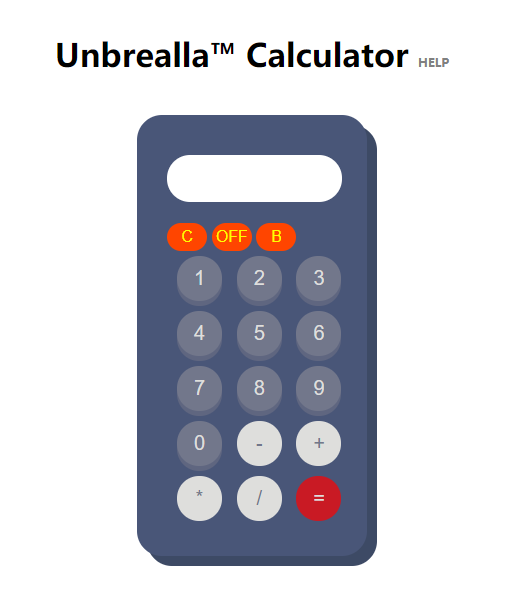
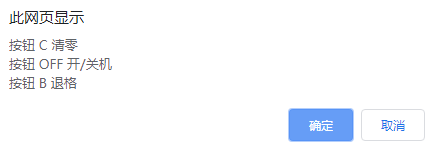
<!doctype html>

<html>

<head>

    <meta charset="utf-8">

    <meta name="keywords" content="Calculator">

    <meta name="description" content="Calculator">

    <meta name="author" content="LIEGE">

    <title>Calculator</title>

<style>

* {

    border: none;

    margin: 0;

    padding: 0;

}

body {

}

.center {

    background-color: #fff;

    border-radius: 50%;

    height: 800px;

    margin: auto;

    width: 800px;

}

h1 {

    color: #495678

    font-size: 30px;

    margin-top: 20px;

    padding-top: 50px;

    display: block;

    text-align: center;

    text-decoration: none;

}

form {

    background-color: #495678;

    box-shadow: 10px 10px #3d4a65;

    margin: 40px auto;

    padding: 40px 0px 30px 30px;

    width: 200px;

}

.btn {

    outline: none;

    font-size: 20px;

    height: 45px;

    margin: 5px 0 5px 10px;

    width: 45px;

}

.btn:first-child {

    margin: 5px 0 5px 10px;

}

#display {

    outline: none;

    background-color: white;

    color: black;

    font-size: 20px;

    height: 47px;

    text-align: right;

    width: 165px;

    padding-right: 10px;

    margin-left: 0px;

}

.btn, #display, form {

    border-radius: 25px;

}

.number {

    background-color: #72778b;

    box-shadow: 0 5px #5f6680;

    color: #dededc;

}

.number:active {

    box-shadow: 0 2px #5f6680;

      -webkit-transform: translateY(2px);

      -ms-transform: translateY(2px);

      -moz-tranform: translateY(2px);

      transform: translateY(2px);

}

.number:hover {

    background-color: rgb(114,119,139,0.4);

    box-shadow: 0 5px #5f6680;

    color: #dededc;

}

.operator {

    background-color: #dededc;

    color: #72778b;

}

.operator:hover {

    background-color:rgb(222,222,220,0.6);

    color: #72778b;

}

.other {

    background-color:rgb(255,0,0,0.7);

    color:#dededc ;

}

.other:hover {

    background-color:rgb(255,0,0,0.4);

    color:#dededc ;

}

.button_clear{

    outline: none;

    border-radius: 25px;

    background-color:#FF4500;

    color:#FFFF00;

    font-size:16px;

    font-style:strong;

    width:40px;

    height:28px;

}

.button_clear:active {

  background-color: red;

  box-shadow: 0 5px #666;

  transform: translateY(2px);

}

.off_on{

    outline: none;

    border-radius: 25px;

    background-color:#FF4500;

    color:#FFFF00;

    font-size:16px;

    font-style:strong;

    width:40px;

    height:28px;

}

.off_on:active{

    background-color: red;

    box-shadow: 0 5px #666;

    transform: translateY(2px);

}

.tishi{

    font-size:10px;

    text-decoration:none;

}

</style>

<script>

var power = 1;

// 1 是开机   -1是关机

function off(){//一开始就运行---》 关机

    power = -power;

    if(power == -1){

        document.getElementById("display").value = "";

    }else{

        welcome();

    }

};

function clearout(){

    if(power == -1){

            document.getElementById("display").value = "";

        }else{

            document.getElementById("display").value = "";

            document.getElementById("display").focus();

        }

};

function welcome(){

    document.getElementById("display").value = "Welcome ☺";

    setTimeout(welcome_end, 2000);

};

function welcome_end(){

    document.getElementById("display").value = "";

    document.getElementById("display").focus();

};

function get(value) {

    if(power == 1){

        document.getElementById("display").value += value;

    }else{

        document.getElementById("display").value = "";

    }

} ;

function back(){

    if(power == 1){

        var now_result = document.getElementById("display"); //*****************************

        document.getElementById("display").value = now_result.value.substring(0, now_result.value.length - 1);

    }else{

        document.getElementById("display").value = "";

    }

};

function calculates() {

    if(power == 1){

        var result = 0;

        result = document.getElementById("display").value;

        document.getElementById("display").value = "";

        document.getElementById("display").value = eval(result);

    }else{

        document.getElementById("display").value = "";

    }

};

function tishi(){

confirm("按钮 C 清零  \n按钮 OFF 开/关机\n按钮 B 退格");

};

</script>

</head>

<body  link="grey" vlink="grey" alink="grey" Onload="off()">

    <div class="center">

        <h1 >Unbrealla™ Calculator <a href="#" onclick="tishi()" class="tishi">HELP</a></h1>

        <form name="calculator">

            <input type="text" id="display" width="300px" value="">

                <br>

                    <br><input type="button" class="button_clear" value="C" onclick="clearout();">

                        <input type="button" class="off_on" value="OFF" onclick="off();">

                        <input type="button" class="off_on" value="B" onclick="back();">

                <br>

            <input type="button" class="btn number" value="1" onclick="get(this.value);">

            <input type="button" class="btn number" value="2" onclick="get(this.value);">

            <input type="button" class="btn number" value="3" onclick="get(this.value);">

            <br />

            <input type="button" class="btn number" value="4" onclick="get(this.value);">

            <input type="button" class="btn number" value="5" onclick="get(this.value);">

            <input type="button" class="btn number" value="6" onclick="get(this.value);">

            <br />

            <input type="button" class="btn number" value="7" onclick="get(this.value);">

            <input type="button" class="btn number" value="8" onclick="get(this.value);">

            <input type="button" class="btn number" value="9" onclick="get(this.value);">

            <br />

            <input type="button" class="btn number" value="0" onclick="get(this.value);">

            <input type="button" class="btn operator" value="-" onclick="get(this.value);">

            <input type="button" class="btn operator" value="+" onclick="get(this.value);">

            <br />

            <input type="button" class="btn operator" value="*" onclick="get(this.value);">

            <input type="button" class="btn operator" value="/" onclick="get(this.value);">

            <input type="button" class="btn other" value="=" onclick="calculates();">

        </form>

    </div>

</body>

</html>
JavaScript —— 实现简单计算器【带有 开/关机 清零 退格 功能】的更多相关文章
- JAVASCRIPT实现简单计算器
最终效果如下图-2,有bug:就是整数后点击%号结果正确,如果小数后面点击%的话结果就错误!其他都正常,求指点:input的value是string类型的,在JS中改如何正确处理下图-1中的if部分? ...
- 学习笔记之javascript编写简单计算器
感觉自己的的实力真的是有待提高,在编写计算器的过程中,出现了各种各样的问题,暴露了自己的基础不扎实,逻辑思维能力不够,学得知识不能运用到自己的demo中区.先介绍一些这个这个计算器的整体思路.大致 ...
- 用javascript编写的简单计算器
老师布置的任务,弄了一天,总算把代码搞出来了,作为菜鸟给自己一点小掌声,传说中JS是很简单的,但是要写出一个程序真的很需要锻炼,我的锻炼实在是太少了,天天DOTA中.呵呵(做了些小注释)大家应该能看懂 ...
- javascript简单计算器实践
参考部分资料,编写一个简单的计算器案例,虽然完成了正常需求,但是也有不满之处,待后续实力提升后再来补充,先把不足之处列出: 1:本来打算只要打开页面,计算器的输入框会显示一个默认为0的状态,但是在输入 ...
- JavaScript+HTML,简单的计算器实现
成功进化到程序猿快一年多了, 还没写过计算器, 正好今天比较闲,随手写了个计算器,最简单的实现,核心是eval()方法,把字符串作为JS代码处理,把输入的信息拼接成字符串,点等号执行代码得到结果,出异 ...
- 用JavaScript制作简单的计算器
<html > <head> <title>简单计算器</title> <style type="text/css"> ...
- Linux——系统开关机指令简单学习笔记
关机: 命令名称:shutdown 命令所在路径:/usr/sbin/shutdown 执行权限:root 语法:shutdown 功能描述:关机 范例:# shutdown -h now 重启: 命 ...
- 利用css和javascript实现简单的计算器
<!doctype html> <html> <head> <!--声明当前页面的编码集--> <meta http-equiv="Co ...
- 菜鸟学Android编程——简单计算器《一》
菜鸟瞎搞,高手莫进 本人菜鸟一枚,最近在学Android编程,网上看了一些视频教程,于是想着平时手机上的计算器应该很简单,自己何不尝试着做一个呢? 于是就冒冒失失的开撸了. 简单计算器嘛,功能当然很少 ...
随机推荐
- rsyslog+loganalyzer日志服务器,无法添加报表模板解决
loganalyzer搭建成功后,各方面功能都算正常但是发现不能创建报表模板,提示报错 mysql错误:'字段列表'中的未知列'Source1' mysql错误号:1054 解决方案:
- python_实现选课系统
校园管理系统 角色: 学校.学员.课程.讲师 要求: 1. 创建北京.上海 2 所学校 2. 创建linux , python , go 3个课程 , linux\py 在北京开, go 在上海开 3 ...
- 【模板】AC自动机加强版
题目大意:给定 N 个模式串和一个文本串,求每个模式串在文本串中出现的次数. 题解:文本串在自动机上匹配的过程中,记录下自动机上每一个状态被访问的次数.对于访问到的节点 i,则状态 i 的后缀中存在的 ...
- 知名界面类控件Kendo UI for jQuery R2 2019 SP1发布|附下载
Kendo UI for jQuery提供了在短时间内构建现在Web应用程序所需要的一切.从70多个UI中选择,并轻松地将它们组合起来,创建出酷炫响应式的应用程序,同时将开发时间加快了50%. [适用 ...
- iOS 自定义NavigationBar右侧按钮rightBarButtonItem
自定义右侧的一个按钮 UIBarButtonItem *myButton = [[UIBarButtonItem alloc] initWithTitle:@"主页" style: ...
- jmeter使用jdbc获取注册验证码进行注册
自动化工具测试注册功能时,往往会遇到验证码,这个烦人的验证码怎么能够解决掉呢? 通常有两种方法 让开发禁用注册码,或在测试环境写个固定的验证码 在jmeter中用 jdbc获取数据库中验证码 今天通过 ...
- JAVA笔记15-线程同步
一.概念 1.多个线程之间访问同一资源,进行协调的过程是线程同步.例如两个人同时操作同一银行账户.解决方法:加锁 2.Java种引入对象互斥锁的概念,保证共享数据操作的完整性.每个对象都对应于一个可称 ...
- Comet OJ - Contest #12 D
题目描述 求(x,y)的对数满足x∈[0,a],y∈[0,b],x⊕y=0且|x-y|<=m 题解 一种比较sb的做法是考虑x-y的借位,根据借位以及差值进行转移 还有一种比较正常的做法,假设一 ...
- js-展开评论与隐藏评论
//控制展开评论和隐藏评论 controldiscuss(){ $(".opendiss").click(function(){ if($(this).context.innerH ...
- POJ 2289 多重二分匹配+二分 模板
题意:在通讯录中有N个人,每个人能可能属于多个group,现要将这些人分组m组,设各组中的最大人数为max,求出该最小的最大值 下面用的是朴素的查找,核心代码find_path复杂度是VE的,不过据说 ...