
github配置和使用
通过手册指导生产ssh key或取已有的ssh key
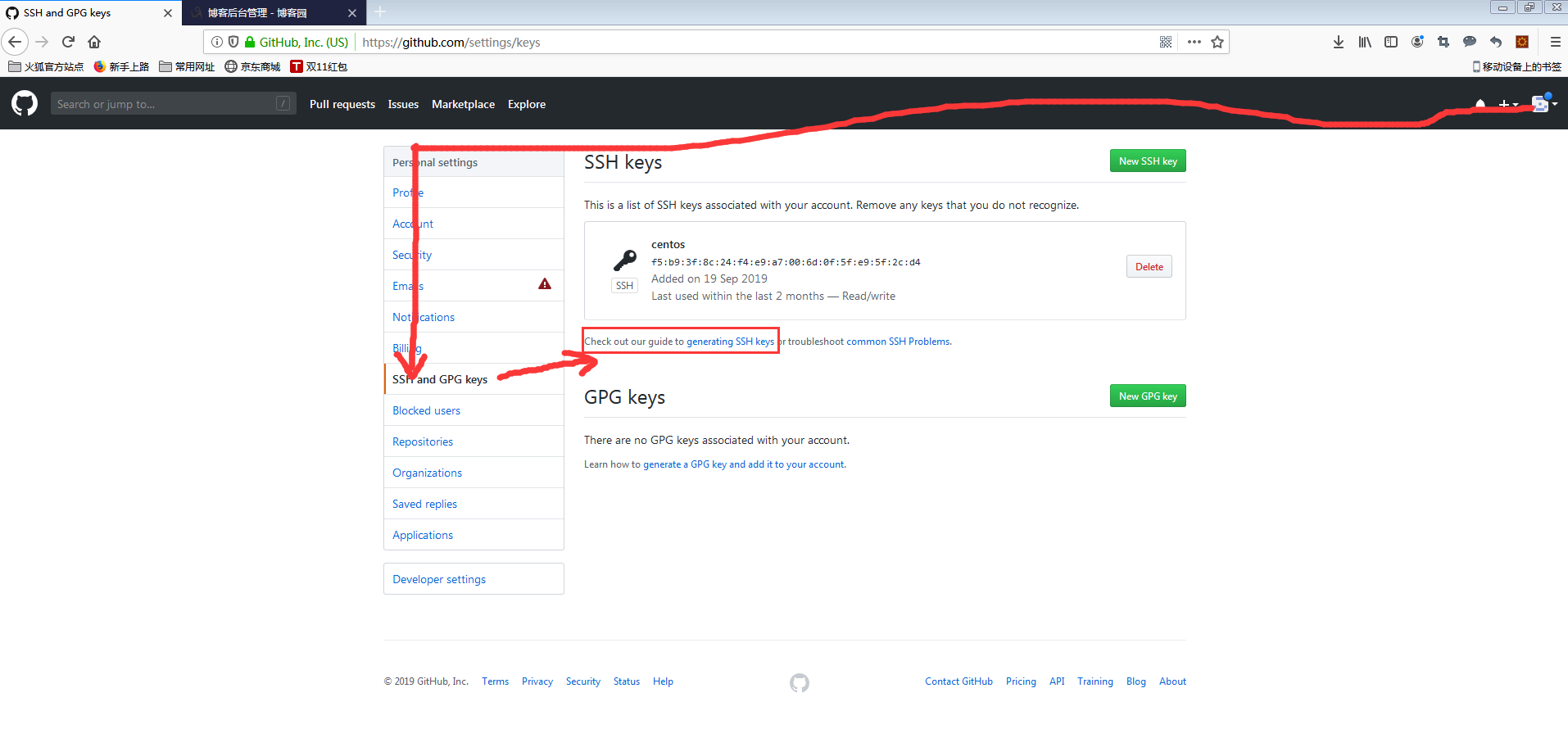
root@iZwz93telmwbh624e5zetqZ:~# ls -al ~/.ssh

total

drwx------   root root  Jun  : .

drwx------  root root  Oct  : ..

-rw-------   root root     Aug  : authorized_keys

root@iZwz93telmwbh624e5zetqZ:~# ssh-keygen -t rsa -b  -C "249757247@qq.com"

Generating public/private rsa key pair.

Enter file in which to save the key (/root/.ssh/id_rsa):

Enter passphrase (empty for no passphrase):                 #这里输入的是pull push密码

Enter same passphrase again:

Your identification has been saved in /root/.ssh/id_rsa.

Your public key has been saved in /root/.ssh/id_rsa.pub.

The key fingerprint is:

SHA256:sbLxozqlCHZcdyMqvwl2uEJffZ4q3xuDbKgAjaKxlAo @qq.com

The key's randomart image is:

+---[RSA ]----+

|                 |

|                 |

|        .        |

| o.  . o =       |

|Eoo . * S .      |

|O= +.o+*..       |

|*oo=+=.+=o.      |

| .+.Boo..+o      |

|  .o.==o.o.      |

+----[SHA256]-----+

root@iZwz93telmwbh624e5zetqZ:~# ll /root/.ssh/

total

drwx------   root root  Oct  : ./

drwx------  root root  Oct  : ../

-rw-------   root root     Aug  : authorized_keys

-rw-------   root root  Oct  : id_rsa

-rw-r--r--   root root   Oct  : id_rsa.pub

root@iZwz93telmwbh624e5zetqZ:~# cat /root/.ssh/id_rsa.pub
ssh-rsa AAAAB3NzaC1yc2EAAAADAQABAAACAQDEmUXTtV7IjNwAe7uOrDrhw+YCUMkO581+JjKG+5Sd6EPzHk0a+218aqP313PUG6yzy77ApPmK6unSgDX3+dN6FtIvJfLBbpGGS+2yuWj8XiyOI9neqU3irc9Haqy6P2K18/8GoSrLmpyfbVLuBEV9O4U62NtpM/YJAoQ00Pj7akJTkuQ1rLJ/9UVf6DGpEeyxwS+BKW0QRgnoCwDBwjcU0xQMSysEtWpYLtw36KqDBQDIdBYRqaqiYCm8U2DeaptkMtlsU2M92mPEE/GOzFlWttXfHhBCktfJRlyFysvFrEOUrZ9PLICFX4bW/eBEuGakGB3iqOwpRvvOoWSv7uaL0sc6x96XfTH3ks5LAJ6VKIvSjBw9BWlky+LGtammupqVKZJVV1WCJu5kp9B2FFUl1BdjtcUXEo6salfhmkXPPgAQF3OfqdrDN6KszijtNom0TVJCwTgtR/iW3etCNX25LRwV/zpfS2yrsAupqZf7fPRoxfRDjSynRaIK778+gLqhkRrWktw6nmxifZoeA7MjQ9pSBFkyqGY5pI4BQ3woRvjUp/BxyXIEGJNQeRrVx/pV+pCuDjwA0e4IXD0EhMQNLNp6Jeihl5cw+e/gUg0cPGf18BETZB52vZhzkdf7rVec/Fc8VLO4b5b/oVxcB2rI54N6hx89zfp5hjjKlzuDRw== 249757247@qq.com
root@iZwz93telmwbh624e5zetqZ:~#
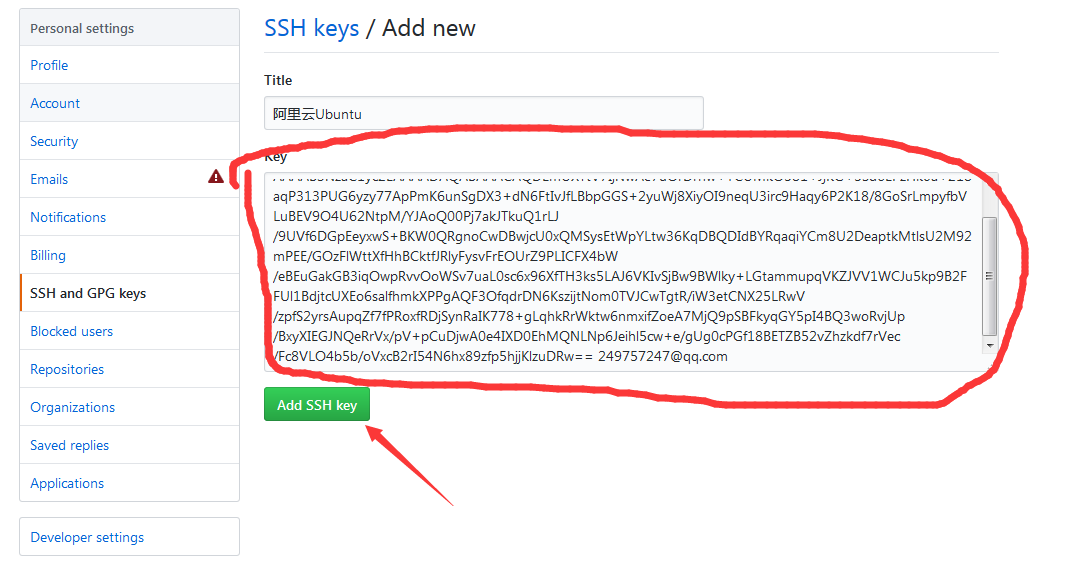
root@iZwz93telmwbh624e5zetqZ:~# ssh -T git@github.com

The authenticity of host 'github.com (13.250.177.223)' can't be established.

RSA key fingerprint is SHA256:nThbg6kXUpJWGl7E1IGOCspRomTxdCARLviKw6E5SY8.

Are you sure you want to continue connecting (yes/no)? yes

Warning: Permanently added 'github.com,13.250.177.223' (RSA) to the list of known hosts.

Enter passphrase for key '/root/.ssh/id_rsa':

Hi hnhycnlc888! You've successfully authenticated, but GitHub does not provide shell access.


root@iZwz93telmwbh624e5zetqZ:~# pwd
/root
root@iZwz93telmwbh624e5zetqZ:~# ls
download  dump.rdb  php_extension  telpo
root@iZwz93telmwbh624e5zetqZ:~# git clone https://github.com/hnhycnlc888/helloworld.git
Cloning into 'helloworld'...
remote: Enumerating objects: 3, done.
remote: Counting objects: 100% (3/3), done.
remote: Total 3 (delta 0), reused 3 (delta 0), pack-reused 0
Unpacking objects: 100% (3/3), done.
Checking connectivity... done.
root@iZwz93telmwbh624e5zetqZ:~# ls
download  dump.rdb  helloworld  php_extension  telpo
root@iZwz93telmwbh624e5zetqZ:~# ll helloworld/
total 16
drwxr-xr-x  3 root root 4096 Oct 25 01:46 ./
drwx------ 14 root root 4096 Oct 25 01:46 ../
drwxr-xr-x  8 root root 4096 Oct 25 01:46 .git/
-rw-r--r--  1 root root   13 Oct 25 01:46 README.md
root@iZwz93telmwbh624e5zetqZ:~# cat helloworld/.git/config
[core]
    repositoryformatversion = 0
    filemode = true
    bare = false
    logallrefupdates = true
[remote "origin"]
    url = https://github.com/hnhycnlc888/helloworld.git
    fetch = +refs/heads/*:refs/remotes/origin/*
[branch "master"]
    remote = origin
    merge = refs/heads/master
root@iZwz93telmwbh624e5zetqZ:~#
github配置和使用的更多相关文章
- window下配置SSH连接GitHub、GitHub配置ssh key
window下配置SSH连接GitHub.GitHub配置ssh key 此经验分两部分: 第一部分介绍:在windows下通过msysGit(Git for windows.Git Bash)配 ...
- 跟我学SpringCloud | 第六篇:Spring Cloud Config Github配置中心
SpringCloud系列教程 | 第六篇:Spring Cloud Config Github配置中心 Springboot: 2.1.6.RELEASE SpringCloud: Greenwic ...
- github配置及使用
安装git 对于linux系统,不同发行版本的安装方法不一样,请参考https://git-scm.com/download/linux.以ubuntu为例: sudo add-apt-reposit ...
- github配置和git学习
参考:http://www.eoeandroid.com/thread-272837-1-1.html http://blog.csdn.net/hcbbt/article/details/11651 ...
- ( 转 )Github配置
以下转自 http://liuzhijun.iteye.com/blog/1457207 有问题请联系我删除. -----———————————————————————— 如果你的代码不知道放哪里好, ...
- window下配置SSH连接GitHub、GitHub配置ssh key(转)
转自:http://jingyan.baidu.com/article/a65957f4e91ccf24e77f9b11.html 此经验分两部分: 第一部分介绍:在windows下通过msysGit ...
- ubuntu 14.0 下github 配置
一:创建Repositories 1:首先在github下创建一个帐号.这个不用多说,然后创建一个Repositories. 2:然后在ubuntu下安装git相关的东东: 1 sudo apt-ge ...
- windows中使用Git工具连接GitHub(配置篇)
Git在源码管理领域目前占很大的比重了,而且开源的项目很多都转到GitHub上面了.例如:jQuery, reddit, Sparkle, curl, Ruby on Rails, node.js, ...
- 同一台电脑使用 gitlab 和 github 配置
Git 客户端与服务器端的通信支持多种协议,ssh 最常用.ssh的公钥登录流程,用户将自己的公钥存储在远程主机,登录时,远程主机会向用户发送一条消息,用户用自己的私钥加密后,再发给服务器.远程主机用 ...
- github配置ssh密钥的方法
配置用户名和邮箱 初次安装git需要配置用户名和邮箱,否则git会提示:please tell me who you are. 你需要运行命令来配置你的用户名和邮箱: $ git config --g ...
随机推荐
- npm 中的 --
-- 命令告诉cli-parser停止向下解析, --后面的内容会传给命令行作为命令行参数 文档地址: https://docs.npmjs.com/misc/config.html
- tensorflow学习笔记二:入门基础 好教程 可用
http://www.cnblogs.com/denny402/p/5852083.html tensorflow学习笔记二:入门基础 TensorFlow用张量这种数据结构来表示所有的数据.用一 ...
- 使用NHibernate连接MySQL数据库及增删改查
学习资料 http://www.sikiedu.com/course/51/task/891/show https://www.codeproject.com/Articles/26123/NHibe ...
- 浅谈Java反射机制 之 使用类的 属性、方法和构造函数
前面两篇我们总结了Java反射机制如何获取类的字节码,如何获取构造函数,属性和方法, 这篇我们将进一步验证如何使用我们获取到的属性.方法以及构造函数 1.使用 反射 获取到的 属性 import ja ...
- Log4net使用(二)
转:http://www.cnblogs.com/basilwang/archive/2006/06/09/421868.html Log4net同时按照日期和大小生成RollingFile和访问Sy ...
- Struts2异常:HTTP Status 404 - /Struts2/book/addBook.action
HTTP Status 404 - /Struts2/book/addBook.action 如果在Struts2的框架中访问路径出现了这个错误,可能存在的原因有如下的两个: 1. 路径写错,也就是a ...
- [Git] 002 初识 Git 与 GitHub 之加入文件 第一弹
在 GitHub 的 UI 界面使用 Git 往仓库里加文件 第一弹 1. 点击右上方的 Create new file 2. 在左上方填入文件名,若有后缀,记得加上 3. 页面跳转,此时已有两个文件 ...
- framebuffer设备驱动分析
一.设备驱动相关文件 1.1. 驱动框架相关文件 1.1.1. drivers/video/fbmem.c a. 创建graphics类.注册FB的字符设备驱动 fbmem_init(void) { ...
- ./configure 配置文件时出错checking for g++... no
checking for g++... no checking for c++... no checking for gpp... no checking for aCC... no 缺少C++编译器 ...
- python 迭代器和生成器的区别
迭代器(iterator)是一个实现了迭代器协议的对象,python的一些内置数据类型(列表,数组,字符串,字典等)都可以通过for语句进行迭代,我们也可以自己创建一个容器,实现了迭代器协议,可以通过 ...