
4-2如何判断字符串a是否以字符串b开头或结尾
1、相关介绍
1.1修改文件权限和查看文件权限
在windows平台实验时 os.chmod()无法将文件权限修改为可执行,暂不深究如何实现。在linux平台进行测试。
(1)创建三个文件
python@ubuntu:/tmp/vmware-python$ ls
vmware-apploader-5673.log
python@ubuntu:/tmp/vmware-python$ touch a.py b.sh c.txt
python@ubuntu:/tmp/vmware-python$ ls -l
总用量 8
-rw-rw-r-- 1 python python 0 10月 26 17:26 a.py
-rw-rw-r-- 1 python python 0 10月 26 17:26 b.sh
-rw-rw-r-- 1 python python 0 10月 26 17:26 c.txt
-rw-r----- 1 python python 4532 10月 26 17:22 vmware-apploader-5673.log
(2)在linux shell界面进入python shell
python@ubuntu:/tmp/vmware-python$ python
Python 2.7.12 (default, Jul 1 2016, 15:12:24)
[GCC 5.4.0 20160609] on linux2
Type "help", "copyright", "credits" or "license" for more information.
(3)查看文件权限
>>> import os,stat

>>> os.stat('a.py')
posix.stat_result(st_mode=33204, st_ino=786703, st_dev=2049, st_nlink=1, st_uid=1000, st_gid=1000, st_size=0, st_atime=1509009983, st_mtime=1509009983, st_ctime=1509009983)
>>> oct(os.stat('a.py').st_mode)
'0100664' #其中 “664”就是权限代码
(4)修改文件权限
>>> stat.S_IXUSR  #执行权限的掩码

64

>>> os.chmod('a.py',os.stat('a.py').st_mode |stat.S_IXUSR)

>>> oct(os.stat('a.py').st_mode)

''

>>> exit()
再次查看文件权限
python@ubuntu:/tmp/vmware-python$ ls
a.py b.sh c.txt vmware-apploader-5673.log
python@ubuntu:/tmp/vmware-python$ ls -l
总用量 8
-rwxrw-r-- 1 python python 0 10月 26 17:26 a.py
-rw-rw-r-- 1 python python 0 10月 26 17:26 b.sh
-rw-rw-r-- 1 python python 0 10月 26 17:26 c.txt
-rw-r----- 1 python python 4532 10月 26 17:22 vmware-apploader-5673.log
1.2用符串的endswith()的方法
>>> s = 'a.py'

>>> s.endswith('.py')

True
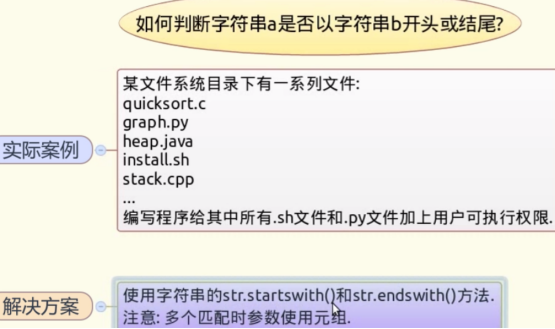
endswith()可以接受元组参数,只要满足元组的一项,即为真。(参数只能是元组不能是列表)
>>> s.endswith(('.py','.sh'))

True

>>> s.endswith(('.sh','.txt'))

False
2、实现方法
>>> import os,stat

>>> [x for x in os.listdir('.') if x.endswith(('.sh','.py'))]

['a.py', 'b.sh']

>>> lFile = [x for x in os.listdir('.') if x.endswith(('.sh','.py'))]

>>> for x in lFile:

...     os.chmod(x,os.stat(x).st_mode | stat.S_IXUSR)

...

>>> os.listdir('.')

['vmware-apploader-5673.log', 'c.txt', 'a.py', 'b.sh']

>>> exit()
查看文件权限:
python@ubuntu:/tmp/vmware-python$ ls -l
总用量 8
-rwxrw-r-- 1 python python 0 10月 26 17:26 a.py
-rwxrw-r-- 1 python python 0 10月 26 17:26 b.sh
-rw-rw-r-- 1 python python 0 10月 26 17:26 c.txt
-rw-r----- 1 python python 4532 10月 26 17:22 vmware-apploader-5673.log
>>> import os

>>> [x for x in os.listdir('.') if x.endswith(('.sh','.py'))]

['a.py', 'b.sh']
3、扩展知识
3.1 os.stat()
>>> help(os.stat)

Help on built-in function stat in module nt:

stat(...)

    stat(path) -> stat result

    Perform a stat system call on the given path.
help(os.stat)
获取文件属性:os.stat(file),如本例中
>>> os.stat('a.py')

posix.stat_result(st_mode=33204, st_ino=786703, st_dev=2049, st_nlink=1, st_uid=1000, st_gid=1000, st_size=0, st_atime=1509009983, st_mtime=1509009983, st_ctime=1509009983)
3.2 str.startswith()
>>> help(str.startswith)

Help on method_descriptor:

startswith(...)

    S.startswith(prefix[, start[, end]]) -> bool

    Return True if S starts with the specified prefix, False otherwise.

    With optional start, test S beginning at that position.

    With optional end, stop comparing S at that position.

    prefix can also be a tuple of strings to try.
help(str.startswith)
3.3 str.endswith()
>>> help(str.endswith)

Help on method_descriptor:

endswith(...)

    S.endswith(suffix[, start[, end]]) -> bool

    Return True if S ends with the specified suffix, False otherwise.

    With optional start, test S beginning at that position.

    With optional end, stop comparing S at that position.

    suffix can also be a tuple of strings to try.
help(str.endswith)
4-2如何判断字符串a是否以字符串b开头或结尾的更多相关文章
- C#算法之判断一个字符串是否是对称字符串
记得曾经一次面试时,面试官给我电脑,让我现场写个算法,判断一个字符串是不是对称字符串.我当时用了几分钟写了一个很简单的代码. 这里说的对称字符串是指字符串的左边和右边字符顺序相反,如"abb ...
- String的两个API,判断指定字符串是否包含另一字符串,在字符串中删除指定字符串。
// 在字符串中删除指定字符串. String phoneNum="1795112345"; phoneNum = phoneNum.replace("17951&quo ...
- php 判断字符串在另一个字符串中位置
$email='user@example.com'; //定义字符串$result=strstr($email,'@'); //返回子字符串echo $result; / ...
- Mysql查找如何判断字段是否包含某个字符串
Mysql查找如何判断字段是否包含某个字符串 有这样一个需求,在Mysql数据库字符串字段(权限)中,用户有多个不同的邮箱,分别被‘,’分开,现在要取出某个邮箱的所有成员列表. 假设有个表: ...
- 【功能代码】---3 JS判断字符串是否包含某个字符串
JS判断字符串是否包含某个字符串 var str ="abc"; if(str.indexOf("bc")>-1){ alert('str中包含bc字符串 ...
- go golang 判断base64数据 获取随机字符串 截取字符串
go golang 判断base64数据 获取随机字符串 截取字符串 先少写点,占个坑,以后接着加. 1,获取指定长度随机字符串 func RandomDigits(length int) strin ...
- python_如何判断字符串a以某个字符串开头或结尾?
案例: 某文件系统目录下有一系列文件: 1.c 2.py 3.java 4.sh 5.cpp ...... 编写一个程序,给其中所有的.sh文件和.py文件加上可执行权限 如何解决这个问题? 1. 先 ...
- mysql判断表里面一个逗号分隔的字符串是否包含单个字符串、查询结果用逗号分隔
1.mysql判断表里面一个逗号分隔的字符串是否包含单个字符串 : FIND_IN_SET select * from tablename where FIND_IN_SET(传的参数,匹配字段) 例 ...
- java算法:统计数字-将数字转换成字符串,然后使用字符串String.valueOf()方法进行判断
题目: 计算数字 k 在 0 到 n 中的出现的次数,k 可能是 0~9 的一个值. 样例 样例 1: 输入: k = 1, n = 1 输出: 1 解释: 在 [0, 1] 中,我们发现 1 出现了 ...
- js判断字符串str是否包含字符串substr
js判断字符串str是否包含字符串substr: function addUser(id,realName){ var userids = $("#userids").val(); ...
随机推荐
- AOP 相关包
aop 命名空间,jar 扫路径
- mfc static控件 视频播放 闪屏问题 解决方案
方案1: 我昨天刚在csdn上解决了这个问题,不是双缓冲和WS_CLIPCHILDREN还有背景擦出什么的问题,就是在你重画的时候要去掉这些控件(按钮什么的)区域, 闪屏是因为窗口大小发生改变时,由于 ...
- VirtualBox NAT Host-only模式下,自动分配IP上网。
修改宿主机上,virtualbox自建虚拟网卡Host-Only 2. 因为我使用了两个适配器,所以这两个适配器的名字分别是ifcfg-eth0, ifcfg-eth1. ifcfg-eh0一般默认就 ...
- [LeetCode]-009-Palindrome_Number
Determine whether an integer is a palindrome. Do this without extra space. Some hints: Could negativ ...
- event.currentTarget
https://api.jquery.com/event.currentTarget/ event.currentTargetReturns: Element Description: The cur ...
- was安装相关步骤(Linux)
本次试验目的主要对websphere 二次内部解剖对中间件性能优化垫铺. 1.准备相关文件 其中 iso文件为WAS主要镜像文件(WAS文件所在地) Instalmgr为IBM安装引导程序instal ...
- js fuction函数内return一个内部函数详解
今天在网上,看到一篇关于js函数难点的文章,js函数的一些难点.在那上面提了一下,关于js函数返回另一个函数的问题,并附上了一道面试题: var add = function(x){ var sum ...
- 由ES规范学JavaScript(二):深入理解“连等赋值”问题
var foo={rzx:1} var bar =foo; foo.x=foo={rzx:100} console.log(foo.x) console.log(bar.x) 有这样一个热门问题: ...
- OpenStack 实现技术分解 (6) 通用库 — oslo_log
目录 目录 前文列表 扩展阅读 日志级别 oslolog 初始化设置 DEMO oslolog 的相关配置项 oslolog 的日志级别 oslolog 的使用技巧 推荐使用 LOGdebug 的地方 ...
- win10 iis部署后 浏览目录报错 500.19
错误摘要HTTP 错误 500.19 - Internal Server Error无法访问请求的页面,因为该页的相关配置数据无效.详细错误信息模块 IIS Web Core 通知 BeginReq ...